Let's be honest, high-quality, professional images for a website aren't just a nice-to-have anymore. They’re a fundamental part of your digital credibility. These visuals are your silent salesperson, working around the clock to build trust and telegraph your brand's quality in those critical first few seconds a visitor lands on your site.
The right image can be the deciding factor between a quick bounce and a solid conversion.
Why Professional Images Are a Non-Negotiable Asset
Think of your website as your digital storefront. If the windows were smudged and the displays were a mess, people would walk right on by. Low-quality, generic, or blurry images have the exact same effect online—they signal a lack of care that can instantly kill trust.
This isn't just a gut feeling; it’s proven by user behavior. When someone lands on your site, they make snap judgments. Crisp, authentic photography communicates that you're reliable and professional before they've even read a single word. It forges an emotional connection, helping visitors picture themselves actually using your product or service.
Building Instant Credibility
A first impression is formed in milliseconds, and our brains process visuals far faster than text. High-quality imagery makes your brand look more established and trustworthy right out of the gate. This is especially true for e-commerce sites, where customers can't physically touch the products. The detail and clarity of your photos directly impact their confidence to buy.
In fact, research shows that 40% of visitors consider images the most essential visual element on a business website—more important than typography or even video. It's a clear signal of what users value.
Your website’s images are doing more than just filling space; they are actively shaping user perception, guiding decisions, and either building or breaking trust with every page load.
Driving User Engagement and Action
But professional images do more than just build trust. They guide the user’s journey. A powerful hero image can stop a visitor in their tracks, preventing a bounce. A crystal-clear product shot can lead them straight to the "Add to Cart" button.
The right visual can simplify a complex service, showcase a transformative result, or introduce the friendly faces behind your brand, humanizing your entire operation. For a deeper dive, check out these 5 compelling reasons why professional photos are essential for any business.
Ultimately, investing in professional images for your website isn't an expense. It's a direct investment in your brand's credibility, user experience, and your bottom line.
Building Your Visual Identity and Image Strategy
Before you even think about scrolling through stock photo sites or calling a photographer, you need a plan. Sourcing professional images for a website without a clear strategy is like going to the grocery store hungry without a list—you'll end up with a cart full of stuff that doesn't quite make a meal. Your visual strategy is what turns random pictures into a cohesive brand story.
It all starts with defining your brand’s personality. Are you modern and minimalist, with a love for clean lines and cool tones? Or are you more warm and rustic, leaning into natural textures and earthy colors? Nailing this down first is crucial. Get it wrong, and you risk sending mixed signals that can confuse visitors and weaken your brand.
Defining Your Visual Brief
Think of a visual brief as the blueprint for your website's entire look and feel. It doesn't have to be some massive, formal document, but it does need to be specific. The goal here is to lock in a consistent vibe that connects with your audience and says, "This is who we are."
Start by asking what core emotion you want your images to trigger. Inspiration? Security? Excitement? A sense of calm? This emotional target will dictate everything from your color choices to the subjects in your photos. If you want to go deeper on this, laying out a set of visual brand guidelines can give you a really solid foundation to build on.
A strong visual strategy is proactive, not reactive. It dictates your image choices so they perfectly align with your brand's voice and goals, instead of just filling empty space.
Mapping Image Needs by Page
Next, it's time to get granular. You need to map out the exact types of images you need for each key page on your site. The hero image on your homepage has a completely different job than a product photo, so a one-size-fits-all approach just won't cut it.
A simple list is all you need to stay organized:
- Homepage: You need a showstopper here. A powerful, high-impact hero image that instantly tells visitors what you're all about. It should be aspirational and make an immediate emotional connection.
- About Us Page: Authenticity is everything on this page. Think professional headshots of your team or candid, behind-the-scenes photos. The goal is to humanize your brand and build trust.
- Services/Product Pages: It's all about clarity and detail. Use sharp, high-resolution photos from multiple angles, shots of the product being used in real-world contexts, and close-ups that show off the quality.
- Blog Posts: Every article needs a compelling featured image. This is what grabs attention on social media and pulls readers into the post. Make sure they're thematically relevant and visually interesting.
By creating this simple map, you turn a vague idea—"get professional images for website"—into a concrete, actionable plan. This is how you make sure every single visual works together to create a powerful, unified experience for everyone who lands on your site.
Your Options for Sourcing Professional Images
Once you’ve nailed down your visual strategy, it’s time to get the actual images. Finding professional images for a website can feel like a huge task, but it really comes down to three main paths. Each one has its own set of pros and cons depending on your budget, timeline, and how original you need to be.
The choice you make here has a direct impact on your brand's authenticity. A custom photoshoot gives you total control, while stock photos offer speed and affordability. But now there's a new player in the game, offering a mix of customization and cost-effectiveness that’s hard to ignore.
This decision tree gives you a simple way to think about it. Your brand's vibe—whether it's sleek and modern or warm and rustic—can point you in the right direction.
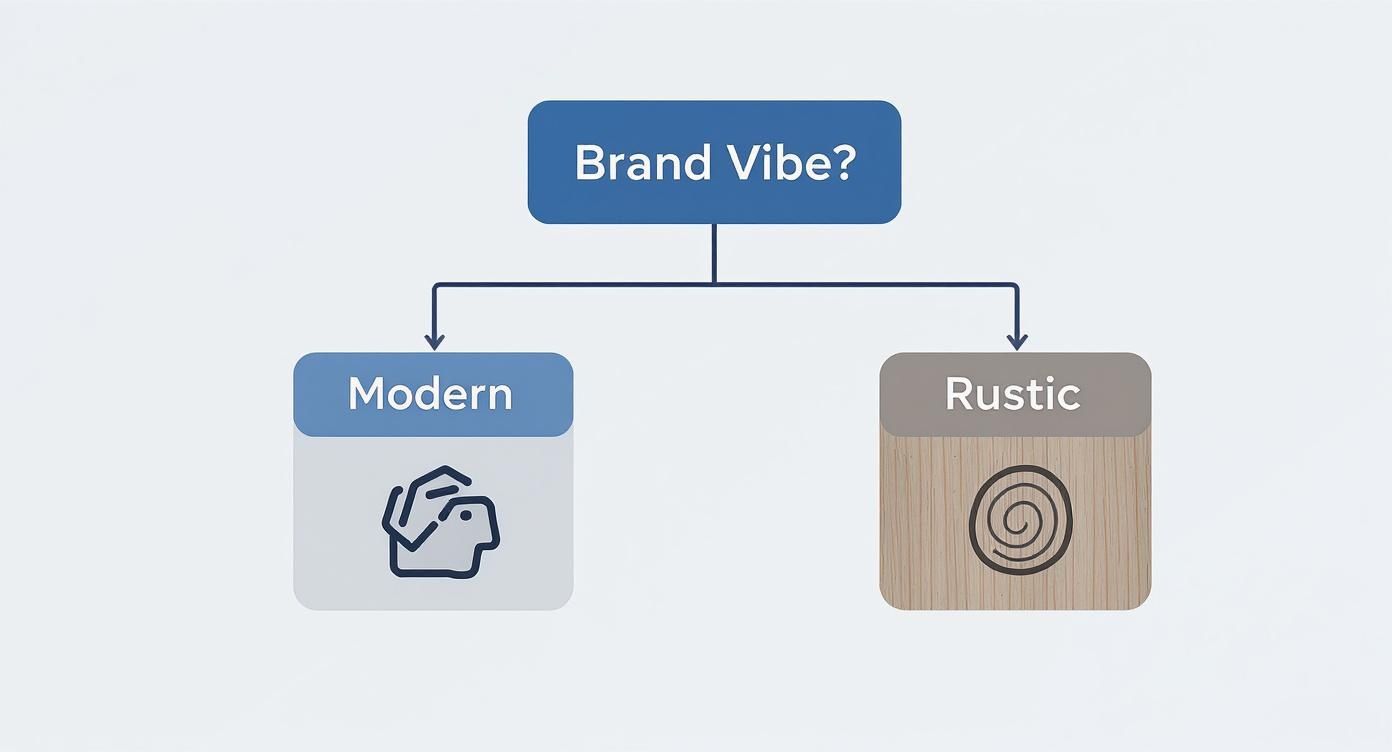
Understanding this fundamental difference is the key to picking an image source that will deliver visuals that truly match your brand identity.
To make this decision easier, let's break down the main options for getting professional-looking images for your site.
Comparing Image Sourcing Methods
| Method | Best For | Pros | Cons |
|---|---|---|---|
| Professional Photoshoot | Established brands, product-based businesses, and showing off your team. | Total originality, complete creative control, and unmatched brand authenticity. | Expensive, time-consuming, and requires significant planning. |
| Premium Stock Photos | Blog posts, social media, and general illustrative needs where speed is key. | Affordable, huge selection, and instant availability. | Images can be generic and used by competitors, risking brand dilution. |
| AI Image Generators | Startups, content creators, and anyone needing unique visuals on a budget. | Highly customizable, incredibly fast, and very cost-effective. | Requires some skill in writing effective prompts to get the best results. |
Each of these methods has its place. A big product launch might demand a professional photoshoot, while your weekly blog posts could be perfectly served by a mix of stock and AI-generated images. It's all about picking the right tool for the job.
Hiring a Professional Photographer
This is the gold standard for creating one-of-a-kind, on-brand imagery. When you hire a professional photographer, you get photos that are 100% yours. They’re perfectly tailored to your visual brief and feature your actual products, team, and location. Nothing builds trust and authenticity like it.
Of course, the biggest hurdles are cost and time. A pro shoot requires a lot of planning, coordination, and a serious budget. Day rates for good photographers can easily run into the thousands. It’s the best route for established brands or anyone selling a physical product where showing the real thing is non-negotiable.
Using Premium Stock Photo Sites
Sites like Getty Images, Adobe Stock, or Shutterstock offer a great middle-ground. They have massive libraries of high-quality, professional photos for way less than a private shoot. You can find a decent image for almost any situation, making it a quick and efficient choice.
The main drawback? Originality. The best stock photos get used over and over, which can make your brand feel less unique. You might find the perfect shot, only to see it on a competitor’s website the next week. It’s a solid option for blog posts and social media, where total exclusivity isn't a deal-breaker.
The real trick to using stock photos well is digging for images that feel authentic and closely match your brand’s specific style. Steer clear of those cheesy, overused "business people laughing at a whiteboard" clichés.
Leveraging AI Image Generators
The newest and most exciting option on the block is using AI image generators. Tools like AI Media Studio are completely changing the game by letting you create totally unique, high-quality images from just a few words. This approach blends the custom feel of a photoshoot with the speed and low cost of stock photography.
You can create visuals in literally any style you can think of—from photorealistic product shots to wild, abstract art—and ensure they fit your brand perfectly. For instance, a prompt like "close-up of a handcrafted leather wallet on a rustic wooden table, warm morning light, sharp focus" can generate a custom product image in seconds.
This is perfect for creating hero images, blog visuals, and social media graphics that you just can't find anywhere else. If you want to see what's possible, you can check out a dedicated tool for creating AI images for websites and just start playing around.
There’s a bit of a learning curve in figuring out how to write good prompts, but the payoff is huge. You get the power to create endless professional images for your website that are both original and perfectly on-brand. It’s an incredible tool for startups, marketers, and businesses of any size.
Optimizing Images for Performance and SEO
Having stunning, professional images on your website is only half the battle. If those beautiful visuals are slowing down your site, they're actively hurting your user experience and search engine rankings. A slow-loading page is a huge liability, sending impatient visitors clicking away before your message even has a chance to land.
This is where optimization becomes a non-negotiable step. It's the art and science of preparing your images to be as efficient as possible for the web, striking a perfect balance between visual quality and file size. Think of it as making your images "web-ready"—lean, fast, and still looking fantastic.
Prepping Your Images For The Web
Before you even think about uploading, a few simple edits can make a massive difference.
Start by cropping your image to focus on the most important subject, cutting out any unnecessary background noise. Not only does this improve the composition, but it also immediately reduces the file size.
Next, resize the image to the exact dimensions it will be displayed at on your website. Seriously, this is a big one. If an image is going to appear in a column that's 800 pixels wide, there's absolutely no reason to upload a 4000-pixel version. This single step prevents browsers from having to waste time and resources scaling down massive files on the fly.
Optimization isn’t just a technical task; it's a critical part of user experience design. Every kilobyte you save contributes to a faster, more enjoyable journey for your visitors, which directly impacts their perception of your brand.
With nearly 1.88 billion websites online, the competition for attention is insane, and page speed is a key differentiator. It's no surprise that 88.5% of web designers rely on tools like Photoshop to expertly prep images for this competitive environment.
Mastering Compression and File Formats
Once your image is cropped and resized, it's time for compression. This process intelligently removes redundant data from the image file to shrink its size. The goal is to get the file as small as possible without a noticeable drop in visual quality.
This is where modern image formats become your best friend. While JPEGs are still great for photos and PNGs are perfect for graphics needing transparency, you should be prioritizing next-gen formats.
- WebP: Developed by Google, this format provides excellent compression while maintaining high quality. It typically creates files that are 25-35% smaller than traditional JPEGs.
- AVIF: An even newer format, AVIF offers even better compression than WebP, resulting in incredibly small file sizes for top-tier performance.
Using tools that can convert your images to these formats will give your site's loading speed a significant boost. To really dive in and see the impact, you'll want to learn how to optimize images for web to get the full SEO and performance benefits.
Unlocking The Power of Image SEO
Finally, don't forget that search engines can't "see" your images the way we do. You have to give them textual clues to help them understand what each image is about. This is where image SEO comes in.
It all starts with a descriptive filename. Instead of IMG_9876.jpg, rename it to something that makes sense, like blue-suede-designer-shoes.jpg. This gives search engines immediate context.
Next up is compelling alt text. This text describes the image for screen readers (a huge win for accessibility) and for search engines. It should be concise and accurately describe the visual content. This simple step can help your images rank in Google Images, driving a whole new stream of traffic to your site. To dive deeper, check out our complete guide on how to optimize images for SEO.
Using Images to Build Trust and Drive Conversions

The right visuals do so much more than just make a page look nice. They're actually powerful tools for building credibility and turning casual visitors into loyal customers. A generic stock photo might fill a blank space, but a real, authentic image tells a story and creates a genuine connection. That difference is everything when it comes to earning a visitor's trust right from the get-go.
Just think about it. Which is more compelling: a stock photo of actors pretending to be in a meeting, or a real shot of your team collaborating on a project? The first one is instantly forgettable. The second one feels human. Authentic professional images for a website are a form of social proof, showing the real people and passion behind your business. That's way more persuasive than any marketing slogan you could write.
Humanize Your Brand with Authentic Visuals
One of the fastest ways to build that connection is to literally put a face to your brand. An 'About Us' page with professional, friendly headshots of your team members makes your company feel instantly more approachable. It tells visitors, "Hey, we're a group of real people who care about our work," not just another faceless corporate entity.
Taking it a step further, behind-the-scenes photos give people a peek into your world—your company culture and how things get done. A snapshot of your workshop, a team brainstorming session, or even your product being carefully packaged builds a strong narrative around quality and care.
This isn't just about warm fuzzy feelings; it has a direct impact on your bottom line. Research shows a staggering 75% of users assess a company’s credibility based on its website design, and high-quality images are a huge part of that equation. If you want to dive deeper, you can discover key web design statistics that influence trust.
Drive Sales with High-Impact Product Imagery
If you're running an e-commerce site, your product photos are probably the most important thing on the page. Customers can't pick up the item or see it for themselves, so your images have to do all the heavy lifting to build their confidence.
You need high-resolution photos that let people zoom in on the details. You need multiple shots from different angles. And you definitely need lifestyle images showing the product in use. All of this helps answer unasked questions and chips away at any hesitation, making the path from browsing to buying that much smoother. It's no surprise that when landing on a new product page, 56% of users look at the images before they even read the product title.
A great product photo doesn't just show what you're selling; it helps the customer visualize how it will fit into their own life. This emotional connection is often the final push needed to convert a curious visitor into a paying customer.
When you start using authentic team photos and high-quality product shots, your visuals stop being simple decorations. They become active, hardworking assets that build trust and drive sales.
Got Questions About Website Images? We’ve Got Answers
When it comes to using images on your website, a few key questions pop up again and again. Getting the details right is a big deal—it affects everything from how fast your site loads to whether you're staying on the right side of the law.
Think of this as your cheat sheet. Nail these basics, and your visuals won't just look fantastic; they'll also keep your site running smoothly and save you from major headaches down the road.
What’s the Right Resolution for Web Images?
This is a classic balancing act. You need images that look sharp and professional, but you can't afford to have massive files bogging down your site's load time. A slow site is a visitor's worst enemy.
Here are a few solid rules of thumb I always follow:
- Big Hero Images: For those full-width banners at the top of a page, aim for a width between 1920 and 2560 pixels. This keeps them looking crisp even on the biggest desktop screens.
- Regular Content Images: For pictures inside a blog post or on a service page, you can easily get away with a width of 1200 to 1600 pixels. Anything more is usually overkill.
- The Golden DPI Rule: Always, always save your images at 72 DPI (dots per inch). It's the standard for web, and anything higher just adds file size with no benefit on a screen.
And remember, resizing is only half the battle. The final, non-negotiable step is compression. Run every image through a tool to shrink its file size without tanking the quality.
Can I Just Grab Images from a Google Search?
I get this question a lot, and the answer is a hard no. Seriously, don't do it. A quick Google Image search scrapes photos from every corner of the internet, and almost all of them are protected by copyright.
Using a copyrighted image without permission is a surefire way to get a nasty cease-and-desist letter or find yourself in a legal mess that costs thousands.
Here's the bottom line: Just because an image is online doesn't mean it's free to use. You should assume every single image you find is copyrighted unless you can prove otherwise.
So, what's the safe way? Stick to reputable stock photo sites where you're buying a proper license. Or, better yet, create something truly unique with an AI image generator or hire a photographer for a custom shoot.
How Do AI Image Generators Fit Into All This?
AI image generators are a game-changer for creating one-of-a-kind, professional visuals without the hefty price tag of a photoshoot. They’re brilliant for bringing abstract concepts to life, designing custom branded graphics, or making stylized illustrations you just can't find anywhere else.
Think of them as a powerful new tool in your creative kit. You can use AI to whip up stunning hero images, unique graphics for your blog posts, or an endless supply of fresh content for your social media feeds.
The trick to getting great, on-brand results is all in the prompt. Get specific. Tell the AI the exact style, color palette, composition, and mood you're after. That’s how you go from a generic image to a visual that feels like it was made just for your brand.
Ready to create stunning, unique visuals for your website in seconds? With AI Media Studio, you can generate professional-quality images from simple text prompts, choosing from over 50 art styles to perfectly match your brand. Get started for free today at https://www.ai-media-studio.com.