The landscape of video creation is transforming. Gone are the days when high-quality video production was exclusively for studios with massive budgets and complex equipment. Today, the rise of the AI video generator has democratized content creation, allowing anyone from solo creators to enterprise marketing teams to produce compelling visual content from simple text prompts, scripts, or even existing articles. This guide cuts through the noise to offer an in-depth analysis of the 12 leading platforms in this space.
This comprehensive resource is designed to help you bypass the trial-and-error phase and select the right tool for your specific needs. We move beyond marketing hype to provide a practical breakdown of each tool's real-world capabilities, ideal use cases, and crucial limitations. For a broader look at how these technologies are being adopted, especially by marketing and performance teams, you can delve into this resource on the top AI video creation tools for performance teams.
Our goal is to equip you with the insights needed to make an informed decision. For each AI video generator on our list, you will find:
- A quick summary of its core function.
- Standout features that set it apart.
- Clear pricing tier information.
- An honest look at its pros and cons.
- Guidance on who the platform is best suited for.
Whether you're creating talking-head explainers with lifelike avatars, cinematic B-roll from a single sentence, or engaging social media clips from blog posts, this resource will help you select the perfect AI partner for your creative workflow. Each entry includes direct links and visual examples to streamline your evaluation process.
1. Runway: For the Creative Professional Seeking Cinematic Control
Runway positions itself as a premier ai video generator for creative professionals who demand both high-fidelity generation and granular post-production control. Its core strength lies in its state-of-the-art models, Gen-3 Alpha and Gen-4 Turbo, which are renowned for producing some of the most coherent and aesthetically pleasing video clips from text or image prompts. This makes it a go-to platform for agencies and studios aiming for cinematic-quality short-form content.
Loading image...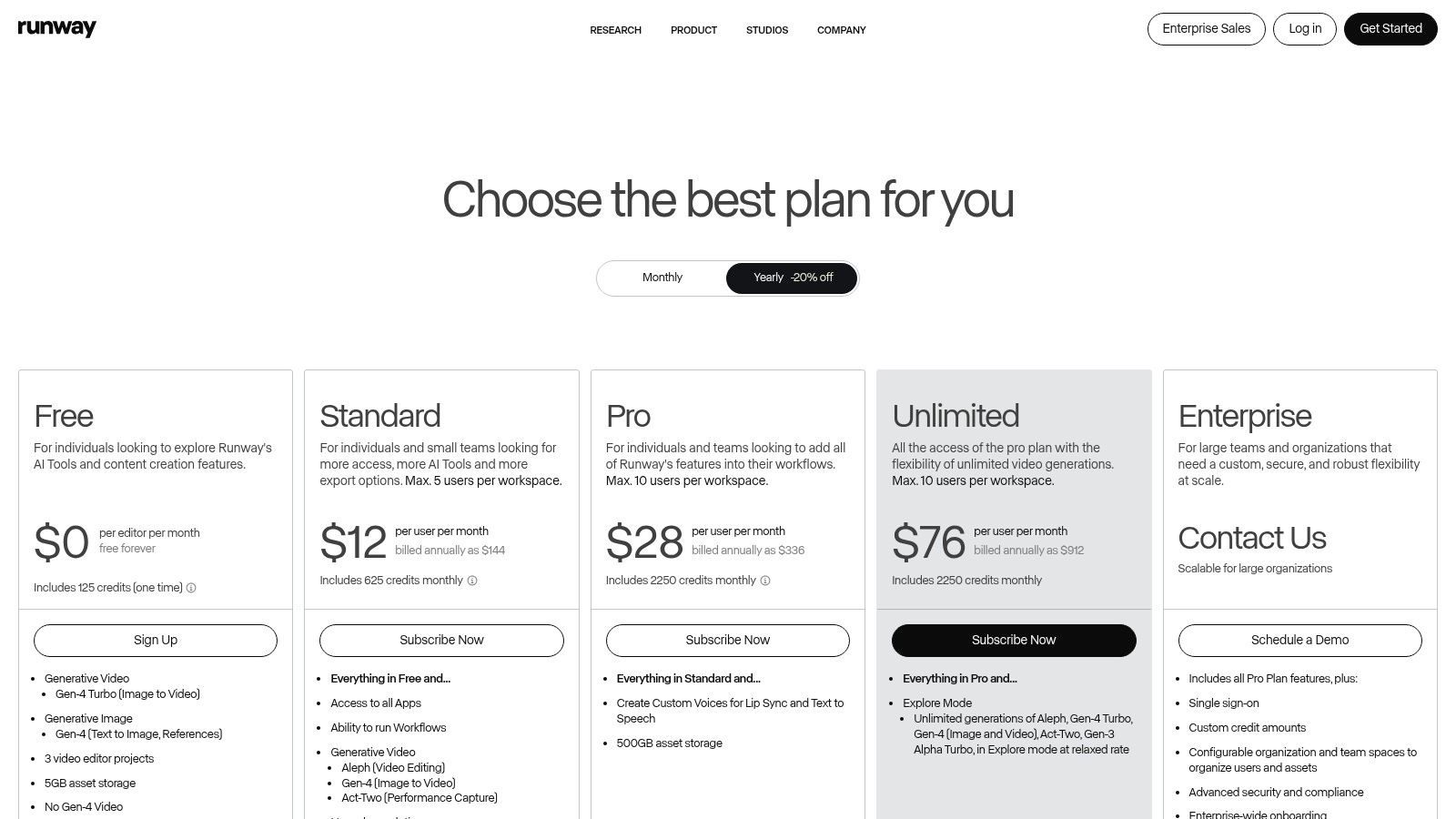
What truly sets Runway apart is its integrated non-linear editor (NLE). Instead of merely generating clips and exporting them to another program, users can refine their creations directly within the platform. This streamlined workflow includes advanced tools like 4K upscaling, motion controls, and powerful AI magic tools for object removal or style transfer. This holistic approach bridges the gap between raw AI generation and a polished, professional final product. For an in-depth look at similar advanced editing features, you can explore the capabilities of video inpainting and how it transforms content.
Key Features and Usage Tips
- Standout Feature: The combination of top-tier Gen-3/4 models with a full-featured video editor is its biggest differentiator.
- Best For: Creative agencies, filmmakers, and professional content creators needing a unified workflow from concept to final edit.
- Pricing: Operates on a credit-based system. A free tier offers limited credits with a watermark, while paid plans (starting at $12/user/month) provide larger credit pools and unlock advanced features.
- Practical Tip: Be mindful of credit consumption. High-demand actions like 4K upscaling or extending clips use more credits. Plan your project steps to manage costs effectively, starting with lower-resolution generations before committing to expensive final renders.
2. Luma AI (Dream Machine): For High-Fidelity Clips and Rapid Innovation
Luma AI, powered by its Dream Machine and Ray series models, has quickly established itself as a leading ai video generator for users who prioritize high-fidelity output and access to rapid model advancements. Its core value proposition is delivering exceptionally fluid and detailed video from both text and image prompts. This makes it a compelling choice for artists and marketers aiming to produce stunning, short-form video content without the steep learning curve of more complex professional suites.
Loading image...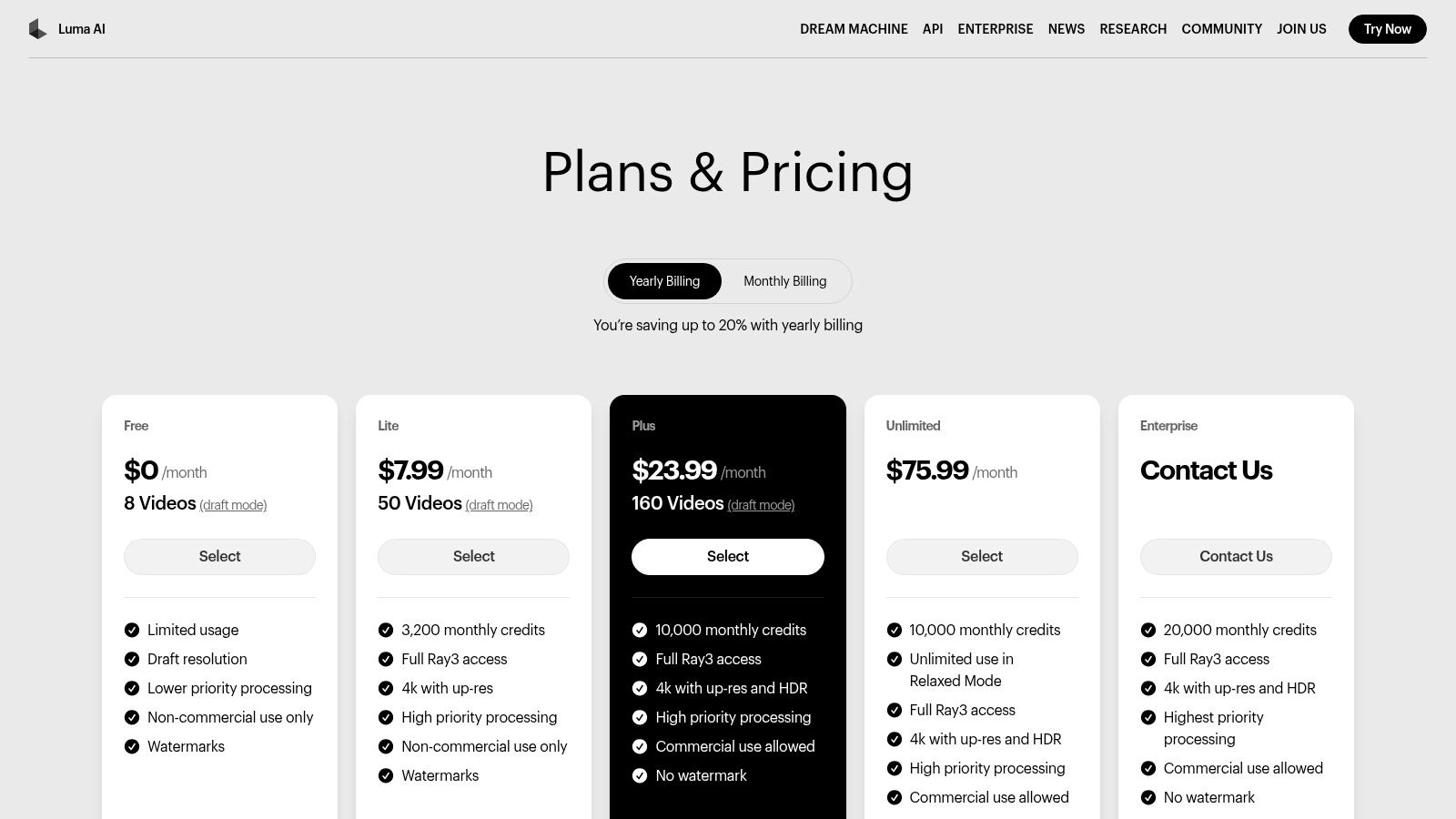
What differentiates Luma AI is its focus on accessible quality and frequent updates. While other platforms might gate their best features, Luma offers a generous free tier for experimentation and provides clear pathways to commercial use and higher resolutions on paid plans. The platform excels at transforming static visuals into dynamic scenes, a process that shares principles with advanced still creation. To better understand the foundations of this technology, you can explore the capabilities of AI image generation and its role in video synthesis.
Key Features and Usage Tips
- Standout Feature: The rapid iteration and quality improvement of its core Ray models, giving users access to cutting-edge generation technology.
- Best For: Social media managers, artists, and small businesses needing quick, high-quality video clips for marketing or creative projects.
- Pricing: A free plan provides 30 monthly generations with a watermark. Paid plans start at $29.99/month for more generations, no watermark, commercial rights, and access to features like 4K upscaling.
- Practical Tip: Use the free plan's draft generations to experiment extensively with your prompts. Once you have a concept that works, use your priority generations on a paid plan to render the final, high-fidelity version to manage your credits efficiently.
3. Synthesia: For Enterprise-Grade Corporate Communication
Synthesia specializes as an ai video generator designed for the corporate world, focusing on training, learning and development (L&D), and marketing communications. Its core strength is the production of professional avatar-led videos at scale. With a library of over 200 stock avatars and the ability to create custom, photorealistic digital twins of key personnel, it allows businesses to create consistent, high-quality video content without cameras or microphones.
Loading image...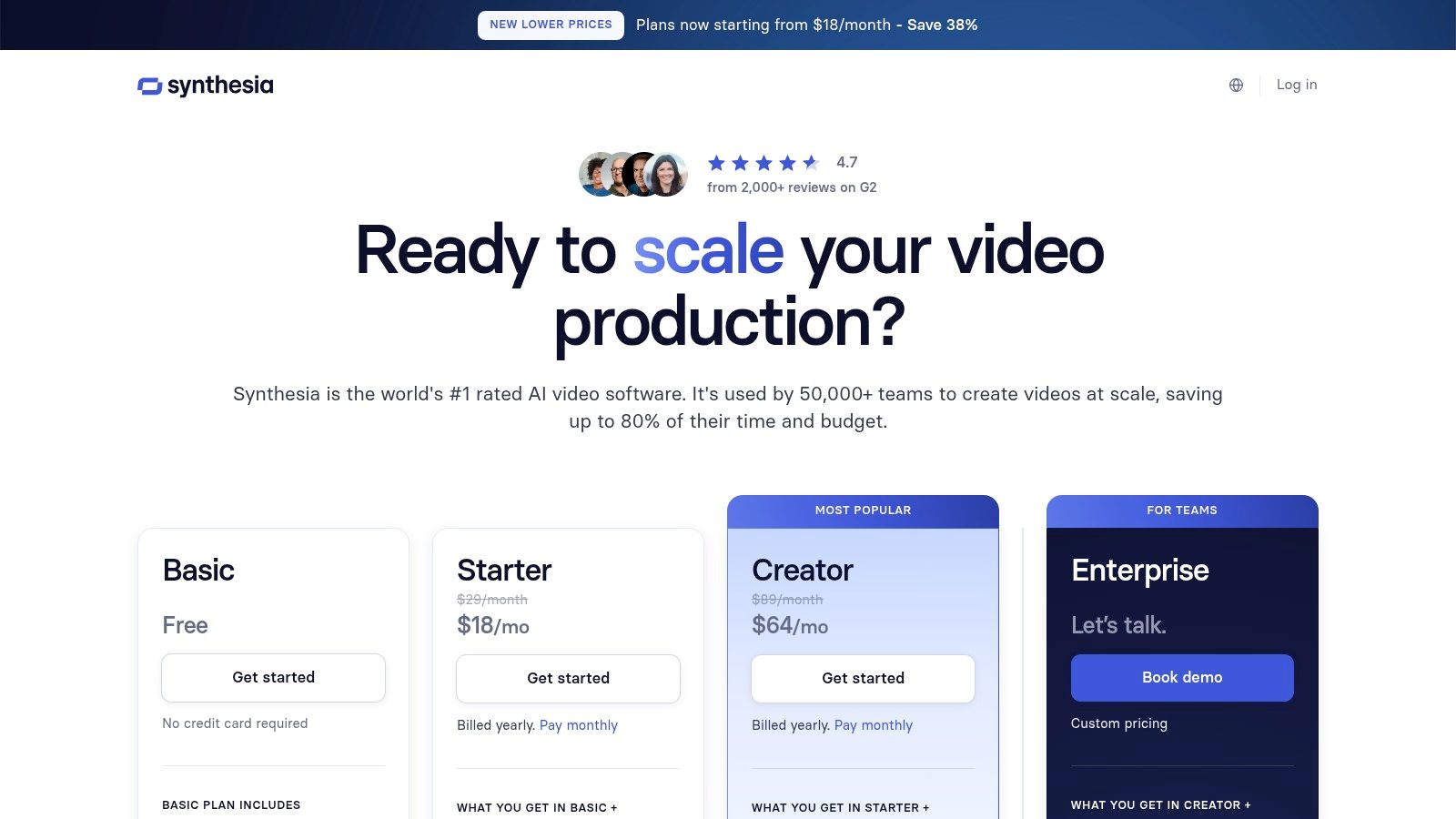
What truly sets Synthesia apart is its enterprise-ready feature set, including SSO, API access, and robust collaboration tools built for team workflows. The platform's multilingual capabilities are a major differentiator, supporting over 130 languages and accents, with one-click translation and AI dubbing to localize content effortlessly. This makes it an invaluable tool for global organizations aiming to standardize their internal and external video messaging. For a deeper understanding of how such avatars are created and used, you can explore the technology behind AI avatar generators and their impact.
Key Features and Usage Tips
- Standout Feature: The combination of custom avatars with extensive multilingual support (130+ languages) and enterprise-level governance.
- Best For: Corporations, L&D departments, and marketing teams needing to produce scalable training and communication videos.
- Pricing: A "Creator" plan is available at $22/month (billed annually) for individuals. "Enterprise" plans with custom pricing offer advanced features like custom avatars, API access, and SSO.
- Practical Tip: Maximize efficiency by creating and saving branded video templates. This ensures consistency across all communications and significantly speeds up the production of recurring content like weekly updates or training modules.
4. HeyGen: For Scalable, Avatar-Driven Content Creation
HeyGen establishes itself as a leading ai video generator for users who need to produce avatar-centric videos quickly and at scale. Its primary strength is a vast library of over 700 stock avatars and the ability to create custom ones, making it ideal for creating consistent training materials, marketing messages, and instructional content without the need for live actors or complex shoots. The platform is designed for efficiency, turning scripts into polished presenter-style videos in minutes.
Loading image...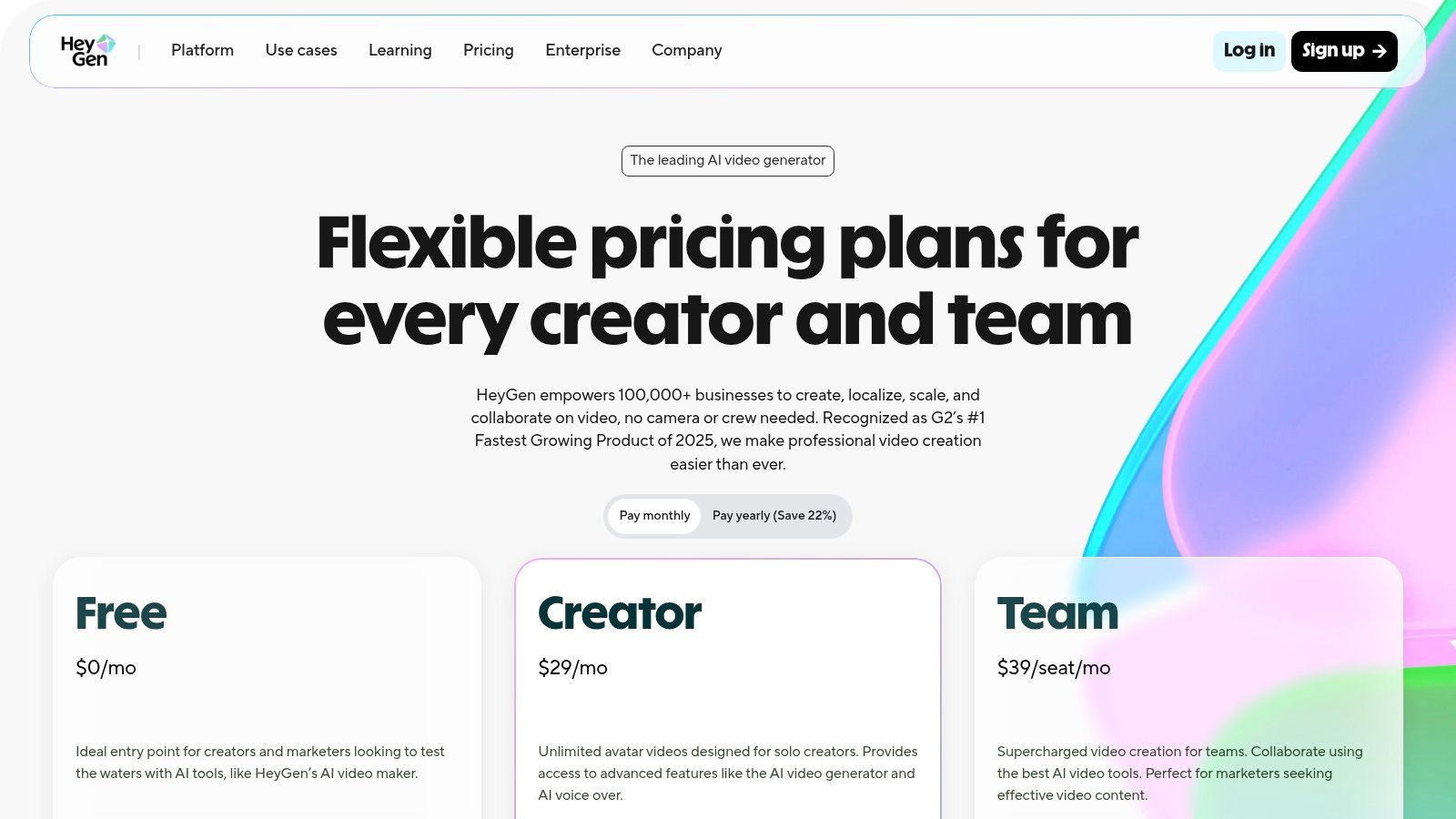
What truly differentiates HeyGen is its powerful multilingual support and API access. With capabilities to translate and generate speech in over 175 dialects, businesses can effortlessly localize their video content for a global audience. Furthermore, its well-documented API allows for programmatic video creation, enabling developers to integrate HeyGen's capabilities directly into their own applications for automated, on-demand video production. This focus on scalability and integration makes it a valuable tool for corporate and marketing teams looking to streamline their video workflows.
Key Features and Usage Tips
- Standout Feature: The combination of a large avatar library, extensive multilingual support, and a robust API for programmatic video generation.
- Best For: Marketing teams, corporate trainers, and developers needing to create consistent, scalable, and localized avatar-based videos.
- Pricing: A free plan is available to test the platform. Paid plans start at $24/month and operate on a credit system, with API access having its own per-credit pricing structure.
- Practical Tip: Familiarize yourself with how credits are used. Different features, like premium avatars or higher-resolution outputs, consume credits at different rates. Plan your script and avatar choice in advance to optimize your credit usage and manage costs effectively.
5. D-ID: For AI-Powered Talking Head and Avatar Videos
D-ID has carved out a specific and powerful niche in the ai video generator market by focusing on creating photorealistic talking-head videos from still images or avatars. It excels at animating faces, synchronizing lip movements with text-to-speech or uploaded audio, making it an ideal tool for corporate training, educational content, and personalized customer service bots. The platform offers a user-friendly Studio interface for creators and a robust API for developers who need to integrate real-time avatar generation into their applications.
Loading image...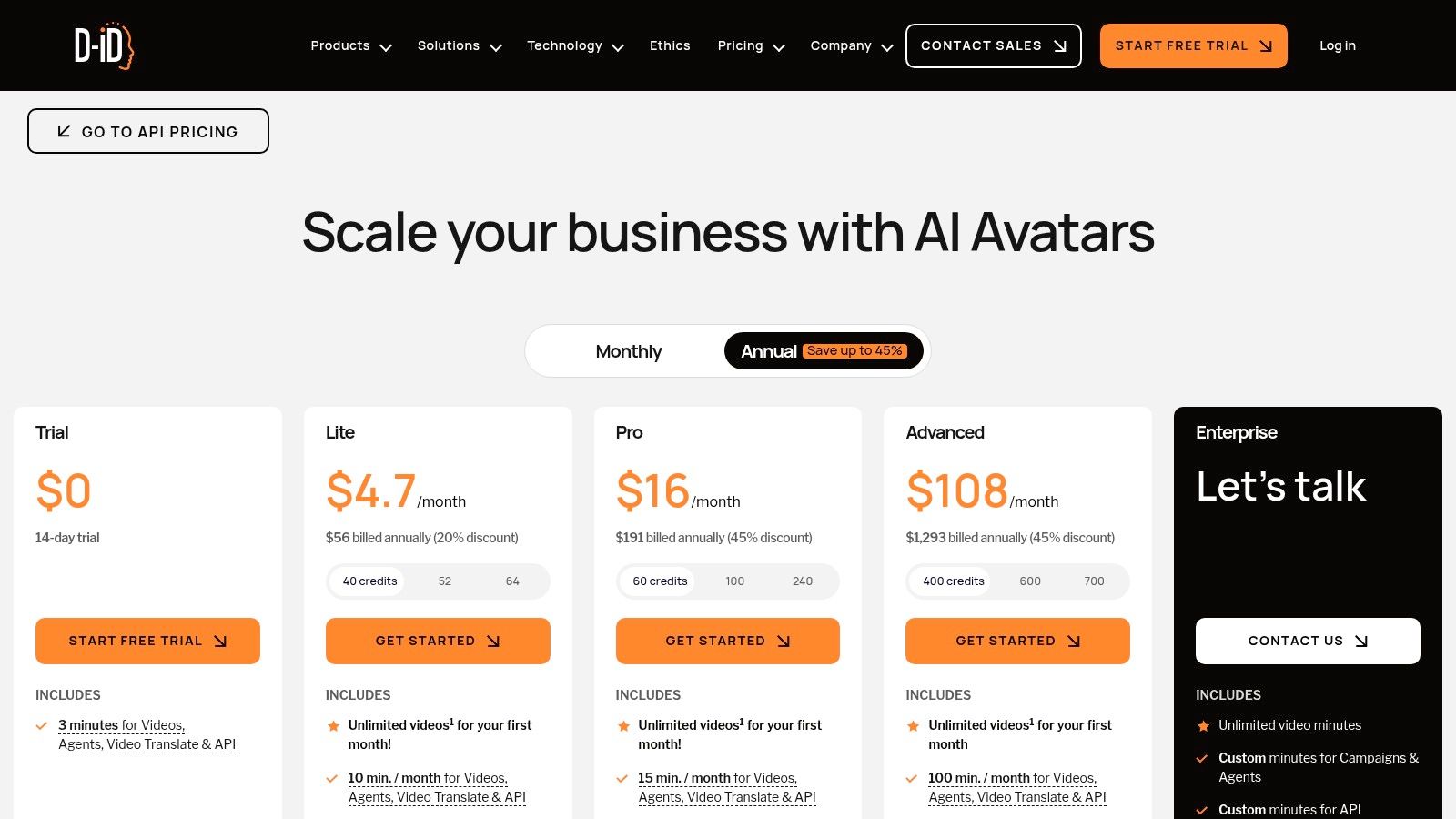
The platform's strength lies in its simplicity and focus. Unlike general-purpose video generators, D-ID is specialized, providing high-quality, believable animations for human faces. This makes it a go-to solution for businesses looking to add a human touch to digital interactions without the cost of filming live actors. The API further extends its utility, enabling innovative uses like live-streaming with AI agents or interactive chatbots, which sets it apart from more content-centric tools.
Key Features and Usage Tips
- Standout Feature: The robust API for real-time video streaming, allowing developers to build interactive AI agents and live experiences.
- Best For: Businesses creating training modules, educators developing e-learning content, and developers building conversational AI applications.
- Pricing: A free trial is available with a watermark. Paid plans start at $4.70/month for the Lite plan, offering credits that translate into video minutes (e.g., 1 credit ≈ 15 seconds of video). Be aware that unused credits do not roll over month-to-month.
- Practical Tip: For the most natural-sounding results, use high-quality audio recordings instead of text-to-speech. Uploading your own voiceover will produce a more authentic and engaging video, as the AI can focus solely on perfecting the lip-sync animation.
6. InVideo AI: For All-in-One Content Creation Workflows
InVideo AI establishes itself as a highly accessible and versatile ai video generator, designed for users who need a comprehensive solution that goes beyond simple clip generation. Its primary appeal is its ability to transform a wide range of inputs, including text, scripts, or even URLs, into complete, editable videos. This "workflow-in-a-box" approach integrates generative AI with a massive library of stock assets and AI avatars, making it ideal for marketers and creators producing explainer videos, social media content, and promotional material without needing multiple separate tools.
Loading image...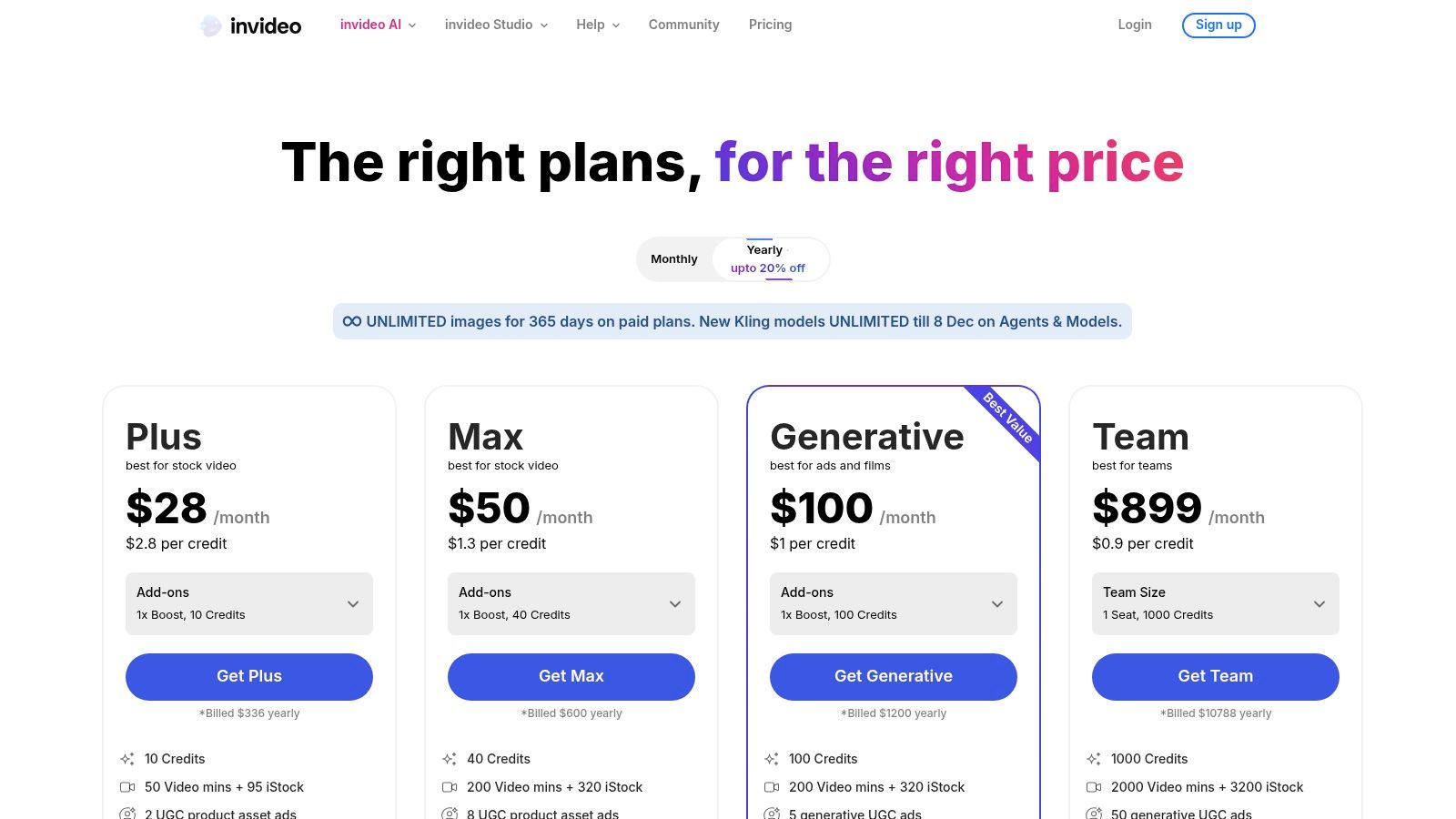
What differentiates InVideo AI is its focus on streamlining the entire content creation process. Instead of just generating raw footage, the platform assists in scripting, voiceover creation, and scene composition using its stock media. This makes it an incredibly efficient tool for users who value speed and convenience. The platform's editor allows for quick adjustments and personalization, blending AI-generated elements with traditional video editing features in a user-friendly interface. This combination removes significant friction for small businesses and solo creators who need to produce polished videos quickly and affordably.
Key Features and Usage Tips
- Standout Feature: The "URL-to-video" function is a powerful time-saver, allowing users to instantly convert articles and blog posts into engaging video summaries.
- Best For: Marketing teams, small business owners, and social media managers who need to rapidly produce a high volume of content like ads, tutorials, and listicles.
- Pricing: InVideo offers a free plan with watermarks and limited exports. Paid plans start at $20/month (billed annually), providing more AI generation credits, watermark-free exports, and access to premium stock assets.
- Practical Tip: Start your project by giving the AI a very detailed prompt or a well-structured script. The more context you provide upfront, the less time you'll spend manually editing scenes and tweaking the generated voiceover, maximizing the platform's efficiency.
7. Pictory: For Efficient Content Repurposing and Marketing
Pictory establishes itself as a highly efficient ai video generator designed for marketers, course creators, and small teams focused on speed and content repurposing. Its core function revolves around transforming long-form text content, such as blog posts or scripts, into engaging summary videos. By automatically selecting relevant stock footage from extensive libraries and generating AI-powered voiceovers, it dramatically reduces the time needed to create social media clips and promotional content.
Loading image...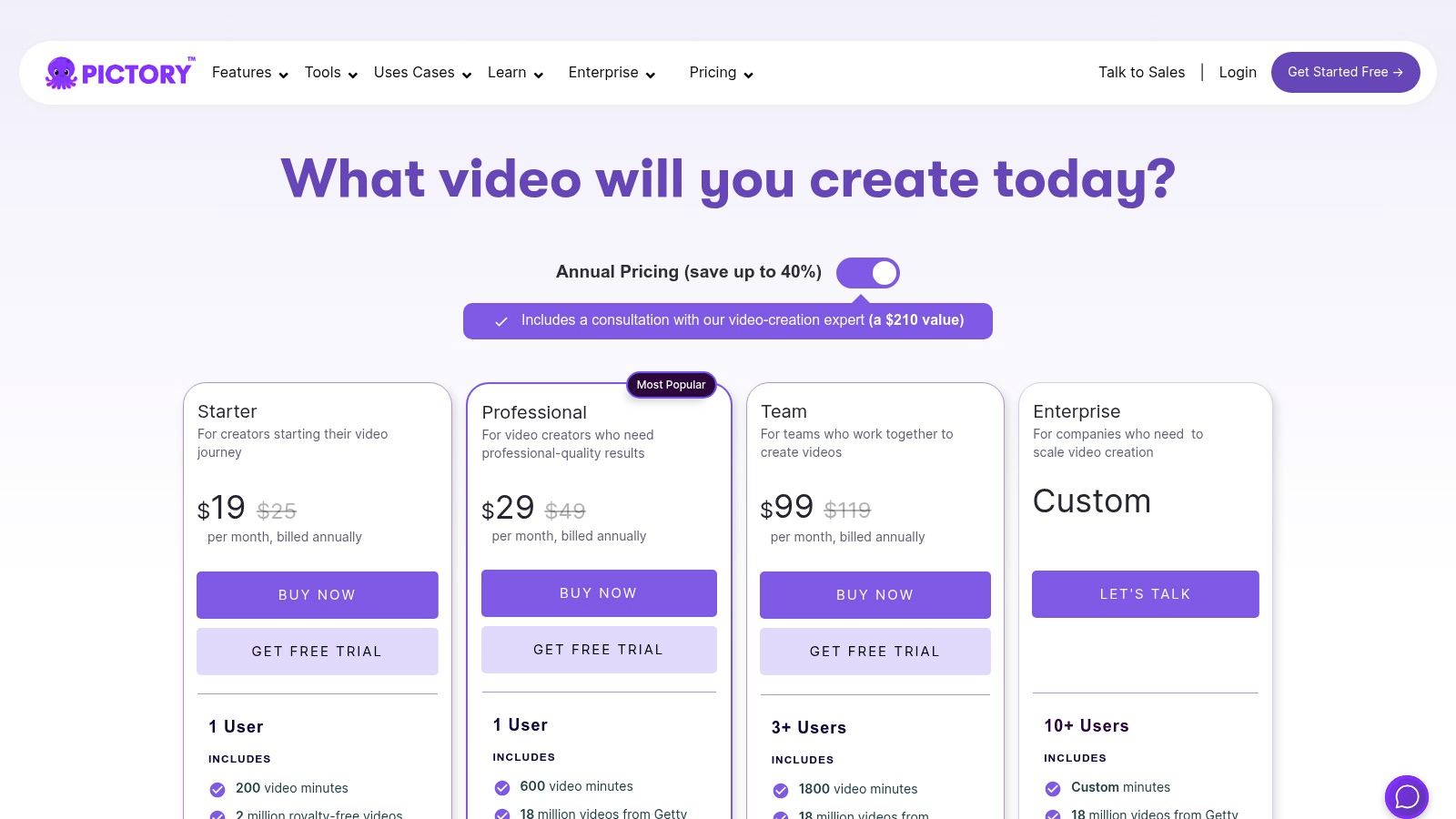
What makes Pictory particularly effective is its streamlined workflow. Users can simply provide a URL or paste text, and the AI will summarize the key points, find matching visuals, and add automatic captions. This makes it an invaluable tool for maximizing the reach of existing written content without requiring deep video editing skills. The platform's emphasis on features like team workspaces, brand kits, and access to premium stock libraries (Storyblocks and Getty) further solidifies its position as a practical solution for consistent and branded video marketing output.
Key Features and Usage Tips
- Standout Feature: The "Article-to-Video" and "Script-to-Video" functions are its core strengths, enabling rapid conversion of text into video.
- Best For: Marketers, bloggers, and small businesses aiming to repurpose articles and scripts into shareable videos with minimal effort.
- Pricing: Offers several tiers, starting with a free trial. Paid plans (from $19/user/month) provide generous video-minute allowances, no watermarks, and access to better stock libraries and AI voices.
- Practical Tip: Leverage the brand kit feature early. Uploading your logo, brand colors, and fonts ensures every video generated maintains a consistent and professional look, saving you from manually adjusting each project.
8. Kapwing: For Social Media Teams and Content Repurposing
Kapwing positions itself as a collaborative online video editor supercharged with practical AI tools, rather than a standalone ai video generator. Its core strength is embedding AI functionalities like text-to-speech, auto-subtitling, and content repurposing directly into a familiar timeline-based editing workflow. This makes it an ideal solution for social media managers and marketing teams who need to quickly adapt and resize existing content for various platforms without leaving their primary editor.
Loading image...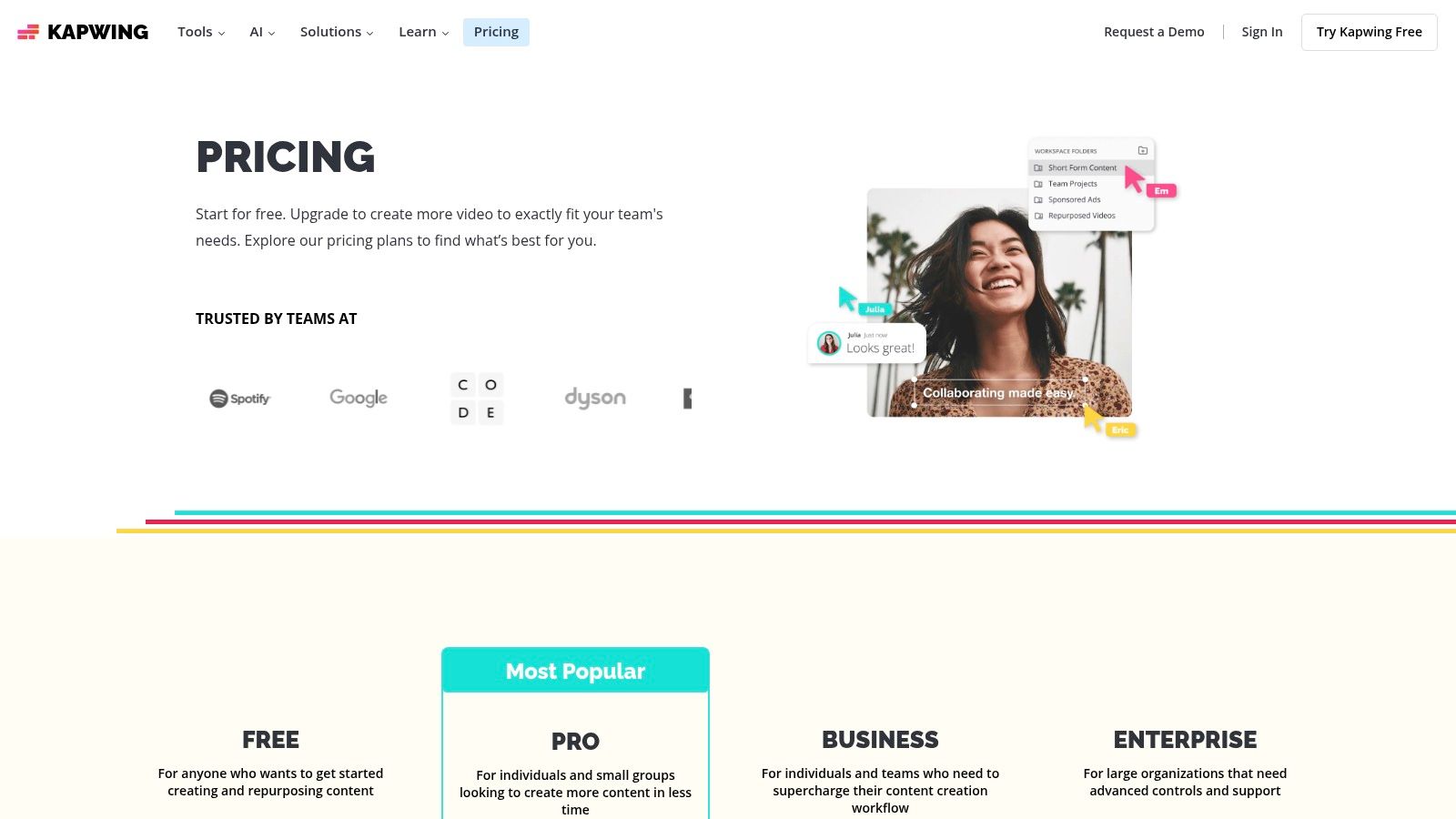
What distinguishes Kapwing is its transparent, tool-specific credit system. Instead of abstract generation costs, the platform clearly states how many credits an action like AI-powered lip dubbing or script generation will consume. This approach demystifies AI costs and allows teams to budget their usage effectively. The platform is built for collaboration, with shared workspaces and brand kits, ensuring content remains consistent across all team-produced videos. This focus on integrating AI into a practical, team-oriented editing environment makes it a powerful asset for high-volume content workflows.
Key Features and Usage Tips
- Standout Feature: A comprehensive suite of AI tools integrated within a traditional, user-friendly video editor, prioritizing workflow efficiency over pure video generation.
- Best For: Marketing teams, social media managers, and creators focused on repurposing and enhancing existing video content for multiple platforms.
- Pricing: Offers a free plan with watermarks and limited credits. Paid plans (starting at $16/user/month, billed annually) remove watermarks, increase credits, and add features like 4K export.
- Practical Tip: Use the "Repurpose" tool to its full potential. Upload a long-form video, like a podcast or webinar, and let the AI find key moments, automatically generate short-form clips with captions, and resize them for TikTok, Reels, or Shorts, saving hours of manual editing.
9. Canva (Magic Studio AI Video Clip): For Integrated Social Content & Presentations
Canva has positioned its ai video generator not as a standalone tool but as a powerful feature within its all-encompassing design ecosystem, Magic Studio. Its text-to-video function is designed for maximum efficiency, allowing users to generate short video clips directly inside the Canva editor. This approach is perfect for marketers and creators who need to quickly produce social media assets, presentation slides, or marketing materials without leaving their primary design environment.
Loading image...
The key advantage of Canva's offering is its seamless integration. An AI-generated clip can be immediately dropped into a template, combined with Canva's massive stock library of graphics and audio, and styled with brand kits. This removes the friction of exporting from one tool and importing into another, streamlining the workflow for those who prioritize speed and brand consistency. It excels at turning a simple idea into a polished visual asset in just a few minutes, making it ideal for non-experts.
Key Features and Usage Tips
- Standout Feature: Its deep integration with Canva's editor, templates, and vast stock media library provides an unparalleled all-in-one workflow.
- Best For: Social media managers, small businesses, and educators who need to quickly create branded video content without specialized video editing skills.
- Pricing: The feature is part of Magic Studio within Canva's plans. A free tier offers a limited number of lifetime generations. Paid plans (like Canva Pro starting at $119.99/year for one person) offer significantly more monthly credits.
- Practical Tip: Use the AI-generated clip as a starting point. Immediately leverage Canva's editor to add text overlays, brand colors, and animations to elevate the simple clip into a complete, on-brand social media post or ad.
10. Vyond: For Enterprise and Corporate Training Content
Vyond targets a specific and crucial niche within the AI video generator landscape: business communications. Its platform is meticulously designed for creating professional animated explainer videos, e-learning modules, and internal training materials. The introduction of Vyond Go, its script-to-video AI tool, streamlines this process, allowing users to instantly generate a first draft from text prompts, documents, or even URLs, which can then be refined in its mature editor.
Loading image...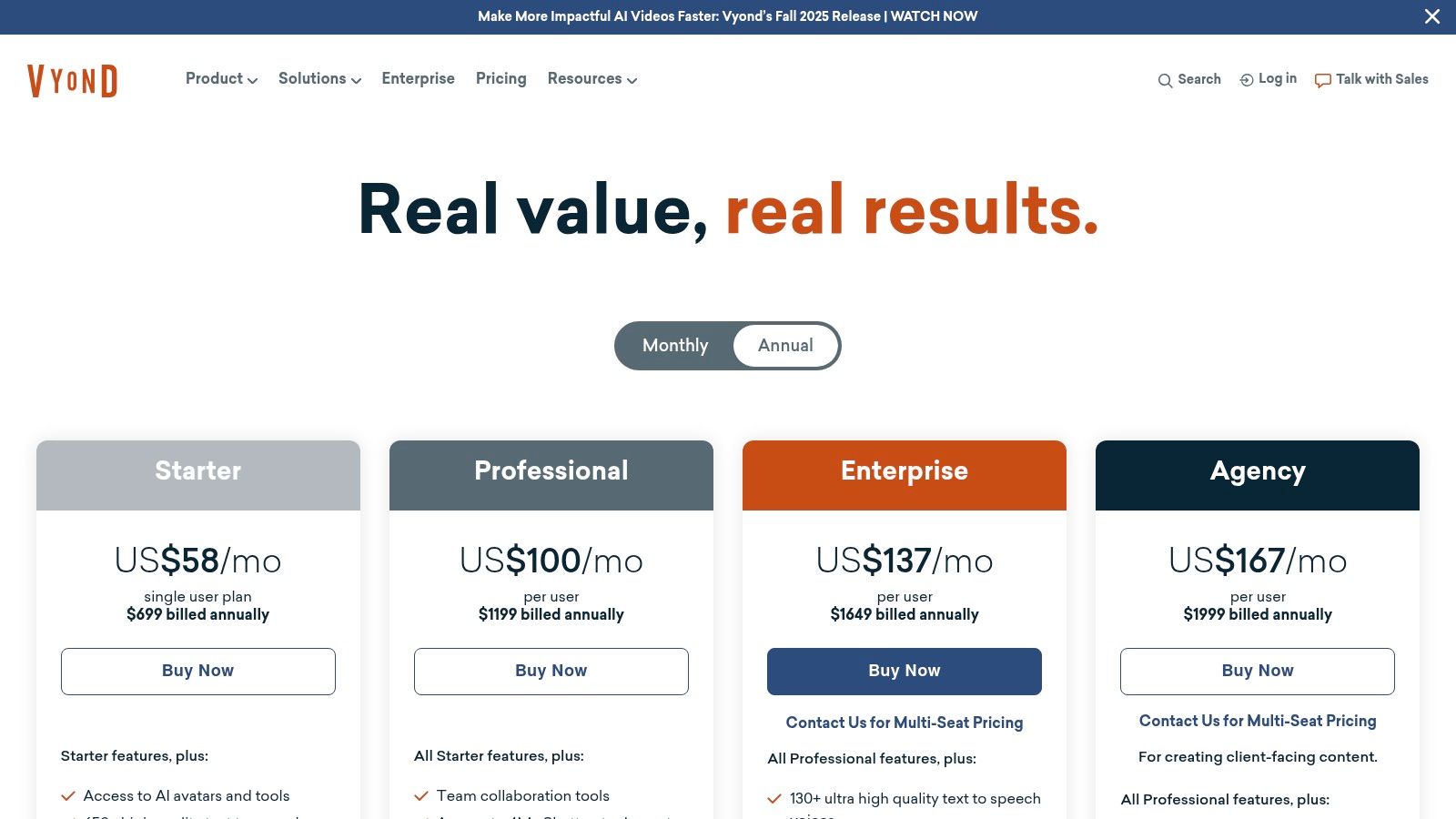
Unlike platforms focused on cinematic or hyper-realistic output, Vyond's strength lies in its vast library of customizable props, characters, and templates in various business-friendly animation styles. This focus on structured, template-driven creation, combined with enterprise-grade features like brand controls, team collaboration, and robust security protocols, makes it a trusted solution for corporate environments. The platform also integrates powerful tools like AI-powered text-to-speech and automated translation, further simplifying the creation of multilingual training content.
Key Features and Usage Tips
- Standout Feature: The seamless integration of the quick-drafting AI tool, Vyond Go, with a powerful, mature animation editor built specifically for business use cases.
- Best For: Corporate training departments, HR teams, and marketing professionals creating explainer videos, e-learning content, and internal communications.
- Pricing: Offers seat-based plans with different tiers (Essential, Premium, Professional) starting from $25/user/month when billed annually. Higher-tier plans include more AI credits and access to the Shutterstock asset library.
- Practical Tip: Leverage Vyond Go to rapidly generate the video's structure and script timing. Then, spend the majority of your time in the full editor swapping out characters, adjusting brand colors, and refining scene transitions to match your company's specific style guide.
11. Colossyan: For Corporate Training and Interactive Learning
Colossyan carves out a niche as a specialized ai video generator for corporate and educational content, particularly for training, internal communications, and knowledge transfer. Its primary strength is its avatar-based system, which allows businesses to quickly create professional-looking presenter-led videos without cameras or studios. The platform is designed to replace traditional learning management system (LMS) content with more engaging and scalable video assets.
Loading image...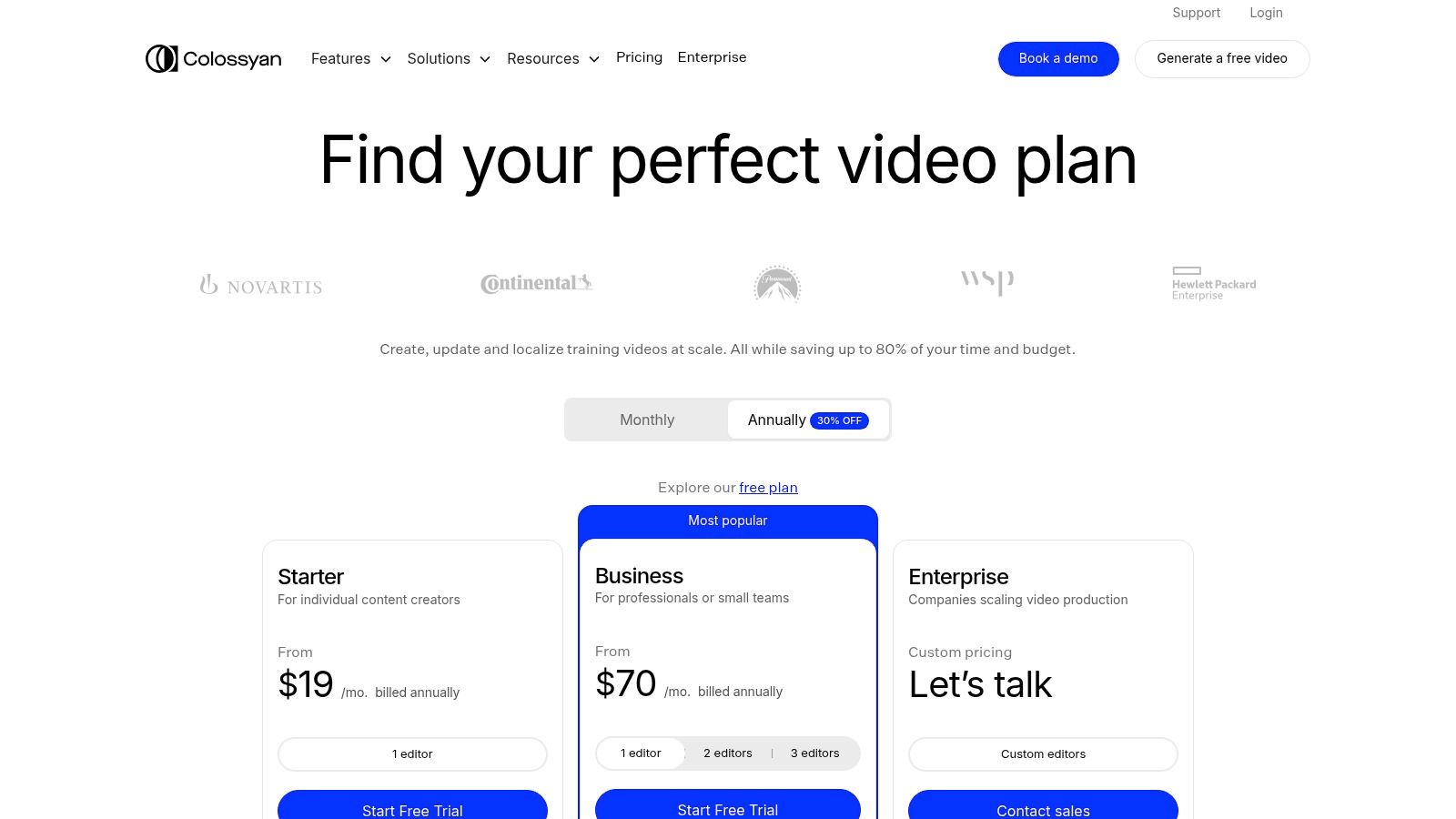
What makes Colossyan a powerful tool for learning and development is its focus on interactivity and localization. Higher-tier plans introduce features like in-video quizzes and conversational branching, transforming passive viewing into an active learning experience. Furthermore, its auto-translation capability supports over 70 languages, enabling global organizations to deploy consistent training materials across different regions with minimal effort. This combination of avatar generation, interactivity, and translation makes it an efficient solution for enterprise-level educational content.
Key Features and Usage Tips
- Standout Feature: The interactive video elements, including quizzes and branching scenarios, set it apart for training and educational use cases.
- Best For: HR departments, corporate trainers, and educational institutions creating scalable and multilingual learning content.
- Pricing: Starts with a free trial. Paid plans begin at $28 per month for the Starter plan, with Business and Enterprise tiers offering unlimited video minutes and advanced features.
- Practical Tip: Leverage the auto-translation feature early in your workflow. Create a master video in one language and then efficiently generate multiple localized versions to maximize your content's reach and impact across a global workforce.
12. Elai.io: For Scalable Avatar-Based Training and Marketing Content
Elai.io carves out its niche as a specialized ai video generator focused on producing polished, avatar-led videos for corporate training, marketing, and educational content. Its primary appeal is the ability to create engaging presentations at scale without the need for cameras, actors, or studios. The platform boasts a library of over 80 stock avatars and supports more than 75 languages, making it a powerful tool for global communication strategies.
Loading image...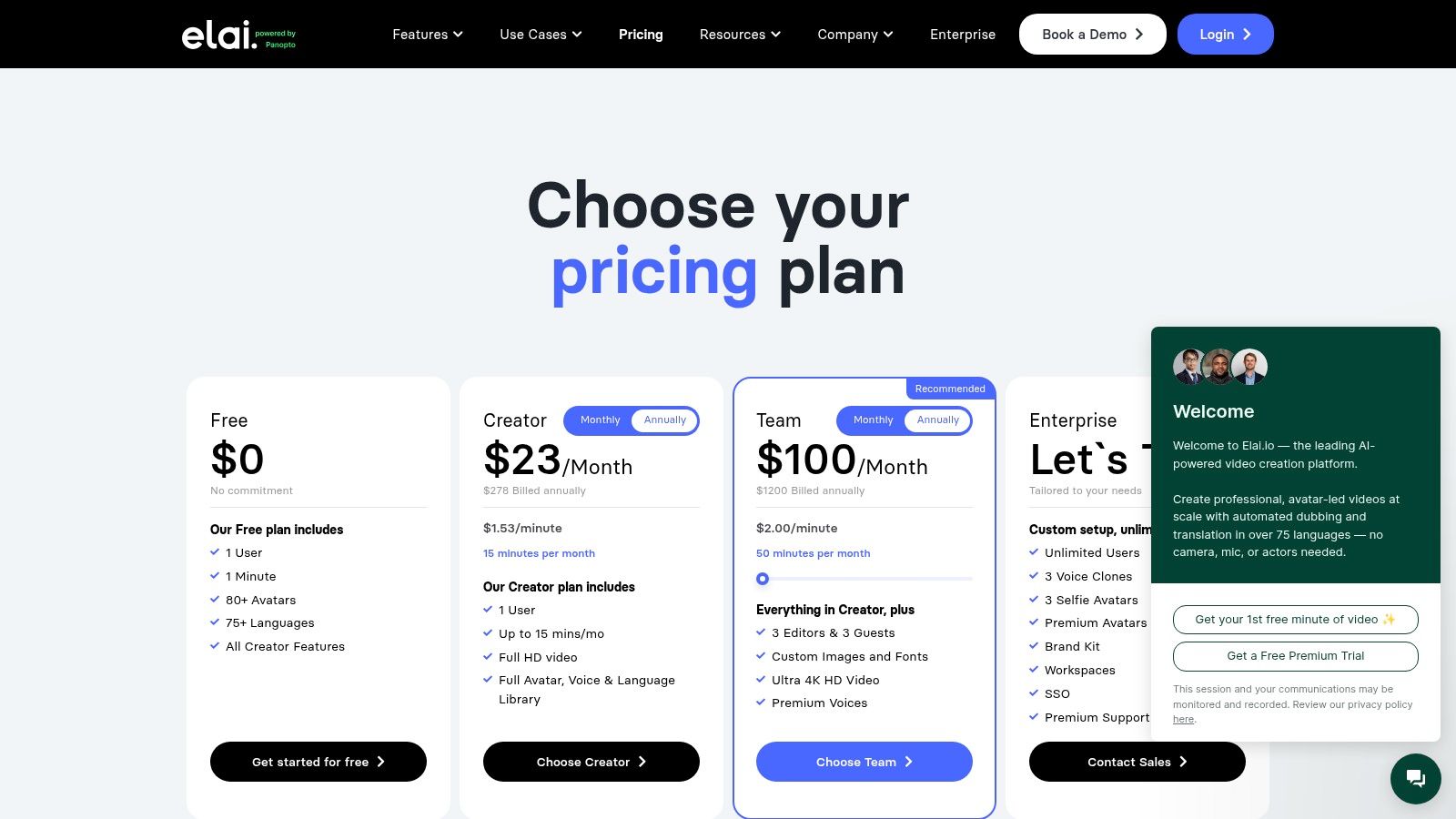
The platform's standout capability is its flexible approach to personalization. Users can create custom "selfie" avatars from a short video clip or invest in a higher-fidelity studio avatar for a truly branded experience. Combined with voice cloning and API access, Elai.io enables businesses to automate video creation and integrate it into their existing learning management systems (LMS) or marketing workflows. This makes it an ideal solution for organizations looking to streamline the production of how-to videos, employee onboarding materials, or product explainers with a consistent, professional presenter.
Key Features and Usage Tips
- Standout Feature: The flexible custom avatar creation options, from simple "selfie" avatars to professional studio-grade models, set it apart for brand consistency.
- Best For: Corporate trainers, L&D departments, and marketing teams needing to produce large volumes of presenter-led instructional or promotional videos efficiently.
- Pricing: Plans are based on the number of video minutes generated per month, starting with a free trial. Paid plans begin at $23/month, with higher tiers unlocking 4K exports, API access, and custom avatar features.
- Practical Tip: Maximize your minute allowance by finalizing your script before generating the video. Since minutes don't roll over on monthly plans, ensure your text and slide content are perfect to avoid wasting credits on re-renders for minor edits.
Top 12 AI Video Generators — Feature Comparison
| Product | Core features ✨ | Quality ★ | Pricing & limits 💰 | Target audience 👥 | Standout 🏆 |
|---|---|---|---|---|---|
| Runway | Gen‑3/Gen‑4 video, integrated editor, 4K upscaling, workspaces | ★★★★ | 💰 Credit‑based; paid = no watermark; enterprise tiers | 👥 Creators & teams | 🏆 Balanced generation + editor |
| Luma AI | Ray models, HDR & 4K up‑res, short high‑fidelity clips | ★★★★ | 💰 Competitive entry; paid for HDR/4K; clip length caps | 👥 Users wanting high‑fidelity short clips | 🏆 Fast model updates & fidelity |
| Synthesia | 140+ languages, custom avatars/voices, API & SSO | ★★★★ | 💰 Minutes/credits; higher tiers unlock commercial features | 👥 Enterprise L&D, marketing | 🏆 Enterprise governance & broad language support |
| HeyGen | 500–700+ avatars, multilingual, API, watermark control | ★★★★ | 💰 API credit pricing; free tier + paid fast processing | 👥 Creators, marketers, teams | 🏆 Huge avatar library & clear API pricing |
| D‑ID | Photo→talking‑head, studio UI + developer API, live support | ★★★★ | 💰 Credit/minute model; discounted streaming; no roll‑over | 👥 Devs & creators for talking‑head videos | 🏆 Best for realistic photo→talking‑head workflows |
| InVideo AI | Text/script/URL→video, avatars, stock library, editor | ★★★★ | 💰 Credit‑based; accessible price points; team plans | 👥 Individuals & small teams for broad content | 🏆 All‑in‑one creation + stock integration |
| Pictory | Script/URL→video, AI summarization, subtitles, stock | ★★★★ | 💰 Minute allowances; stock varies by tier; no watermark paid | 👥 Marketers & small teams for repurposing | 🏆 Fast repurposing & simple minutes model |
| Kapwing | Collaborative editor with AI (TTS, lip‑sync, autosub) | ★★★★ | 💰 Tool‑specific credits; free has watermark limits | 👥 Social creators & repurposers | 🏆 Editor + transparent AI costs |
| Canva (Magic Studio) | Prompt→clip (short), integrated editor, huge stock library | ★★★★ | 💰 Bundled with Canva plans; clip caps on some tiers | 👥 Non‑experts, teams for quick social assets | 🏆 Seamless editor + ecosystem ease |
| Vyond | Script→video, animation/avatars, TTS, seat‑based plans | ★★★★ | 💰 Seat‑based pricing; best value annual; credits per user | 👥 Training, corporate comms, enterprises | 🏆 Enterprise admin & animation control |
| Colossyan | Avatar videos, interactivity (quizzes), auto‑translation | ★★★★ | 💰 Starter minutes; Business+ offers unlimited minutes | 👥 Internal comms & training teams | 🏆 Unlimited minutes & branching interactivity |
| Elai.io | 80+ avatars, custom/selfie avatars, voice cloning, 4K | ★★★★ | 💰 Minute‑based pricing; extra minutes purchasable | 👥 Marketers, how‑to creators, trainers | 🏆 Custom avatars + voice cloning support |
Choosing Your AI Co-Pilot: A Strategic Framework
We've journeyed through a dynamic landscape of powerful AI video generator tools, each with its unique strengths, workflows, and ideal applications. The sheer diversity of options, from cinematic text-to-video pioneers like Runway and Luma AI to polished corporate presentation platforms like Synthesia, highlights a crucial takeaway: the "best" tool is entirely subjective and depends on your specific mission. Selecting the right AI co-pilot isn't about chasing the most hyped technology, but about strategically aligning a platform’s capabilities with your creative or business objectives.
The decision-making process can feel overwhelming, but it becomes manageable when you filter your choices through a clear, strategic lens. Your selection should be a deliberate one, guided by a framework that prioritizes your project's core needs over generalized features.
A Three-Pillar Approach to Selection
To demystify the process, consider these three core pillars when evaluating which ai video generator to integrate into your workflow:
-
Primary Use Case: What is the primary job you need this tool to do? Are you creating avant-garde short films, generating thousands of personalized sales outreach videos, producing multilingual training modules, or simply repurposing blog content for social media? The answer drastically narrows the field. A marketing team focused on content repurposing will find immense value in the automated workflows of Pictory or InVideo AI, while a creative agency will gravitate towards the raw generative power of Runway.
-
Technical & Creative Skill Level: Be honest about your team's comfort level. Platforms like Canva and Vyond Go are designed for maximum accessibility, allowing users with minimal video editing experience to produce quality content quickly. In contrast, tools offering more granular control, advanced camera movements, and API access, such as HeyGen or D-ID, cater to users with a more technical or development-oriented background who need to build scalable, automated systems.
-
Budget & Scalability Model: Your financial commitment and future needs are critical. Some platforms operate on a subscription model with generous allowances, ideal for consistent output. Others use a credit-based system, which can be more cost-effective for sporadic, high-intensity projects but requires careful management. Consider not just the monthly cost, but the cost-per-video at the quality you require. For large organizations, enterprise-level features like team collaboration, SSO, and dedicated support from providers like Colossyan are non-negotiable. When developing your strategic framework for choosing an AI co-pilot, a deep dive into the 12 best AI video generator platforms of 2025 can provide crucial insights and direct comparisons to refine your choice.
Final Thoughts: From Tool to Creative Partner
The most significant shift AI introduces to video creation is the transformation of these platforms from simple tools into collaborative creative partners. They are not here to replace human creativity but to augment and accelerate it. The right ai video generator will handle the repetitive, time-consuming aspects of production, freeing you to focus on strategy, storytelling, and refining the final output. The key is to experiment. Nearly every tool on our list offers a free trial or a freemium tier. Use this opportunity to run a small, real-world project from start to finish. This hands-on experience is the ultimate test of a platform’s true value for your unique workflow. Embrace this new era of video creation; your next breakthrough project might just be a single prompt away.
Ready to take the first step in your AI media journey? While many generators create video, the foundation of a stunning visual often starts with a perfect image. ai-media-studio specializes in producing ultra-high-quality, custom AI imagery that can serve as the perfect source material for your image-to-video projects. Generate your core visuals with us, then bring them to life with the video tool of your choice. Explore the possibilities at ai-media-studio.