Imagine getting hours back on every single content project. Instead of grinding away on tedious manual work, you’re free to focus on the big picture—the strategy. This isn’t some far-off dream; it’s the new reality of using AI for content creation. This shift is empowering creators to brainstorm ideas, draft entire outlines, and produce visuals in moments, giving them a serious competitive advantage.
The New Reality of AI-Driven Content
But let's be clear: this isn't about replacing human creativity. It's about augmenting it. Think of AI as a powerful creative partner or an exceptionally skilled assistant. It’s a tool that takes over the repetitive, time-sucking parts of the job, letting you pour your energy into what actually matters: the core message, your unique insights, and the strategic direction.
A Rapidly Accelerating Trend
The adoption of these tools is happening at an incredible pace. Generative AI use in content creation has more than doubled, soaring from 33% in 2023 to a staggering 71% in 2024. This explosion highlights a massive shift in how businesses work, with marketers now saving an average of three hours per piece of content. You can discover more insights about this trend and its impact on productivity from recent industry reports.
This rapid integration is fueled by tangible benefits that go way beyond just speed. Teams using AI aren't just faster; they're often more creative and consistent.
By automating the groundwork, AI frees up mental bandwidth for real innovation. Creators can experiment with more ideas, test different visual styles, and produce a higher volume of quality work without risking burnout.
Understanding the Core Shift
At its heart, using AI for content creation is about changing your role from a manual laborer to a strategic director. Instead of painstakingly writing every word or designing every graphic from scratch, you provide the vision and the guidance. Your expertise becomes the input that steers the AI toward the exact output you need.
This guide will demystify the technology and give you a clear roadmap. We’ll explore how professionals across industries are using platforms like AI Media Studio to:
- Scale Production: Churn out more content in less time, meeting the demands of modern marketing without ever sacrificing quality.
- Boost Creativity: Instantly explore hundreds of ideas and visual concepts, smashing through creative blocks and discovering possibilities you hadn't even considered.
- Gain a Competitive Edge: Reallocate your resources from tedious tasks to high-impact activities like audience research, promotion, and big-picture strategy.
We’re going to move past the hype and dive straight into practical applications, showing you exactly how to make this technology work for you.
How AI Is Reshaping Visual Content Creation
For years, creating high-quality, original visuals was a serious bottleneck. It meant wrestling with expensive software, needing specialized design skills, or shelling out a significant budget for stock photography. This reality often forced creators to settle for generic images that just couldn't capture their brand's unique vibe.
That entire dynamic has been turned on its head. The rise of accessible AI image generation has democratized visual content, putting the power of a professional design studio into pretty much anyone's hands. Now, a simple text description is all it takes to produce a stunning, bespoke visual in seconds.
The process is simpler than it sounds. At its core, an AI image generator works like an incredibly skilled artist who can paint anything you can describe. You provide a text prompt—a detailed instruction—and the AI model, trained on billions of images, translates your words into pixels.
From Simple Words to Stunning Visuals
Imagine you're a food blogger writing about homemade pasta. Instead of scrolling through stock photo sites for an image that thousands of other blogs have already used, you can create something completely new.
A prompt like, "A rustic, overhead shot of fresh pappardelle pasta on a floured wooden board, with natural morning light coming from a window," can produce a professional-grade photo that perfectly matches your article's mood. This level of specific control is a game-changer for anyone using AI for content creation.
Platforms like AI Media Studio make this incredibly straightforward, offering dozens of predefined artistic styles. You can generate an image that looks like:
- A photorealistic photograph for a clean, modern look.
- A whimsical watercolor painting for a softer, more artistic feel.
- A futuristic cyberpunk illustration for a tech-focused article.
This shows the AI Media Studio interface, where users can easily select styles and input prompts to generate custom visuals.
The clean layout demonstrates how creators can quickly move from an idea to a finished image without a steep learning curve.
The scale of this shift is monumental. One recent analysis revealed that AI models generate a staggering 34 million images every single day, accumulating over 15 billion visuals since 2022. To put that in perspective, it took traditional photography 149 years to reach that same 15 billion milestone—a feat AI accomplished in just 1.5 years.
Gaining Unprecedented Creative Control
Modern AI tools offer more than just basic text-to-image functions; they provide advanced features that give you granular control over the final output. This is where you can truly refine your visuals to perfection.
Two powerful features are inpainting and outpainting.
Inpainting lets you select a specific part of a generated image and change it with a new prompt. If you love the overall scene but want to change a person’s shirt from blue to red, inpainting lets you do it seamlessly.
Outpainting, on the other hand, expands the canvas. It intelligently fills in the areas around your existing image, creating a wider landscape or a different composition. It's perfect for adapting a square social media graphic into a wide banner for your website.
These capabilities move beyond simple generation into true creative collaboration. You can explore a vast library of styles and features to see how our platform empowers advanced AI image generation. By combining your creative vision with these powerful tools, you can produce visuals that not only look professional but are also perfectly aligned with your brand's narrative and aesthetic.
Integrating AI into Your Content Workflow
Bringing artificial intelligence into your creative process isn't about flipping a switch and hoping for the best. It’s about being smart and strategic. The most successful creators I know don't see AI as a replacement for their skills; they treat it like a powerful new member of the team, assigning it specific jobs within the familiar flow of getting work done.
This hybrid approach is where the real magic happens. Let the AI handle the heavy lifting—the tedious data sifting, the first-round drafting, and churning out initial visual concepts. That frees you up to provide what really matters: the strategic direction, the brand voice, and the emotional intelligence that makes content truly connect with people.
The Brainstorming and Ideation Phase
Every great piece of content begins with that initial spark. For years, this meant staring at a blank page or sitting through marathon brainstorming sessions. Now, you can tap into AI as a bottomless well of inspiration to get the ball rolling.
Forget generic prompts. The key is to be specific to get high-quality ideas back. For instance, a marketer could ask an AI, "Generate 10 blog post titles about sustainable fashion for a Millennial audience, focusing on affordability and style." This gives the model clear guardrails and a target demographic, leading to far more relevant and usable concepts.
This doesn't replace your strategic brain; it just hits the accelerator. You get a broad menu of ideas that you can then filter, combine, and sharpen based on your deep industry knowledge and what you want to achieve.
Drafting and Outlining with AI
Once you've landed on a solid idea, the next hurdle is giving it structure. This is where an AI assistant shines. It can take a single topic and instantly spin it into a comprehensive outline, complete with logical sections, subheadings, and key talking points. What you get is a solid skeleton for your article, ensuring it flows smoothly from one idea to the next.
For example, you could prompt an AI with, "Create a detailed blog post outline for the title '5 Ways to Improve Remote Team Collaboration'." The tool will spit back a structured framework that you can then flesh out with your own unique insights, personal stories, and expert opinions. This partnership ensures the final piece is both well-organized and genuinely authentic. To see how teams can work together on these projects, you can explore platforms offering robust tools for collaboration.
By handing off the structural grunt work to AI, you free up your mental bandwidth to focus on the heart of the content: the message itself. This hybrid method gives you efficiency without sacrificing the human touch that builds trust with your audience.
Creating Visuals with AI Prompts
Visual creation used to be a major bottleneck for many teams. Now, it's one of the most exciting areas for AI-driven content creation. The process of generating an image is a workflow in itself, a dance that goes from a simple text idea to a polished visual asset.
This flowchart breaks down the basic steps for creating visuals with AI, from the initial prompt to the final, ready-to-use image.
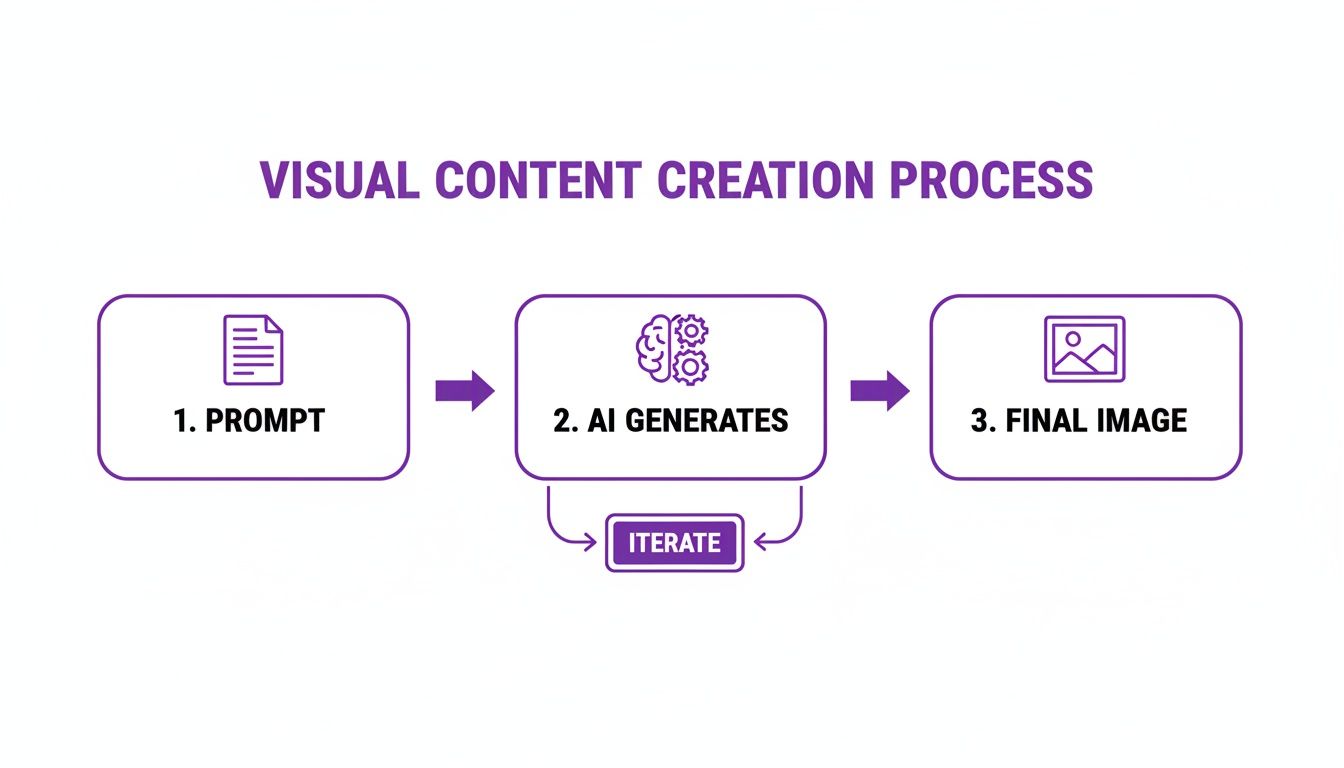
As you can see, the process is all about iteration. You're in a constant conversation with the AI, refining your prompts until it produces the perfect visual for your needs.
To give you a better sense of how this works in practice, here's a simple table breaking down the old way versus the new, AI-assisted way.
AI-Enhanced Content Creation Workflow
| Workflow Stage | Traditional Method (Manual) | AI-Assisted Method (Hybrid) | Key Benefit |
|---|---|---|---|
| Ideation | Team brainstorming, keyword research | AI generates topic clusters, headlines, angles | Overcomes creative blocks, uncovers new ideas |
| Outlining | Staring at a blank document, manual structuring | AI builds a logical structure and talking points | Creates a solid foundation in seconds |
| Drafting | Writing every word from scratch | AI generates a first draft, human refines and adds voice | Drastically reduces writing time |
| Visuals | Searching stock photos, hiring designers | AI generates custom images and graphics from prompts | Creates unique, on-brand visuals instantly |
| Editing | Manual proofreading, fact-checking, and polishing | AI checks for grammar, human edits for tone and nuance | Speeds up the editing cycle while preserving quality |
This table really highlights how AI doesn't just do the work for you; it creates opportunities at every step to make the work better and faster.
Refining and Finalizing Content
The final stage is where your human expertise is absolutely critical. AI-generated drafts are fantastic starting points, but they always need editing, fact-checking, and a final polish to match your brand's unique voice and quality standards. This is the "human-in-the-loop" model, where the tech provides the raw material and an expert provides the final seal of approval.
This final pass always includes:
- Editing for Tone: Rewriting sentences to make sure they sound like you, not a robot.
- Fact-Checking: Verifying every stat, date, and claim the AI made in its draft.
- Adding Personal Stories: Weaving in real-world examples and personal experiences that an AI simply can't invent.
Understanding the different strategies for AI integration in post-production can offer some great insights for this final step. Ultimately, this blended workflow lets you produce high-quality content at a speed that was once unimaginable, combining the raw power of machines with the irreplaceable nuance of human creativity.
Choosing the Right AI Content Creation Tools
Jumping into the world of AI tools can feel like walking into a massive, noisy marketplace. Every vendor is shouting about their features, each one promising to be smarter, faster, or more creative than the last. Making the right call here is a big deal if you want to effectively **use AI for content creation** and avoid a serious case of buyer's remorse.A bad choice can lead to clunky user experiences, bland results, and a bunch of surprise costs you didn't see coming. To cut through the noise, you need to set some clear criteria. Forget the flashy marketing slogans for a minute and focus on what actually matters for what you need to do. The right tool should feel less like a complicated piece of software and more like a natural part of your creative flow.
Core Criteria for Evaluating AI Tools
Before you even think about pulling out your credit card, you need to measure any platform against a few key benchmarks. A methodical approach will make sure you land on a tool that fits your goals, budget, and skill level—helping you sidestep common traps like confusing pricing or restrictive terms.
Here are the four pillars of a solid evaluation:
- Quality of Output: Does the tool actually produce high-quality, nuanced, and visually appealing content? You need to look at examples and run your own tests. The goal is to find something that generates assets you’re proud to publish with only minor tweaks.
- Ease of Use: How intuitive is the interface, really? A steep learning curve can instantly cancel out any time you were supposed to save. The best tools, like AI Media Studio, are built for creators, not coders, with straightforward navigation that just makes sense.
- Specific Features: Does it have the specific capabilities you'll use every day? If you're all about visuals, look for advanced functions like inpainting (the ability to edit specific parts of an image) and a deep library of artistic styles to match your brand.
- Transparent Pricing: Are the costs clear and upfront? Steer clear of platforms with confusing credit systems or a ton of expensive add-ons. You want simple, scalable plans that offer a free tier to get started and predictable pricing as you grow.
Matching the Tool to Your Creative Goals
Once you've got your criteria locked down, the next move is to line them up with your own unique goals. The best AI tool for a solo blogger who just needs article images is going to be completely different from what a big marketing agency needs for a multi-channel campaign.
Think about what you'll actually be making. If you're focused on visual media, a platform with a strong image and video generator is obviously the priority. For example, our guide on the AI Media Studio AI video generator breaks down how specialized tools can handle specific creative challenges, from short social clips to detailed explainer videos. The trick is to pick a solution that excels at the type of content you create most.
The business impact of this choice is massive. AI's role in content creation is projected to add a staggering $15.7 trillion to the global economy by 2030, mostly from productivity gains. With companies already putting up to 20% of their tech budgets toward AI and 58% planning to invest more, picking the right platform isn't just a creative decision—it's a major business one. You can dig into a detailed breakdown of these economic predictions and their impact on technology from top industry analysts.
Why a Unified Platform Can Be Better
While juggling a few specialized tools can work, many creators are finding that a unified platform is the smarter play. A solution like AI Media Studio brings different creative functions together under one roof, giving you a consistent user experience and a single subscription to manage.
Choosing an all-in-one platform simplifies your workflow, reduces costs, and ensures a consistent creative output across different media types. It allows you to move seamlessly from generating a blog post image to creating a promotional video without switching contexts.
This integrated approach is a lifesaver for brand consistency. When you have access to a shared library of styles and assets, you can make sure that every visual—whether it's a static image or a video clip—reflects your brand's unique aesthetic. This creates a much more cohesive and professional presence across all your channels.
Making AI Content Sound Genuinely Human
Let's be honest. The biggest mistake you can make with AI is hitting "generate" and immediately publishing what comes out. That’s a fast track to creating bland, soulless content that makes your audience cringe and slowly chips away at your brand's credibility.
The secret to making this work isn't just using AI; it's using it thoughtfully. Think of it as a creative partner, not a magic button that replaces your own expertise and experience.
Authenticity is all about the human touch. Your unique perspective, real-world stories, and brand personality are your most valuable assets. AI can build the frame of the house, but you’re the one who needs to come in and decorate, adding the personal touches that make it a home. This means you have to get your hands dirty—guiding, editing, and injecting your voice into every piece of content.
Always Keep a Human in the Loop
The most effective way to use AI for content is a hybrid model. Picture yourself as the editor-in-chief, and the AI is your incredibly fast—but very junior—writer. Your job is to set the direction, critically review the draft, and apply the final polish.
This human oversight is absolutely non-negotiable for a few key reasons:
- Fact-Checking: AI models are notorious for "hallucinating," which is a polite way of saying they make things up. They can present outdated info or just plain wrong statistics as hard facts. It is 100% your responsibility to verify every single claim, number, and data point before it goes live.
- Tone and Voice: An AI doesn't know the inside jokes you share with your audience or the specific personality of your brand. You have to rewrite sections to make sure the language aligns with your voice, whether it's witty, professional, or deeply empathetic.
- Adding Nuance and Emotion: AI often misses the subtle context and emotional depth that truly connects with people. Your job is to weave in that layer of understanding that a machine simply can't replicate.
This "human-in-the-loop" approach is what turns a generic draft into a valuable, trustworthy resource.
Raw AI output is just a starting point. The real magic happens during the human editing process, where you add your expertise, personal anecdotes, and brand-specific insights that build a genuine connection with your audience.
Master the Art of the Prompt
The quality of what you get out of an AI is directly tied to the quality of what you put in. A vague, one-sentence prompt will almost always give you a generic, uninspired result. Learning to craft a detailed, nuanced prompt is the first and most important step toward creating high-quality content.
A great prompt is like a detailed creative brief for your AI assistant. It needs to clearly spell out the what, who, why, and how of the content you’re trying to create.
For instance, instead of this weak prompt:
- "Write a blog post about email marketing."
Get way more specific:
- "Write a 500-word blog post for small business owners who are new to email marketing. Use a friendly, encouraging tone. Include an analogy that compares building an email list to tending a community garden. Focus on three beginner-friendly tips: how to choose a provider, what to include in a welcome email, and a simple way to segment subscribers."
This level of detail gives the AI the guardrails it needs to produce a draft that’s already much closer to what you envisioned, saving you a ton of time on the back end.
Inject Your Unique Brand Voice
Your brand voice is your ultimate competitive advantage. It’s that unique blend of personality, stories, and values that makes you, well, you. After the AI generates a draft, your main job is to rewrite and reshape it until it sounds undeniably like something you would say.
Here’s a simple checklist to make that happen:
- Rewrite Key Sections from Scratch: Go through the introduction, conclusion, and any key paragraphs. Rewrite them entirely in your own words. This is the fastest way to establish a strong, authentic voice from the start.
- Add Personal Stories and Examples: Weave in real-world examples, a personal anecdote, or a client case study. These experiences are completely unique to you and provide immense value that AI can't invent.
- Use Your Vocabulary: Swap out generic business jargon for the specific words and phrases your audience knows and loves. Make it sound like it came from a real person in your industry, not a robot.
By making these practices a habit, you can get all the speed and efficiency of AI without sacrificing the authenticity that builds lasting trust with your audience.
Real World Examples of AI in Action
It’s one thing to talk about AI in theory, but seeing it work in the real world is where everything clicks. All kinds of businesses are already using AI for content creation to tackle practical challenges, slash costs, and produce incredible visuals that were once completely out of reach. These examples prove just how accessible and potent this technology really is.
Let's dive into a couple of mini case studies. These scenarios break down a real business problem, the exact prompt used to solve it, and the tangible results, showing how a few lines of text can become a valuable asset.
E-Commerce Product Photography on a Budget
A small e-commerce brand specializing in handcrafted soaps had a classic startup problem: they needed beautiful, aspirational lifestyle photos but couldn't afford a professional photographer and set. Their goal was to showcase their products in high-end bathroom settings to drive online sales.
- Prompt Used: "Photorealistic image of a bar of artisanal lavender soap on a white marble countertop next to a ceramic sink. Soft, natural morning light from a window, with a sprig of fresh lavender and a neatly folded white towel in the background. Minimalist and clean aesthetic."
- Result: The brand generated a dozen unique, high-resolution lifestyle shots in less than an hour.
- Business Benefit: They saved an estimated $1,500 in photography costs and were able to launch their new product line two weeks ahead of schedule.
This is a perfect example of AI leveling the playing field. It gives small businesses access to the kind of polished marketing visuals that used to be reserved for big brands with deep pockets.
Rapid Prototyping for a Marketing Agency
A fast-paced marketing agency had to pitch three different campaign ideas to a new client—and they needed to do it yesterday. The traditional route would have meant a graphic designer spending days mocking up social media ads. Instead, they used AI to turbocharge their brainstorming and visualization.
For businesses looking to apply these methods, checking out a guide to using AI for content at scale can offer some fantastic insights.
- Prompt Used: "Create a vibrant, eye-catching social media ad for a new energy drink. Style: Pop art illustration. Include a dynamic splash of colorful liquid and bold, playful typography. Aspect ratio 9:16 for Instagram Stories."
- Result: In just a few hours, the team had multiple compelling visual concepts for all three campaigns.
- Business Benefit: They walked into the client meeting the very next day with professional mockups and won the account with their speed and creativity. The agency cut its concepting time by over 80%.
Got Questions About AI Content? We've Got Answers.
As you start weaving AI into your creative workflow, some very practical questions are bound to pop up. It’s completely normal. Getting these common concerns sorted out is the key to using these incredible tools with confidence. Let's dig into a few of the most common ones.
Will Using AI for Content Creation Hurt My SEO?
Not at all—as long as your main focus stays locked on quality. Search engines like Google have been pretty clear on this: they reward helpful, reliable, people-first content. It doesn't matter how it was made.
The goal is to create something genuinely valuable, not just to pump out low-effort spam. An AI-assisted article that you’ve heavily edited, fact-checked, and injected with your own expertise and brand voice can rank incredibly well. Just think of AI as a powerful assistant, not the finished product. The human value you add is what makes it win.
Can I Legally Use AI-Generated Images for My Business?
This is a big one, and the answer comes down to one thing: the terms of service of the AI tool you're using. You absolutely have to check the licensing agreement before you use any AI visuals for commercial purposes.
Many of the most reputable platforms grant full commercial usage rights, especially when you sign up for their paid plans. This gives you the green light to use your creations for marketing, ads, and pretty much any other business need.
For example, AI Media Studio provides crystal-clear commercial rights on its premium tiers, so you can deploy the visuals you create without a second thought. Always, always check the fine print of your chosen service to stay compliant and protect your business.
How Do I Write Effective Prompts for AI Image Generators?
Writing a great prompt feels more like an art than a science, but there are some solid principles that will get you 90% of the way there. Start with a clear subject, then begin layering on descriptive details to steer the AI toward your vision. The more specific you are, the better.
Instead of a vague prompt like "a picture of a cat," you need to give the AI a much richer brief:
- Subject: "A fluffy calico cat"
- Action: "napping in a sunbeam on a rustic wooden floor"
- Style: "Photorealistic, close-up shot"
- Lighting & Mood: "Soft morning light, peaceful mood, shallow depth of field"
The best way to get good at this is through iteration. Generate an initial image, see what you like and what you don't, and then tweak your prompt for the next round. Each attempt will get you that much closer to the perfect visual.
Ready to elevate your visual content with stunning, on-brand AI imagery? AI Media Studio makes it simple to generate professional-quality visuals in seconds. Start creating for free today at https://ai-media-studio.com and see the difference for yourself.