Which AI model is best for editing photos? Nano Banana, GPT Image and Muse on the same photos (October 2026)
It depends on the edit. In our eight tests, GPT Image 2.5 and Muse Image kept the original framing and pose most closely on the background swap and the relight, where both Nano Banana models reframed the portrait. On a gentle skin retouch, Nano Banana Pro and GPT Image 2.5 made subtle changes and kept both faces, Nano Banana 2.1 smoothed more and also kept them, and Muse Image sharpened the skin instead of softening it. Nano Banana Pro gave the most faithful old-photo restoration, and no model removed background people cleanly in one run. Muse Image is the cheapest at 2 credits per edit; GPT Image 2.5 costs 11 in the web app. On the independent Artificial Analysis editing leaderboard (read October 11, 2026), GPT Image 2.5 Sunburst (max) ranks first and Nano Banana 2.1 fourth; that benchmark does not measure the settings the studio uses.
We sent the same photos and the same prompts to every image and video model in AI Media Studio and kept the results unretouched. Each result shows the model, what that exact output costs, and a short note on what it did. Page reviewed . Prices for every resolution and length are on the AI model price list.
The short answer: results by edit
Eight edits, one run per model and edit. A cell reads “not tested” when that run does not settle the question, for example where the prompt asked for a new scene rather than the original framing, or where we did not judge the framing of a cleanup edit. Credits are for one edit in the web app.
| Edit | Model | Kept framing and pose | Kept identity and details | Credits in the web app |
|---|---|---|---|---|
| Product shot: bottle on wet slate | Nano Banana 2.1 | not tested | Yes: bottle and dropper recognisable | 9 |
| Nano Banana Pro | not tested | Yes: bottle and dropper recognisable | 30 | |
| GPT Image 2.5 | not tested | Yes: bottle and dropper recognisable | 11 | |
| Muse Image | not tested | Yes: bottle and dropper recognisable | 2 | |
| New background: Paris street café | Nano Banana 2.1 | No: pulled the camera back | not tested | 9 |
| Nano Banana Pro | No: reframed wider | not tested | 30 | |
| GPT Image 2.5 | Yes: original crop and pose | not tested | 11 | |
| Muse Image | Yes: closest to the source | not tested | 2 | |
| Relight: soft window daylight | Nano Banana 2.1 | Partly: head angle shifted slightly | Makeup kept | 9 |
| Nano Banana Pro | Partly: head angle shifted slightly | Makeup kept | 30 | |
| GPT Image 2.5 | Yes: pose held | Makeup kept | 11 | |
| Muse Image | Yes: closest to the source | Makeup kept | 2 | |
| Add text: a label that reads GLOW SERUM | Nano Banana 2.1 | Yes: rest of the photo left alone | Yes: both lines, spelled correctly | 9 |
| Nano Banana Pro | Yes: rest of the photo left alone | Yes: both lines, spelled correctly | 30 | |
| GPT Image 2.5 | Yes: rest of the photo left alone | Yes: both lines, spelled correctly | 11 | |
| Muse Image | Yes: rest of the photo left alone | Yes: both lines, spelled correctly | 2 | |
| Add an object: a red ball in front of the dog | Nano Banana 2.1 | Yes: framing kept | Dog kept; ball beside the paw, not in front | 9 |
| Nano Banana Pro | Yes: framing kept | Dog kept; ball beside the paw, not in front | 30 | |
| GPT Image 2.5 | Yes: framing kept | Dog kept; ball where asked | 11 | |
| Muse Image | Yes: framing kept | Dog kept; smaller ball where asked | 2 | |
| Remove people behind the subject | Nano Banana 2.1 | not tested | No: added a stool and crate to the street | 9 |
| Nano Banana Pro | not tested | Partly: a pedestrian and rider were left in | 30 | |
| GPT Image 2.5 | not tested | No: added cars and shop goods to the street | 11 | |
| Muse Image | not tested | Partly: redrew the shop on the left | 2 | |
| Retouch skin without changing faces | Nano Banana 2.1 | not tested | Faces kept (judged at reduced size) | 9 |
| Nano Banana Pro | not tested | Faces kept (judged at reduced size) | 30 | |
| GPT Image 2.5 | not tested | Faces kept (judged at reduced size) | 11 | |
| Muse Image | not tested | Partly: sharper skin; man may read older | 2 | |
| Restore a damaged 1950s print | Nano Banana 2.1 | not tested | Partly: sepia tint instead of black and white | 9 |
| Nano Banana Pro | not tested | Yes: most faithful, neutral black and white | 30 | |
| GPT Image 2.5 | not tested | Partly: contrast and sharpness pushed past gentle | 11 | |
| Muse Image | not tested | Yes: faithful, slightly flat | 2 |
Which model for which job
Start from what must not change in your photo, then pick the model that held it in these runs. Each row links to the results it is based on.
| Job | Try first | Why |
|---|---|---|
| Swap the background, keep the framing and pose | GPT Image 2.5 or Muse Image | Both kept the original crop and pose; both Nano Banana models reframed the shot. See the results |
| Relight a portrait without changing the pose | GPT Image 2.5 or Muse Image | Both held the pose most closely; the Nano Banana models shifted the head angle a little. See the results |
| Stage a product in a new scene | GPT Image 2.5 or Nano Banana Pro | All four kept the bottle. GPT Image 2.5 made the most of the light; Nano Banana Pro built the most complete room. See the results |
| Add a short text label | Muse Image | All four spelled both lines correctly, and Muse Image costs the least. See the results |
| Animate a product without altering it | Kling O3 Pro or Seedance 2.0 | Both kept the bottle unchanged; Grok Imagine Video 1.5 invented a label. See the results |
| Animate a portrait with a visible face | Kling O3 Pro | It kept the original backdrop. Seedance 2.0 refuses real-looking faces. See the results |
| Follow a specific hand or camera move | Kling v3 Pro | It turned the bottle most visibly and made the strongest camera move. See the results |
| Walk through a room | Any of the four | All kept the furniture stable; Seedance 2.0 moved furthest into the room. See the results |
Whatever the model, name what must stay in the prompt (“keep her face, makeup and jacket exactly the same”), as every prompt on this page does.
How we tested
- Same source photo and the same written instruction for every model.
- One run per model, first result only, no retouching or cherry-picking.
- The first four image edits ran on October 9, 2026 and the last four (add an object, remove people, retouch, restore) on October 12, 2026 through the AI Media Studio API; clips ran on October 10, 2026. Each set lists its settings, and the credits shown are what each result cost.
- The October 12 source photos are synthetic: fictional people and a damaged 1950s print generated with GPT Image 2.5 Sunburst, so no real person's photo was edited.
- Download every run (CSV): model, prompt, settings, credits, time of run (UTC) and our verdict for each October 12 run.
- “Kept framing and pose” means the crop and the subject's position match the original. “Kept identity and details” means the things the prompt said to keep (the bottle, the makeup, the label text, the faces, the street) are still there.
Image models: eight everyday edits
One run per model and edit, so treat these as examples rather than a benchmark: running the same prompt again gives a different result.
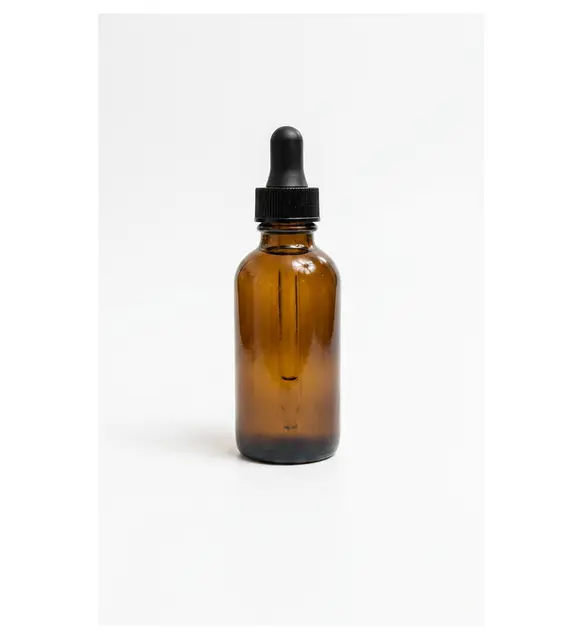
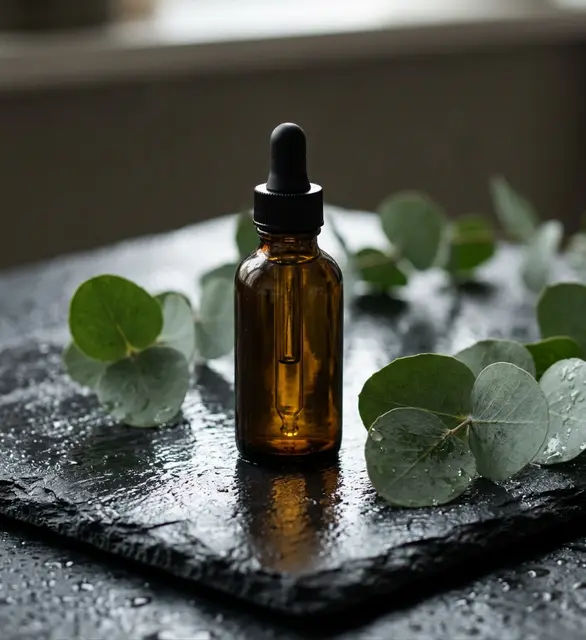
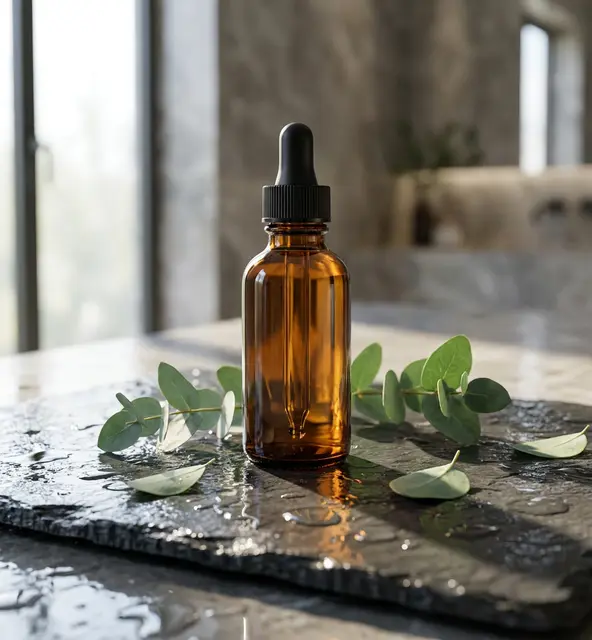
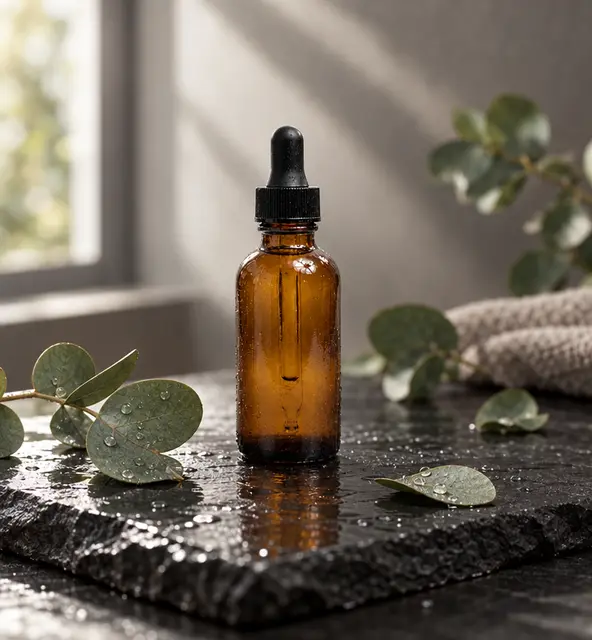
Product shot: bottle on wet slate
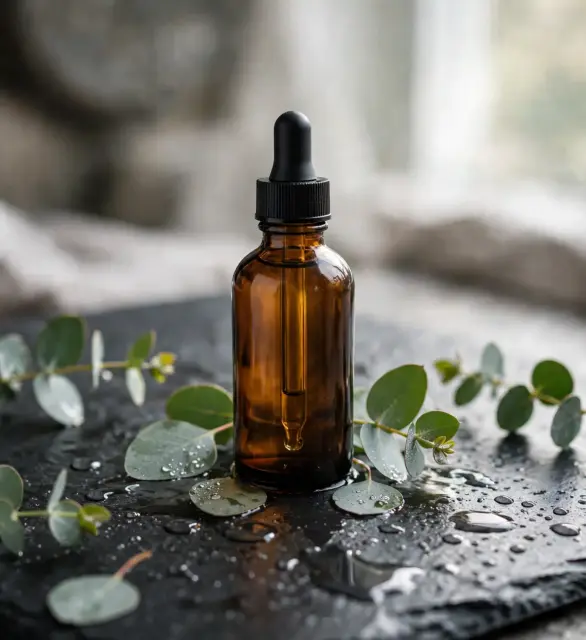
Prompt: Place this bottle on a wet dark slate surface with a few eucalyptus leaves, soft natural window light, premium skincare advert. Keep the bottle exactly as it is.
Settings: Edit endpoint, one uploaded photo, one output. Nano Banana 2.1 and Nano Banana Pro at 1K, GPT Image 2.5 at high quality, Muse Image at its single size. Run on October 9, 2026; results unretouched, resized to 640 px wide for this page.
What the results show
- All four models kept the amber bottle and dropper recognisable and followed the slate, leaves and window-light brief.
- The differences are in staging: GPT Image 2.5 made the most of the window light, Nano Banana Pro built the most complete room, and Muse Image spread the most droplets for the lowest price.
New background: Paris street café
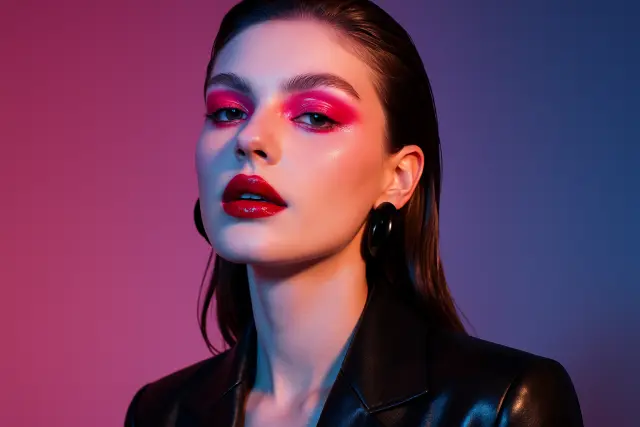
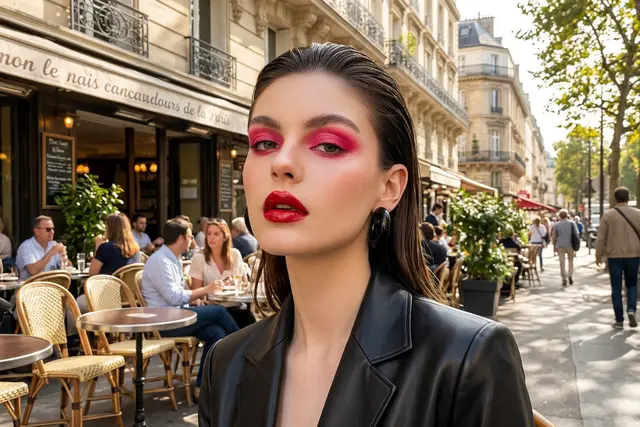
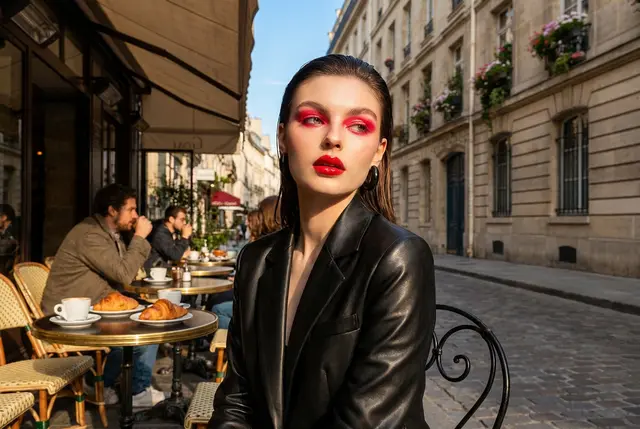
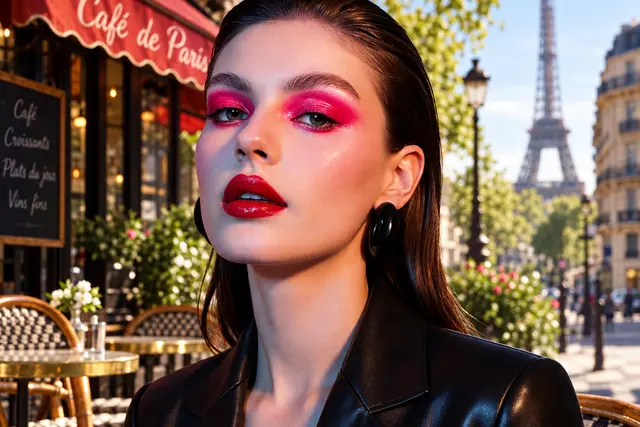
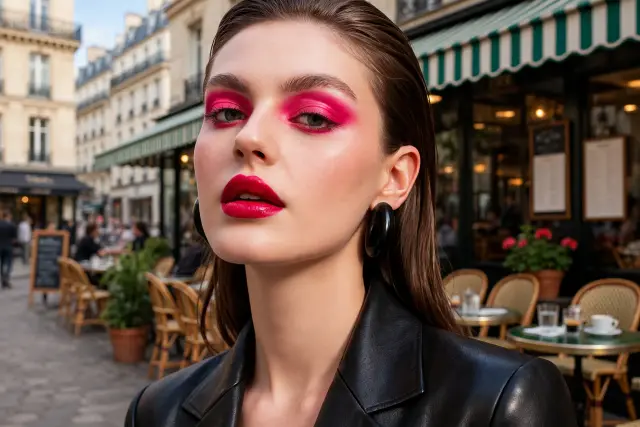
Prompt: Replace the background with a sunny Paris street café. Keep her face, makeup, hair and jacket exactly the same.
Settings: Edit endpoint, one uploaded photo, one output. Nano Banana 2.1 and Nano Banana Pro at 1K, GPT Image 2.5 at high quality, Muse Image at its single size. Run on October 9, 2026; results unretouched, resized to 640 px wide for this page.
What the results show
- GPT Image 2.5 and Muse Image kept the original crop and pose and only swapped the background.
- Both Nano Banana models reframed the shot, showing more of the scene and changing her position. That reads as a new photo rather than a background swap, which matters if the framing has to stay.
Relight: soft window daylight
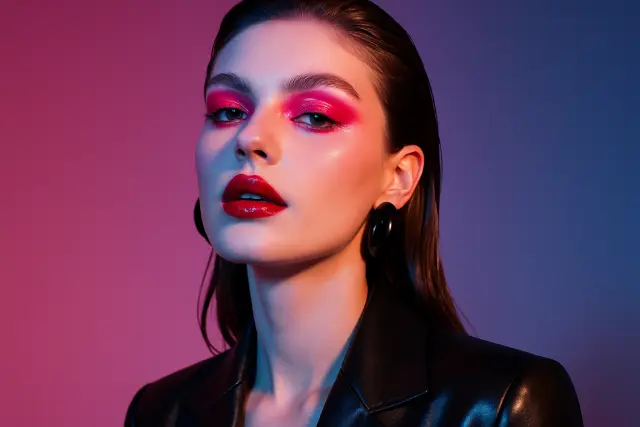
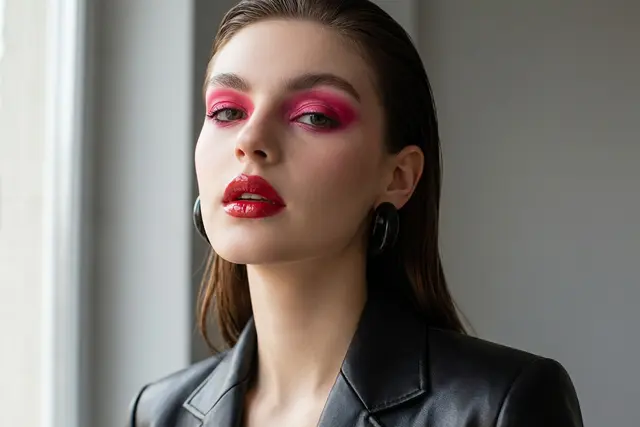
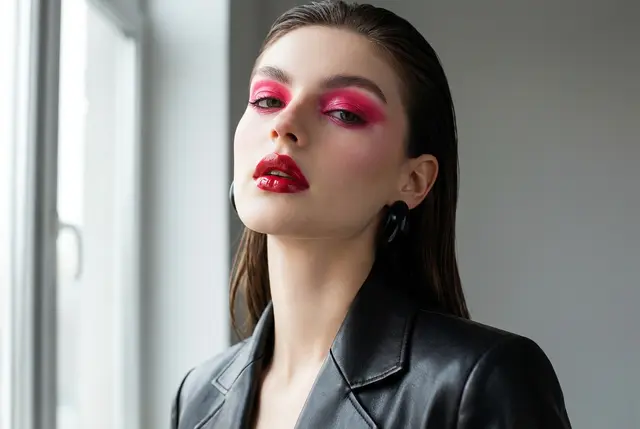
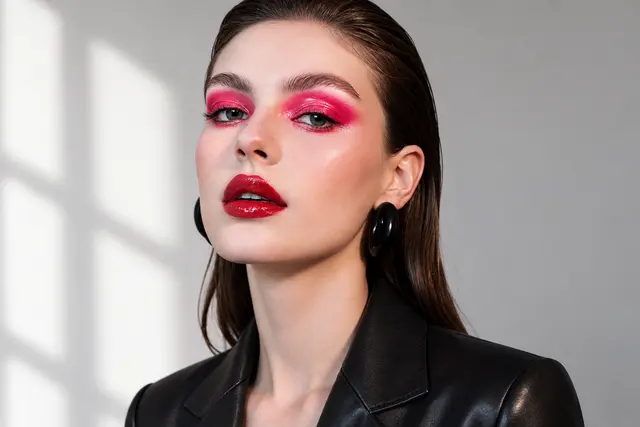
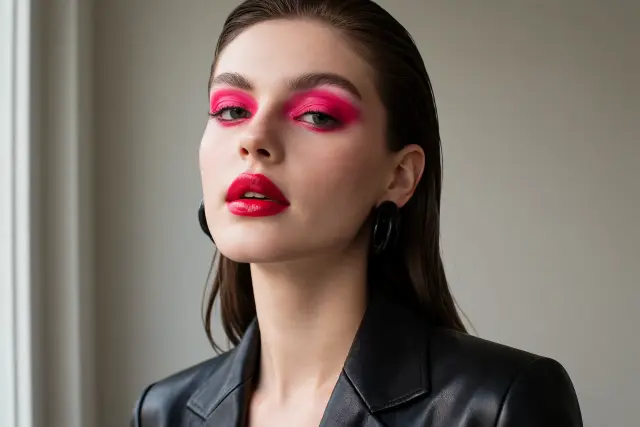
Prompt: Relight this portrait with soft natural daylight from a window on the left, neutral background. Keep her identity, makeup and pose unchanged.
Settings: Edit endpoint, one uploaded photo, one output. Nano Banana 2.1 and Nano Banana Pro at 1K, GPT Image 2.5 at high quality, Muse Image at its single size. Run on October 9, 2026; results unretouched, resized to 640 px wide for this page.
What the results show
- Every model removed the coloured gels and produced neutral daylight while keeping the makeup.
- GPT Image 2.5 and Muse Image held the original pose most closely; the Nano Banana models changed the head angle a little.
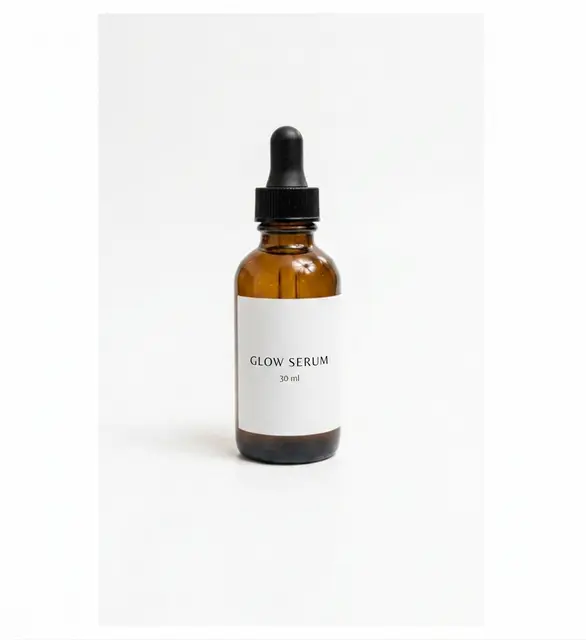
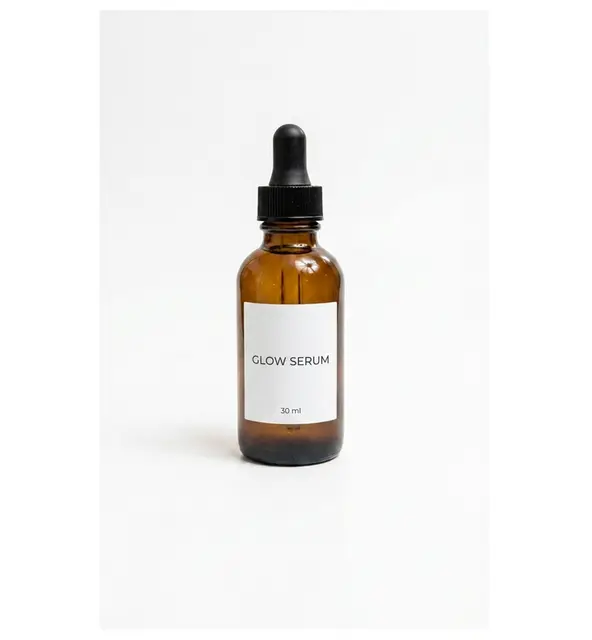
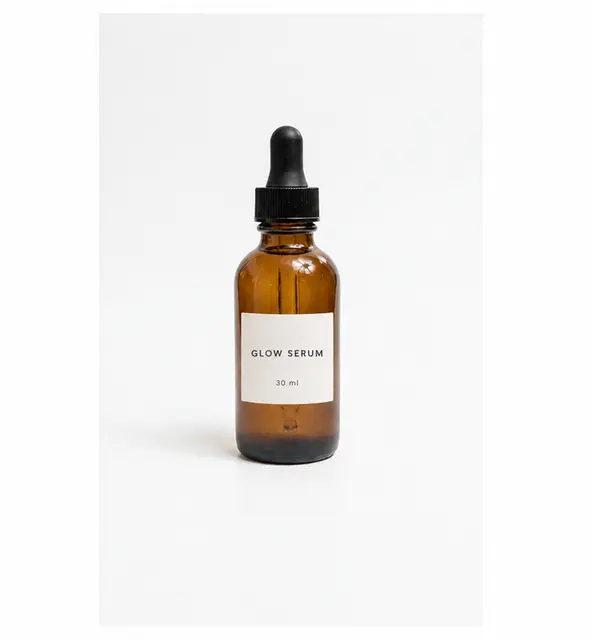
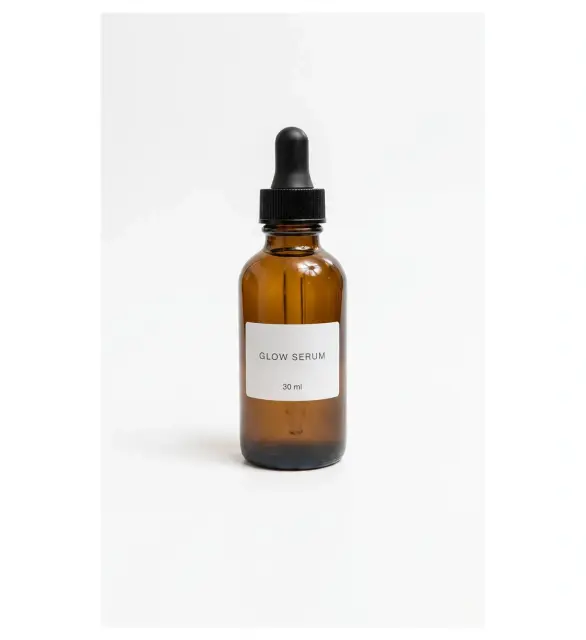
Add text: a label that reads GLOW SERUM
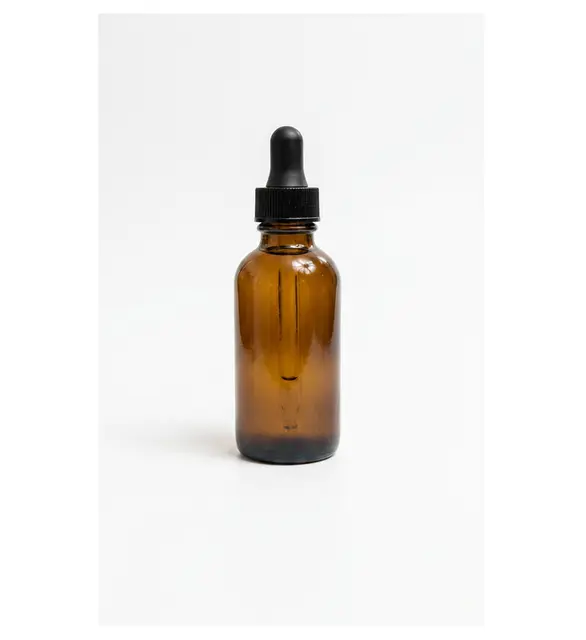
Prompt: Add a minimal white label to the bottle that reads "GLOW SERUM" and below it "30 ml", in a clean sans-serif font. Keep everything else unchanged.
Settings: Edit endpoint, one uploaded photo, one output. Nano Banana 2.1 and Nano Banana Pro at 1K, GPT Image 2.5 at high quality, Muse Image at its single size. Run on October 9, 2026; results unretouched, resized to 640 px wide for this page.
What the results show
- All four models placed a white label with both requested lines and left the rest of the photo alone.
- The main difference is label size. At this resolution none of them misspelled the words, so the cheapest model was enough for this simple label.
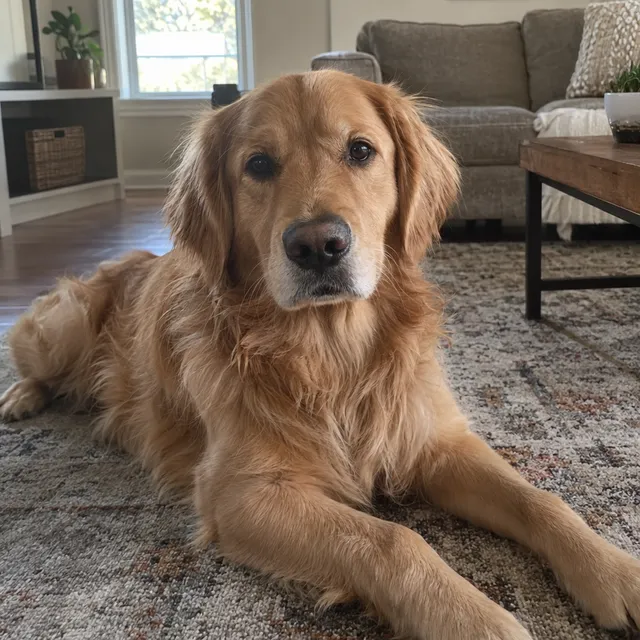
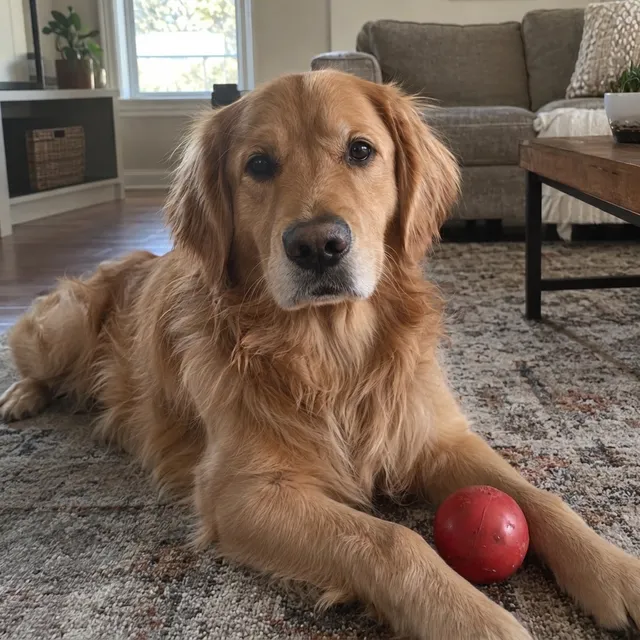
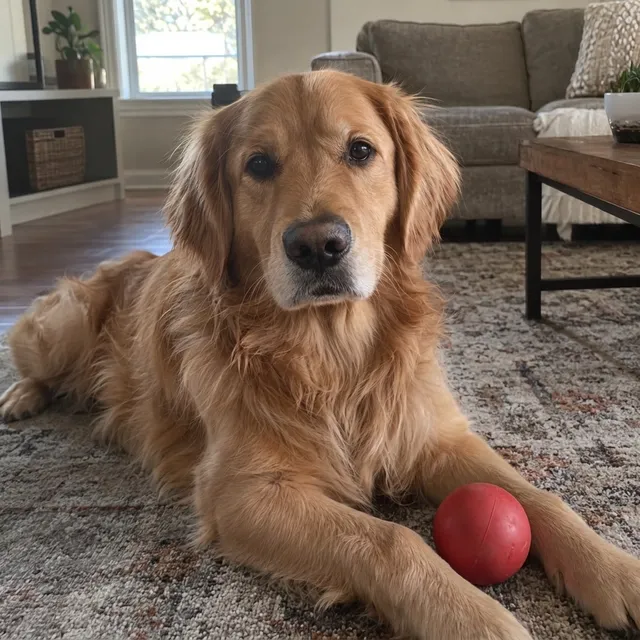
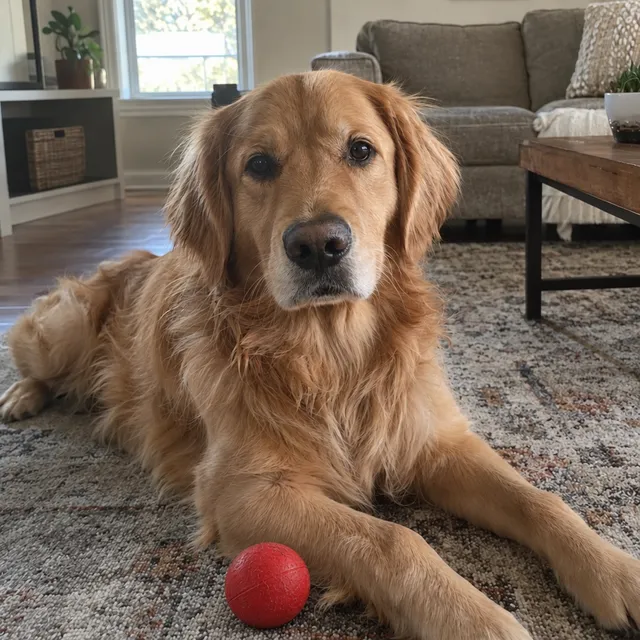
Add an object: a red ball in front of the dog
Prompt: Add a red rubber ball on the rug just in front of the dog's front paws. Keep the dog, the rug and the room exactly as they are.
Settings: AI Media Studio API edit endpoint, one uploaded photo, one output. Nano Banana 2.1 and Nano Banana Pro at 1K, GPT Image 2.5 (Flare edit) at high quality, Muse Image at its single size. Run on October 12, 2026; results unretouched, resized to 640 px wide for this page. The source is synthetic: a smartphone-style photo of a golden retriever on a living room rug, generated with GPT Image 2.5 Sunburst.
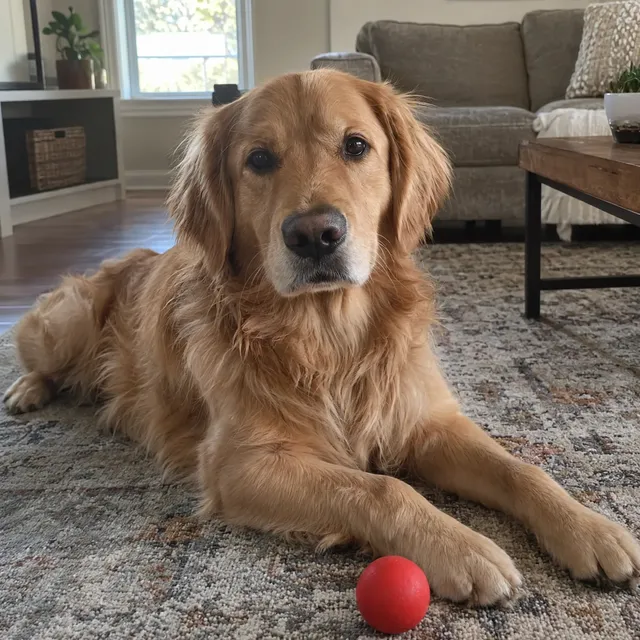
What the results show
- All four added a red ball and kept the framing and the dog.
- GPT Image 2.5 and Muse Image put the ball in front of the paws as asked; both Nano Banana models placed it beside a paw instead.
Remove people behind the subject
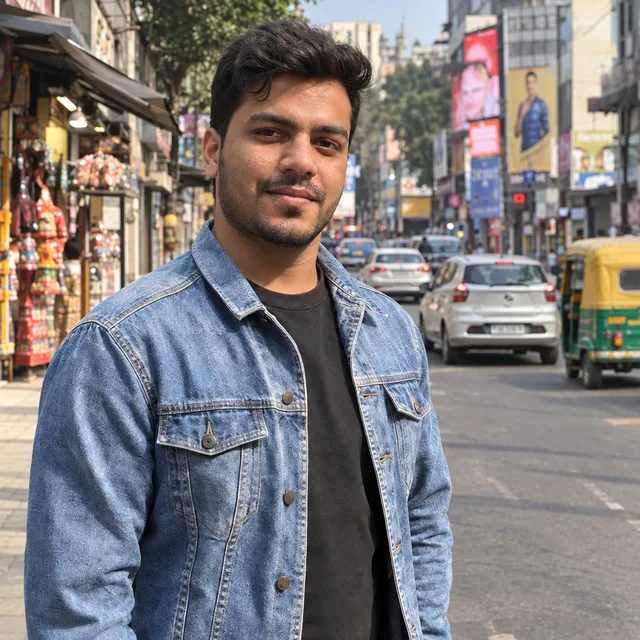
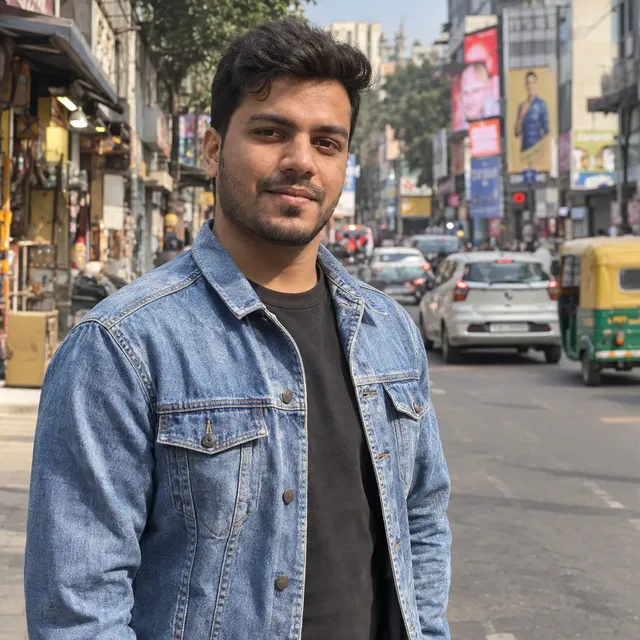
Prompt: Remove the people and the motorbike rider behind the man. Keep the man, his face, jacket and pose, and the street exactly as they are.
Settings: AI Media Studio API edit endpoint, one uploaded photo, one output. Nano Banana 2.1 and Nano Banana Pro at 1K, GPT Image 2.5 (Flare edit) at high quality, Muse Image at its single size. Run on October 12, 2026; results unretouched, resized to 640 px wide for this page. The source is synthetic: a smartphone-style half-body portrait of a fictional man on a busy street, generated with GPT Image 2.5 Sunburst.
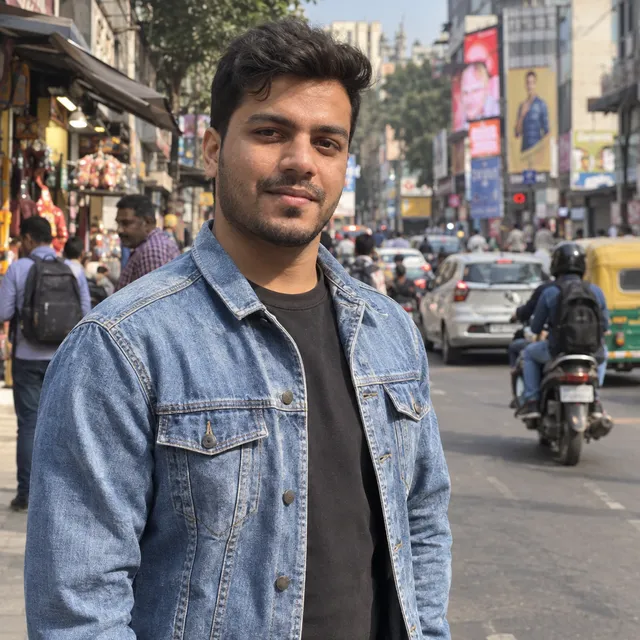
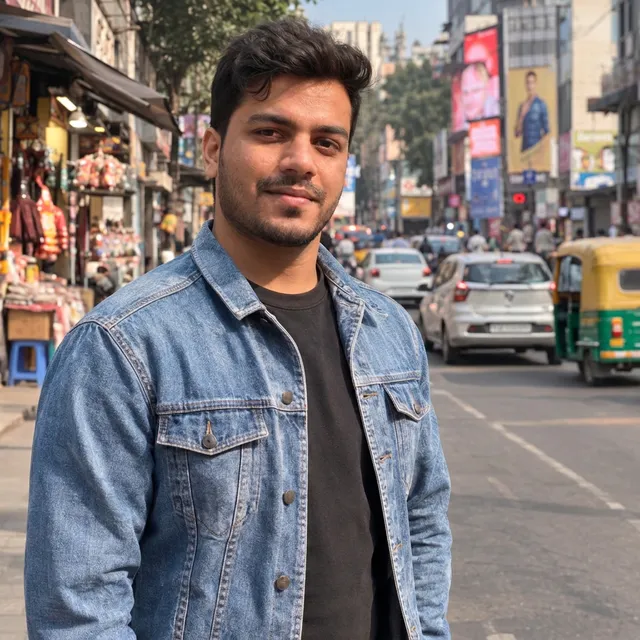
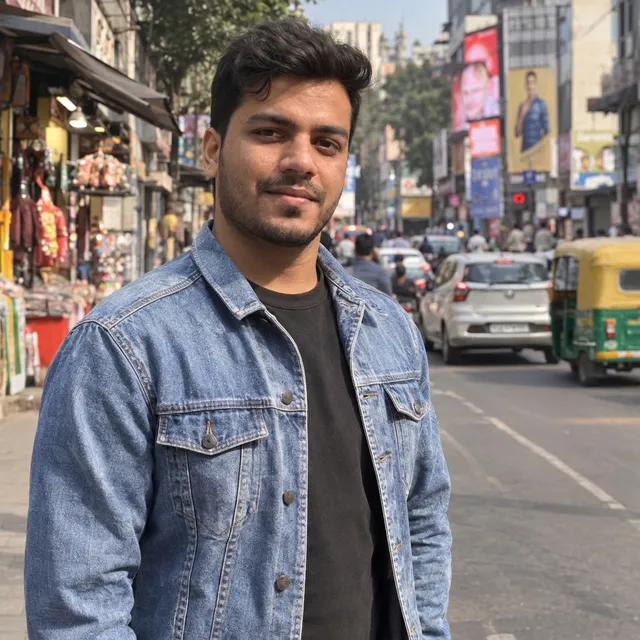
What the results show
- None of the four gave a clean result: every model either changed the street or left someone in.
- Nano Banana 2.1, GPT Image 2.5 and Muse Image removed the people and the rider but filled the gap with new objects or redrew a shop; Nano Banana Pro removed the people in front but left a pedestrian and a rider further back.
Retouch skin without changing faces
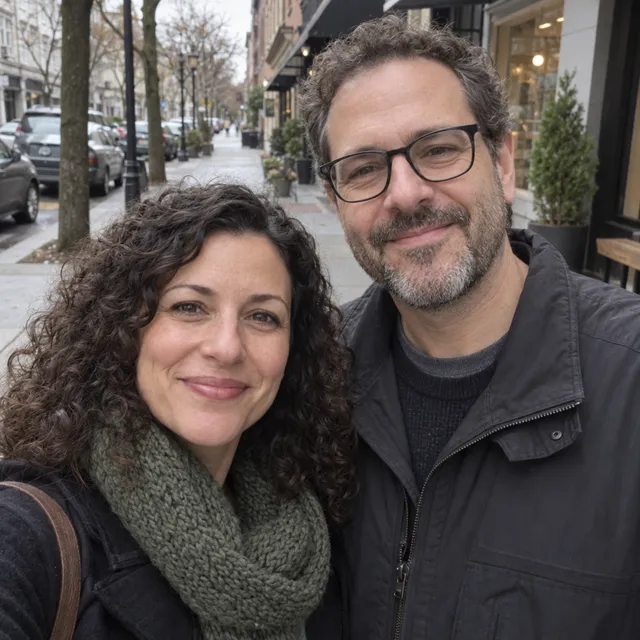
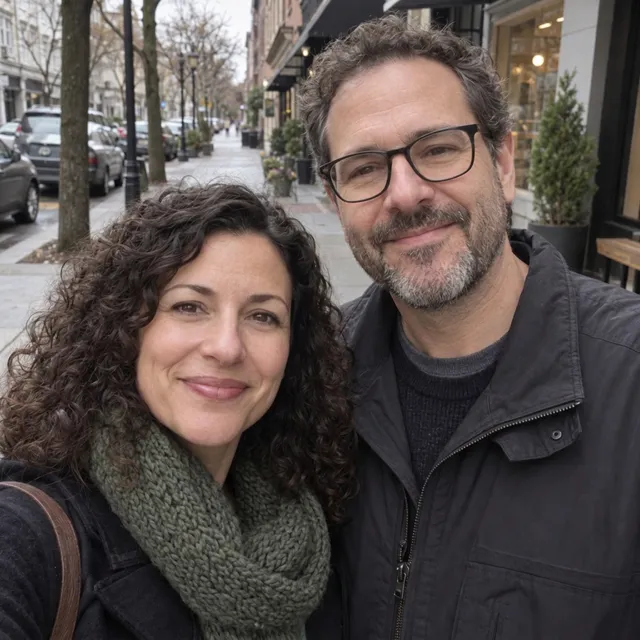
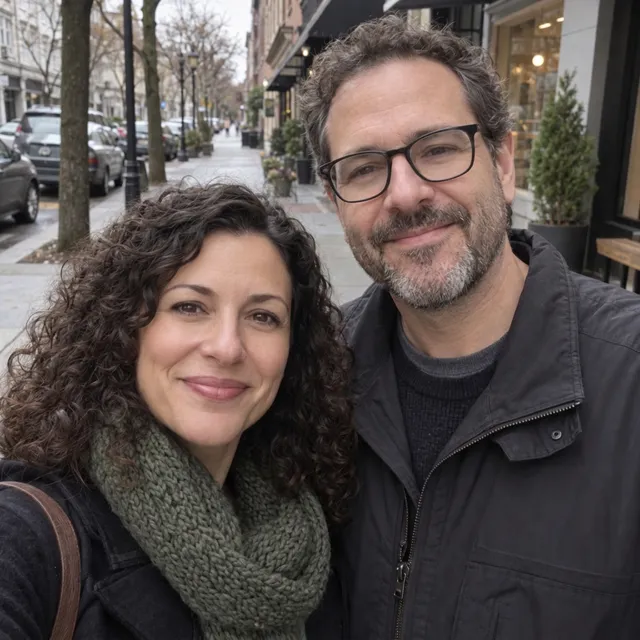
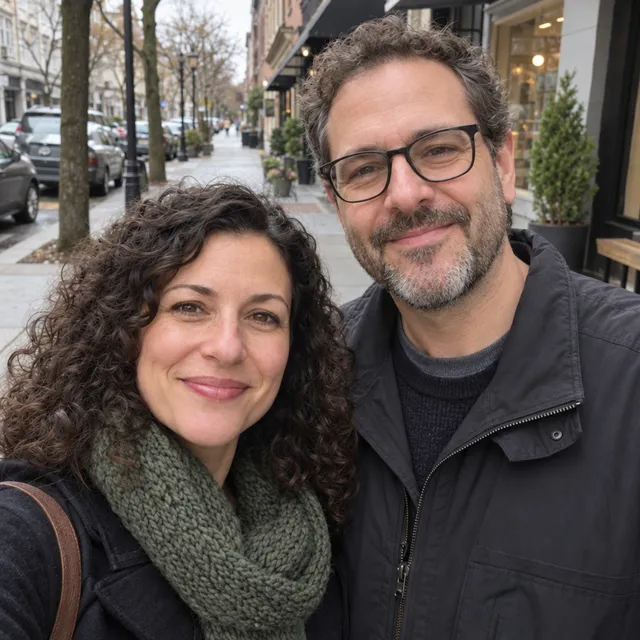
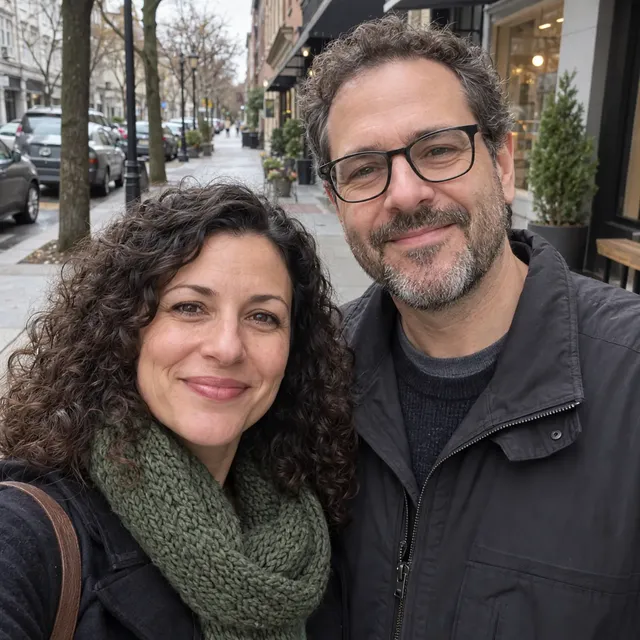
Prompt: Gently retouch both faces: soften under-eye shadows and even out skin tone. Do not change their faces, features, age, hair, glasses or expressions.
Settings: AI Media Studio API edit endpoint, one uploaded photo, one output. Nano Banana 2.1 and Nano Banana Pro at 1K, GPT Image 2.5 (Flare edit) at high quality, Muse Image at its single size. Run on October 12, 2026; results unretouched, resized to 640 px wide for this page. The source is synthetic: a smartphone-style portrait of a fictional couple on a city sidewalk, generated with GPT Image 2.5 Sunburst.
What the results show
- Nano Banana 2.1, Nano Banana Pro and GPT Image 2.5 retouched the skin and kept both faces. Nano Banana 2.1 gave the smoothest skin and lightest under-eyes; Nano Banana Pro and GPT Image 2.5 made subtler changes.
- Muse Image did the opposite of the request: it sharpened the skin and made lines more visible.
- We judged the faces at reduced size, not pixel by pixel, so check small details on your own photo.
Restore a damaged 1950s print
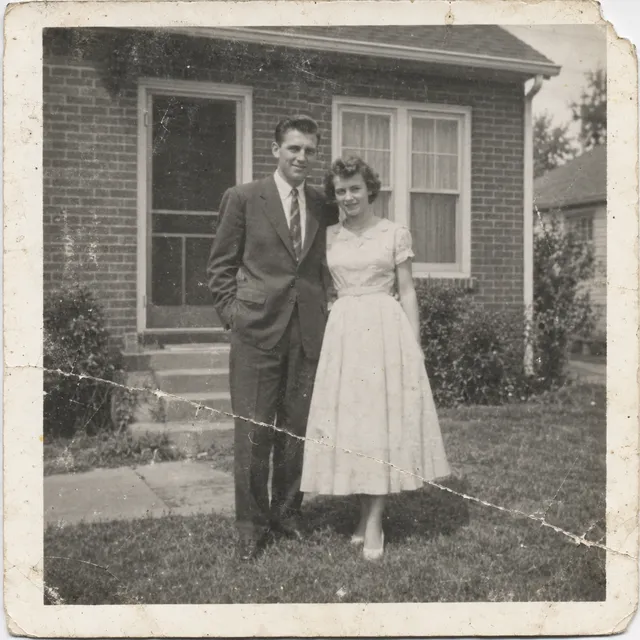
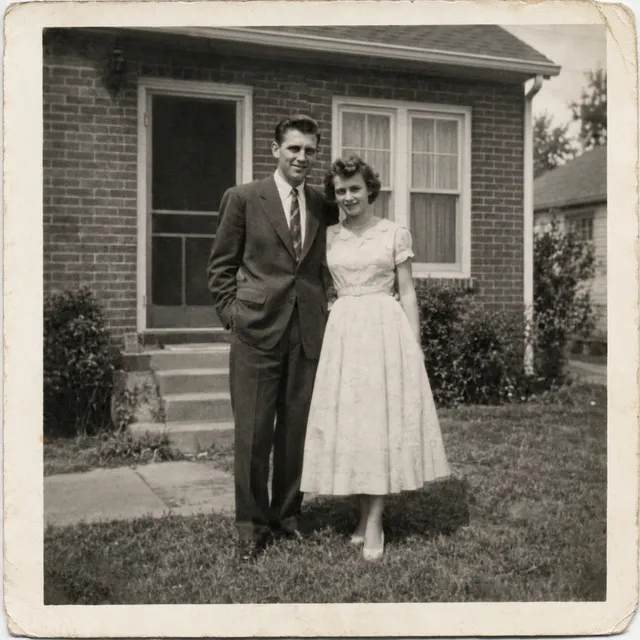
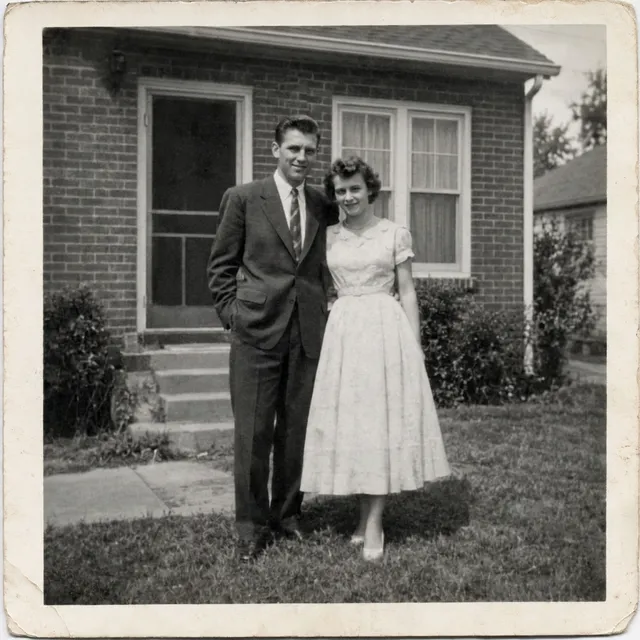
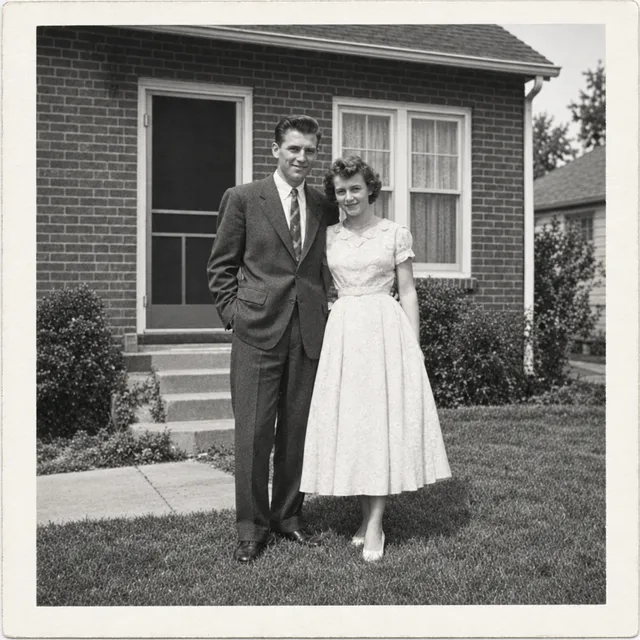
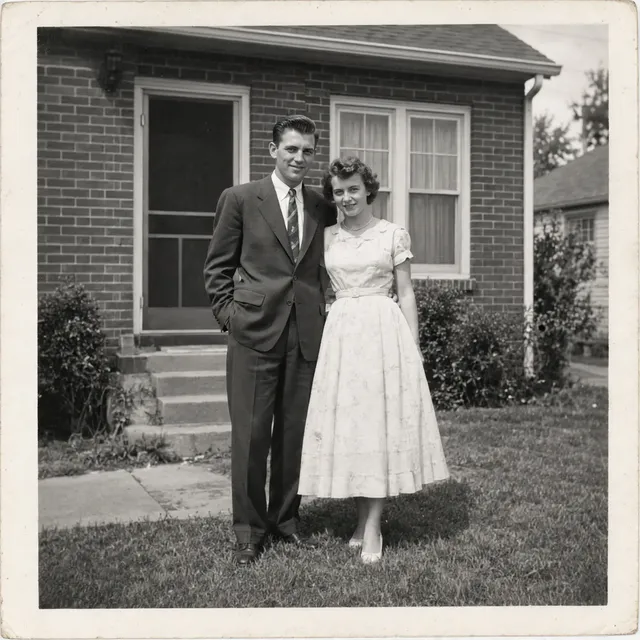
Prompt: Restore this old photograph: remove the scratches, the crease, the dust spots and repair the torn corner. Improve contrast gently. Keep it black and white and keep both people's faces, clothes and poses exactly as they are.
Settings: AI Media Studio API edit endpoint, one uploaded photo, one output. Nano Banana 2.1 and Nano Banana Pro at 1K, GPT Image 2.5 (Flare edit) at high quality, Muse Image at its single size. Run on October 12, 2026; results unretouched, resized to 640 px wide for this page. The source is synthetic: a scan of a damaged 1950s black-and-white print of a fictional couple, generated with GPT Image 2.5 Sunburst.
What the results show
- All four removed the scratches, crease, dust and torn corner.
- Nano Banana Pro gave the most faithful result in neutral black and white, and Muse Image was also faithful, if a little flat. Nano Banana 2.1 left a sepia tint, and GPT Image 2.5 pushed contrast and sharpness so the photo looks less like a period print.
Video models: four photos brought to life
Clips play muted and loop. Veo 3.1 and Sora 2 are no longer offered, so they are not shown.
Product orbit
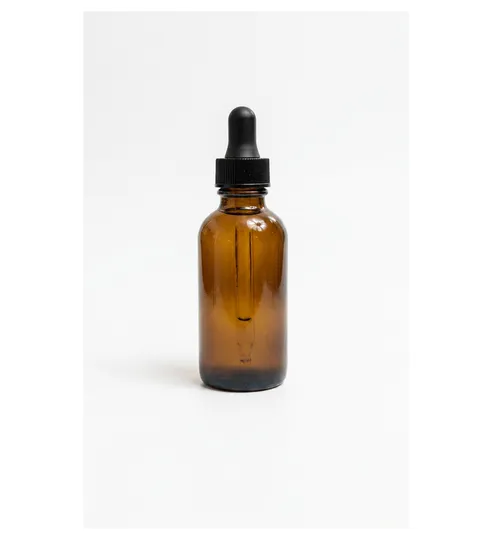
Prompt: Slow camera orbit around the bottle on the table, soft studio light glinting off the glass, premium skincare advert. Keep the bottle and its label exactly as they are.
Settings: Image-to-video from the photo shown, 5 seconds, audio off. Kling O3 Pro: no resolution option; Grok Imagine Video 1.5: 720p; Kling v3 Pro: no resolution option; Seedance 2.0: 720p. Run on October 10, 2026; clips unretouched, resized to 540 px for this page and shown without sound.
What the results show
- Kling O3 Pro and Seedance 2.0 kept the bottle unchanged, as the prompt asked.
- Grok Imagine Video 1.5 invented a label on the back of the bottle, so check product details when you use it for ads.
- None of the four produced a full orbit; Kling v3 Pro moved the camera the most.
Portrait comes alive
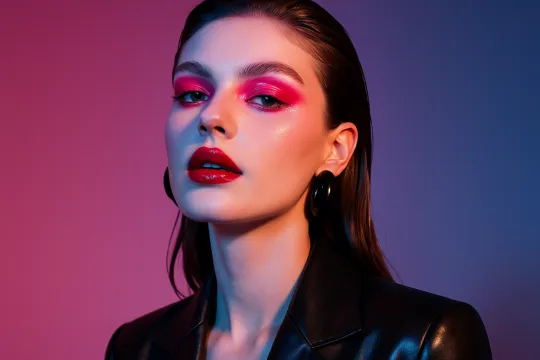
Prompt: She turns toward the camera, smiles and tucks her hair behind her ear, a gentle breeze, natural daylight. Keep her face, makeup and jacket unchanged.
Settings: Image-to-video from the photo shown, 5 seconds, audio off. Kling O3 Pro: no resolution option; Grok Imagine Video 1.5: 720p; Kling v3 Pro: no resolution option; Seedance 2.0: 720p. Run on October 10, 2026; clips unretouched, resized to 540 px for this page and shown without sound.
What the results show
- All three clips show the smile and hair gesture from the prompt and keep the makeup and jacket.
- Kling O3 Pro kept the original backdrop; Grok Imagine Video 1.5 and Kling v3 Pro replaced it with lighter tones.
- Seedance 2.0 refused this photo (likenesses of real people), and refused jobs cost no credits. Photos of people without a visible face work, as the Hands set shows.
Hands with product
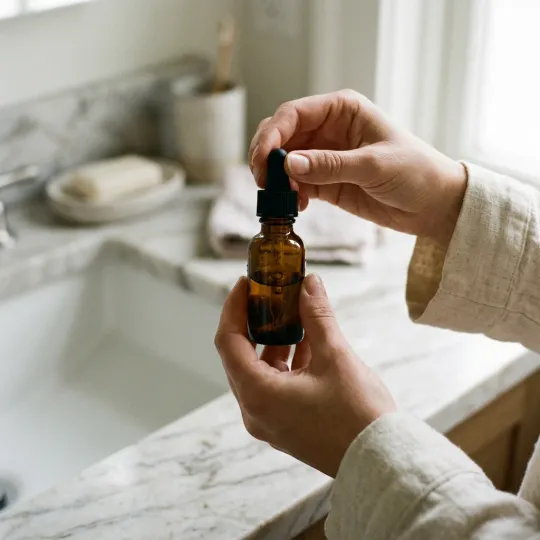
Prompt: She gently turns the bottle in her hands to show it from the side, soft natural light, premium skincare advert. Keep the bottle exactly as it is.
Settings: Image-to-video from the photo shown, 5 seconds, audio off. Kling O3 Pro: no resolution option; Grok Imagine Video 1.5: 720p; Kling v3 Pro: no resolution option; Seedance 2.0: 720p. Run on October 10, 2026; clips unretouched, resized to 540 px for this page and shown without sound. The source photo was itself generated with Nano Banana 2.1.
What the results show
- All four models kept the bottle and the bathroom setting consistent through the clip.
- Kling v3 Pro followed the turn-the-bottle instruction most visibly; Seedance 2.0 added a push-in.
Room walkthrough
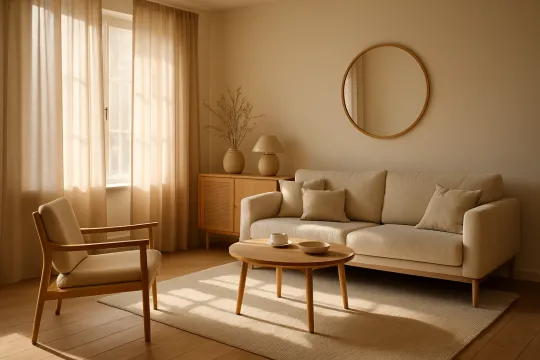
Prompt: Smooth slow dolly forward into the living room, warm afternoon sunlight moving across the sofa and floor. Keep the furniture and layout unchanged.
Settings: Image-to-video from the photo shown, 5 seconds, audio off. Kling O3 Pro: no resolution option; Grok Imagine Video 1.5: 720p; Kling v3 Pro: no resolution option; Seedance 2.0: 720p. Run on October 10, 2026; clips unretouched, resized to 540 px for this page and shown without sound.
What the results show
- Every model kept the furniture and layout stable, so all four suit simple room walkthroughs.
- Seedance 2.0 travelled furthest into the room; the other three made a gentler move.
What each edit costs in the web app
Dollar amounts are the plan's price per credit: $19 for 1,000 credits a month on Starter and $199 for 20,000 on Ultra. The web app runs GPT Image 2.5 at high quality; low and medium quality are available through the API. Higher resolutions and every video length are on the AI model price list.
| Model | Setting | Where | Credits per edit | On Starter | On Ultra |
|---|---|---|---|---|---|
| Muse Image | one size (about 2.5 MP) | Web app | 2 | $0.038 | $0.020 |
| Nano Banana 2.1 | 1K | Web app | 9 | $0.171 | $0.090 |
| Nano Banana Pro | 1K or 2K | Web app | 30 | $0.570 | $0.298 |
| GPT Image 2.5 | high quality | Web app | 11 | $0.209 | $0.109 |
| GPT Image 2.5 | low quality | API only | 2 | $0.038 | $0.020 |
| GPT Image 2.5 | medium quality | API only | 3 | $0.057 | $0.030 |
What the benchmarks say
Artificial Analysis's AA-Image-Editing v2.0 leaderboard ranks editing models by Elo from blind votes from a recruited human panel plus public Image Arena votes cast before January 1, 2026. We read it on ; scores for the models on this page:
| Model variant on the leaderboard | Elo (95% interval) | Rank |
|---|---|---|
| GPT Image 2.5 Sunburst (max) | 1184 ±7 | 1 |
| GPT Image 2.5 Flare (max) | 1165 ±7 | 2 |
| Nano Banana 2.1 | 1140 ±9 | 4 (range 3–4) |
| Muse Image | 1121 ±7 | 7 (range 6–8) |
| Nano Banana Pro (Gemini 3 Pro Image) | 1103 ±7 | 14 (range 13–14) |
The leaderboard judges preference on its own photos and instructions, for the exact variants named above, such as GPT Image 2.5 at max quality. It does not measure the settings the studio uses (GPT Image 2.5 at high quality, Nano Banana at 1K), and it does not check whether an edit kept the original framing, which is where the models differed most in our runs. Source: Artificial Analysis, AA-Image-Editing v2.0.
Run these models on your own photo
Open the editor with a model already picked, upload a photo and write what to change and what to keep. The credit cost is shown before you generate. Every edit needs a paid plan. Plans start at $19/month.
- Edit a photo with Nano Banana 2.1
- Edit a photo with Nano Banana Pro
- Edit a photo with GPT Image 2.5
- Edit a photo with Muse Image
New to prompt editing? Start with the AI image editor guide, or see the model guides for what each model is best at.
Frequently asked questions
Which AI image model is best for editing a photo?
It depends on the edit. In these tests GPT Image 2.5 and Muse Image kept the original framing and pose most closely on the background swap and the relight, while both Nano Banana models reframed the portrait. GPT Image 2.5 and Muse Image also put an added object exactly where we asked. For a gentle skin retouch, Nano Banana 2.1, Nano Banana Pro and GPT Image 2.5 kept the faces and Muse Image did not soften the skin; for restoring an old print, Nano Banana Pro was the most faithful. For a simple text label all four did the job, and Muse Image costs the least at 2 credits per edit.
Which AI model keeps a face unchanged when retouching?
In our skin retouch (soften under-eye shadows, even out skin tone, change nothing else), Nano Banana Pro and GPT Image 2.5 made subtle changes and kept both faces. Nano Banana 2.1 smoothed the skin more and also kept the faces. Muse Image sharpened the skin and made lines more visible instead of softening them, and the man may read slightly older. We judged the faces at reduced size, on one synthetic photo, so check fine details on your own photo before you rely on it.
Which AI model is best for restoring an old photo?
In our test on a synthetic damaged 1950s print, all four models removed the scratches, crease, dust and torn corner. Nano Banana Pro was the most faithful and kept a neutral black and white; Muse Image was also faithful but slightly flat. Nano Banana 2.1 left a warm sepia tint, and GPT Image 2.5 boosted contrast and sharpness so the result looks less like a period print. Nano Banana Pro costs 30 credits per edit at 1K and Muse Image 2.
Can AI remove people from the background of a photo?
All four models removed most of the people behind our subject, but none gave a clean result in one run. Nano Banana 2.1 invented a stool and crate, GPT Image 2.5 filled the gap with extra cars and shop goods, Muse Image redrew a shop, and Nano Banana Pro left a pedestrian and a rider further back. Expect to check the background and run the edit again.
Which AI video model keeps a product unchanged?
On the product orbit, Kling O3 Pro and Seedance 2.0 kept the bottle as it was. Grok Imagine Video 1.5 added a label that is not in the photo, so check product details before using a clip in an ad.
Why is there no Seedance 2.0 clip for the portrait?
Seedance 2.0 refuses photos that show a real-looking face, whatever the prompt, and a refused job costs no credits. It animated the photo of hands holding a bottle, where no face is visible.
Is Nano Banana better than GPT Image for photo editing?
Not across these eight edits. GPT Image 2.5 kept the original crop on the background swap, held the pose on the relight and put the added ball where we asked, where Nano Banana 2.1 pulled the camera back, shifted the head angle slightly and placed the ball beside a paw. On the skin retouch both kept the faces (Nano Banana 2.1 smoothed more), and on the restoration Nano Banana 2.1 left a sepia tint while GPT Image 2.5 pushed contrast. Nano Banana 2.1 costs 9 credits per edit at 1K and GPT Image 2.5 costs 11 in the web app. AA-Image-Editing v2.0 also ranks GPT Image 2.5 higher (1184 for the Sunburst max variant against 1140 for Nano Banana 2.1, read October 11, 2026).
Which model is best for adding text to an image?
For a short label, any of the four. All of them added a white label reading "GLOW SERUM" and "30 ml" with both lines spelled correctly and left the rest of the photo alone; the main difference was label size. Muse Image did it for 2 credits. We have not tested longer text or posters yet.
What is the cheapest AI model for photo edits?
Muse Image, at 2 credits per edit in the web app ($0.038 on Starter). GPT Image 2.5 at low quality also costs 2 credits, but low and medium quality are API options; the web app runs GPT Image 2.5 at high quality for 11 credits.
Is Nano Banana Pro worth the extra cost over Nano Banana 2.1?
Only for some edits. Nano Banana Pro costs 30 credits per edit at 1K or 2K against 9 for Nano Banana 2.1 at 1K. It gave the most faithful old-photo restoration, where Nano Banana 2.1 left a sepia tint, and it built the most complete room on the product shot. But it reframed the background swap, shifted the head angle on the relight and misplaced the added ball just like Nano Banana 2.1, and both kept the faces on the skin retouch.
What model does Canva Magic Edit use?
Canva says Magic Edit is powered by Google's Nano Banana model (canva.com/features/ai-photo-editing, checked October 11, 2026). Canva does not name the version on that page, so we cannot say which Nano Banana model it runs.
Can I use these models without separate subscriptions?
Yes. Every model on this page runs in AI Media Studio on one plan that uses credits, so you do not need a separate account with each model maker. Plans start at $19 a month for 1,000 credits, and the cost of each run is shown before you generate.
Can I use the edited photos commercially?
Paid AI Media Studio plans include a commercial license. You need the rights to the photos you upload.
Dollar amounts in captions use the Starter plan ($19 for 1,000 credits a month); the price list also shows Ultra.