Skip to contentAI Media Studio
Open the studio
AI Tool

AI image editor: describe the change you want

Upload your own photo, then describe what to change and what to keep. Replace a background, remove a distracting object, or try a new look without starting from scratch.

Every edit needs a paid plan. Plans start at $19/month. Commercial use is included on paid plans.

Open the AI photo editor

Real photo edits: before and after

Two actual edits from our October 12, 2026 API runs. The starting photos are AI-generated test images, not customer photos. Each result is one unretouched run, resized for display.

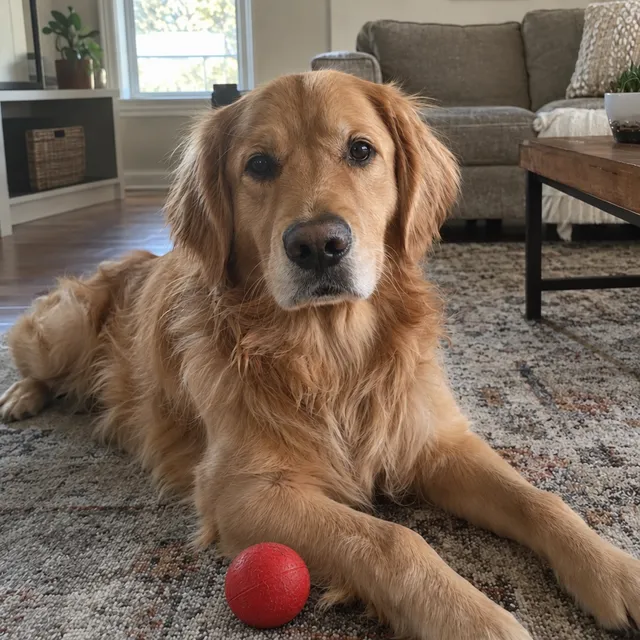
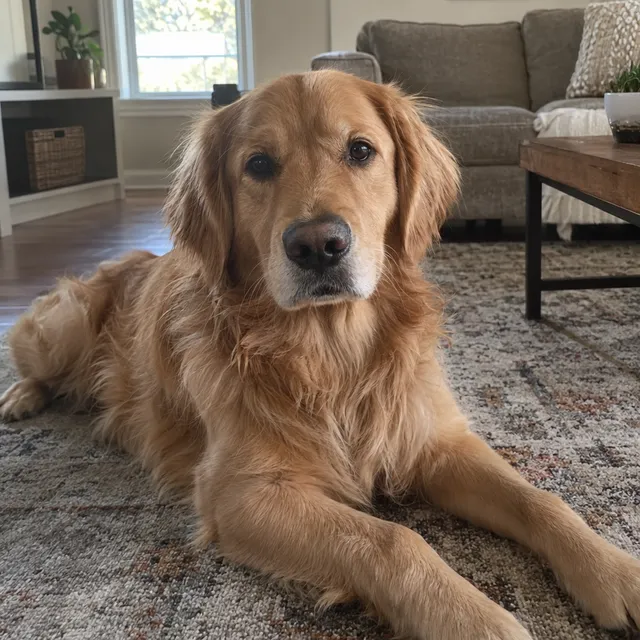
Add an object where you ask for it

GPT Image 2.5
AI-generated golden retriever lying on a living room rug, without a ball
Before: AI-generated test photo
The same dog photo edited by GPT Image 2.5, with a red ball in front of its paws
After: actual edit
Current cost per edit
11 credits ($0.209 on Starter, billed monthly)
Settings
High quality; one source image, one output.
Run date

Exact prompt used: Add a red rubber ball on the rug just in front of the dog's front paws. Keep the dog, the rug and the room exactly as they are.

What happened: The red ball appears in front of the paws. The dog and framing stay close to the source.

What to check: This is one successful placement, not a guarantee. Compare fur, paws and surrounding texture with your original.
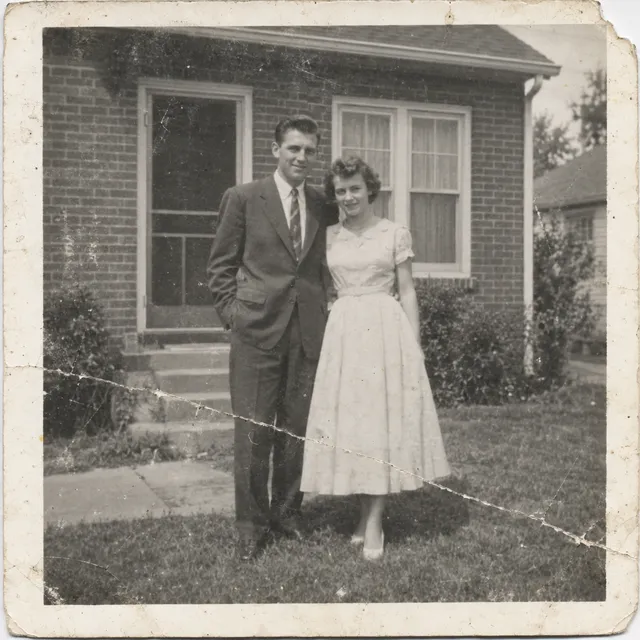
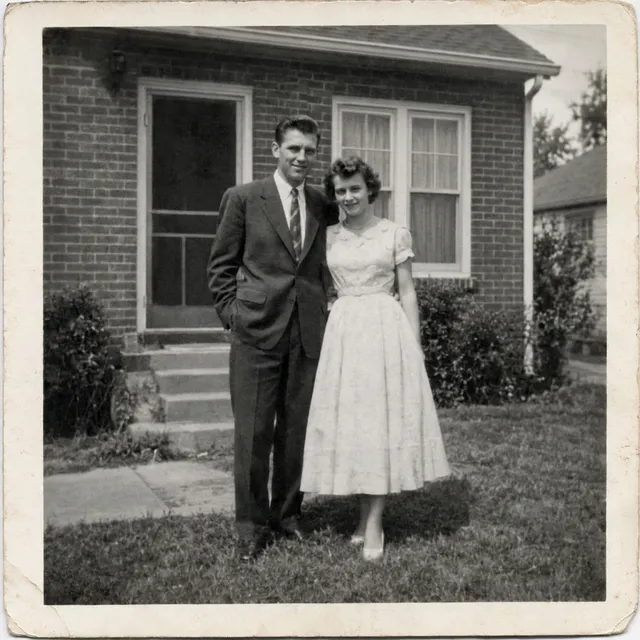
Clean up a damaged photograph

Nano Banana Pro

AI-generated black-and-white print of a fictional couple, with simulated scratches, a crease and a torn corner
Before: AI-generated test photo
The fictional couple photo edited by Nano Banana Pro, with the simulated damage removed
After: actual edit
Current cost per edit
30 credits ($0.57 on Starter, billed monthly)
Settings
1K; one source image, one output.
Run date

Exact prompt used: Restore this old photograph: remove the scratches, the crease, the dust spots and repair the torn corner. Improve contrast gently. Keep it black and white and keep both people's faces, clothes and poses exactly as they are.

What happened: Scratches, crease and torn corner are removed. The result stays in neutral black and white.

What to check: The damage is simulated. AI estimates missing detail; this does not prove recovery of a real face or a historical scene.

The prompts below are the original English instructions used for these runs. The dollar amounts use the Starter monthly price per credit. The editor shows your cost before generating; each refinement is another edit.

Upload your own photo to edit

Powerful AI Editing Features

Edit an uploaded photo
Describe changes in your own words
Replace a background
Restyle a portrait
Review before downloading
Continue with another edit

AI Editing Tools

Professional-grade editing tools powered by artificial intelligence. No design skills required.

Background changes
Describe a new setting while asking to keep the subject unchanged.
Remove distractions
Ask to remove a specific unwanted object, then check the surrounding area.
Restyling
Try a different visual style while retaining the main subject.

Perfect for Every Industry

🛒

E-commerce

Create professional product photos with clean backgrounds

📱

Social Media

Enhance photos for Instagram, TikTok, and other platforms

📸

Portrait Photography

Retouch portraits with AI-powered tools

📈

Marketing

Create stunning visuals for ads and campaigns

How to get a useful result

  1. 1.

    Start with your original photo

    Use a clear image with the subject fully visible. Avoid screenshots when you have the original file.

  2. 2.

    Ask for one specific change

    Name the object, background, lighting, or style to change. Say which details should stay the same.

  3. 3.

    Review and refine

    Check faces, text, edges, and small details. Adjust the instruction if needed, then download the version you prefer.

Example to try

Replace the busy background with a plain warm-grey wall. Keep the person’s face, clothes, pose, and framing unchanged.

Frequently Asked Questions

Can I edit a photo by typing instructions?

Yes. Upload a photo and describe the change in plain language. Start with one edit at a time so you can check its effect.

Will AI keep every detail of the original?

Not always. Generative edits can change details you did not request. Keep the original and inspect faces, lettering, and product details before using the result.

Every edit needs a paid plan. Plans start at $19/month. Commercial use is included on paid plans.

Choosing an editing model? Compare Nano Banana vs GPT Image for photo editing with the same-photo results and costs from our studio.

Start Editing Images with AI Today

Edit images faster with AI-powered tools. Plans from $19/month.

Upload a photo to edit

Open the AI photo editor