Comparison · Image
Nano Banana vs GPT Image: which image model to use for which edit
Nano Banana is Google's family of Gemini image models, the ones used in the Gemini app. GPT Image is OpenAI's image model family for developers, released alongside each ChatGPT Images update. Both edit a photo from a written instruction and create images from a prompt. They differ in what their makers optimize for, and in AI Media Studio they sit in the same model menu.
Plans from $19/month. A paid plan is required to generate images and videos. Paid plans include a commercial license, and the credit cost is shown before you generate.
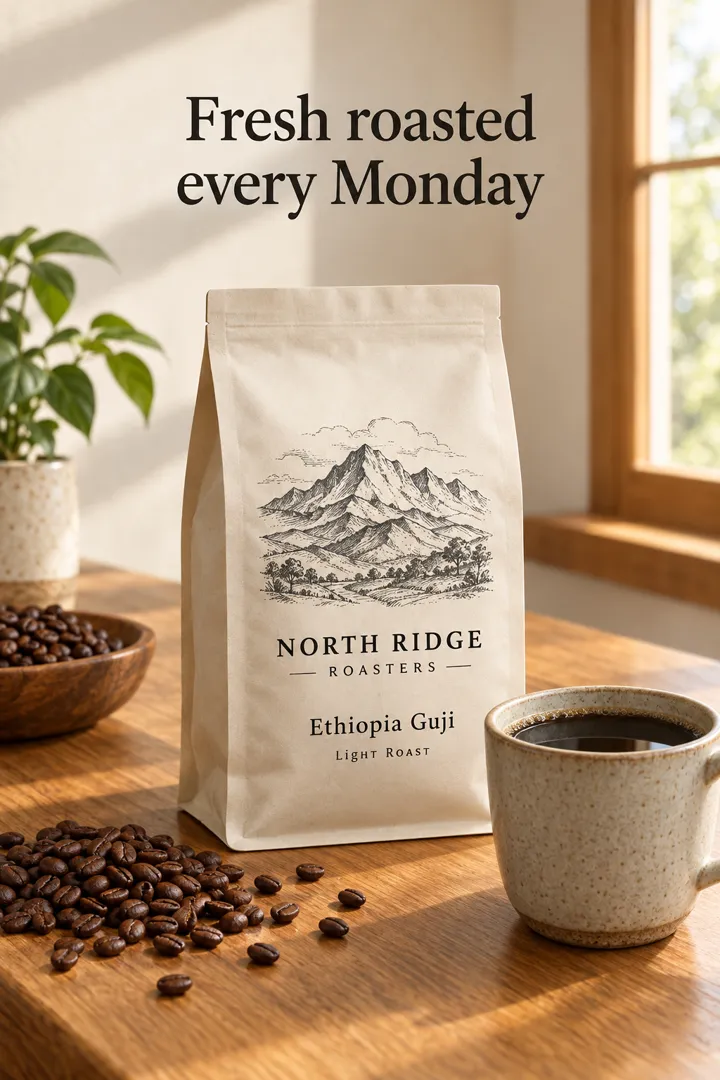
AI-generated example made with GPT Image 2.5 Flare from a text prompt, through the same model endpoint the studio offers. The brand is fictional; the headline and label text were rendered by the model. For a Nano Banana Pro example, see the Nano Banana guide; the two used different prompts, so this is not a head-to-head test. Illustrative, not customer work.
PromptVertical product poster for a small-batch coffee roaster: a matte cream coffee bag with a hand-drawn mountain illustration and the clearly legible label text "NORTH RIDGE ROASTERS — Ethiopia Guji, Light Roast", standing on a warm oak counter next to a ceramic cup of black coffee and scattered roasted beans, soft morning window light, a clean headline at the top reading "Fresh roasted every Monday", editorial product photography, no other text
Quick answer
- Reach for Nano Banana (Pro or 2) for fast iterations, subject-consistent series and 4K output in the photo editor.
- Reach for GPT Image (2 or 2.5) for posters, diagrams and other text-heavy layouts, and for multi-step edits.
- On a hard edit, run the same instruction on both and keep the better result.
Side by side
Nano Banana vs GPT Image at a glance
| Criterion | Nano Banana | GPT Image |
|---|---|---|
| Made by | Google (Gemini image models) | OpenAI |
| Versions in the studio | Nano Banana Pro, Nano Banana 2 | GPT Image 2.5 Flare and Sunburst, GPT Image 2, GPT Image 1.5 |
| What the maker emphasizes | World knowledge, subject consistency, precise instruction following at Flash speed (Nano Banana 2) | Text rendering, layouts, structured visuals, reliable editing (GPT Image 2); multi-turn edits and lower latency (2.5) |
| Output size in the studio | 1K, 2K or 4K | Fixed by the model |
| Aspect ratios in the photo editor | Keep source framing (auto), 1:1, 4:5, 16:9 | Keep source framing (auto), 1:1, 2:3, 3:2 |
Pick Nano Banana when
- You iterate quickly on a look (Nano Banana 2)
- The same person or product must stay recognizable across images
- You need 4K, a 4:5 portrait or a 16:9 landscape format
Pick GPT Image when
- The image contains a lot of text: posters, menus, diagrams
- You refine one image over several instructions
- Square, 2:3 or 3:2 formats are enough
How to use it
Both models in AI Media Studio
Opens the photo editor with Nano Banana Pro selected. Switch to GPT Image in the same model menu for the second run.
Open the photo editor- 01
Upload your photo
Use the image you actually want to edit; results vary by photo.
- 02
Run the instruction on both
Pick Nano Banana, generate, then switch to GPT Image with the same instruction. The credit cost appears before each run.
- 03
Keep the better one
Compare against your original and download the version that fits.
Compare
Compare with other models
FAQ
Frequently asked questions
Is Nano Banana better than ChatGPT for editing photos?
It depends on the edit. Google emphasizes subject consistency and speed for Nano Banana 2; OpenAI emphasizes text rendering and reliable multi-step editing for GPT Image. The fastest way to know is to run your instruction on both.
Nano Banana Pro or GPT Image 2 for text in images?
OpenAI specifically highlights text rendering and layouts for GPT Image 2, so start there for posters and diagrams. Check the spelling in either model's output before you publish.
Do I need Gemini or ChatGPT subscriptions?
No. One AI Media Studio plan covers both model families. Plans start at $19/month, and a paid plan is required to generate.
Which one costs fewer credits?
It depends on the model version and settings. The studio shows the credit cost of each generation before you run it.
Can I use the results commercially?
Paid plans include a commercial license. You need the rights to any photo you upload.
Sources
- Google: Nano Banana 2 announcement
- OpenAI: Introducing ChatGPT Images 2.0
- OpenAI: Introducing ChatGPT Images 2.5
Reviewed . Model availability and versions in the studio can change; the model menu always shows what is live.
Nano Banana, Gemini and Veo are trademarks of Google LLC. Kling is a trademark of Kuaishou. Seedance and Seedream are trademarks of ByteDance. GPT Image and Sora are trademarks of OpenAI. Grok is a trademark of xAI. AI Media Studio is an independent product and is not affiliated with, sponsored by, or endorsed by these companies.
Comparison · Image
Every top AI model. One studio.
Open the photo editorPlans from $19/month. A paid plan is required to generate images and videos. Paid plans include a commercial license, and the credit cost is shown before you generate.