Change a Photo Background with AI
Change a photo background with AI.
Change the background of a photo with a short instruction. Describe the setting, light, and what should stay unchanged.
Plans start at $19/month. Three free edits after sign-up: your own uploaded photos, edited with Muse Image. Everything else needs a paid plan. Commercial use is included on paid plans.
Same photo, two models: what we got
One synthetic street portrait, edited once by each model with the prompt shown. Nano Banana 2.1 kept the face and jacket closest to the source; Muse Image relit him more warmly and his hair and skin changed slightly. The starter instruction further down asks for a studio instead of a park.
Street portrait to a quiet park
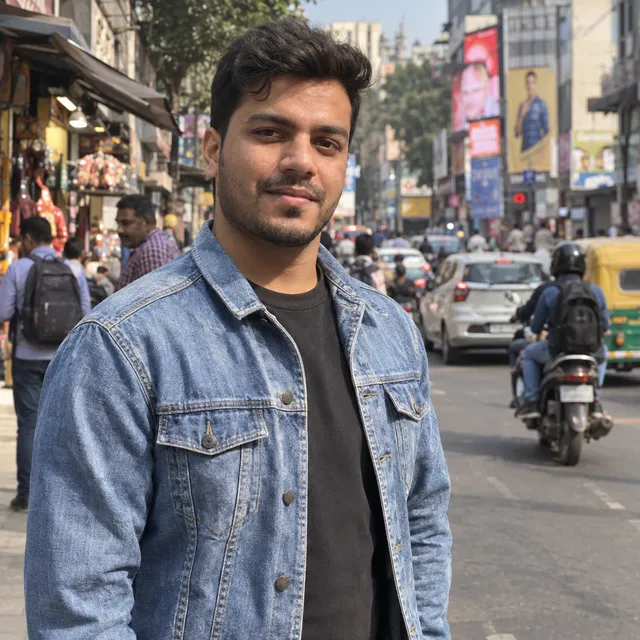
Source (synthetic photo)
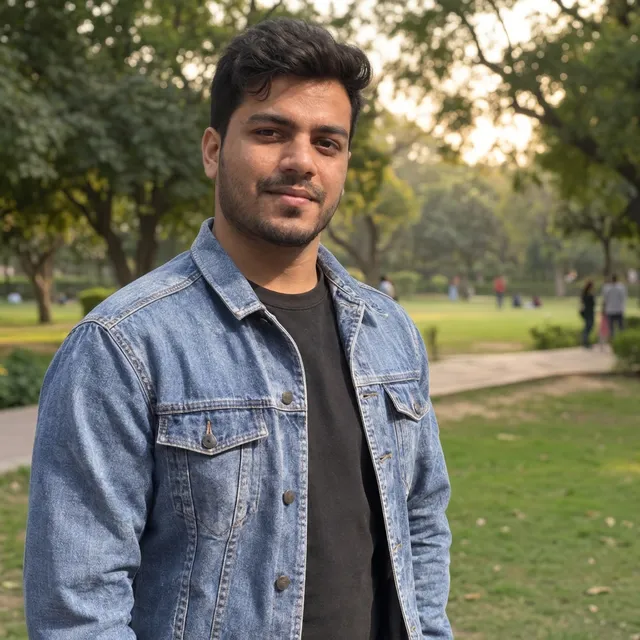
Nano Banana 2.1
9 credits ($0.171 on Starter)Generated in 17 s
Done; face and jacket match the source closely.
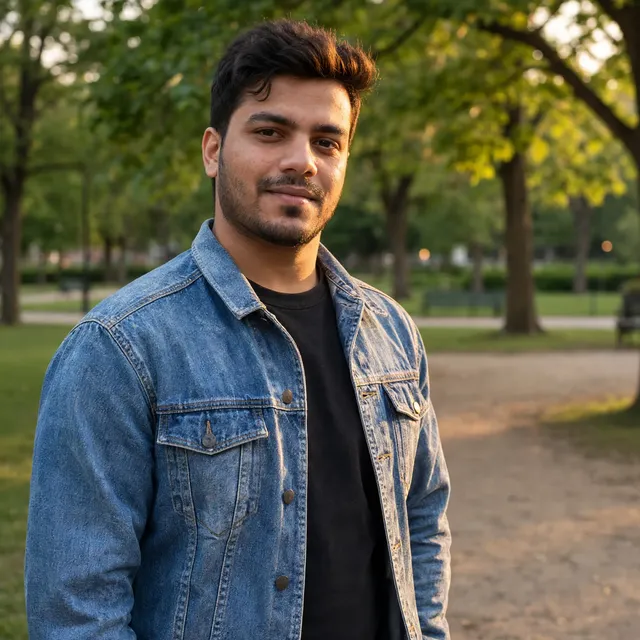
Muse Image
2 credits ($0.038 on Starter)Generated in 20 s
Done; warmer relight, hair and skin look slightly different.
Replace the busy street behind him with a quiet green park in soft late-afternoon light. Keep the man, his face, hair, jacket and pose exactly as they are, and match the light on him to the new background.
Start with these words
An instruction you can make your own
Replace the background with a warm, softly lit studio. Keep the subject, its shape, colors, and position unchanged. Match the shadows to the new setting.
“Try this edit” opens this instruction in the editor. Upload your own photo, adjust the wording, and generate when you are ready.
From your photo to a finished edit
- 01
Start with a clear subject
Upload a photo with visible edges. A sharp source makes it easier to assess whether the subject survives the edit.
- 02
Describe the new setting
Name a place, surface, and light direction. Add what to keep: the face, product shape, colors, or composition.
- 03
Compare, then refine
Check the original beside the result. Refine the lighting or scene in a second instruction, then download the version you prefer.
Which model to use, and what one edit costs
Every model runs in the same editor and draws from the same credits. Prices are per edit in the web app; the editor shows the cost before you generate.
| Model | Credits per edit | On Starter | Use it for |
|---|---|---|---|
| Muse Image | 2 | $0.038 | The cheapest edit. In our tests it gave a clean white-background cutout, but its warmer relight in the park scene changed the man’s hair and skin slightly. One output size of about 2.5 MP. |
| Nano Banana 2.11K | 9 | $0.171 | Fast everyday edits, including a full scene change with new light. In our park test the face and jacket stayed closest to the source. 14 credits at 2K and 31 at 4K. |
| GPT Image 2.5 | 11 | $0.209 | Fine detail, logos and lettering that must stay legible. |
What AI cannot do here
- Generative editing redraws the image. Faces, hands, logos and lettering can change slightly even when you ask to keep them.
- Hair, fur, glass and other fine edges are where a new background most often looks pasted on.
- A generated scene is a new picture, not a photo of a real place. Do not use it to suggest a product was shot somewhere it was not.
Before you download
- Inspect hair, glass, and other fine edges at full size.
- Check logos, labels, faces, and product geometry against the original.
- Look for shadows that match the direction of the new light.
Questions about this edit
Can I change a photo background without changing the person or product?
Ask the editor to preserve the subject, then inspect the result. Generative editing can change faces, lettering, edges, or shapes; exact preservation is not guaranteed.
How do I ask for a specific background?
Describe the place, surface, and lighting. For example: replace the background with a pale stone countertop beside a window, keeping the bottle and its label unchanged.
Is this the same as removing a background?
This workflow generates a replacement scene. It is not a precise cutout tool and does not promise a transparent PNG. Use the white-background recipe if you want a plain setting.
How many credits does one background change use?
One edit costs 2 credits on Muse Image, 9 credits on Nano Banana 2.1 at 1K, 11 credits on GPT Image 2.5. On the Starter plan that is $0.038 to $0.209 per edit. The editor shows the cost before you generate, and each refinement is a new edit.
What does it cost to try?
Plans start at $19/month. Three free edits after sign-up: your own uploaded photos, edited with Muse Image. Everything else needs a paid plan. Commercial use is included on paid plans.