For ecommerce sellers
AI Product Photography
Start with a photo of the product you actually sell. Use AI product photography to explore cleaner backgrounds and new scenes, then compare each result with the original before using it in your store.
One free edit after sign-up: one uploaded photo, edited with Muse Image. Everything else needs a paid plan.
Paid plans from $19/month. Check the credit cost before generating.
What is AI product photography?
AI product photography uses a reference photo and an instruction to create a different version of a product shot. You can ask for a cleaner background, different lighting or a new setting. Start with the actual item so you can compare the result with what you sell. A generated scene still needs a product-accuracy review.
For a prompt-first walkthrough, see the AI product photo generator. To choose between services, read the product photography tools comparison.
One reference. Two actual edits.
A product-photo example you can inspect
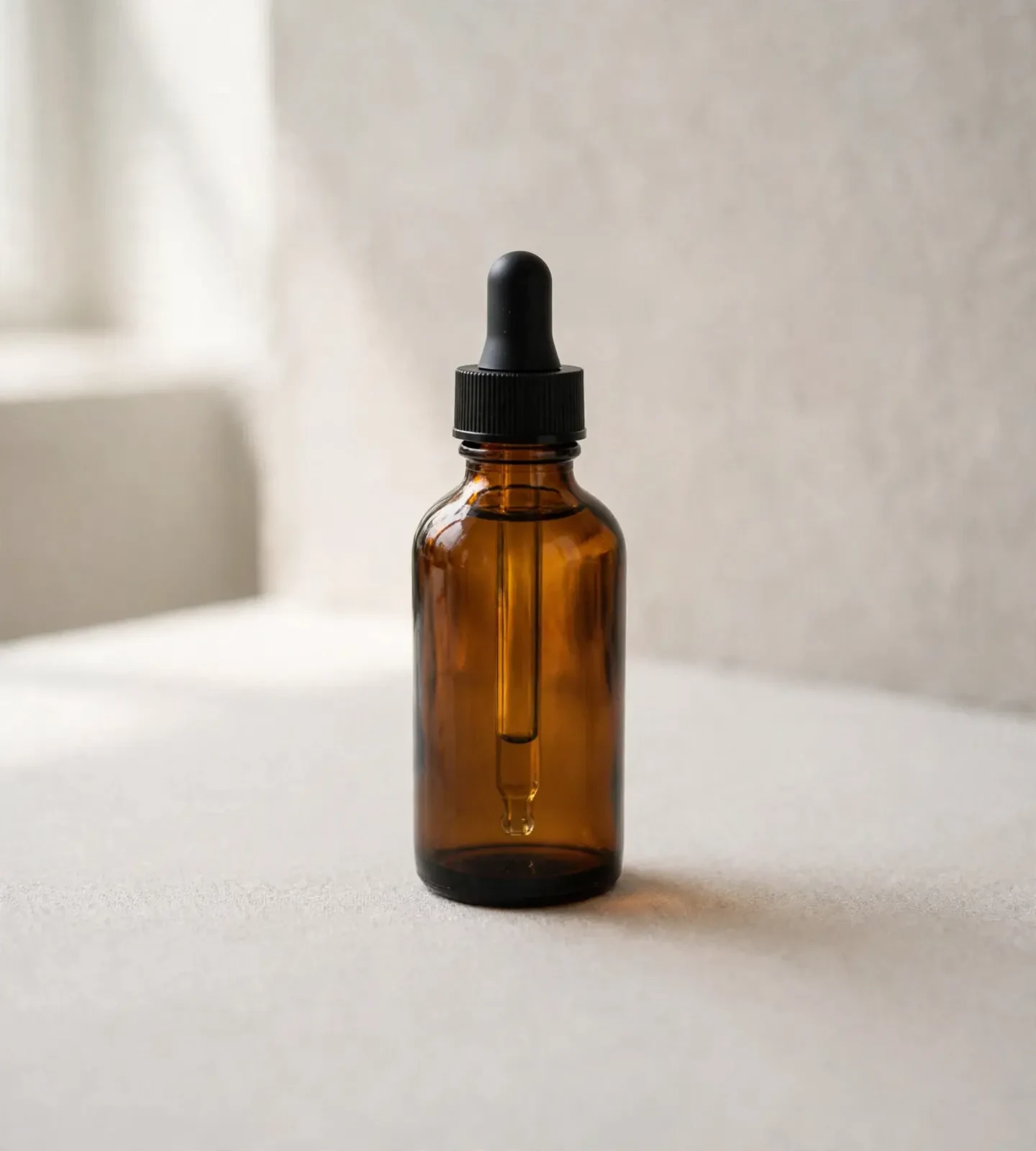
We reused a synthetic amber-bottle image from our model comparison. It is an AI-generated test image, not a customer photo or a real product listing. We uploaded that same file separately for each edit in the studio on October 12, 2026, with Muse Image, Original aspect ratio, no style and one output.
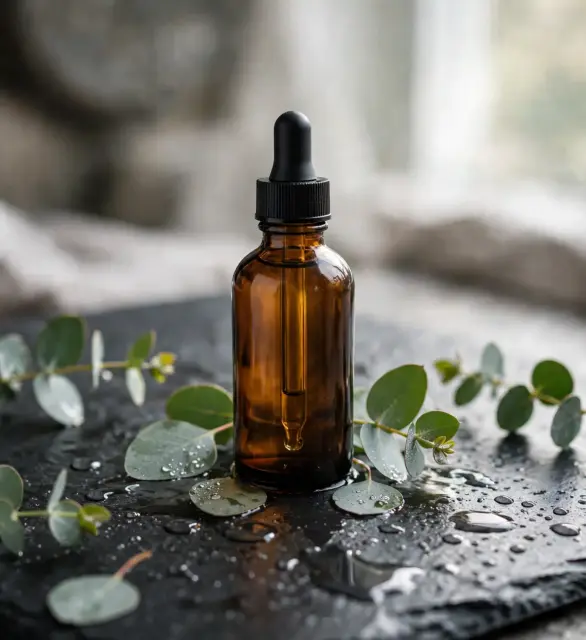
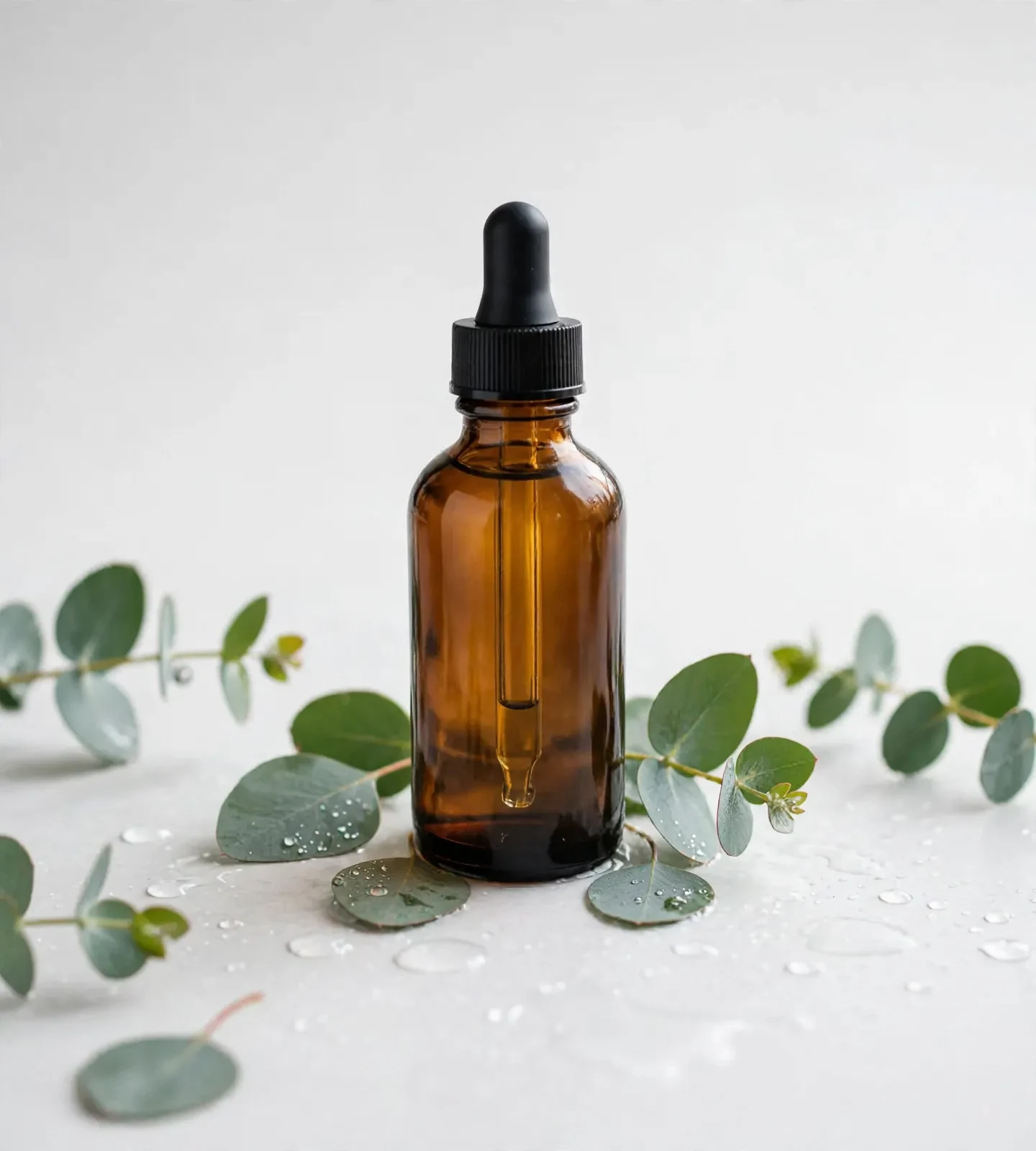
The white-background edit lightened the setting but kept the eucalyptus leaves and droplets. It is not a clean product-only listing shot. The neutral scene removed the props, but changed the bottle silhouette and reflections. Reject those changes if they misrepresent your item. This unlabelled fixture does not test label or logo fidelity.
White-background instruction
Edit this photo of the actual product. Replace the surrounding background with neutral white and keep a soft, natural contact shadow. Keep the visible product shape, color, material, label wording, logo and proportions unchanged. Do not add accessories, redesign the packaging or reconstruct parts the original photo does not show. Keep the entire product inside the frame.
Neutral-scene instruction
Use this original product photo as the reference. Place the product on a simple matte neutral surface beside a softly lit wall, with natural window light and enough space around it for a crop. Keep the product shape, label wording, logo, color, material and proportions unchanged. Do not add included items, claims or a new view of hidden product details.
Each result is one run, without manual retouching. The displayed WebP copies were compressed without resizing. The source was already resized for our model comparison. These are individual editor runs, not an export-package test. View the source, prompts and settings.
How to make AI product photos
1. Choose a clear source photo
Show the whole product in focus, with readable labels and enough room around it. Use a photo you have permission to edit. Photograph each angle you need.
2. Define the change
The product workflow asks for a production brief and background or setting, with an optional style direction. For a single edit like the examples above, open Image, attach your photo and describe one change.
3. Review settings and cost
Check the model, available aspect ratio, output count and credit quote before generating. In the product workflow, review the selected assets and total cost. Another generation uses more credits.
4. Compare and download
Compare the output with the original at full size. Reject changed product details, refine one issue at a time and check the downloaded dimensions before making a listing crop.
Check the product before the background
- Read every label, logo and number against the source. Look for invented wording or claims.
- Compare color, material and texture. A different reflection can hide a changed surface.
- Check proportions, seams, closures, edges and the number of parts.
- Remove scenes that imply accessories or included items you do not sell.
- Inspect shadows and cutout edges, then review the crop at the size buyers will see.
- Use a real photo for a missing angle. A prompt cannot reveal an unseen back or interior.
Prepare the image for your store
Our examples downloaded individually as PNG files. Check the actual dimensions of your own result, then review each crop for the placement you need. The product workflow offers asset selection and package generation; the examples above do not verify every format in that package. Do not assume a single result includes every listing or ad size.
Check the Amazon image requirements, Shopify image sizes, Etsy photo sizes and eBay photo sizes for your destination. For campaign layouts, see AI images for marketing.
Start with the details your category needs
Apparel photography
Check garment shape, fit, seams, print and fabric texture against the actual item.
Skincare photography
Read packaging, ingredient and volume text. Check the cap, bottle shape and label alignment.
Furniture photography
Check scale, legs, upholstery, construction and what is included in the purchase.
Browse all product photography tools and guides
Review costs before generating
One free edit after sign-up: one uploaded photo, edited with Muse Image. Everything else needs a paid plan.
Paid plans start at $19/month. Each example above was quoted at 2 credits for one Muse Image edit. Your total depends on the model, settings, assets and number of attempts. Check current plans and the displayed quote before generating. Review the terms and your source rights before commercial use.
AI product photography questions
Can I try AI product photography for free?
One free edit after sign-up: one uploaded photo, edited with Muse Image. Everything else needs a paid plan. Paid plans start at $19/month. Check the displayed credit cost before each generation.
Will AI keep my product exactly the same?
A reference photo and a precise instruction can guide the result, but they cannot guarantee exact product fidelity. Compare labels, logos, color, material, proportions and included items with the original. Reject an image if the product has changed.
Can I use the images on Amazon, Shopify and Etsy?
Review each image against the current rules for its marketplace, category and placement. A white background or square crop alone does not establish compliance. Check product accuracy, dimensions, image content and the final crop before publishing.
What size and format can I download?
Sizes and formats depend on the selected model and settings. Our two Muse Image edits downloaded as PNG files at 1440 × 1600 pixels. The WebP images on this page are display copies. Check your own downloaded file and prepare each crop for its placement.
Can I use AI product photos commercially?
Paid plans include a commercial license. You must have rights to the source images, products and branding and review outputs for accuracy and third-party rights. The public terms retain user ownership but do not specify a separate commercial license for the single introductory photo edit; ask support before relying on it for a commercial project.
Can AI create accurate new angles of my product?
One photo does not show hidden product details. AI can invent a plausible back, underside or interior that differs from the item you sell. Photograph the missing angle and use that photo as the reference when accuracy matters.