Photo to video AI
Photo to Video AI: turn a still photo into a video clip with Kling, Seedance or Grok Imagine
Upload a photo, describe the motion and get a clip of up to 15 seconds from Kling O3 Pro, Kling v3 Pro, Seedance 2.0 or Grok Imagine Video 1.5 in AI Media Studio. The cost shows before you generate: 85 credits for a 5-second clip on Kling O3 Pro, the default. Plans start at $19/month. A paid plan is required to generate videos.
Kling O3 Pro · 85 credits
Grok Imagine Video 1.5 · 105 credits
Kling v3 Pro · 85 credits
Seedance 2.0 · 220 credits
Same product photo, same prompt, four current models, 5 seconds each, audio off (Grok Imagine and Seedance at 720p), generated in AI Media Studio on October 10, 2026. Kling O3 Pro and Seedance 2.0 kept the bottle unchanged; Grok Imagine Video 1.5 showed a label that is not in the photo. Prompt: “Slow camera orbit around the bottle on the table, soft studio light glinting off the glass, premium skincare advert. Keep the bottle and its label exactly as they are.”
How do I turn a photo into a video with AI?
Upload the photo to an image-to-video model, describe only the motion, pick a length and generate. Clips run up to 15 seconds: 3 to 15 on Kling, 4 to 15 on Seedance, 1 to 15 on Grok Imagine. A 5-second clip on Kling O3 Pro costs 85 credits with audio off. Fix a soft or dark photo first.
This is image-to-video, not a slideshow editor: one photo becomes one clip. Length, resolution and audio depend on the model you pick.
- 1Upload the photo — A portrait, product shot, room, pet or landscape, or an image you already edited in the studio. Fix it first if it is soft, dark or cluttered.
- 2Pick a video model — Kling O3 Pro is the default and suits most photos. Use the table below to choose by photo type.
- 3Describe the motion — One camera move, one subject action, one atmosphere detail and a line saying what must stay unchanged.
- 4Set the length, check the cost, generate — Pick 1 to 15 seconds depending on the model. The credit cost shows before you run; preview the clip, then download it or try another model on the same photo.

For more motion ideas, see the image-to-video tool page or the broader AI video generator overview.
Which model should I use to animate my photo?
Start with Kling O3 Pro, the default: it suits most photos, including faces, and 5 seconds cost 85 credits. Switch by photo type: Seedance 2.0 for rooms and products that must not change (but no faces), Kling v3 Pro for bolder motion, and Grok Imagine for cheap drafts at 60 credits for 5 seconds at 480p.
| Photo type | First-choice model | Why | Allowed length | 5-second cost |
|---|---|---|---|---|
| Portrait with a visible face | Kling O3 Pro | Kept the backdrop, makeup and jacket in our portrait test. Seedance 2.0 declines real-looking faces. | 3–15 s | 85 credits (about $1.61 of the $19 Starter plan) |
| Product shot | Kling O3 Pro | Kept the bottle and label unchanged in our product test. Seedance 2.0 did too; Grok Imagine invented a label. | 3–15 s | 85 credits (about $1.61 of the $19 Starter plan) |
| Hands holding a product (no face) | Kling v3 Pro | Followed the “turn the bottle” instruction most visibly in our hands test. | 3–15 s | 85 credits (about $1.61 of the $19 Starter plan) |
| Room or interior | Seedance 2.0 (720p) | Moved furthest into the room in our walkthrough test; all four models kept the furniture in place. | 4–15 s | 220 credits (about $4.18 of the $19 Starter plan) |
| Old photo of a person | Kling O3 Pro, after restoring | Tested: on a restored 1950s photo, a subtle prompt gave a slow push-in with stable clothes and mild face drift; a bold prompt changed the dress. Restore first and keep motion small. Seedance 2.0 declines real-looking faces. | 3–15 s | 85 credits (about $1.61 of the $19 Starter plan) |
| Pet | Kling v3 Pro | Tested: in our dog clip the head tilted and blinked while the face and fur stayed stable. Name the fur in the keep line. | 3–15 s | 85 credits (about $1.61 of the $19 Starter plan) |
| Landscape or sky | Grok Imagine Video 1.5 (480p) | Tested at 480p: with a static camera the lake scene stayed stable but the motion was very subtle; a camera pan regenerated trees and mountains. Cheapest per second at 480p. | 1–15 s | 60 credits (about $1.14 of the $19 Starter plan) |
Costs are for 5 seconds with audio off. Portrait, product, hands and room choices are based on our October 10, 2026 test clips on Compare AI models, where every model ran the same photo. The pet, old-photo and landscape rows rest on one October 12, 2026 clip each on the listed model, from synthetic test photos (see the examples below and the run log (CSV)); other models were not compared on those photos. Full price list: AI model prices.
Kling O3 Pro (the default)
Text or photo to video, a start and an end frame for transitions, and reference images. 3 to 15 seconds, no resolution setting, 17 credits a second with audio off and 21 with audio on, so 85 credits for 5 seconds. In our tests it kept the portrait's backdrop and the product's label unchanged.
Kling v3 Pro
Bolder motion: the strongest camera move in our product test and the clearest bottle turn in our hands test. 3 to 15 seconds, 17 credits a second with audio off and 25 with audio on. In our portrait test it lightened the backdrop by the end of the clip; in our dog test the head tilted while the face and fur stayed stable.
Seedance 2.0
480p, 720p or 1080p at 21, 44 or 99 credits a second, audio at the same price, 4 to 15 seconds. It kept the bottle unchanged and moved furthest into the room in our tests. It declines photos that show a real-looking face; a declined job costs no credits.
Grok Imagine Video 1.5
1 to 15 seconds at 480p, 720p or 1080p for 12, 21 or 36 credits a second: the cheapest per second at 480p. Check product details: in our product test it turned the bottle and showed a label that is not in the photo. On our lake photo at 480p a static camera kept the scene stable; a camera pan regenerated the trees and mountains.
How do the three video model families differ?
AI Media Studio offers three video model families with four models (October 2026): Kling O3 Pro and Kling v3 Pro from Kuaishou, Seedance 2.0 from ByteDance and Grok Imagine Video 1.5 from xAI. They differ in what they keep steady, how boldly they move and which photos they accept. Settings and cost show in the composer.
| Family | Tiers AMS lists | Clip length | Best starting jobs | Watch-outs | When to switch |
|---|---|---|---|---|---|
| ByteDance Seedance | 2.0 | 4–15 s | Products that must hold their shape, rooms, and shots built from several reference images | Declines photos with a realistic face; complex multi-action prompts can overcook the frame | Switch to Kling for portraits, or if motion feels too locked |
| Kuaishou Kling | 3 Pro · O3 Pro | 3–15 s | Everyday photo-to-video, start-and-end-frame transitions and reference images on O3 Pro (the studio default); bolder motion and camera moves on 3 Pro | Over-prompting action stacks can warp hands and faces | Switch to a quieter family if the job is subtle product motion |
| xAI Grok Imagine | Video 1.5 | 1–15 s | Cheap drafts at 480p and lively takes on the same photo | Can add product details that are not in the photo | Switch to Kling when you need a start and end frame, or for faces |
Sora 2 is not listed: OpenAI shut down its API on September 24, 2026. Veo 3.1 left the studio in October 2026 because our model provider retires it on October 22, 2026.
What does the same photo look like in each model?
We animated one portrait with every current model: same prompt, 5 seconds, audio off. Kling O3 Pro kept the pink and blue backdrop; Grok Imagine and Kling v3 Pro lightened it. Seedance 2.0 declined the photo because it shows a real-looking face, and a declined job costs no credits.
Kling O3 Pro · 85 credits
Grok Imagine Video 1.5 · 105 credits
Kling v3 Pro · 85 credits
Same portrait, same prompt, 5 seconds, audio off, generated on October 10, 2026. Seedance 2.0 declined the photo because it shows a real-looking face, so there is no Seedance clip. Prompt: “She turns toward the camera, smiles and tucks her hair behind her ear, a gentle breeze, natural daylight. Keep her face, makeup and jacket unchanged.”
How do pets, old photos and landscapes animate?
We tested one photo of each on October 12, 2026: 5 seconds, audio off. Kling v3 Pro kept the dog's face and fur stable while its head tilted. Kling O3 Pro kept a restored 1950s couple's clothes stable, with mild face drift. Grok Imagine at 480p kept the lake stable, but the motion was very subtle.
Pet · Kling v3 Pro · 85 credits
Head tilts and blinks; face and fur stable. Prompt: “The dog tilts its head, blinks and wags its tail on the rug, slow camera push-in. Keep the dog's face and fur unchanged.”
Old photo, subtle prompt · Kling O3 Pro · 85 credits
Slow push-in, clothes stable, mild face drift; stays black and white. Prompt: “Very subtle motion only: the couple breathe and blink, a light breeze moves the leaves, very slow camera push-in. They do not move closer, change pose or change clothes. Keep the photo black and white and both faces unchanged.”
Landscape · Grok Imagine Video 1.5 · 60 credits
Scene stable; motion very subtle. Prompt: “Static camera. Clouds drift slowly and the reflections on the lake shimmer gently. Keep the trees and mountains exactly as they are.”
One clip per photo type, 5 seconds, audio off, generated on October 12, 2026. The old photo was restored with Nano Banana Pro first. Each result comes from one run on one model, so it shows what to expect, not a model ranking. The source photos are synthetic (AI-generated, fictional people and pets); every prompt, setting, credit cost and verdict is in the run log (CSV).
How do I write a motion prompt that works?
Describe motion, not a new scene. A good image-to-video prompt has 4 parts: one camera move, one subject action, one atmosphere detail and a “keep” line naming what must not change. One of each is enough; stacking several actions is a common reason hands and faces warp.
The formula: camera + subject + atmosphere + keep line
Slow push-in (camera). She smiles and tucks her hair behind her ear (subject). Soft daylight and a light breeze (atmosphere). Keep her face, makeup and jacket unchanged (keep line).
10 copy-ready motion prompts
Portrait
“Slow push-in. She smiles and tucks her hair behind her ear. Soft daylight, a light breeze. Keep her face, makeup and clothing unchanged.”
Product orbit
“Slow camera orbit around the bottle on the table, soft studio light glinting off the glass, premium skincare advert. Keep the bottle and its label exactly as they are.”
Room walkthrough
“Smooth slow dolly forward into the living room, warm afternoon sunlight moving across the sofa and floor. Keep the furniture and layout unchanged.”
Old photo of a person
“Very subtle motion only: she blinks and smiles slightly, the camera stays still. Keep her face, hairstyle, clothing and the photo's grain and colours unchanged.”
Pet (tested on Kling v3 Pro)
“The dog tilts its head, blinks and wags its tail on the rug, slow camera push-in. Keep the dog's face and fur unchanged.”
Food
“Steam rises slowly from the bowl, slow push-in from above, warm window light. Keep the plate, garnish and table unchanged.”
Landscape (tested on Grok Imagine, 480p)
“Static camera. Clouds drift slowly and the reflections on the lake shimmer gently. Keep the trees and mountains exactly as they are.”
Hands with a product
“She gently turns the bottle in her hands to show it from the side, soft natural light, premium skincare advert. Keep the bottle exactly as it is.”
Fabric and clothing
“Slow pan across the dress as the fabric moves gently in a light breeze, soft studio light. Keep the colour, pattern and cut unchanged.”
Text on screen (check every frame)
“Slow push-in toward the poster, soft light. Keep all text exactly as it is: no new words, letters or logos.”
What not to do: “Transform into a cyberpunk city at night with flying cars and a new character.” That is a scene rewrite. Edit the photo first (or generate a new image), then animate. Text in the frame is the riskiest part of any clip: check every word before you use it.
Keep the motion small: the same old photo with a bold and a subtle prompt
Bold prompt · Kling O3 Pro · 85 credits
The couple move together and the woman's dress changes length and pattern; stays black and white. Prompt: “The couple smile and lean slightly towards each other, a light breeze moves the woman's dress and the leaves, slow gentle camera push-in. Keep the photo black and white and keep both faces unchanged.”
Subtle prompt · Kling O3 Pro · 85 credits
Slow push-in, clothes stable, mild face drift; stays black and white. Prompt: “Very subtle motion only: the couple breathe and blink, a light breeze moves the leaves, very slow camera push-in. They do not move closer, change pose or change clothes. Keep the photo black and white and both faces unchanged.”
Same restored photo, Kling O3 Pro, 5 seconds, audio off, 85 credits each, October 12, 2026. The bold prompt (lean together, a breeze in the dress) changed the dress's length and pattern. The subtle prompt (breathe and blink, no change of pose or clothes) kept the clothes stable, with mild face drift. The source photos are synthetic (AI-generated, fictional people and pets); every prompt, setting, credit cost and verdict is in the run log (CSV).
Should I fix the photo before I animate it?
Yes, if it is soft, dark or cluttered: motion makes every flaw more visible, and the clip cannot be sharper than the photo. Fix the photo with a text edit or the enhancer, then animate the result. Editing costs far less than video: a 1K edit on Nano Banana 2.1 is 9 credits, a 5-second Kling clip 85.
Before you animate:
- Clean up identity, background and composition with Edit photo or the AI image editor.
- Sharpen and brighten with Enhance photo or the AI photo enhancer.
- Repair scratches and fading on old family photos with Restore old photos before you animate them.
- New set, outfit or product context: make it as an image first (see the Canva Magic Edit alternative), then animate it.
Rule of thumb: if the hard part is what the photo should look like, edit first. If the hard part is how it should move, go straight to image-to-video.
Before
After

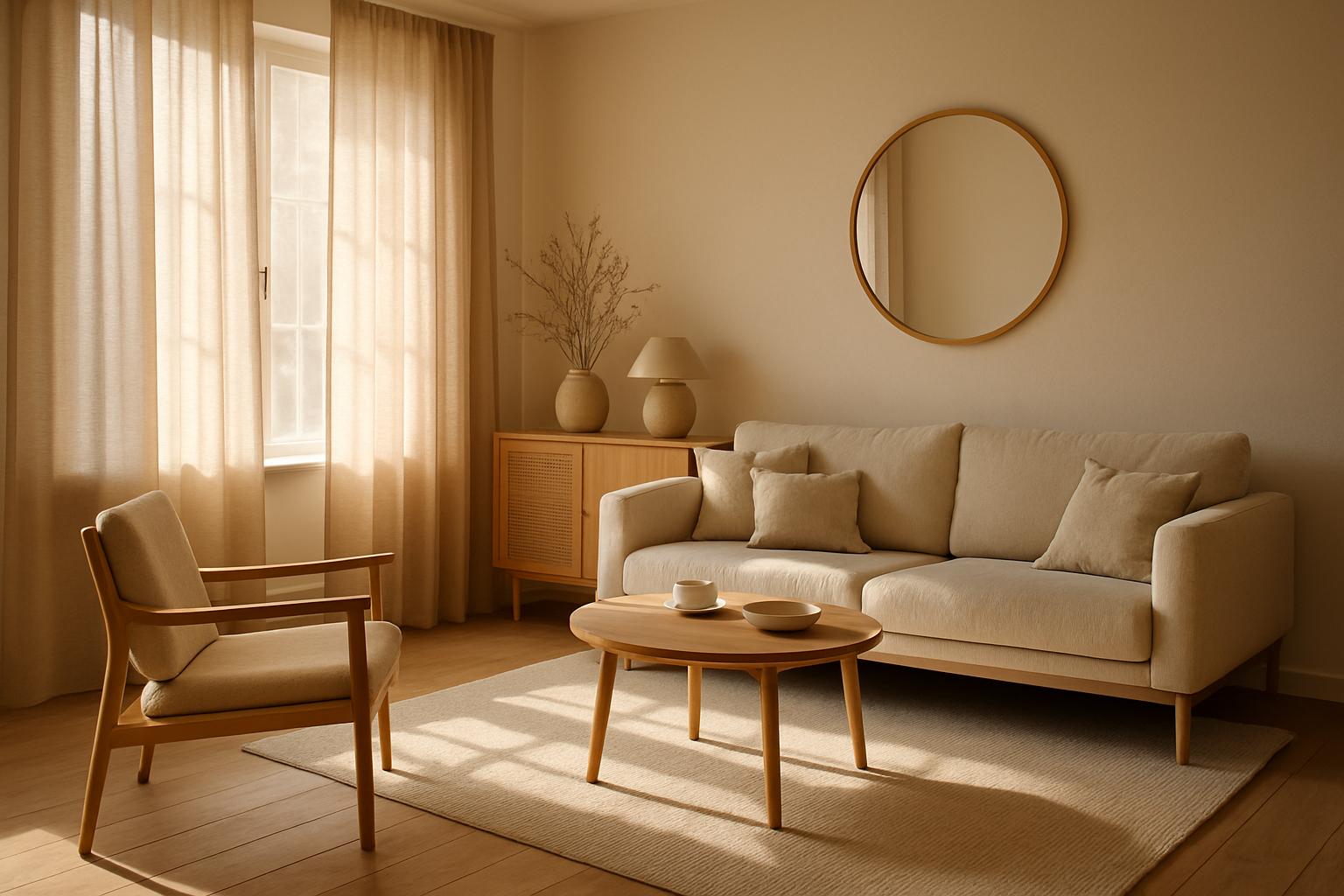
A real AI Media Studio edit: a Scandinavian living room restyled toward warm Mediterranean light with one text prompt. Fixing or restyling the photo like this first is cheaper than regenerating a clip, and the animated result can only be as good as the photo.
Fix the photo first: the same prompt on a dim still and a fixed still
1. Original still: dim and soft
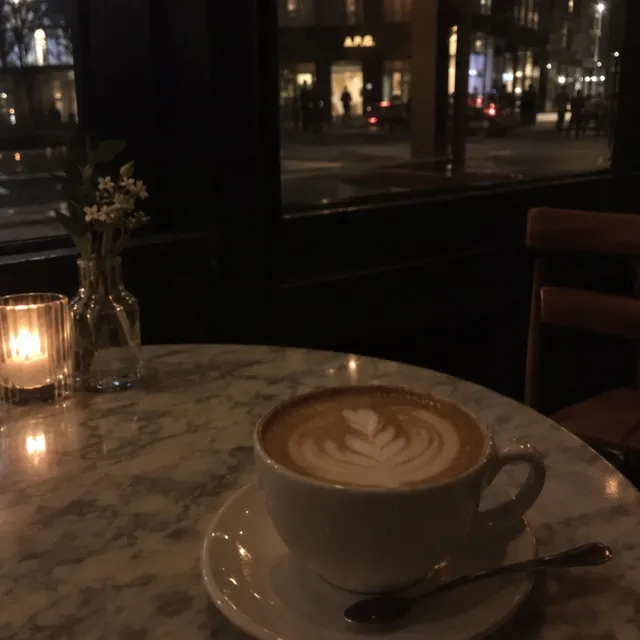
Underexposed and slightly blurry on purpose.
2. Fixed still · Nano Banana 2.1 edit · 9 credits
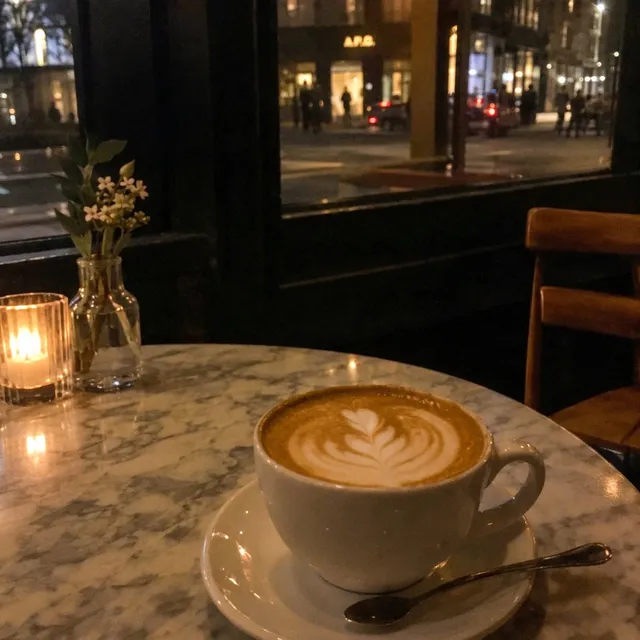
Brighter and sharper; same composition.
3. Clip from original · Kling O3 Pro · 85 credits
Almost static and dark: only figures outside the window move.
4. Clip from fixed still · Kling O3 Pro · 85 credits
People and a car pass outside; cup and latte art stable; brighter.
Same Kling O3 Pro prompt, 5 seconds, audio off, 85 credits per clip, generated on October 12, 2026. From the dim original the clip stayed almost static and dark: only figures outside the window moved. After a 9-credit Nano Banana 2.1 edit, people and a car pass outside, the cup and latte art stay stable and the clip is brighter. One photo, one clip each. Edit prompt: “Make this photo sharp and well exposed, like it was taken with a good camera: brighter, cleaner, less grain, natural warm evening colours. Keep the cup, latte art, table and window exactly as they are.” Motion prompt for both clips: “Steam rises gently from the cappuccino, the candle flickers, people pass by outside the window. Static camera.” The source photos are synthetic (AI-generated, fictional people and pets); every prompt, setting, credit cost and verdict is in the run log (CSV).
How much does it cost to turn a photo into a video?
A 5-second clip costs 60 to 495 credits depending on model and resolution: 85 on Kling O3 Pro with audio off, 220 on Seedance 2.0 at 720p, 60 on Grok Imagine at 480p. The $19 Starter plan has 1,000 credits a month, so 85 credits is about $1.61 of it.
- Plans start at $19/month. A paid plan is required to generate videos.
- Unused credits roll over.
- Commercial license on paid plans, and downloads carry no watermark.
- The credit cost shows in the composer before you generate.
- Every model and price: AI model prices. Plans: pricing.
Dollar amounts are a share of the monthly plan price (plan price ÷ monthly credits), not a separate charge. Three free edits after sign-up: your own uploaded photos, edited with Muse Image. Everything else needs a paid plan.
Video prices per model
| Model | Resolution | Audio | Credits per second | 5-second clip | 15-second clip | 5 s on Starter | 5 s on Ultra |
|---|---|---|---|---|---|---|---|
| Kling O3 Pro | no resolution option | off | 17 | 85 | 255 | $1.61 of $19 | $0.846 of $199 |
| Kling O3 Pro | no resolution option | on | 21 | 105 | 315 | $1.99 of $19 | $1.04 of $199 |
| Kling v3 Pro | no resolution option | off | 17 | 85 | 255 | $1.61 of $19 | $0.846 of $199 |
| Kling v3 Pro | no resolution option | on | 25 | 125 | 375 | $2.38 of $19 | $1.24 of $199 |
| Seedance 2.0 | 480p | on or off (same price) | 21 | 105 | 315 | $1.99 of $19 | $1.04 of $199 |
| Seedance 2.0 | 720p | on or off (same price) | 44 | 220 | 660 | $4.18 of $19 | $2.19 of $199 |
| Seedance 2.0 | 1080p | on or off (same price) | 99 | 495 | 1485 | $9.40 of $19 | $4.93 of $199 |
| Grok Imagine Video 1.5 | 480p | on or off (same price) | 12 | 60 | 180 | $1.14 of $19 | $0.597 of $199 |
| Grok Imagine Video 1.5 | 720p | on or off (same price) | 21 | 105 | 315 | $1.99 of $19 | $1.04 of $199 |
| Grok Imagine Video 1.5 | 1080p | on or off (same price) | 36 | 180 | 540 | $3.42 of $19 | $1.79 of $199 |
Credits are rounded up per clip, as in the app. Dollar values are a share of the monthly plan price: Starter $19 for 1,000 credits, Ultra $199 for 20,000.

What are the limits of photo to video AI?
Clips stop at 15 seconds and 1080p, and every model can drift: faces change slightly, hands warp, and product labels can melt or appear from nowhere. In our product test Grok Imagine showed a label that was not in the photo. One photo makes one clip; there is no slideshow mode.
- Length: 3 to 15 seconds on Kling, 4 to 15 on Seedance 2.0, 1 to 15 on Grok Imagine Video 1.5.
- Resolution: Seedance 2.0 and Grok Imagine offer 480p, 720p and 1080p. Kling has no resolution setting.
- Faces: Seedance 2.0 declines photos with a real-looking face. Kling and Grok Imagine accept them, but expressions and features can drift.
- Products and text: check logos, labels and on-screen words frame by frame before you use a clip in an ad.
- Bold prompts on old photos: on our restored 1950s photo, asking the couple to lean together changed the woman's dress on Kling O3 Pro; a “very subtle motion only” prompt kept the clothes stable.
- Camera moves on landscapes: on our lake photo, a pan on Grok Imagine at 480p regenerated the trees and mountains; a static camera kept them. Motion with the static camera was very subtle.
- No talking-photo or lip-sync tool: you cannot upload a voice recording and have the face speak it.
What do I do when a clip goes wrong?
Change the smallest thing first: one line of the prompt, or the model, on the same photo.
| Problem | Fix |
|---|---|
| Face warps or identity drifts | Simplify the subject motion; try Kling O3 Pro or Kling v3 Pro on the same photo |
| Logo or label melts, or a new one appears | Add “keep the label exactly as it is”, slow the camera, and compare Kling O3 Pro or Seedance 2.0 |
| Motion too wild or jittery | One verb only (push, pan, breeze); drop multi-action stacks |
| Clip feels flat | Add one atmosphere line, or fix the lighting on the photo first and animate again |
| Draft looks right but soft | Keep the prompt and run it at 1080p on Seedance 2.0 or Grok Imagine |
What are other ways to animate a photo?
AI Media Studio is one multi-model option. Four other kinds of tool fit some jobs better:
Kling's own app
Kuaishou's Kling site and app run only Kling models. New Kling versions and features can appear there before they reach third-party platforms such as ours.
Adobe Firefly
Firefly's image-to-video runs inside Adobe's apps and also offers partner models, including Kling, as listed on Adobe's partner-models page. It fits if you already work in Adobe tools.
CapCut
ByteDance's video editor for phone and desktop includes AI tools that animate photos. It fits when the clip is one part of a reel you are cutting with music, captions and transitions.
HeyGen
HeyGen makes talking photos and avatars: a portrait speaks a script or an audio track. Use it, or a similar avatar tool, when a face needs to say your words, which AI Media Studio does not do.
Try it
- 1Open the app with animate intent: app.ai-media-studio.com/?intent=animate
- 2Or start from the tool page: Image to video
- 3Need a cleaner photo first? Edit photo, then come back here to animate.
Browse tools · gallery · same photo, every AI model
Plans start at $19/month. A paid plan is required to generate videos.
Plans start at $19/month. A paid plan is required to generate videos. Three free edits after sign-up: your own uploaded photos, edited with Muse Image. Everything else needs a paid plan.
Frequently asked questions
How do I turn a photo into a video with AI?
Upload the photo to an image-to-video model, describe the motion (camera, subject, atmosphere and what must stay unchanged), pick a length of up to 15 seconds, check the credit cost and generate. In AI Media Studio a 5-second clip on Kling O3 Pro, the default model, costs 85 credits with audio off. Start at app.ai-media-studio.com/?intent=animate.
Which model should I use to animate a photo: Kling, Seedance or Grok Imagine?
Start with Kling O3 Pro: it accepts faces, keeps details steady and costs 85 credits for 5 seconds. Use Kling v3 Pro for bolder motion, Seedance 2.0 for rooms and products that must not change (it declines photos with a real-looking face) and Grok Imagine Video 1.5 for cheap drafts at 60 credits for 5 seconds at 480p. Run the same photo through two of them and keep the better take.
How long can an AI video from a photo be?
In AI Media Studio a clip from one photo can be up to 15 seconds: 3 to 15 seconds on Kling O3 Pro and Kling v3 Pro, 4 to 15 on Seedance 2.0 and 1 to 15 on Grok Imagine Video 1.5. You pick the length before you generate, and cost grows with every second.
How much does it cost to turn a photo into a video?
A 5-second clip costs 60 to 495 credits in AI Media Studio, depending on model and resolution: 85 credits on Kling O3 Pro with audio off, about $1.61 of the $19 Starter plan. Plans start at $19/month. A paid plan is required to generate videos. Three free edits after sign-up: your own uploaded photos, edited with Muse Image. Everything else needs a paid plan.
Which model keeps my product unchanged?
In our product test (a bottle, 5 seconds, same prompt) Kling O3 Pro and Seedance 2.0 kept the bottle and its label unchanged. Grok Imagine Video 1.5 turned the bottle and showed a label that was not in the photo. Add “keep the product and its label exactly as they are” to the prompt and check every frame before using a clip in an ad.
Can I animate an old photo of a person?
Yes, with Kling O3 Pro or Kling v3 Pro; Seedance 2.0 declines photos with a real-looking face. Restore scratches, fading and blur first, because motion makes damage more visible, and keep the motion small: a blink or a slight smile. In our test on a restored 1950s photo, Kling O3 Pro with a subtle prompt kept the clothes stable with mild face drift, while a bolder prompt changed the woman's dress. Only animate people with their consent or their family's. A 5-second Kling clip costs 85 credits.
Can I make a photo talk?
Not in AI Media Studio. There is no talking-photo or lip-sync tool: you cannot upload a voice recording or script and have the face speak it. Kling can add generated sound to a clip with audio on (21 credits a second on Kling O3 Pro instead of 17), but that does not make a portrait say your words. For talking portraits, use an avatar tool such as HeyGen.
Can ChatGPT turn a photo into a video?
Not with OpenAI's own video model any more. OpenAI discontinued the Sora web and app experiences on April 26, 2026 and the Sora API on September 24, 2026, and says no one-to-one replacement API is available (OpenAI Help Center, “What to know about the Sora discontinuation”). ChatGPT can still look at your photo and write a motion prompt, which you can paste into an image-to-video model.
What happened to Veo 3.1 and Sora?
Both are gone from AI Media Studio. OpenAI shut down the Sora 2 API on September 24, 2026. Veo 3.1 left the studio in October 2026 because our model provider retires it on October 22, 2026. For the same photo-to-video jobs, the studio now offers 4 models: Kling O3 Pro (the default), Kling v3 Pro, Seedance 2.0 and Grok Imagine Video 1.5. Our Veo 3.1 alternatives guide has the details.
Can I use the clip commercially, and is there a watermark?
Yes. Clips made on a paid AI Media Studio plan include a commercial license under the plan terms, so you can use them for client and brand work, and downloads carry no watermark. Plans start at $19/month and unused credits roll over. Check rights for the photo you upload: you need permission for the people and brands in it.