Most businesses do not start with a perfect creative brief.
They start with a phone photo of a kitchen showroom. A product shot taken under bad lighting. A real estate interior that needs to feel cleaner. A furniture photo that would sell better in a lifestyle setting. A sketch, a reference image, or a half-formed idea that needs to become something presentable.
That is why the next useful step in AI image tools is not only better prompt-to-image generation. Businesses need an AI image studio: one place to generate, edit, reimagine, enhance, upscale, export, and organize commercial visuals from whatever starting point they already have.
Loading image...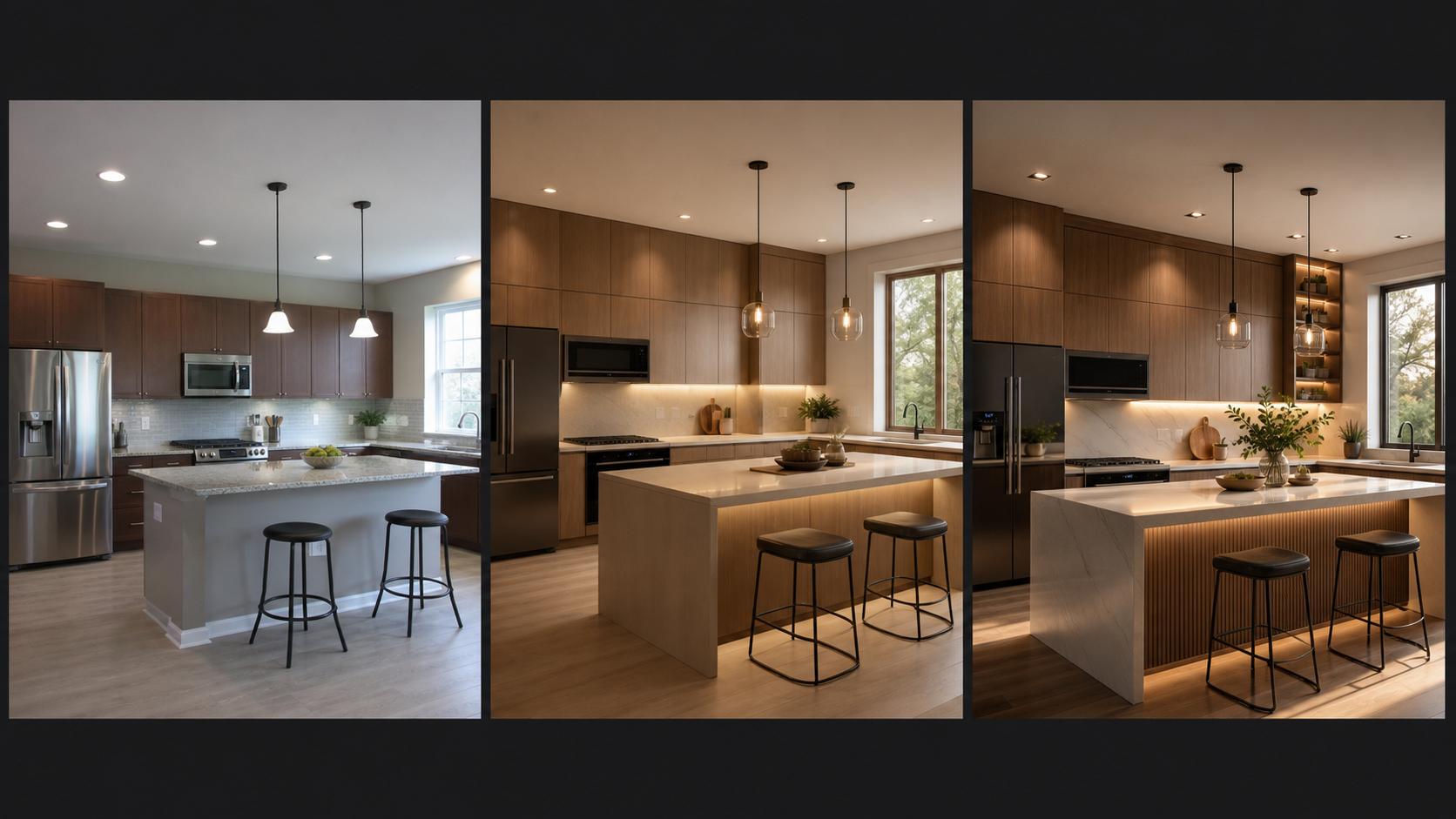
The Problem With Prompt-Only Image Workflows
Prompt-to-image tools are powerful, but many business visuals do not begin with a blank prompt.
A kitchen seller might already have a showroom photo. A furniture store might have a supplier image. A real estate agent might have an average room shot. An ecommerce brand might have a product photo that needs a cleaner background, sharper detail, or a more premium campaign look.
In those cases, the job is not simply “make an image.” The real job is:
- Keep the useful parts of the original image.
- Improve what looks weak.
- Explore better versions.
- Increase resolution and detail.
- Export something that can be used in a proposal, listing, website, ad, or catalog.
That is a workflow problem, not only a generation problem.
From Rough Image to Sales-Ready Visual
The most practical AI image workflow for businesses looks like this:
- Upload photo
- Reimagine
- Enhance
- Upscale
- Export
For example, a kitchen seller can start with a basic showroom photo, reimagine it as a modern interior render, enhance the surfaces and lighting, upscale the final image, and export a high-resolution visual for a sales proposal.
The same pattern works across many business categories:
- Kitchen showrooms: turn basic room photos into polished kitchen visuals.
- Furniture catalogs: place products in realistic lifestyle settings.
- Product shots: improve lighting, background, material detail, and sharpness.
- Real estate: refresh interiors, stage empty rooms, and clean up listing visuals.
- Ecommerce: create product variations, hero images, and sharper listing assets.
- Ads: generate campaign-ready image variants without starting from scratch each time.
The advantage is simple: the business can move from “this is the image we have” to “this is the image we can sell with.”
Create From Any Starting Point
A business image tool has to support more than one input type. Different teams and owners start with different material.
Sometimes the best starting point is a prompt. Sometimes it is an existing photo. Sometimes it is a sketch, a reference image, or a visual style the business wants to match.
A useful AI image studio should support:
- Prompt to image: create a fresh concept from a product, room, or campaign idea.
- Image to image: upload a rough photo and generate cleaner versions.
- Reference image: preserve composition, product cues, or mood while improving the result.
- Style transfer: apply a consistent commercial look across a project.
- Background change: replace distracting scenes with clean, sales-ready environments.
This matters because business owners usually do not want to become prompt engineers. They want a practical way to turn existing material into usable visuals.
Enhancement Is Where Business Value Shows Up
Generation gets attention, but enhancement often creates the most immediate business value.
If a product surface looks soft, the image feels less premium. If an interior photo has flat lighting, the room feels less attractive. If a listing image is too low resolution, it cannot be used confidently across a website, PDF proposal, or ad campaign.
Enhancement and upscaling help with:
- sharper product surfaces,
- cleaner room lighting,
- recovered material detail,
- larger commercial exports,
- more consistent presentation quality.
This is especially important for interiors, furniture, kitchens, real estate, and ecommerce. In these categories, small visual improvements can change how expensive, trustworthy, or desirable the offer feels.
Built for Businesses, Not Prompt Engineers
Broad creative tools are useful, but they can feel too open-ended for business users who need predictable outputs.
A kitchen seller does not want to learn a complex creative system before preparing a customer proposal. A local service business does not want to test dozens of abstract prompts just to create a sharper website image. A furniture store does not want every visual experiment to turn into a design project.
The business-first workflow should be simpler:
- upload the asset,
- choose the type of transformation,
- generate options,
- enhance the winner,
- export the final visual.
That is the difference between a general creative playground and a practical AI image studio.
Use Cases for Commercial Visuals
An AI image studio becomes most useful when it maps to real business outputs.
Kitchen Sellers
Kitchen sellers can modernize showroom photos, create proposal visuals, and show customers what a space could look like with different materials, lighting, or layouts.
Furniture Stores
Furniture stores can turn isolated product photos into room scenes, catalog visuals, and lifestyle assets without arranging a full photoshoot for every item.
Real Estate Agents
Real estate agents can refresh interiors, stage rooms, and create cleaner listing visuals that help buyers understand the potential of a property.
Ecommerce Brands
Ecommerce brands can create product hero images, background variations, campaign shots, and sharper details for product pages.
Local Service Businesses
Local service businesses can create cleaner website visuals, promotional images, and before/after-style assets without relying on generic stock photography.
Interior Designers
Interior designers can turn sketches, references, and rough room photos into polished presentation visuals for clients.
What to Look for in an AI Image Studio
If you are choosing an AI image tool for business use, look beyond whether it can generate a nice image from a prompt.
The more important questions are:
- Can it start from an existing image?
- Can it reimagine a photo without losing the business context?
- Can it enhance detail and upscale the final output?
- Can it handle interiors, product shots, ecommerce assets, and ads?
- Can you organize versions and exports in one place?
- Can the final image be used commercially?
Those are the questions that matter when visuals need to support sales, listings, proposals, and campaigns.
The Bottom Line
Businesses do not need AI images that only look interesting. They need visuals that help them sell, explain, present, and publish.
That is the reason to think in terms of an AI image studio instead of a single-purpose generator. The workflow should take you from a rough starting point to a polished commercial visual: upload, reimagine, enhance, upscale, and export.
For business owners, the best AI image workflow is not the most complicated one. It is the one that turns the images you already have into the visuals you actually need.