Animate old photos
Animate old photos with AI: restore first, then bring the photo to life
To animate an old photo, scan it, repair scratches and fading in the editor first, then send the restored still to an image-to-video model with a short motion prompt such as a slow push-in or a gentle smile. In AI Media Studio a restoration edit costs 2 credits on Muse Image or 9 on Nano Banana 2.1, and a 5-second clip on Kling O3 Pro, the default video model, costs 85 credits with audio off. The motion is generated: it shows how the moment might have moved, not footage of it.
Three free edits after sign-up: your own uploaded photos, edited with Muse Image. Everything else needs a paid plan.
How do I animate an old photo with AI?
- 01
Digitize the print
Scan the photo, or photograph it straight on in even light without reflections. Keep an untouched copy of the file.
- 02
Restore the still first
Repair scratches, tears and fading in the editor and keep the original tones. A clip cannot be cleaner than the photo it starts from, and damage tends to smear once it moves.
- 03
Write a short motion prompt
Describe the camera and one small movement, then add a keep line for the face and tones. Small motions (a blink, a slight smile, a slow push-in) look more natural on old photos than big gestures.
- 04
Generate, compare and download
Watch the clip next to the restored still. If a face drifts, regenerate with less movement or a shorter clip. Keep the original scan, the restored still and the clip together.
Scanning and restoration tips: restore old photos with AI.
Restore, then animate: two test prints
Two synthetic damaged prints went through the whole pipeline: restored with Nano Banana Pro (30 credits), then animated with Kling O3 Pro (5 seconds, audio off, 85 credits). Both clips use a subtle motion prompt. Each clip was generated once.
Damaged 1950s black-and-white print
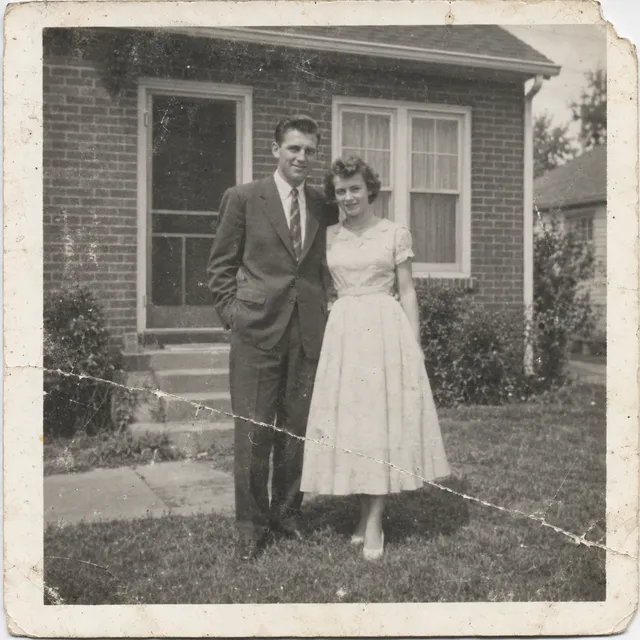
1. Scan (synthetic print)
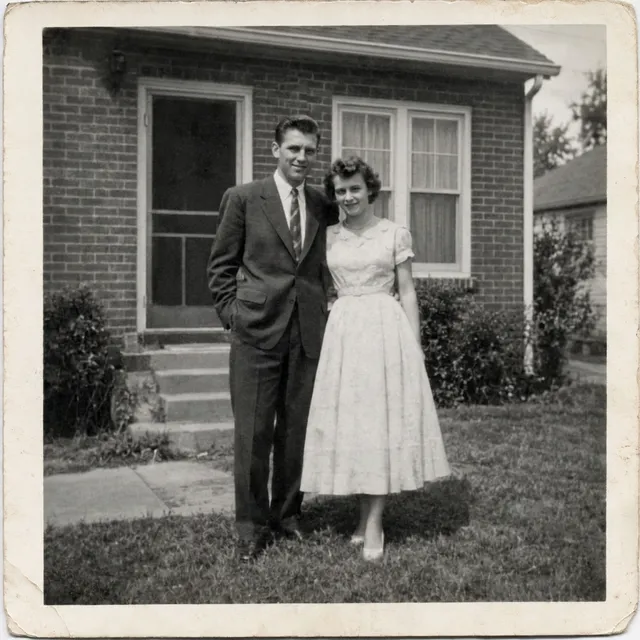
2. Restored with Nano Banana Pro
30 credits per edit ($0.570 on Starter)
Damage removed; most faithful, neutral black and white.
3. Animated with Kling O3 Pro
Kling O3 Pro · 5 s · audio off · 85 credits
Subtle prompt: slow push-in, clothes stable, mild face drift; stays black and white.
Restore prompt: Restore this old photograph: remove the scratches, the crease, the dust spots and repair the torn corner. Improve contrast gently. Keep it black and white and keep both people's faces, clothes and poses exactly as they are.
Motion prompt: Very subtle motion only: the couple breathe and blink, a light breeze moves the leaves, very slow camera push-in. They do not move closer, change pose or change clothes. Keep the photo black and white and both faces unchanged.
Faded 1970s colour snapshot
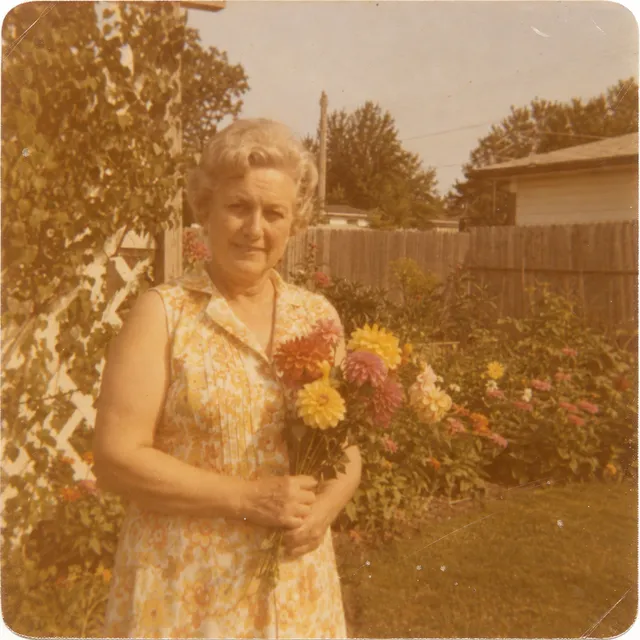
1. Scan (synthetic print)
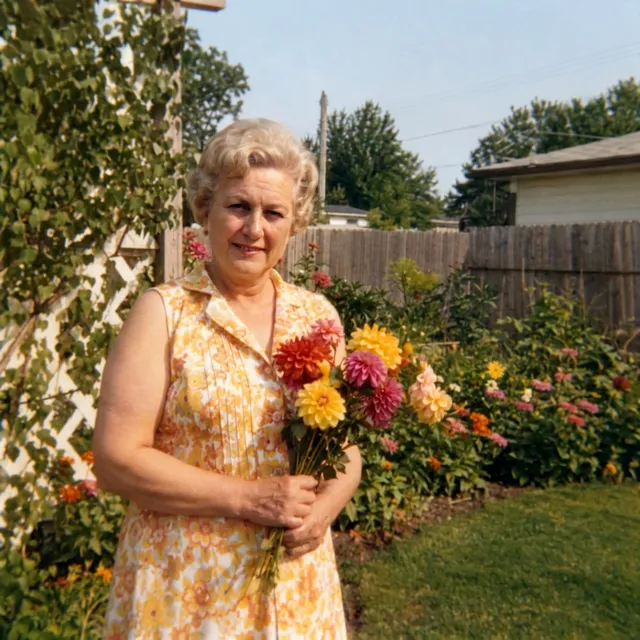
2. Restored with Nano Banana Pro
30 credits per edit ($0.570 on Starter)
Cast removed; most natural colours; rounded corners squared.
3. Animated with Kling O3 Pro
Kling O3 Pro · 5 s · audio off · 85 credits
Subtle prompt: slow push-in, face and dress stable, flowers rearrange slightly.
Restore prompt: Restore this old photograph: remove the colour cast and the scratches and dust, bring back natural colours and contrast. Keep the woman's face, hair, dress, the flowers and the garden exactly as they are.
Motion prompt: Very subtle motion only: the woman blinks and smiles slightly, a light breeze moves the flowers a little, very slow camera push-in. Do not add or change flowers, and keep her face unchanged.
What a bold motion prompt does to an old photo
Same restored 1950s still, same model and length, two prompts. The bold prompt asked the couple to lean towards each other and the breeze to move her dress; the dress changed length and pattern. The subtle prompt only asked for breathing, blinking and leaves, and said what must not change; the clothes stayed stable, though the faces still drifted a little.
1950s couple, bold motion prompt
Kling O3 Pro · 5 s · audio off · 85 credits
Bold prompt: the couple move together and the woman's dress changes length and pattern; stays black and white.
The couple smile and lean slightly towards each other, a light breeze moves the woman's dress and the leaves, slow gentle camera push-in. Keep the photo black and white and keep both faces unchanged.
1950s couple, subtle motion prompt
Kling O3 Pro · 5 s · audio off · 85 credits
Subtle prompt: slow push-in, clothes stable, mild face drift; stays black and white.
Very subtle motion only: the couple breathe and blink, a light breeze moves the leaves, very slow camera push-in. They do not move closer, change pose or change clothes. Keep the photo black and white and both faces unchanged.
Which model to use
Every video model runs in the same composer and draws from the same credits. Clip price = credits per second x seconds, rounded up. The 5-second column uses audio off and 720p where a model has resolutions.
| Model | Clip length | Credits per second | 5-second clip | Use it for |
|---|---|---|---|---|
| Kling O3 Prodefault | 3 to 15 s | 17 (21 with audio) | 85 creditsaudio off, $1.61 on Starter | Start here. Animates a photo and supports start and end frames and references. |
| Kling v3 Pro | 3 to 15 s | 17 (25 with audio) | 85 creditsaudio off, $1.61 on Starter | Dynamic camera moves when the photo can take more motion. |
| Grok Imagine Video 1.5 | 1 to 15 s | 12 / 21 / 36 at 480p / 720p / 1080p | 105 credits720p, $1.99 on Starter | Lively, natural motion; the lowest price per second at 480p. |
| Seedance 2.0 | 4 to 15 s | 21 / 44 / 99 at 480p / 720p / 1080p | 220 credits720p, $4.18 on Starter | Declines photos that show a real-looking face, so most portraits will not work. Use it for old photos of houses, streets or landscapes. |
The composer shows the credit cost before you generate. All model prices.
Motion prompts to copy
Paste one into the video composer with your restored photo and adjust the details. These are starting instructions; only the prompts in the examples above were tested.
Portrait
Slow camera push-in. The person blinks once and smiles slightly. Keep the face, hair, clothes and the black-and-white tones unchanged. No other movement.
Couple or family group
Gentle handheld camera movement. Everyone breathes naturally and one person turns their head slightly toward the others. Keep every face and the number of people unchanged.
Wedding photo
Slow pull-back. A light breeze moves the veil and the flowers. Keep the couple’s faces, poses and the original tones unchanged.
House or street (no visible faces)
Slow pan from left to right across the street. Leaves move in the wind and smoke rises from a chimney. Keep the buildings and the sepia tones unchanged.
Holiday landscape
Slow forward camera move over the beach. Waves roll in gently and clouds drift. Keep the original colors and film grain.
Limits to know
- The motion is invented. A clip shows a plausible movement, not a record of what happened; do not present it as real footage.
- Faces can drift during a clip, more with large movements and longer clips. Keep the motion small and compare the face with the still.
- Clothes and objects can change too. In our 1950s test a bold prompt changed the length and pattern of the woman’s dress; a subtle prompt that said what must not change kept the clothes stable.
- Colorization is a guess. AI cannot know the original colors of clothes, eyes or rooms, so treat a colorized version as a creative interpretation, done as a separate edit.
- Restoration can also invent detail in damaged areas. Keep the original scan for family and historical reference.
- Clips run up to 15 seconds at up to 1080p across the current lineup. Handwriting and printed text in the photo may warp once it moves.
Consent and sensitivity
- Ask living people before you animate their photo, and a parent or guardian before you animate a child.
- Photos of relatives who have died can mean a lot to other family members. Talk with them before you share an animated version.
- Label the clip as AI-animated when you share it. Downloads carry no visible watermark, so the label is up to you.
- Your images stay in your workspace unless you share them, and you can delete them from your library.
- Uploads are processed by the AI provider that runs the model you pick. Retention, processors and deletion requests are covered in the privacy policy.
What it costs
Restoring the still costs 2 credits on Muse Image or 9 on Nano Banana 2.1 at 1K (31 at 4K). A 5-second Kling O3 Pro clip with audio off costs 85 credits.
Restore plus one clip: 87 credits with Muse Image or 94 with Nano Banana 2.1, which is $1.65 to $1.79 on the Starter plan ($19 for 1,000 credits a month). Each retry costs the same again.
The examples on this page used Nano Banana Pro for the restore (30 credits) plus one clip, 115 credits per photo ($2.19 on Starter).
Plans start at $19/month. Unused subscription credits roll over, downloads carry no watermark, and paid plans include a commercial license. Video needs a paid plan.
Three free edits after sign-up: your own uploaded photos, edited with Muse Image. Everything else needs a paid plan.
Frequently asked questions
How do I animate an old photo with AI?
Scan the photo, restore it in the editor, then open the video composer with the restored still and a short motion prompt such as "slow push-in, the person blinks and smiles slightly, keep the face unchanged". Pick a length (3 to 15 seconds on Kling O3 Pro), generate and compare the clip with the still.
Should I restore the photo before animating it?
Yes. Scratches, dust and fading move along with the image and often look worse in motion. Restore the still first, check the face against the original, then animate the restored version.
Which AI model is best for animating old photos?
Start with Kling O3 Pro, the default video model: 17 credits per second with audio off, 3 to 15 seconds. Seedance 2.0 declines photos that show a real-looking face, so use it only for photos without visible faces, such as a house or a street.
How long can the video be?
Kling O3 Pro and Kling v3 Pro make 3 to 15 second clips, Seedance 2.0 4 to 15 seconds and Grok Imagine Video 1.5 1 to 15 seconds. Shorter clips usually keep a face steadier.
How much does it cost to animate an old photo?
A 5-second clip on Kling O3 Pro costs 85 credits with audio off ($1.61 on Starter). Restoring the still first adds 2 credits on Muse Image or 9 on Nano Banana 2.1. Plans start at $19/month; video needs a paid plan.
Will the person still look like themselves?
Often close, but not guaranteed. Even our subtle-prompt 1950s test clip showed mild face drift. Ask for one small movement, add a keep line for the face and clothes, and regenerate with less motion if the face drifts.
Can I colorize the photo too?
You can ask for color as a separate edit before animating, but the colors are a guess: AI cannot know what the original clothes, eyes or rooms looked like. Keep the black-and-white version as well.
Is it okay to animate photos of people who have died?
It is a personal decision. Talk with the family before sharing, label the clip as AI-animated, and keep the original photo. The movement is generated and should not be presented as a real recording.
Can the clip have sound?
Kling O3 Pro can add audio for 21 credits per second instead of 17. For most old photos a silent clip, or music added later in a video editor, is the safer choice.