AI hairstyle changer
AI hairstyle changer: try a new haircut on your own photo
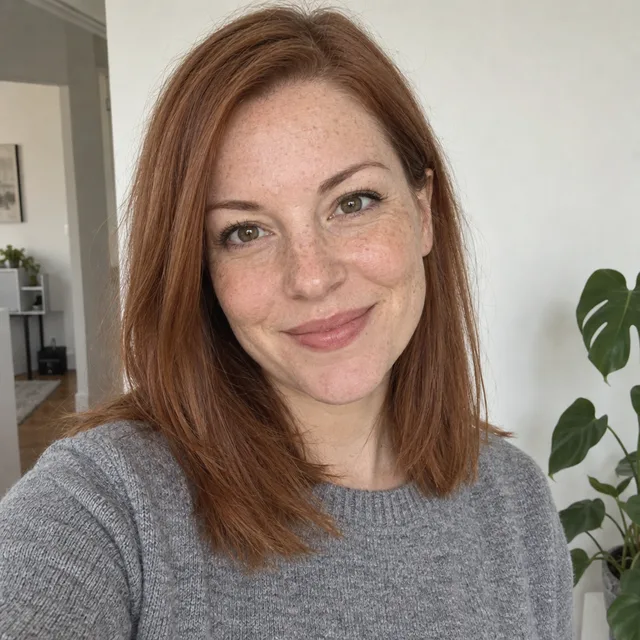
Upload a front-facing photo, describe the haircut (length, texture, parting, fringe) and end the prompt with “Change only the hair” plus what must stay the same. We tried eight styles and colours on one portrait: every result kept her face, freckles and background. One edit costs 2 credits on Muse Image, 9 on Nano Banana 2.1 or 11 on GPT Image 2.5, and you see the cost before you generate.
Every edit needs a paid plan. Plans start at $19/month.
How do I try a new hairstyle on my photo?
- 01
Pick a front-facing photo
Your face looking at the camera, even light, and your hair and shoulders in the frame. A photo with your hair tied back works too, but the model then has to guess your hairline.
- 02
Describe the cut, not just the name
Name the length, texture, parting and fringe: “a sleek chin-length bob with a straight blunt edge” gives the model more to work with than “a bob”.
- 03
Add the keep line
End with “Change only the hair” and list what must stay: face, skin, eye colour, expression, clothes, background. For a colour change, also keep the cut, length and parting.
- 04
Compare, then show your stylist
Put the result next to your original and check the face and hairline at full size. Treat it as a preview: take it to your hairdresser as a reference, not as a promise of how the cut will fall.
8 hairstyles and colours from one photo
Every result starts from the same synthetic portrait. Open “Prompt we ran” under an image for the exact prompt, or copy the prompt card and change the style to the one you want.
1.Pixie cut, on three models
The biggest change: shoulder length to a short crop. All three models kept her face, freckles and sweater. Nano Banana 2.1 and Muse Image gave a classic textured pixie; GPT Image 2.5 left a longer swept fringe and cropped the photo slightly tighter.
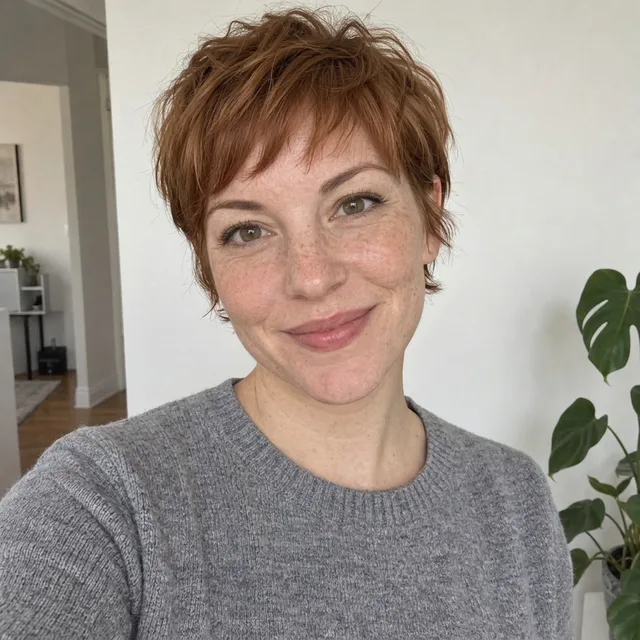
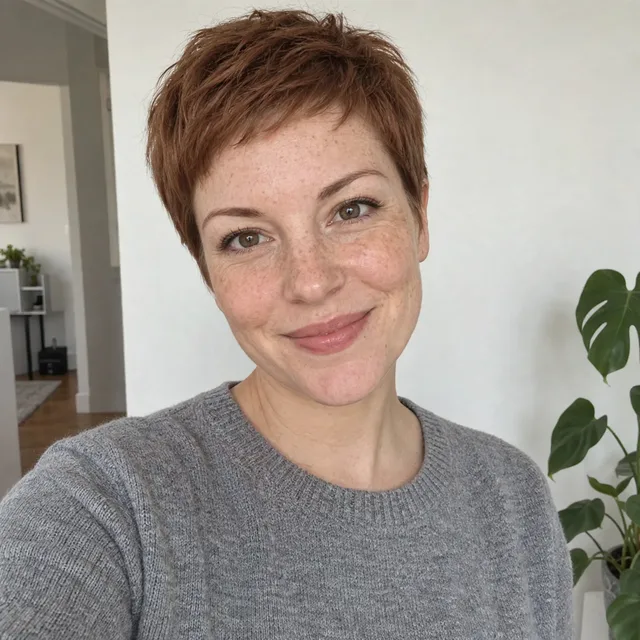
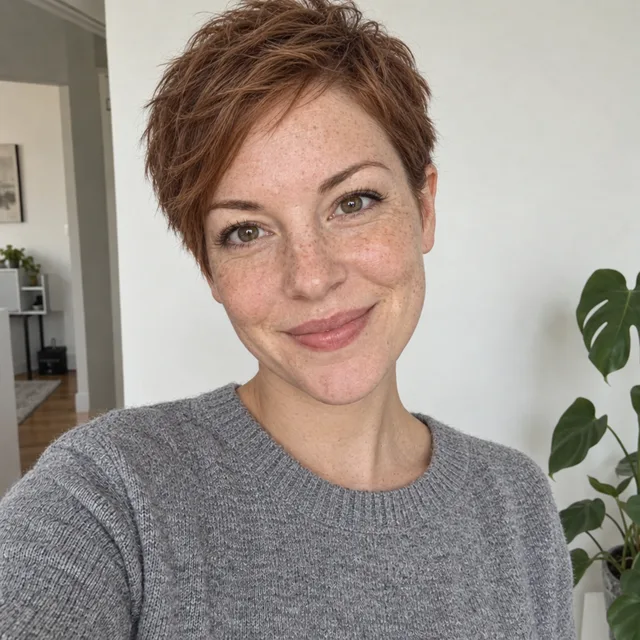
Prompt we ran
Give her a short textured pixie cut. Keep her face, freckles, skin, eye colour, expression, grey sweater and the background exactly the same. Change only the hair.
Suggested model: Nano Banana 2.1
2.Bob and curtain bangs
Two smaller changes. The bob came out sleek and blunt as asked but ends at the neck, a little longer than chin length; the curtain bangs kept the rest of her hair as it was.
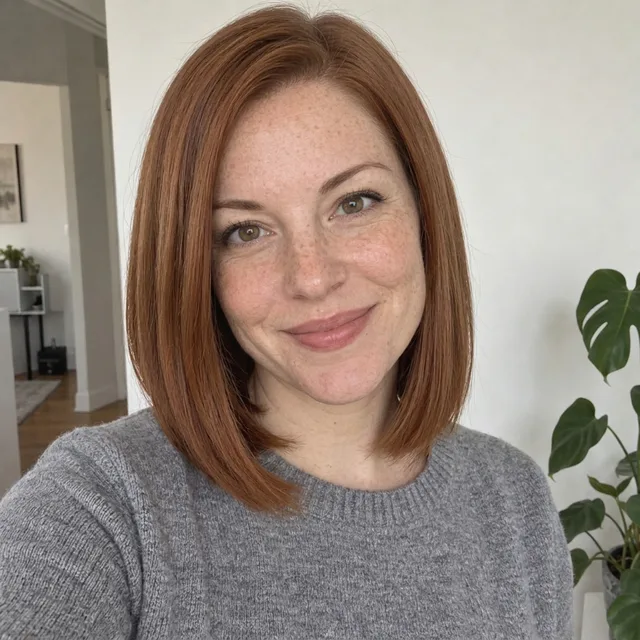
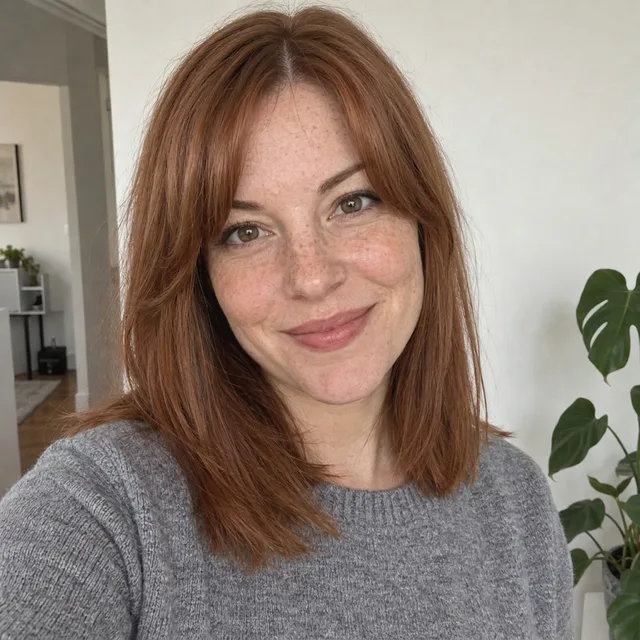
Exact prompt we ran
Give her curtain bangs parted in the middle, with the rest of her hair at its current length. Keep her face, freckles, skin, eye colour, expression, grey sweater and the background exactly the same. Change only the hair.
Prompt we ran
Give her a sleek chin-length bob with a straight blunt edge. Keep her face, freckles, skin, eye colour, expression, grey sweater and the background exactly the same. Change only the hair.
Suggested model: Nano Banana 2.1
If the length is off, say it in a measurable way (“ending at her jawline”) and run it again from the original photo.
3.Long waves and curls
Adding length and texture. Both kept her face; the curls changed the outline of the whole head the most, so check how they sit around the face.
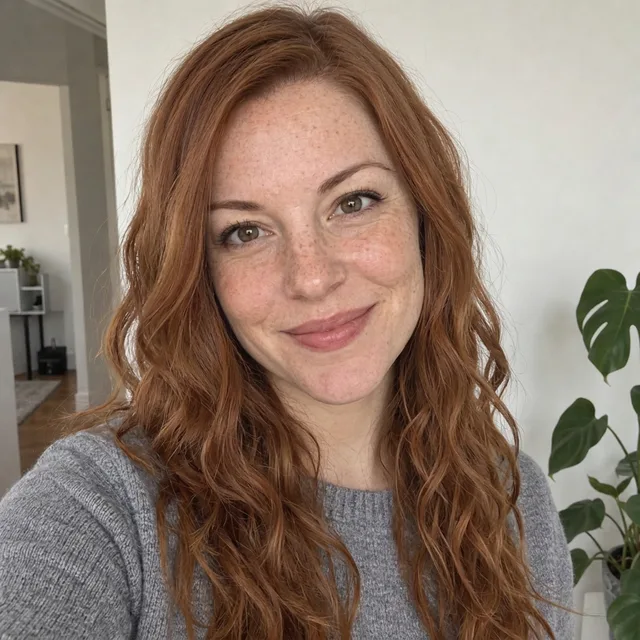
Exact prompt we ran
Give her long, loose beach waves falling past her shoulders. Keep her face, freckles, skin, eye colour, expression, grey sweater and the background exactly the same. Change only the hair.
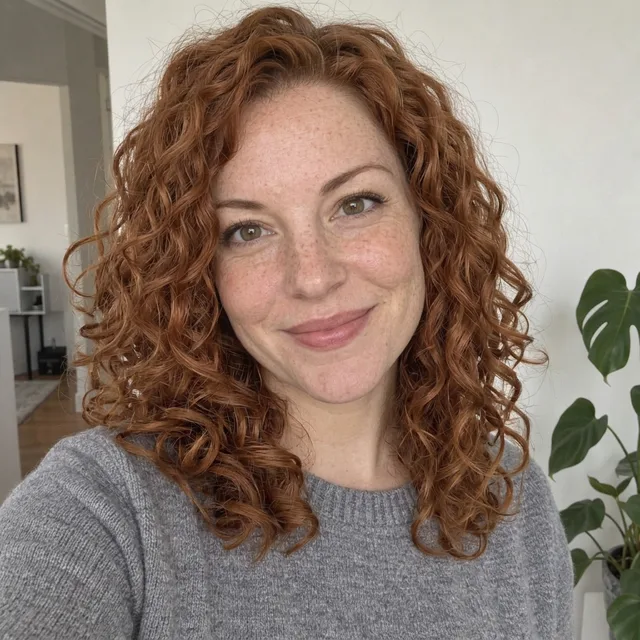
Prompt we ran
Give her shoulder-length natural curls with lots of volume. Keep her face, freckles, skin, eye colour, expression, grey sweater and the background exactly the same. Change only the hair.
Suggested model: Nano Banana 2.1
4.Messy bun
An updo for an event or just to see your face without hair around it.
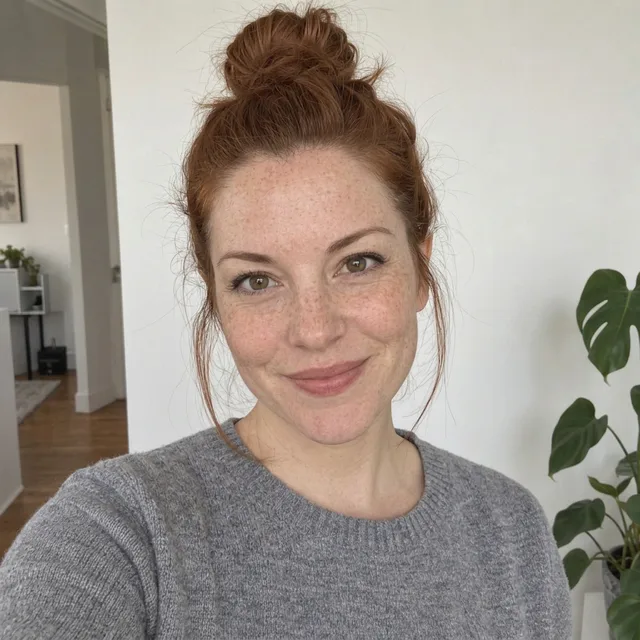
Prompt we ran
Put her hair up in a messy top bun with a few loose strands framing her face. Keep her face, freckles, skin, eye colour, expression, grey sweater and the background exactly the same. Change only the hair.
Suggested model: Nano Banana 2.1
5.New hair colour
Keep the cut and change only the colour. Glossy black came out as asked; “soft honey blonde” came out as a warmer strawberry blonde, so name the shade you want as precisely as you can and compare it with a swatch.
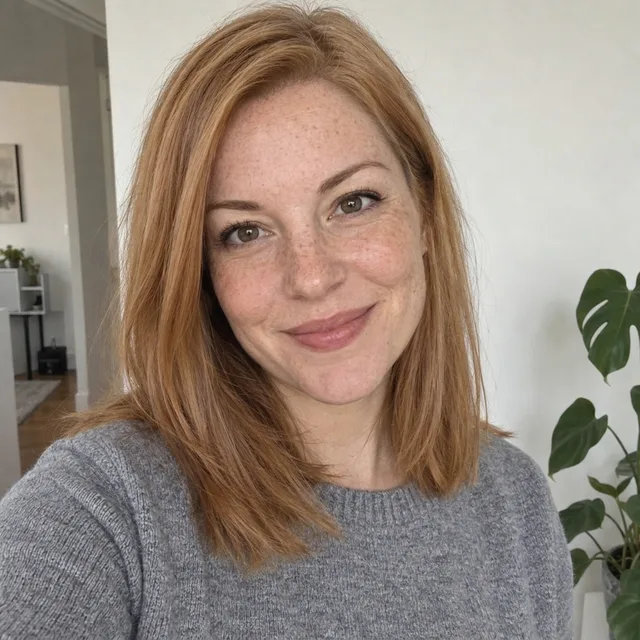
Exact prompt we ran
Change her hair colour to a soft honey blonde. Keep the cut, length and parting the same. Keep her face, freckles, skin, eye colour, expression, grey sweater and the background exactly the same. Change only the hair.

Prompt we ran
Change her hair colour to glossy jet black. Keep the cut, length and parting the same. Keep her face, freckles, skin, eye colour, expression, grey sweater and the background exactly the same. Change only the hair.
Suggested model: Nano Banana 2.1
Screens and lighting change how a colour looks. Use the result to choose a direction, then agree the exact shade with your colourist.
Keep it looking like you
- End every prompt with “Change only the hair” and name what must stay: face, skin, eye colour, expression, clothes, background. With that line, all ten of our results kept her face.
- Change one thing per edit: the cut first, then the colour in a second edit from the result you like.
- Describe the cut with lengths and landmarks (jawline, shoulders, collarbone), not just a style name. Our “chin-length” bob still came out longer, so check the length.
- If something drifts, go back to the original photo rather than editing the edit.
- A generated haircut shows a direction, not exactly how your hair will behave. Your hair’s thickness, texture and growth pattern decide what a stylist can actually do.
Which model to use
Every model runs in the same editor and draws from the same credits. Prices are for one edit in the web app.
| Model | Credits per edit | On Starter | Use it for |
|---|---|---|---|
| Muse Imageone size, about 2.5 MP | 2 | $0.038 | The cheapest way to try many styles; a clean pixie in our test. |
| Nano Banana 2.11K | 9 | $0.171 | Cuts, texture and colour; all eight of our styles. 14 credits at 2K. |
| GPT Image 2.5high quality | 11 | $0.209 | A second opinion on a style; it cropped our photo slightly tighter. |
The editor shows the credit cost before you generate. Prices checked .
What it costs
One edit costs 2 credits on Muse Image, 9 on Nano Banana 2.1 at 1K and 11 on GPT Image 2.5. On the Starter plan ($19 for 1,000 credits a month) that is $0.038 to $0.209 per edit; trying all eight styles on Nano Banana 2.1 costs 72 credits.
Every edit needs a paid plan. Plans start at $19/month. Unused subscription credits roll over, downloads carry no watermark, and paid plans include a commercial license.
Frequently asked questions
How do I see what a haircut would look like on me?
Upload a front-facing photo to the editor, describe the cut with its length, texture, parting and fringe, and end the prompt with “Change only the hair” and what must stay the same. Compare the result with your original, then try the next style from the original photo.
Will my face stay the same?
In our ten test edits it did on every model, because the prompt said to change only the hair and named the face, skin, eye colour and expression. It is not guaranteed: compare at full size, and start again from the original if anything changes.
Can I change my hair colour without changing the cut?
Yes. Ask for the colour and add “Keep the cut, length and parting the same”. Name the shade precisely: our “soft honey blonde” came out as a warmer strawberry blonde.
Can I try bangs or a fringe?
Yes. Say what kind (curtain bangs, a blunt fringe, side-swept) and that the rest of your hair keeps its current length.
How accurate is it for my real hair?
It shows the look, not how your own hair will behave. Thickness, curl pattern, cowlicks and growth decide what a cut really looks like, so use the result as a reference to discuss with your hairdresser.
Does it work for men’s haircuts and beards?
The same prompt pattern works for any haircut: describe the length and shape and keep the face. We did not test men’s cuts or beards for this page, so check the result closely.
How much does it cost? Is there a free option?
One edit costs 2 credits on Muse Image, 9 on Nano Banana 2.1 at 1K or 11 on GPT Image 2.5. AI Media Studio has no free tier. Every edit needs a paid plan. Plans start at $19/month.
Uploads are processed by the AI provider that runs the model you pick. Retention, processors and deletion requests are covered in the privacy policy.