Colorize photo
Colorize a black and white photo with AI, and check it against the real colors
Upload the black and white photo, ask for natural, realistic colors, and name every color you know (“her sweater is emerald green”). Without that, the model guesses: in our tests all three models turned a pink car turquoise, and a red and white awning came back green or blue. With the colors named, Nano Banana 2.1 matched the real photo on all four tests. No result came back sepia. One edit costs 2 credits on Muse Image, 9 on Nano Banana 2.1 or 11 on GPT Image 2.5.
Every edit needs a paid plan. Plans start at $19/month.
How do I colorize a black and white photo?
- 01
Scan or photograph the print
A flat scan is best. A phone photo works if the print is flat and there is no glare. If the photo is torn or scratched, restore it first, then colorize the restored copy.
- 02
Ask for natural colors
“Colorize this black and white photo with natural, realistic colors.” For a brown, faded print, add “remove the brown tint and the grain”.
- 03
Name every color you know
Clothes, a car, a front door, a sign: “the car is pastel pink, the front door is bright blue”. Ask relatives, or look at other photos from the same day. Anything you do not name is a guess.
- 04
Keep the rest, then compare
End with “Keep … exactly the same” and “Do not add or remove anything”. Then check faces, skin tones and any words against the original.
4 black and white photos, colorized and checked against the real colors
We took four color photos, removed the color ourselves, and gave only the black and white copy to each model. That is how each result can sit next to the real colors. Three models got a prompt that names no colors; Nano Banana 2.1 also got the same prompt with the real colors named. The prompt card is that second prompt; the prompt behind each image is under it.
1.A vintage car: every model picked the same wrong color
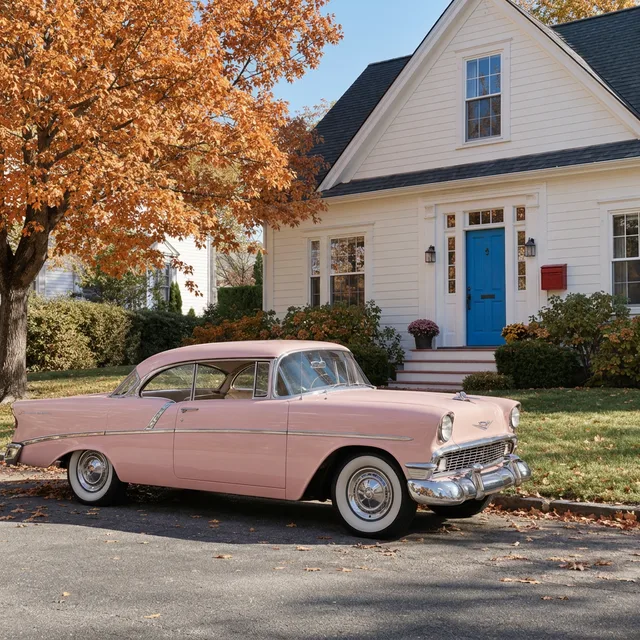
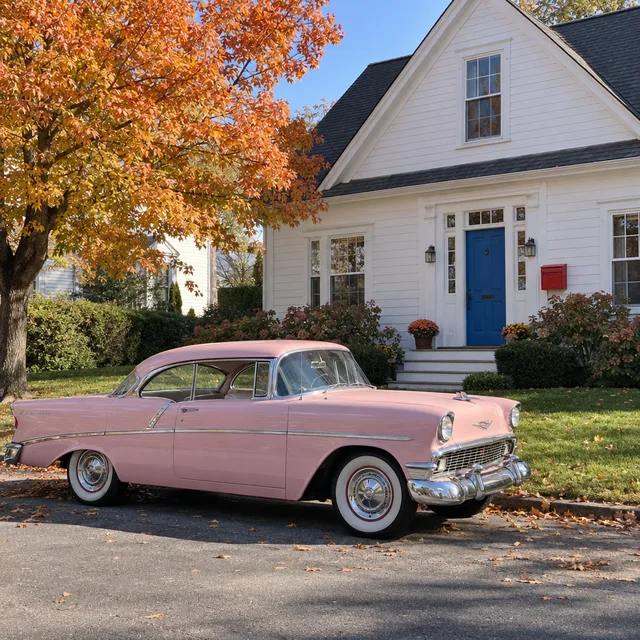
The car was pastel pink, the door bright blue, the mailbox red, the tree orange. In gray, pink and light blue look the same, and all three models chose turquoise. All three also made the door dark green and the mailbox gray; only GPT Image 2.5 kept some autumn in the tree. Naming the four colors fixed every one of them.
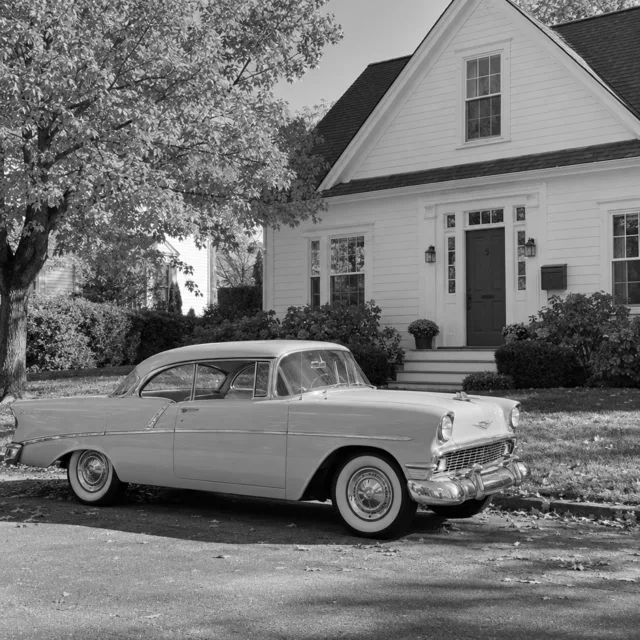
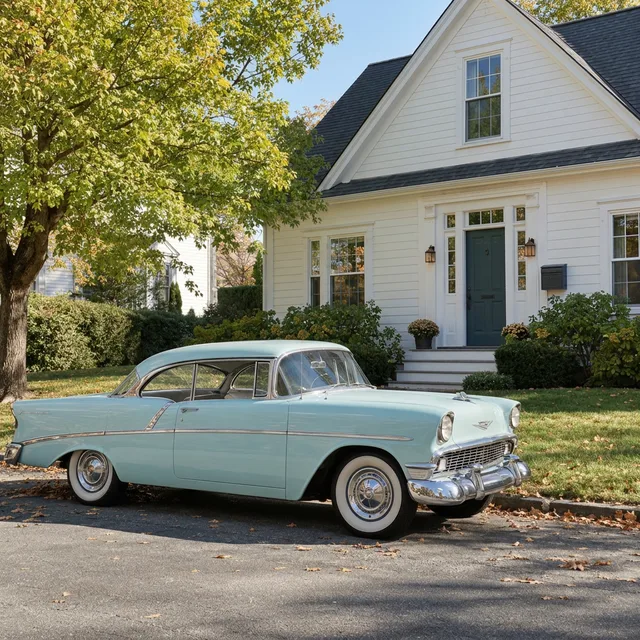
Exact prompt we ran
Colorize this black and white photo with natural, realistic colors. Keep everything else exactly the same: the car, the house, the door, the tree, the street and the light. Do not add or remove anything.
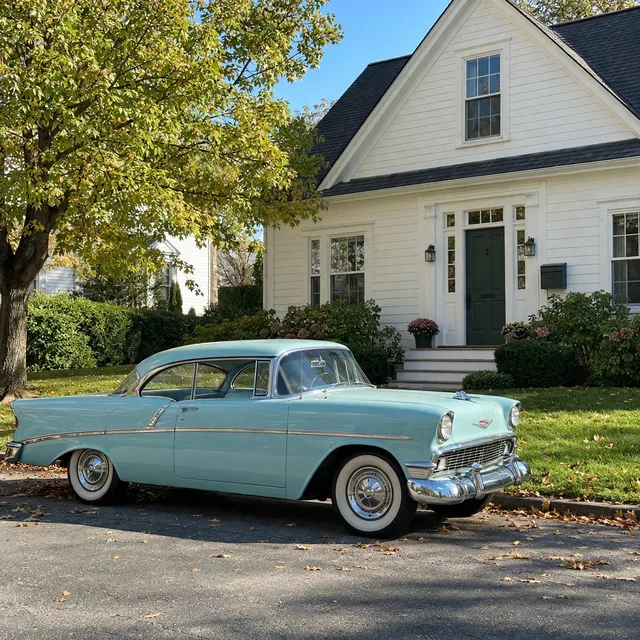
Exact prompt we ran
Colorize this black and white photo with natural, realistic colors. Keep everything else exactly the same: the car, the house, the door, the tree, the street and the light. Do not add or remove anything.
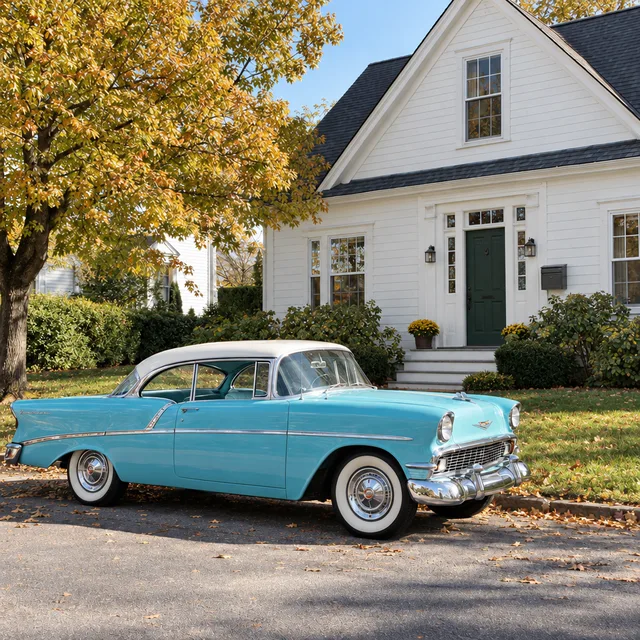
Exact prompt we ran
Colorize this black and white photo with natural, realistic colors. Keep everything else exactly the same: the car, the house, the door, the tree, the street and the light. Do not add or remove anything.
Prompt we ran
Colorize this black and white photo with natural, realistic colors. The car is pastel pink, the front door is bright blue, the mailbox is red and the tree has orange autumn leaves. Keep everything else exactly the same: the car, the house, the door, the tree, the street and the light. Do not add or remove anything.
Suggested model: Nano Banana 2.1
Colors that were in fashion when the photo was taken are not what a model expects today. If you know them, say them.
2.A portrait: right skin, wrong sweater
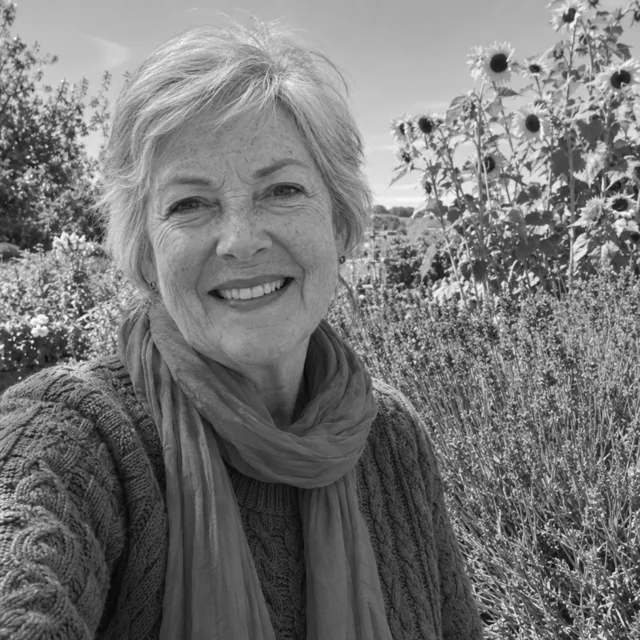
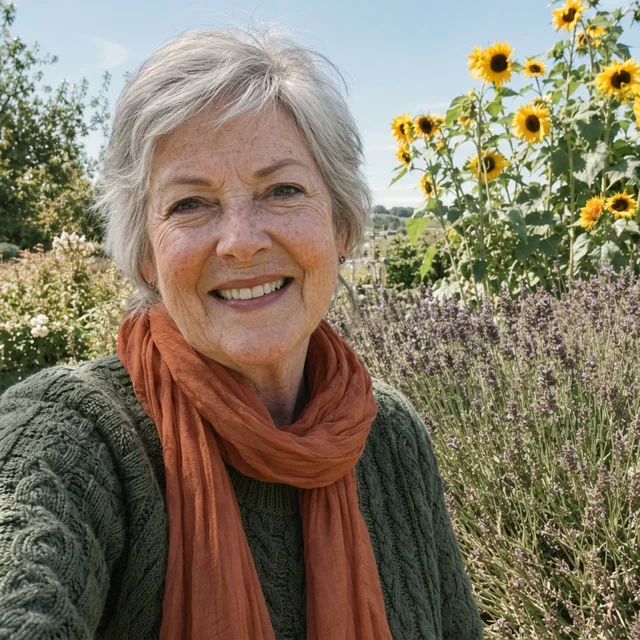
Skin, silver hair, sky and sunflowers came back natural on every model. The emerald sweater did not: dark olive on Nano Banana 2.1, beige on Muse Image, blue on GPT Image 2.5. The coral scarf came back orange or coral, close enough.
Exact prompt we ran
Colorize this black and white photo with natural, realistic colors. Keep everything else exactly the same: her face, expression, hair, clothes, the garden and the light. Do not add or remove anything.
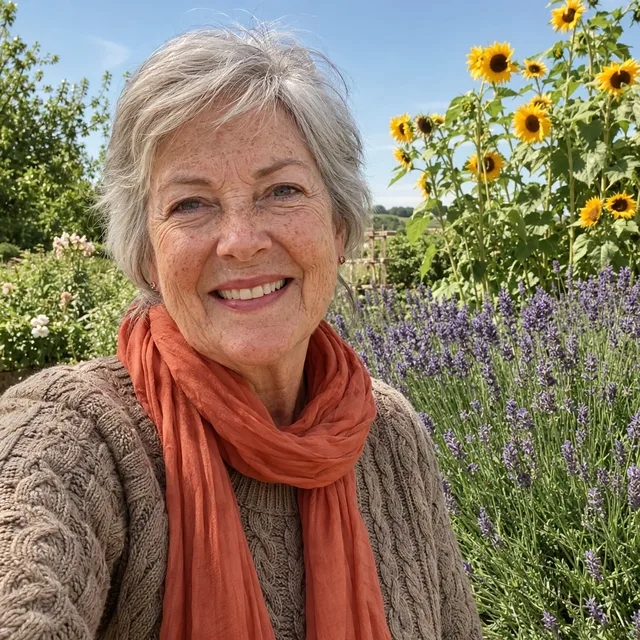
Exact prompt we ran
Colorize this black and white photo with natural, realistic colors. Keep everything else exactly the same: her face, expression, hair, clothes, the garden and the light. Do not add or remove anything.
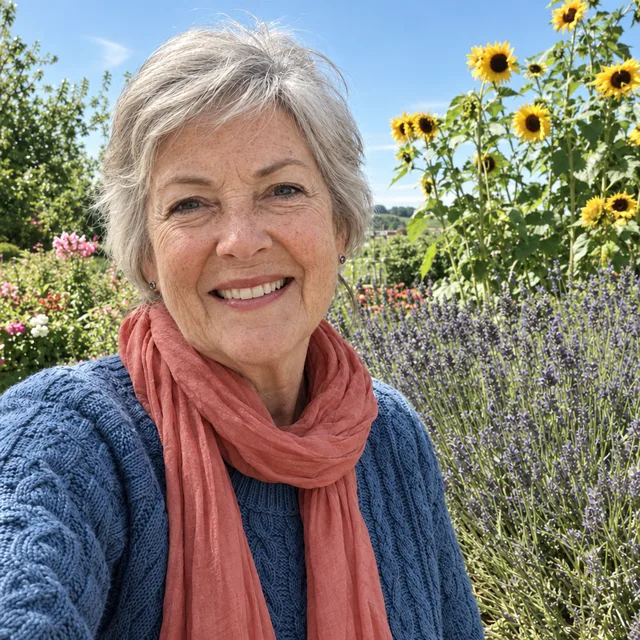
Exact prompt we ran
Colorize this black and white photo with natural, realistic colors. Keep everything else exactly the same: her face, expression, hair, clothes, the garden and the light. Do not add or remove anything.
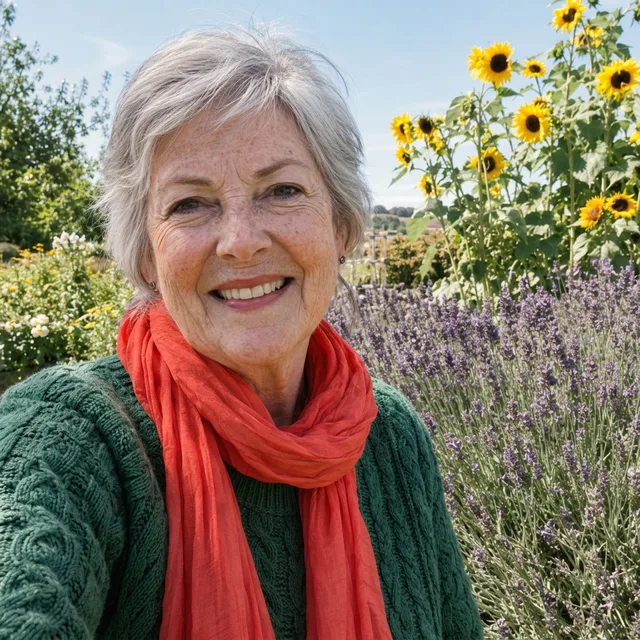
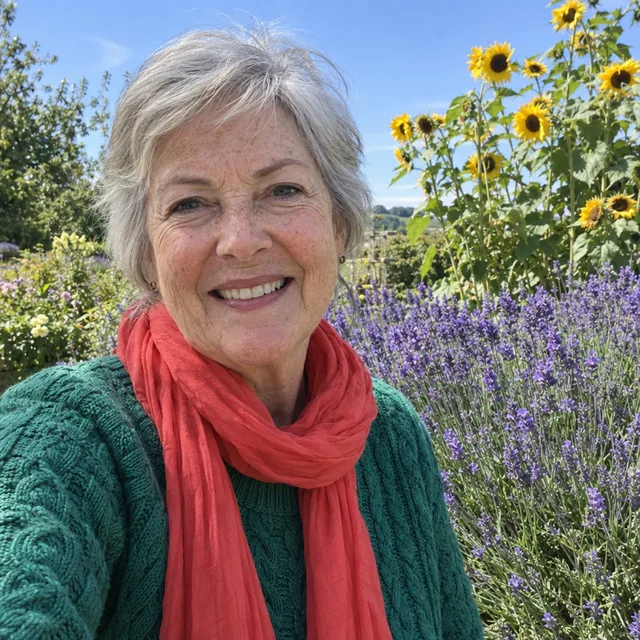
Prompt we ran
Colorize this black and white photo with natural, realistic colors. Her sweater is emerald green, her scarf is coral red, the flowers behind her are purple lavender and yellow sunflowers. Keep everything else exactly the same: her face, expression, hair, clothes, the garden and the light. Do not add or remove anything.
Suggested model: Nano Banana 2.1
3.A shop front with a sign
Every model kept the sign “Café Lumière” letter for letter, accents included. None guessed the colors: the turquoise front came back green or blue, the red and white awning green or blue and white, the yellow bicycle cream, the orange chairs green or tan.
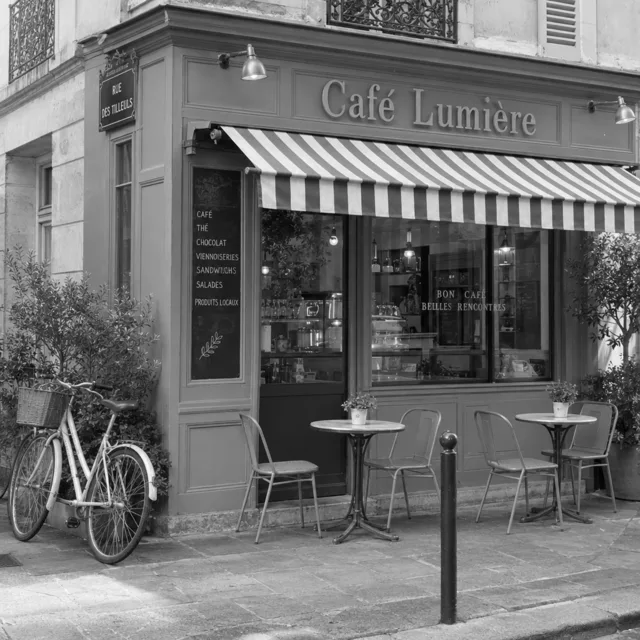
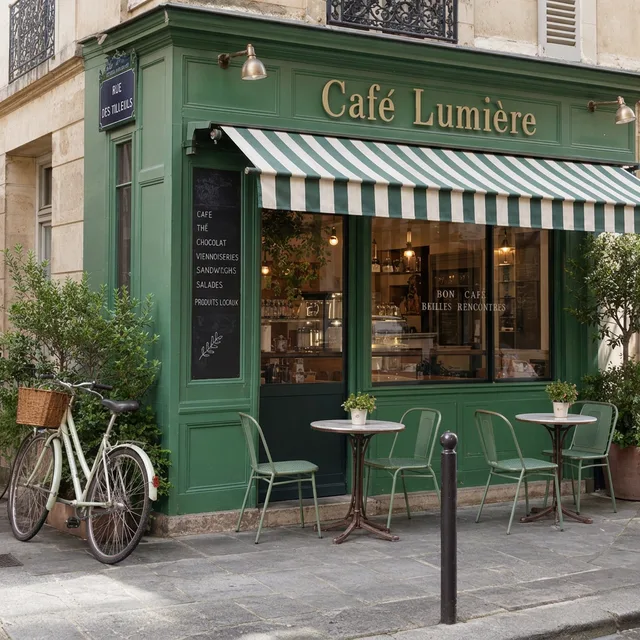
Exact prompt we ran
Colorize this black and white photo with natural, realistic colors. Keep everything else exactly the same: the shop front, the sign and its words, the awning, the tables and chairs, the bicycle and the light. Do not add or remove anything.
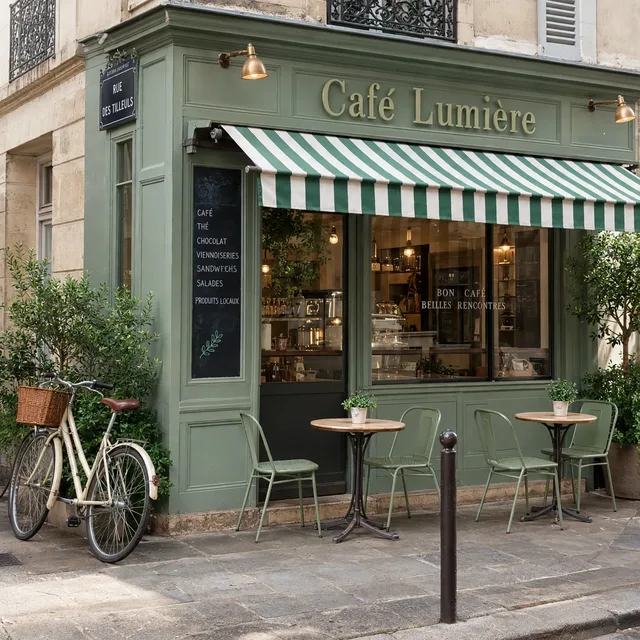
Exact prompt we ran
Colorize this black and white photo with natural, realistic colors. Keep everything else exactly the same: the shop front, the sign and its words, the awning, the tables and chairs, the bicycle and the light. Do not add or remove anything.
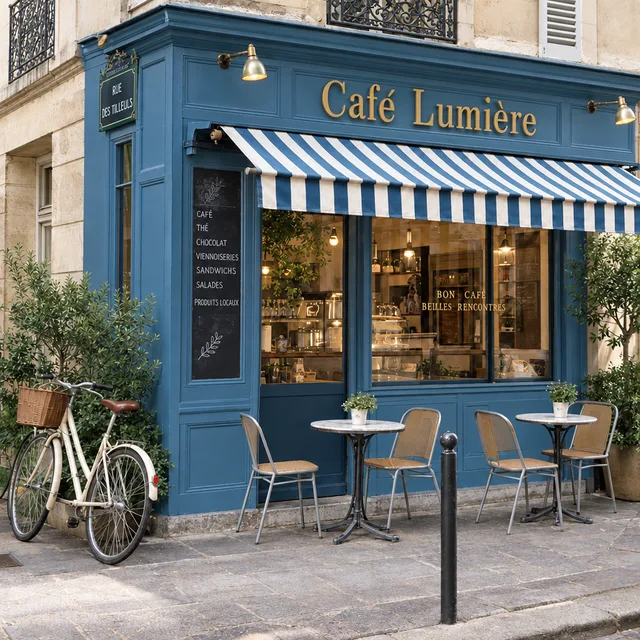
Exact prompt we ran
Colorize this black and white photo with natural, realistic colors. Keep everything else exactly the same: the shop front, the sign and its words, the awning, the tables and chairs, the bicycle and the light. Do not add or remove anything.
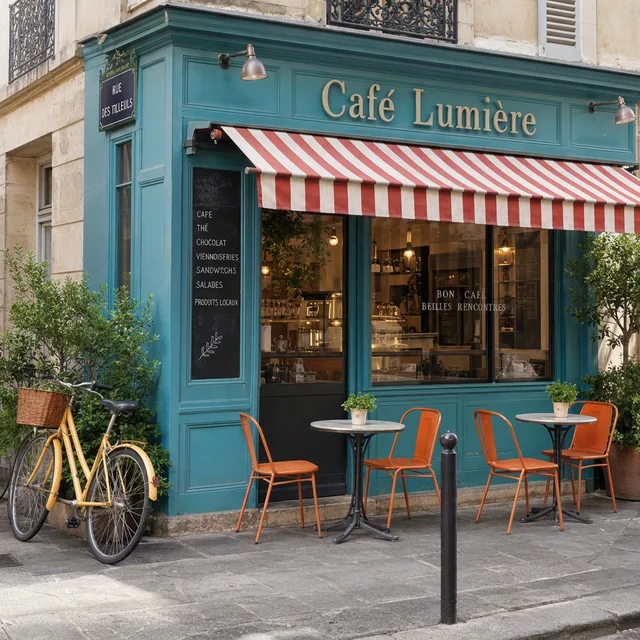
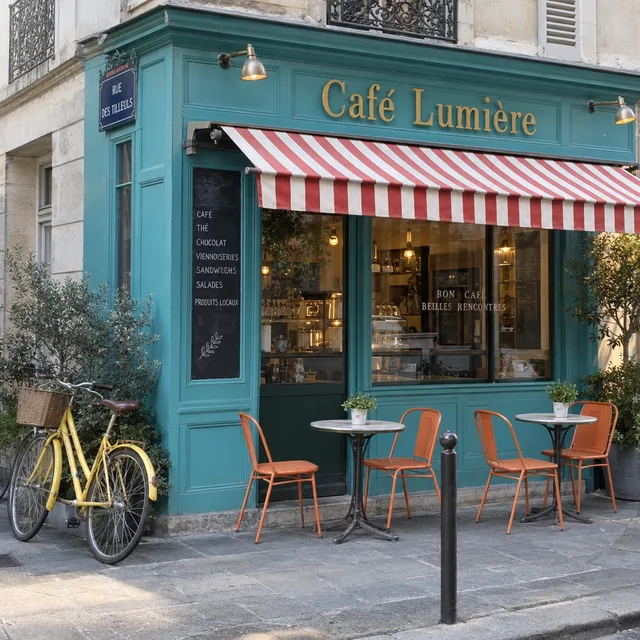
Prompt we ran
Colorize this black and white photo with natural, realistic colors. The shop front is turquoise, the awning has red and white stripes, the chairs are orange and the bicycle is yellow. Keep everything else exactly the same: the shop front, the sign and its words, the awning, the tables and chairs, the bicycle and the light. Do not add or remove anything.
Suggested model: Nano Banana 2.1
4.An old sepia print with grain
We gave this one a brown tint and film grain, like a faded print. Every model removed both and returned full color, not sepia. The navy floral dress came back right everywhere, because dark blue reads as dark gray. The mustard cardigan did not: beige, gray or gray-blue. GPT Image 2.5 also turned his beige trousers into blue jeans.
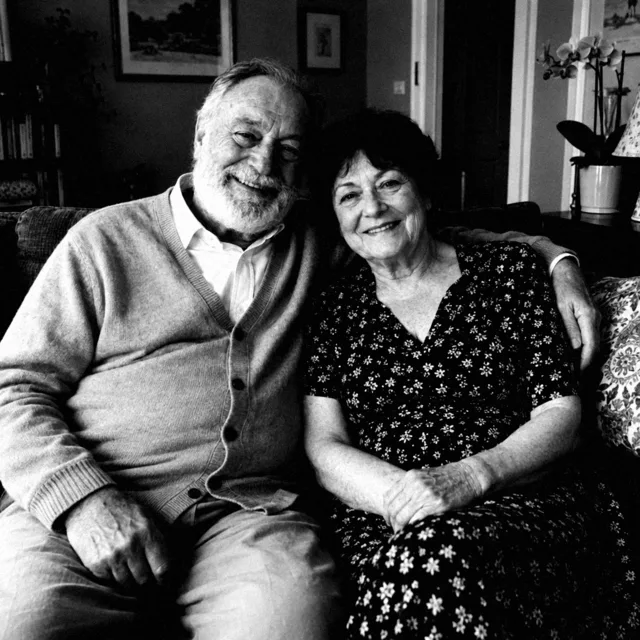
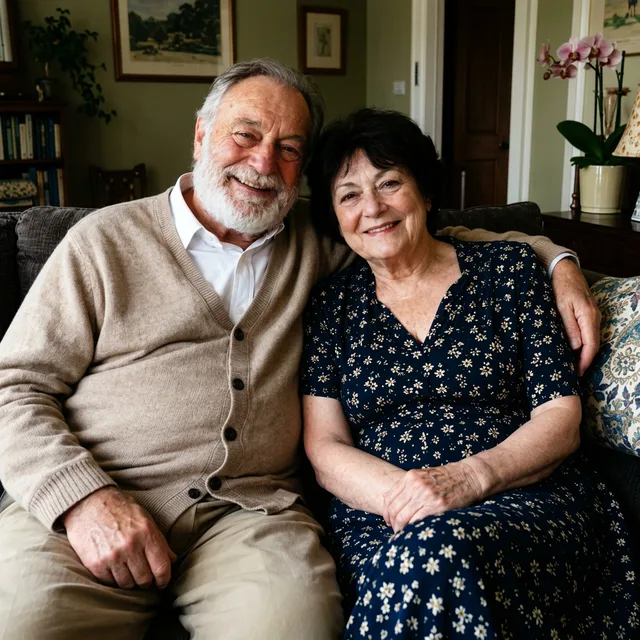
Exact prompt we ran
Colorize this old sepia photo with natural, realistic colors, and remove the brown tint and the grain. Keep everything else exactly the same: their faces, expressions, hair, clothes, the room and the light. Do not add or remove anything.
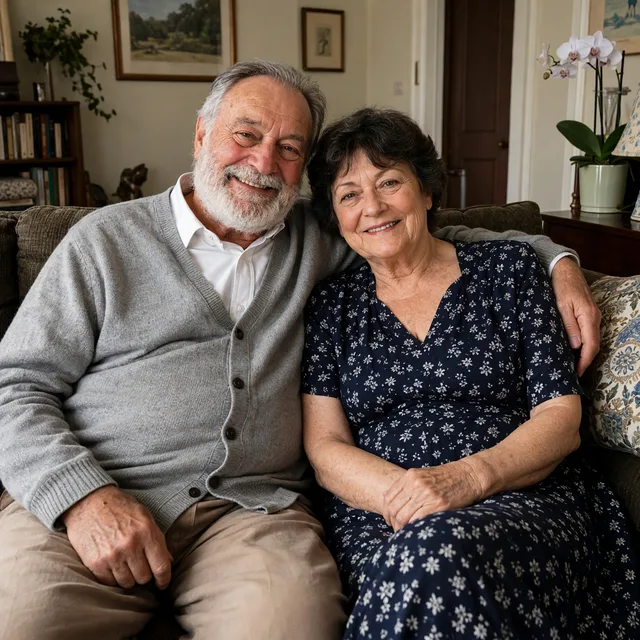
Exact prompt we ran
Colorize this old sepia photo with natural, realistic colors, and remove the brown tint and the grain. Keep everything else exactly the same: their faces, expressions, hair, clothes, the room and the light. Do not add or remove anything.
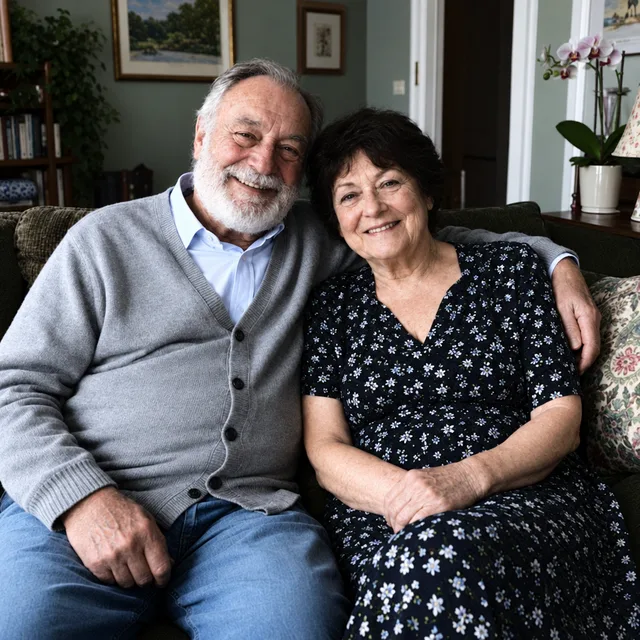
Exact prompt we ran
Colorize this old sepia photo with natural, realistic colors, and remove the brown tint and the grain. Keep everything else exactly the same: their faces, expressions, hair, clothes, the room and the light. Do not add or remove anything.
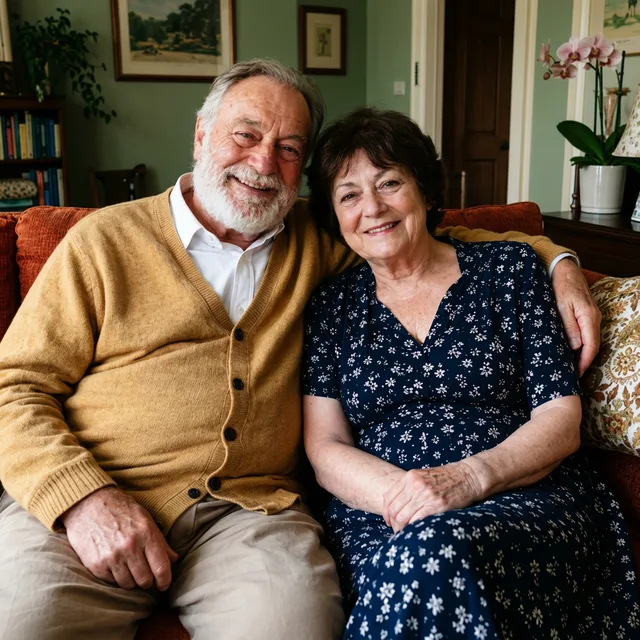
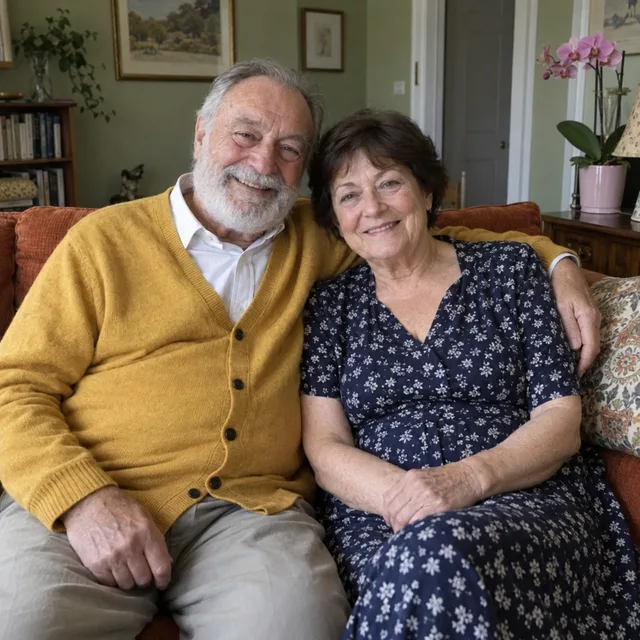
Prompt we ran
Colorize this old sepia photo with natural, realistic colors, and remove the brown tint and the grain. His cardigan is mustard yellow, her dress is navy blue with white flowers, the sofa is burnt orange and the wallpaper is sage green. Keep everything else exactly the same: their faces, expressions, hair, clothes, the room and the light. Do not add or remove anything.
Suggested model: Nano Banana 2.1
If the print is damaged as well as faded, restore it first and colorize the restored copy, so the model is not guessing through scratches.
Check before you use it
- Every color you did not name is a guess. Gray only records how light or dark a color was, so pink, light blue and pale green can all come back as the same shade.
- Faces stayed the same people in our tests, and skin came back natural, sometimes a little warm. Compare eyes and teeth before you share it.
- Look at clothes and objects you did not mention: a model can change more than the color, as when beige trousers came back as jeans.
- Words on signs stayed exactly the same in our tests. Check them anyway.
- Label it as colorized when you share a family or archive photo. The colors you did not know are the model’s choice, not a record.
Which model to use
Every model runs in the same editor and draws from the same credits. Prices are for one edit in the web app.
| Model | Credits per edit | On Starter | Use it for |
|---|---|---|---|
| Muse Imageone size, about 2.5 MP | 2 | $0.038 | Cheapest; natural colors and faces kept, but its guesses were as wrong as the others’. |
| Nano Banana 2.11K | 9 | $0.171 | Our pick: with the colors named it matched all four real photos. 14 credits at 2K for a larger file. |
| GPT Image 2.5high quality | 11 | $0.209 | Brightest colors; it changed beige trousers into jeans, so check clothes. |
The editor shows the credit cost before you generate. Prices checked .
What it costs
One edit costs 2 credits on Muse Image, 9 on Nano Banana 2.1 at 1K and 11 on GPT Image 2.5. On the Starter plan ($19 for 1,000 credits a month) that is $0.038 to $0.209 per photo.
Every edit needs a paid plan. Plans start at $19/month. Unused subscription credits roll over, downloads carry no watermark, and paid plans include a commercial license.
Frequently asked questions
How do I colorize a black and white photo?
Upload it to the editor and write “Colorize this black and white photo with natural, realistic colors”, then name every color you know and end with “Keep everything else exactly the same. Do not add or remove anything.” Compare the result with the original before you download it.
Are AI colors accurate?
Only the ones you name. Black and white keeps how light a color was, not which color it was, so the model picks a likely one. In our tests the models got skin, sky and plants right, and got a pink car, a red awning, an emerald sweater and a mustard cardigan wrong until we named them.
Can I colorize an old sepia photo?
Yes. Add “remove the brown tint and the grain” to the prompt. On our grainy sepia print, all three models removed the tint and the grain and returned full color.
Will faces change?
In our runs every face stayed the same person, with natural skin that was sometimes a little warm. The image is redrawn, though, so compare faces closely before you share it.
Should I restore the photo first?
If it has scratches, tears or stains, yes: restore it, then colorize the restored copy. Doing both in one prompt gives the model more to guess.
How much does it cost? Is there a free option?
One edit costs 2 credits on Muse Image, 9 on Nano Banana 2.1 at 1K or 11 on GPT Image 2.5. AI Media Studio has no free tier. Every edit needs a paid plan. Plans start at $19/month.
Uploads are processed by the AI provider that runs the model you pick. Retention, processors and deletion requests are covered in the privacy policy.