AI Christmas card
AI Christmas card: turn your own photo into a family card
Upload a family, couple or pet photo, describe the card (colour, border, decorations), put the greeting in quotation marks and end with what must stay the same. We made seven cards this way and every greeting came out spelled correctly. The text is drawn by the image model, not typed in, so read it letter by letter. One card costs 11 credits on GPT Image 2.5 or 9 on Nano Banana 2.1, and you see the cost before you generate.
Every edit needs a paid plan. Plans start at $19/month.
How do I make a Christmas card from my photo?
- 01
Pick the photo
Sharp, every face visible, nobody cut off at the edge. Use the original file: the card is built around it, so a small screenshot makes a small card.
- 02
Describe the card
Background colour, border, where the photo sits and a few decorations: “a deep red card with a thin gold border and small white snowflakes”. One style per card works better than a list of ideas.
- 03
Write the greeting in quotes
Put the exact words in quotation marks and say where they go and in what kind of font. Short greetings are safest; we also tested a two-line message and it came out right.
- 04
Check, then print or send
Read the greeting letter by letter and compare every face with the original. Download the card as an image to send, or check the pixel size and format before you order prints.
7 Christmas cards from our own photos
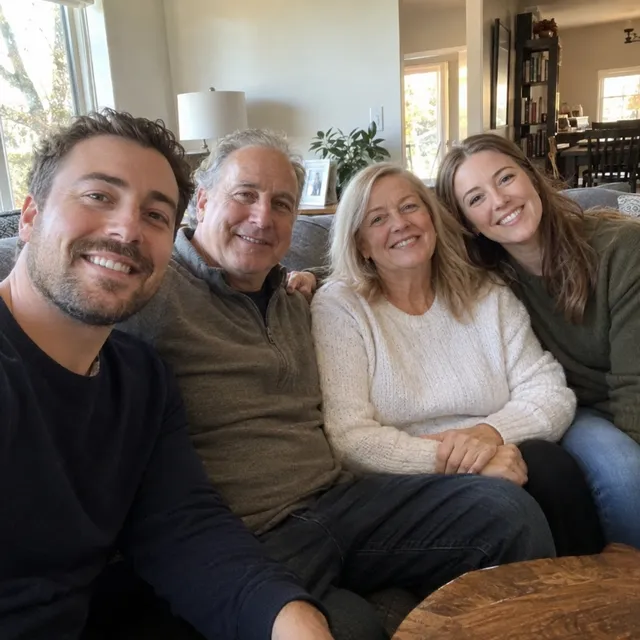
Each card starts from a synthetic photo. The prompt card is the exact prompt we ran; copy it, change the names and the greeting, and use your own photo.
1.Classic family Christmas card, on two models
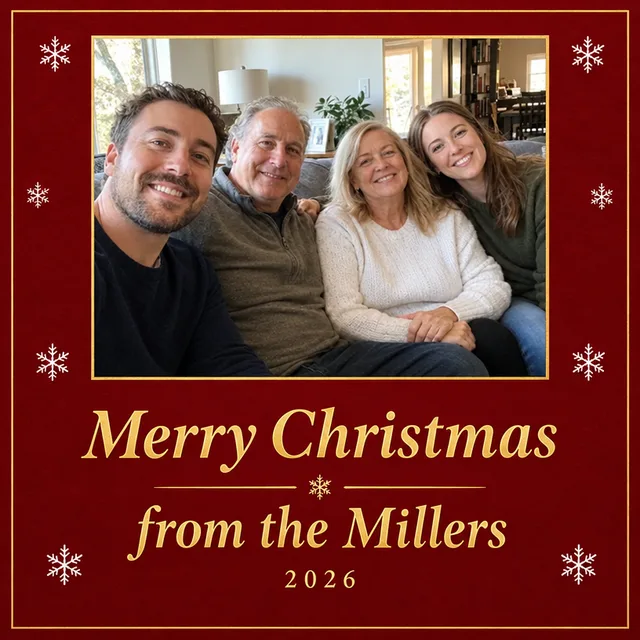
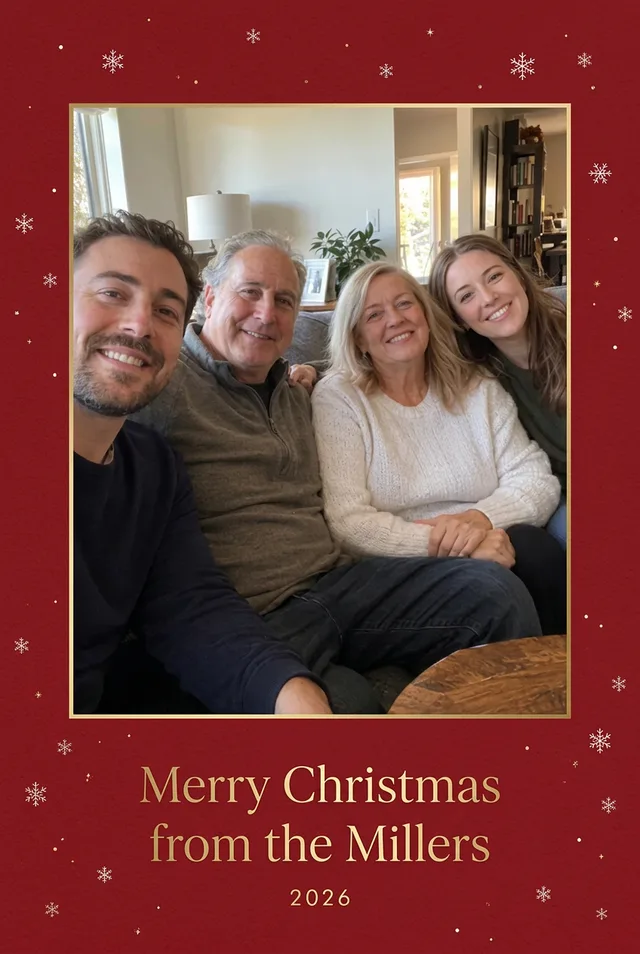
Red and gold with the family name and the year. Both models wrote the greeting correctly and kept all four faces. We asked for a portrait card: Nano Banana 2.1 returned one, GPT Image 2.5 returned a square card with a cleaner layout.
Prompt we ran
Turn this photo into a portrait-format Christmas card: place the photo in the upper part on a deep red card with a thin gold border, add small white snowflakes around it, and below the photo write "Merry Christmas from the Millers" in an elegant gold serif font and "2026" underneath in smaller letters. Keep all four people exactly as they are: same faces, expressions, hair, number of people and poses.
Suggested model: GPT Image 2.5
If you need a specific shape, such as 5 × 7 inches, set the aspect ratio in the editor and check the result; a model may ignore a shape written only in the prompt.
2.Couple card with a longer message
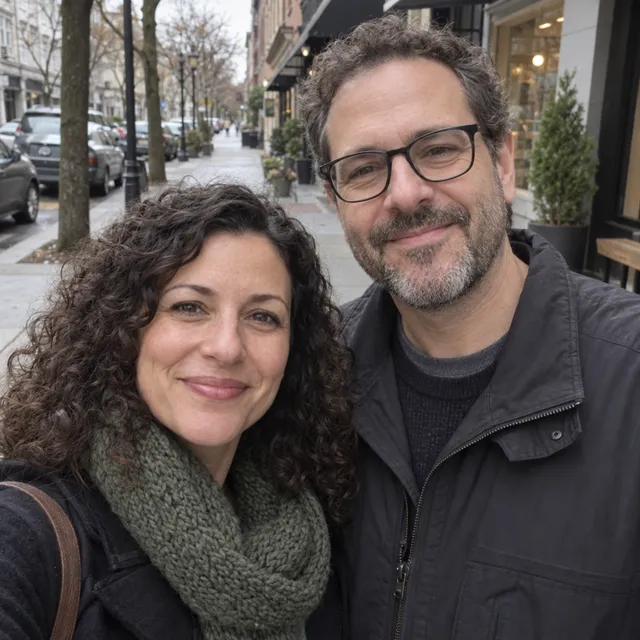
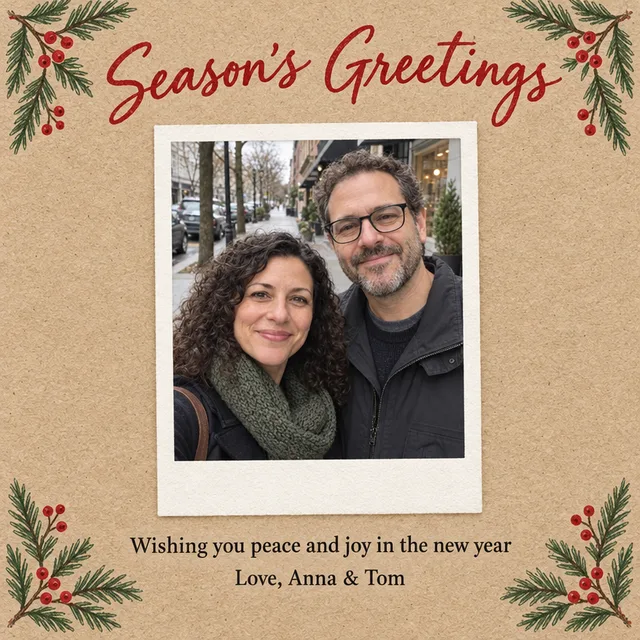
Kraft paper, pine branches and a polaroid frame, with a heading and a two-line message. All three lines came out exactly as written, apostrophe and ampersand included.
Prompt we ran
Turn this photo into a portrait-format holiday card on textured kraft paper with hand-drawn pine branches and red berries in the corners. Put the photo in a white polaroid-style frame in the centre. Above it write "Season's Greetings" in a red handwritten script. Below it write, in a simple dark serif font, on two lines: "Wishing you peace and joy in the new year" and "Love, Anna & Tom". Keep both people exactly as they are: same faces, expressions, glasses, hair and clothes.
Suggested model: GPT Image 2.5
3.Card from your dog
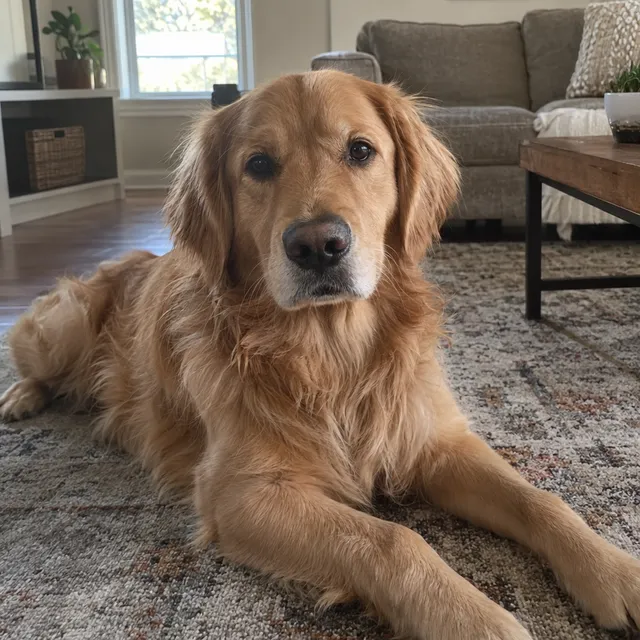
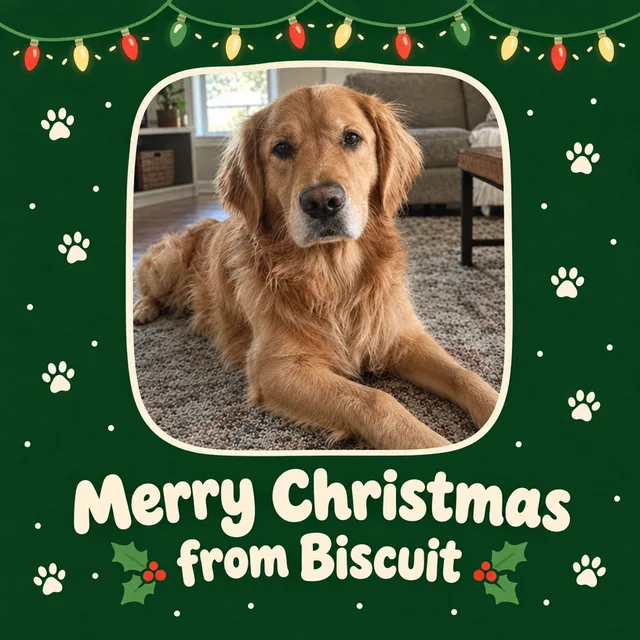
A card signed by the pet. Bold, rounded lettering suits a playful card and is easy to read in a small thumbnail.
Prompt we ran
Turn this photo into a playful portrait-format Christmas card: the dog's photo in a rounded frame on a dark green background with small white paw prints and string lights along the top, and at the bottom the words "Merry Christmas from Biscuit" in a bold rounded cream font. Keep the dog exactly the same: breed, face, fur colour and pose.
Suggested model: GPT Image 2.5
4.Minimal card from one portrait
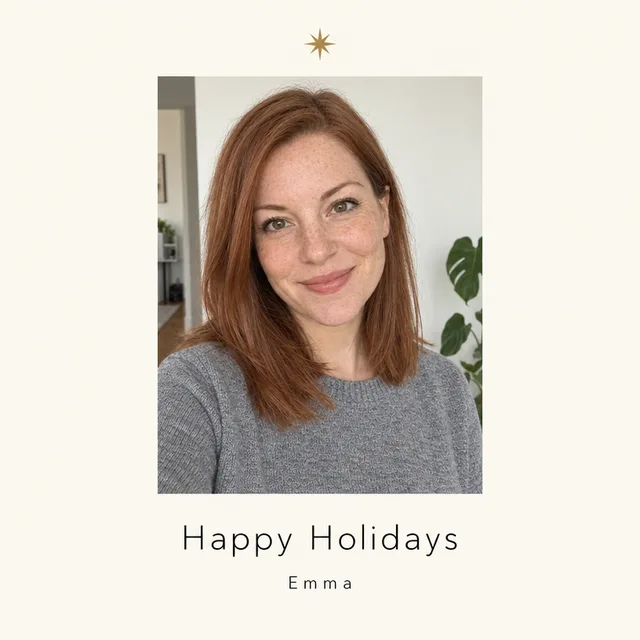
For a single person or a business-style greeting: lots of space, one small detail, a thin font.

Prompt we ran
Turn this photo into a minimal, modern portrait-format holiday card: a cream background, the photo as a tall rectangle in the upper two thirds, a small gold star above it, and below it "Happy Holidays" in a thin black sans-serif font with "Emma" underneath in smaller letters. Keep her face, freckles, expression, hair and sweater exactly the same.
Suggested model: GPT Image 2.5
5.Watercolour family card
The family as a painted illustration. It hides small differences in faces and is the better choice for a card with children on it.
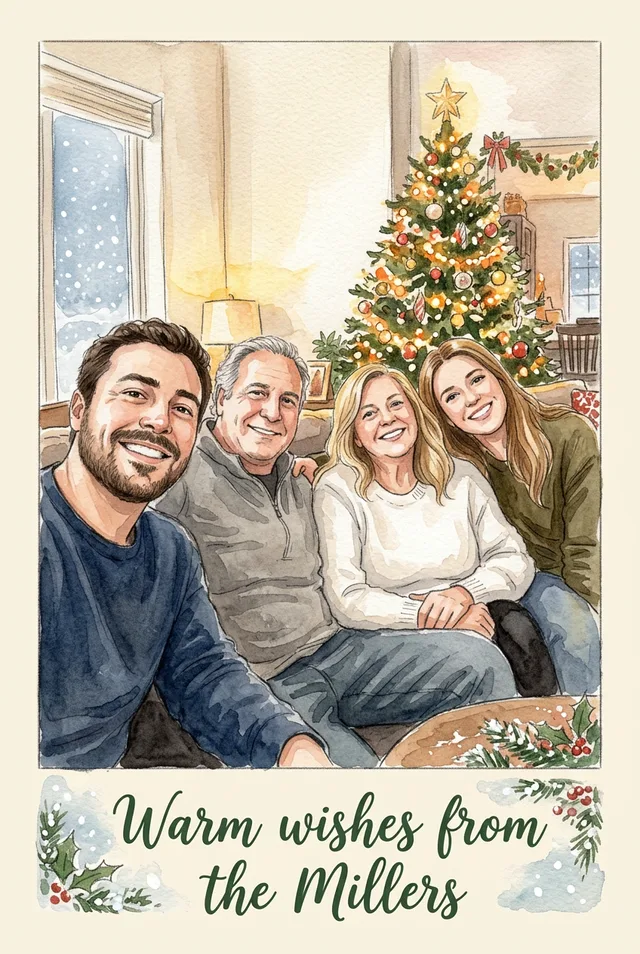
Prompt we ran
Turn this family photo into a hand-painted watercolour Christmas card: the four people as a warm watercolour illustration in front of a decorated tree, soft snow, a cream paper border, and at the bottom "Warm wishes from the Millers" in a dark green hand-lettered font. Keep each person recognisable: hair colour, faces, clothing colours and seating order.
Suggested model: Nano Banana 2.1
6.Two photos on one card
The family and the dog were photographed separately. Upload both photos and say which goes where.
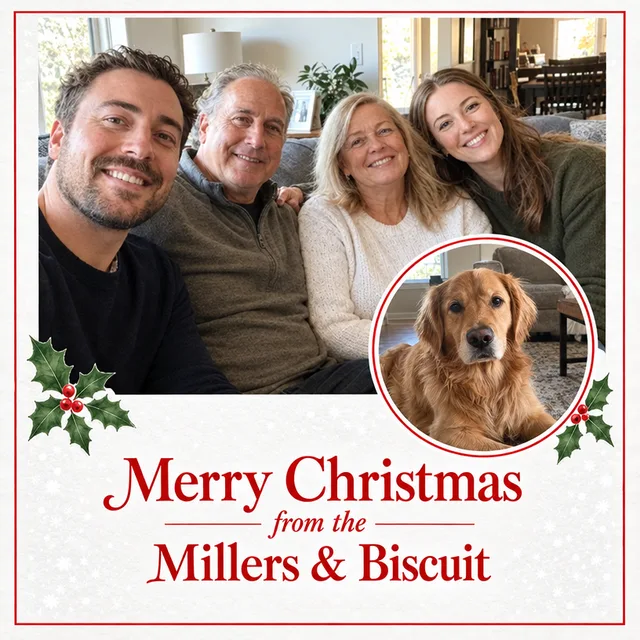
Prompt we ran
Make a portrait-format Christmas photo card from these two photos: the family photo (first image) large at the top and the dog photo (second image) as a smaller round inset overlapping its lower right corner, on a snowy white card with a thin red border and a few holly leaves. At the bottom write "Merry Christmas from the Millers & Biscuit" in an elegant red serif font. Keep the four people and the dog exactly as they are: same faces, expressions, fur and poses.
Suggested model: GPT Image 2.5
Name each photo by its order (“first image”, “second image”) so the model knows which is the main photo.
Check before you print or send
- Read the greeting letter by letter, including names, apostrophes and the year. All seven of ours were right, but a single wrong letter is the most common way an AI card fails; regenerate or switch model if you find one.
- Compare every face with the original at full size. Cards shrink the photo, so check the eyes and smiles closely.
- Check the shape and size. GPT Image 2.5 gave us square cards although we asked for portrait ones. For prints, generate with Nano Banana 2.1 at 2K or 4K and confirm the pixel size your print service needs.
- The editor makes an image, not a print file: there is no bleed, fold line or back page. Ask your print service which size and margins it needs.
- A template maker such as Canva is faster if you want to place and retype text yourself or lay out a folded card. Use an AI card when you want the design built around your photo.
Which model to use
Every model runs in the same editor and draws from the same credits. Prices are for one edit in the web app.
| Model | Credits per edit | On Starter | Use it for |
|---|---|---|---|
| Muse Imageone size, about 2.5 MP | 2 | $0.038 | A cheap way to try a background or colour; we did not test it for cards with text. |
| Nano Banana 2.11K | 9 | $0.171 | Portrait cards and illustrated styles; kept our 2:3 request. 14 credits at 2K and 31 at 4K for print. |
| GPT Image 2.5high quality | 11 | $0.209 | Cleanest lettering and layout in our tests, including a two-line message; returned square cards. |
The editor shows the credit cost before you generate. Prices checked .
What it costs
One card costs 11 credits on GPT Image 2.5 or 9 on Nano Banana 2.1 at 1K. On the Starter plan ($19 for 1,000 credits a month) that is $0.171 to $0.209 per card design; printing is paid separately to your print service.
Every edit needs a paid plan. Plans start at $19/month. Unused subscription credits roll over, downloads carry no watermark, and paid plans include a commercial license.
Frequently asked questions
How do I make a Christmas card with my own photo?
Upload the photo to the editor, describe the card design, write the greeting in quotation marks and end with what must not change: faces, number of people, poses. Check the greeting and faces, then download the card.
Is it a Christmas card maker with templates?
No. There are no templates or text boxes: you describe the card and the model draws it around your photo, greeting included. If you want to drag text around or design a folded card, a template maker such as Canva is the faster tool.
Will the greeting be spelled correctly?
In our seven cards every greeting was right, including a two-line message, an apostrophe and an ampersand. It is not guaranteed, because the model draws the letters. Read the text letter by letter and regenerate if anything is off.
Can I print the card?
Yes, as a photo print or flat card. Check the pixel size first: for larger prints, make the card with Nano Banana 2.1 at 2K (14 credits) or 4K (31 credits). The result is an image, so add bleed or margins the way your print service asks.
Can I put two photos on one card?
Yes. Upload both and say which is the main photo and where the other goes, for example a round inset in a corner. Our family and dog card placed both as asked.
Is it safe to make a card with my children’s photo?
Only upload photos of children as their parent or guardian, or with their consent, and consider an illustrated style such as watercolour. Images stay in your workspace until you share them, and you can delete them from your library.
How much does it cost? Is there a free option?
One card costs 11 credits on GPT Image 2.5 or 9 on Nano Banana 2.1 at 1K. AI Media Studio has no free tier. Every edit needs a paid plan. Plans start at $19/month.
Uploads are processed by the AI provider that runs the model you pick. Retention, processors and deletion requests are covered in the privacy policy.