AI outfit changer
AI outfit changer: change the clothes in your photo
Upload a photo, describe the outfit piece by piece (garment, colour, fabric, shoes) and end the prompt with “Change only her clothes” plus what must stay the same. To wear a specific garment, upload its product photo as a second image and say “the coat from the second image”. We ran 15 outfit changes on two people: every result kept the face, pose and background. One edit costs 2 credits on Muse Image, 9 on Nano Banana 2.1 or 11 on GPT Image 2.5, and you see the cost before you generate.
Every edit needs a paid plan. Plans start at $19/month.
How do I change the outfit in a photo?
- 01
Pick a clear photo
The whole outfit in frame, a natural pose and even light. A full-body photo lets you change shoes too; a waist-up photo is enough for a jacket, suit or shirt.
- 02
Describe each piece
Garment, colour, fabric and length: “a tailored navy trouser suit, a white silk blouse and black loafers” gives the model more than “something smart”.
- 03
Add the keep line
End with “Change only her clothes” and list what must stay: face, hair, pose, body shape, background, light. Without it, the model may also restyle the hair or the scene.
- 04
To wear a real garment, add its photo
Upload the product photo as a second image and refer to it by order: “Put the green coat from the second image on the woman in the first image.” Then compare the details (buttons, print, collar) with the product photo.
15 outfit changes with the prompts we ran
Every result starts from one of two synthetic photos. Open “Prompt we ran” under an image for the exact prompt, or copy the prompt card and describe your own outfit.
1.A work outfit, on three models
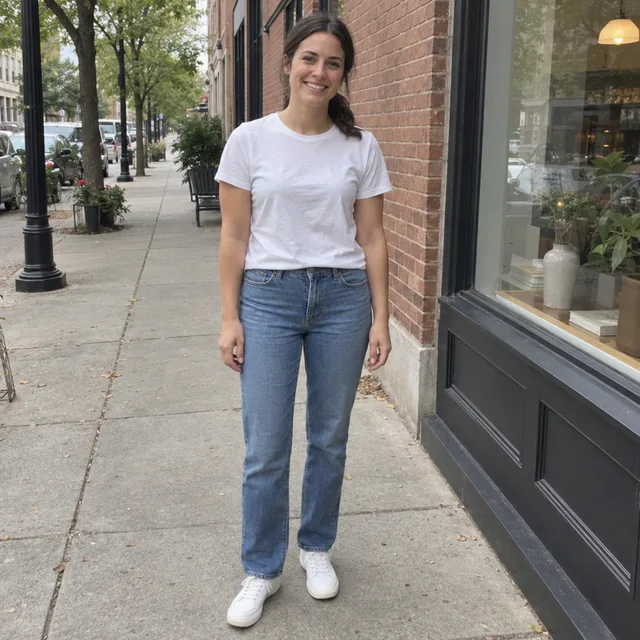
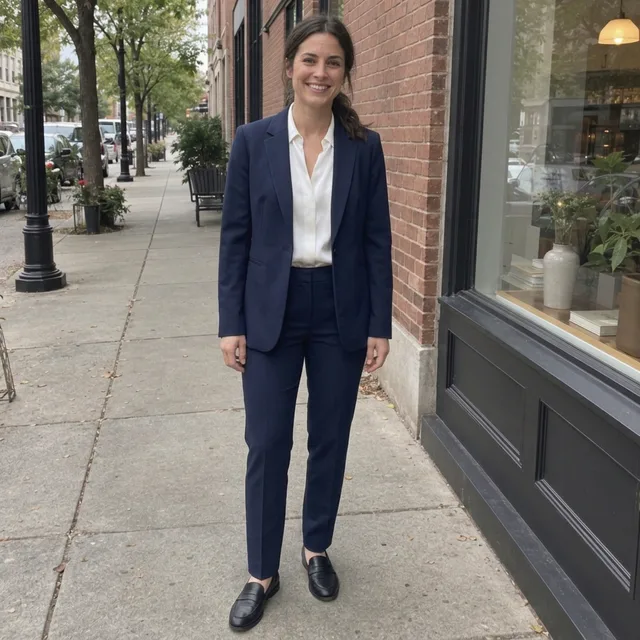
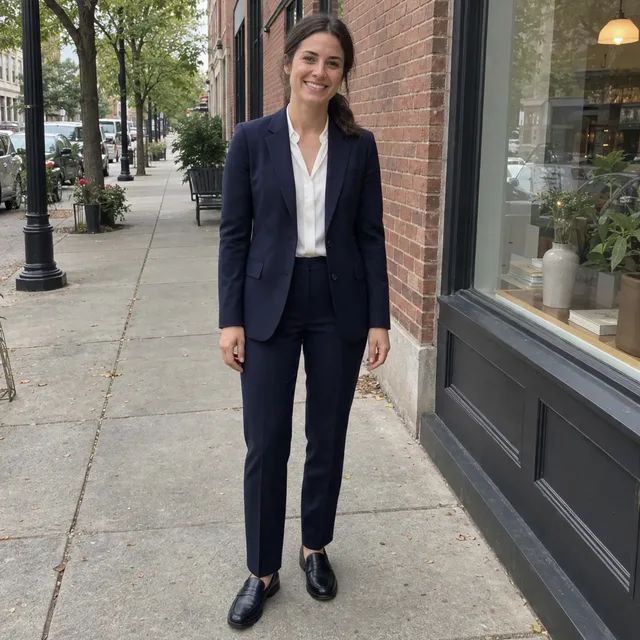
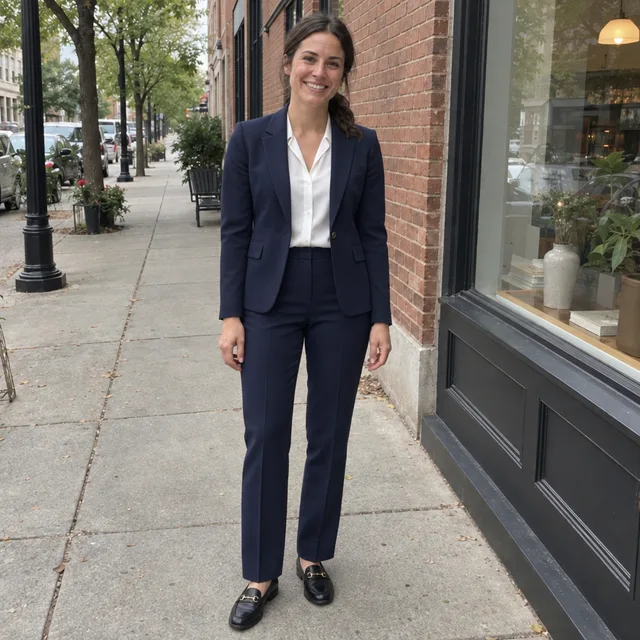
From t-shirt and jeans to a navy trouser suit. All three models dressed her as described and kept her face, ponytail, pose and the street. The results are almost interchangeable; GPT Image 2.5 added gold horsebit buckles to the loafers, which we did not ask for.
Prompt we ran
Dress her in a tailored navy trouser suit: a single-breasted blazer over a white silk blouse, matching navy trousers and black loafers. Keep her face, hair, pose, body shape, the street and the light exactly the same. Change only her clothes.
Suggested model: Nano Banana 2.1
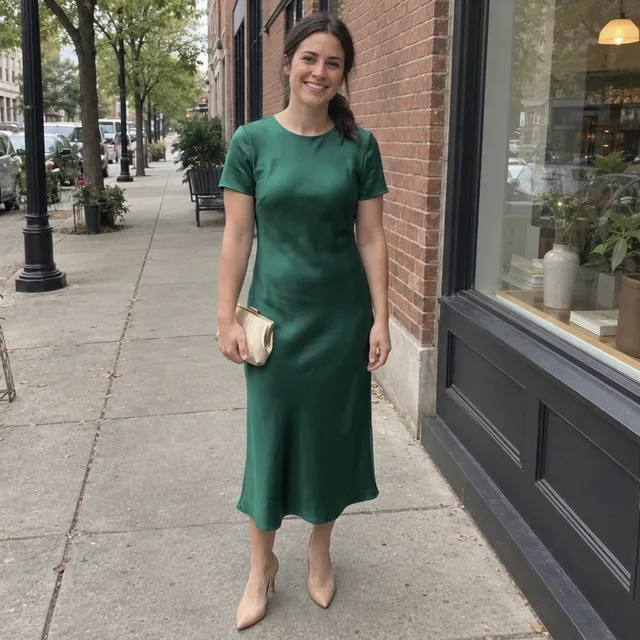
2.Summer, wedding guest and winter
The same photo dressed for three occasions. Each prompt named the garment, its colour, its length and the shoes, and each came back as described, down to the gold clutch in her right hand.
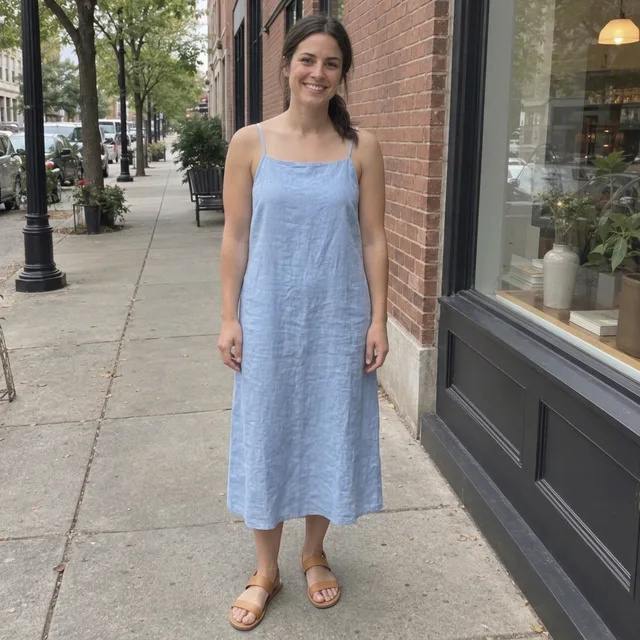
Exact prompt we ran
Dress her in a light blue linen sundress with thin straps that falls to mid-calf, and tan leather sandals. Keep her face, hair, pose, body shape, the street and the light exactly the same. Change only her clothes.
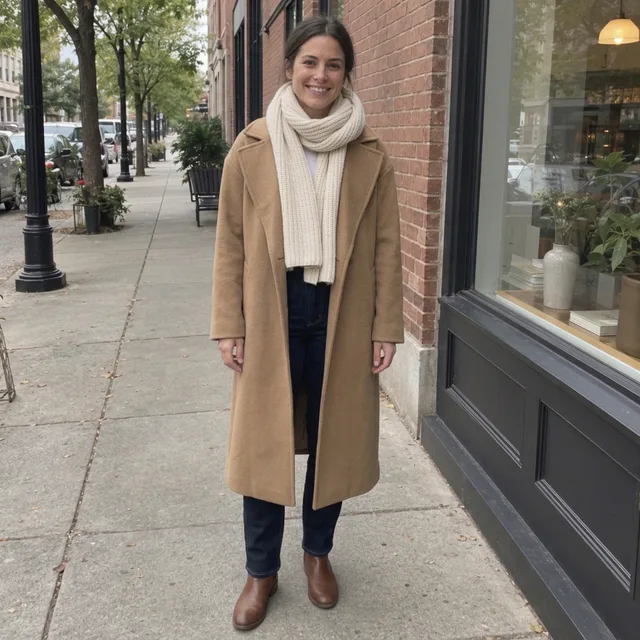
Exact prompt we ran
Dress her for winter in a long camel wool coat, a chunky cream knit scarf, dark jeans and brown leather ankle boots. Keep her face, hair, pose, body shape, the street and the light exactly the same. Change only her clothes.
Prompt we ran
Dress her as a wedding guest in an emerald green satin midi dress with short sleeves, nude heels and a small gold clutch in her right hand. Keep her face, hair, pose, body shape, the street and the light exactly the same. Change only her clothes.
Suggested model: Nano Banana 2.1
3.Change the color of clothes in a photo
The smallest change: one garment, new colour, same cut. Say which garment, the new colour, and that the cut and the rest stay the same. Both models changed only the t-shirt; the jeans and sneakers were untouched.
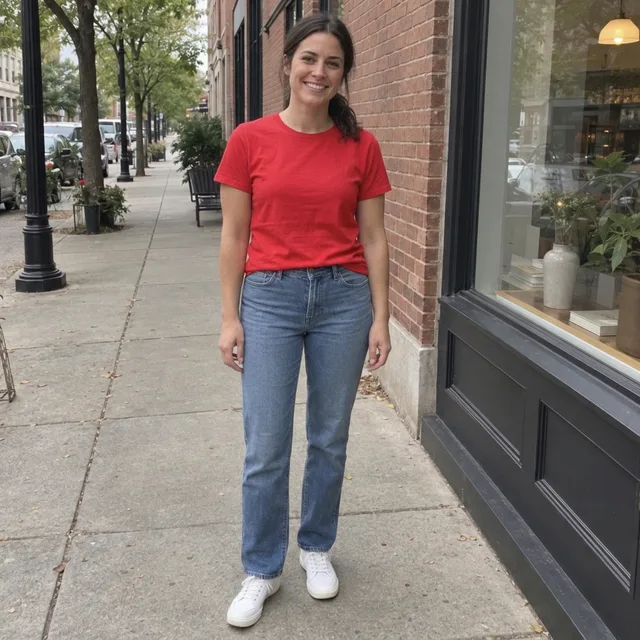
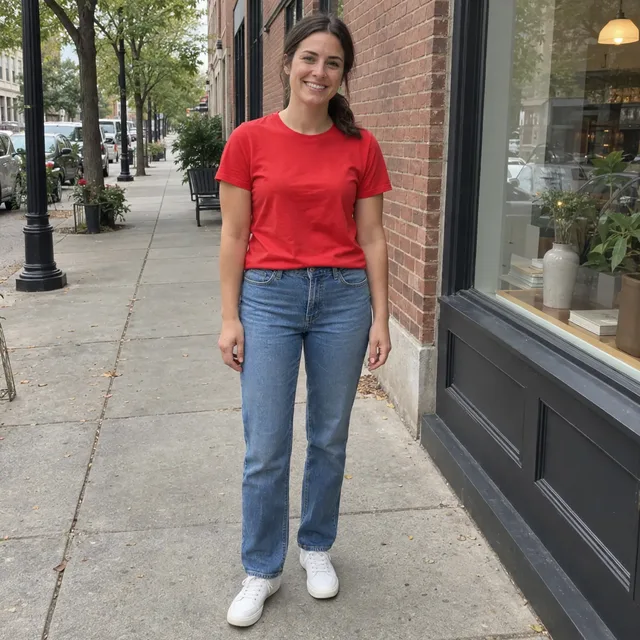
Prompt we ran
Change her white t-shirt to a bright red t-shirt. Keep the cut, the jeans, the sneakers and everything else exactly the same.
Suggested model: Muse Image
4.Try on a coat from a product photo
Upload your photo first and the garment second, then refer to them as “the first image” and “the second image”. Both models put on the green double-breasted coat with its six gold buttons, wide collar and length, and kept her face and the street.
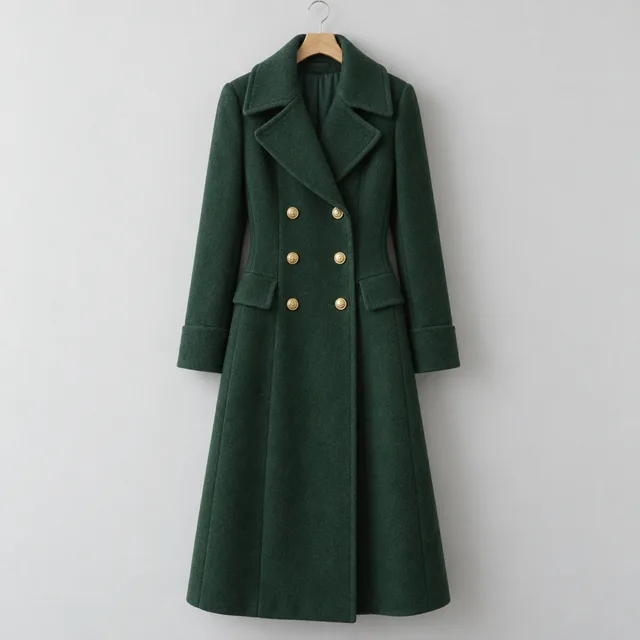
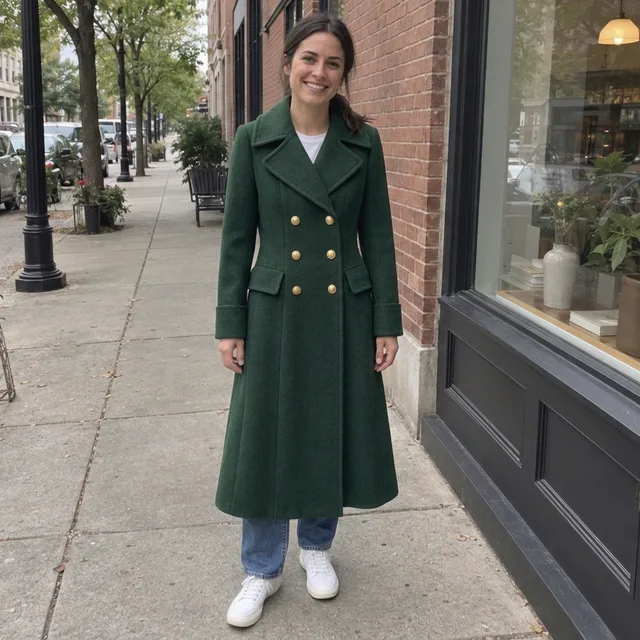
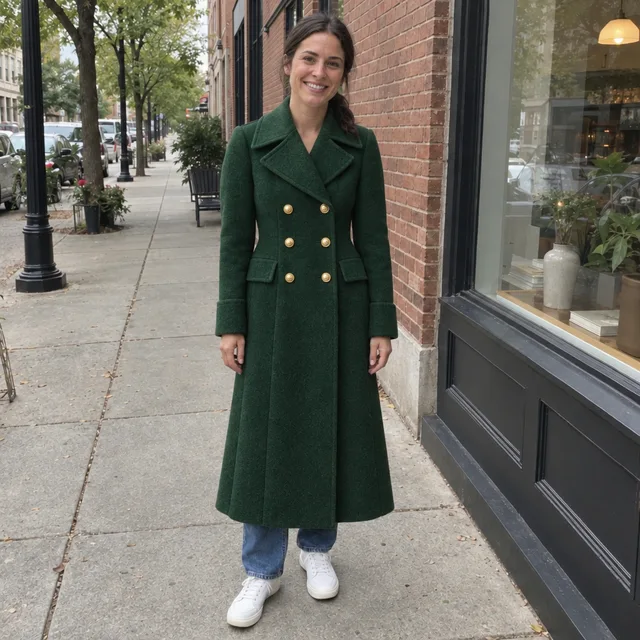
Prompt we ran
Put the green coat from the second image on the woman in the first image, worn closed over her outfit. Match the coat's colour, gold buttons, collar and length exactly. Keep her face, hair, pose, body shape, the street and the light exactly the same. Change only her clothes.
Suggested model: Nano Banana 2.1
This shows the look, not the fit. The model draws the garment on your body shape; it cannot tell you how a size will fit or drape.
5.Try on a patterned dress
A busy print is harder to copy than a plain colour. Both models kept the lemon-and-leaf print and the wrap shape; Nano Banana 2.1 kept the side tie, GPT Image 2.5 moved it to the front.
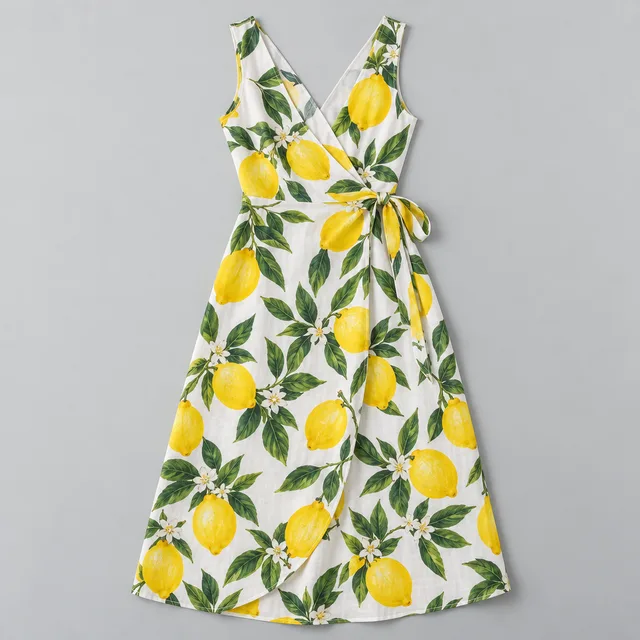
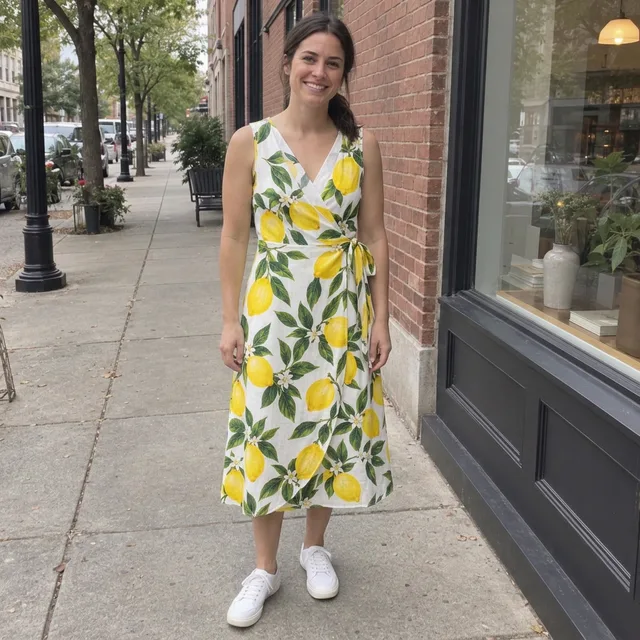
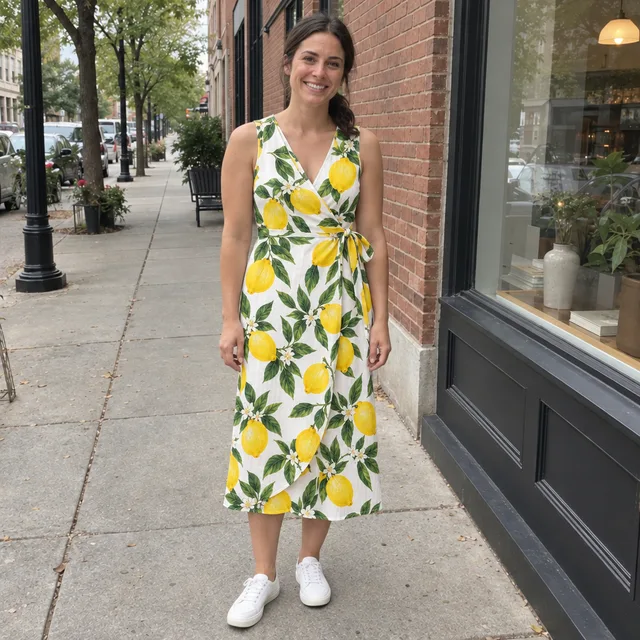
Prompt we ran
Dress the woman in the first image in the lemon-print wrap dress from the second image. Match the dress's print, colours and cut exactly, and give her white sneakers. Keep her face, hair, pose, body shape, the street and the light exactly the same. Change only her clothes.
Suggested model: Nano Banana 2.1
Compare small details with the product photo before you share the result as “this dress”: ties, buttons, hems and print scale can shift.
6.Men’s outfits: suit, tuxedo, denim jacket
A waist-up office photo in a hoodie, dressed three ways. His face, beard and the office stayed the same; the suit and tuxedo came with the shirt and tie we named.



Exact prompt we ran
Dress him in a black tuxedo with a white shirt and a black bow tie. Keep his face, hair, beard, expression, the office background and the light exactly the same. Change only his clothes.

Exact prompt we ran
Dress him in a light blue denim jacket over a plain white t-shirt. Keep his face, hair, beard, expression, the office background and the light exactly the same. Change only his clothes.
Prompt we ran
Dress him in a charcoal grey suit with a white shirt and a dark blue tie. Keep his face, hair, beard, expression, the office background and the light exactly the same. Change only his clothes.
Suggested model: Nano Banana 2.1
Before you use it
- End every prompt with “Change only her clothes” (or his) and name what must stay: face, hair, pose, body shape, background. With that line, all 15 of our results kept the person and the scene.
- Check what the model added. GPT Image 2.5 put gold buckles on loafers we described as plain black; name details you care about.
- For a real garment, compare buttons, ties, collar and print with the product photo. Our dress kept its print, but one model moved the tie.
- It shows a look, not a fit. The model cannot know how a size will sit on you.
- Only change clothes in photos of yourself or of people who agreed to it, and do not present an edited photo as real where that matters.
Which model to use
Every model runs in the same editor and draws from the same credits. Prices are for one edit in the web app.
| Model | Credits per edit | On Starter | Use it for |
|---|---|---|---|
| Muse Imageone size, about 2.5 MP | 2 | $0.038 | The cheapest way to try many outfits; matched Nano Banana on the suit and the colour change. |
| Nano Banana 2.11K | 9 | $0.171 | Our default: all 10 of its outfits, including both try-ons from a product photo. 14 credits at 2K. |
| GPT Image 2.5high quality | 11 | $0.209 | A second take on a try-on; it adds small details of its own, so check them. |
The editor shows the credit cost before you generate. Prices checked .
What it costs
One edit costs 2 credits on Muse Image, 9 on Nano Banana 2.1 at 1K and 11 on GPT Image 2.5. On the Starter plan ($19 for 1,000 credits a month) that is $0.038 to $0.209 per outfit; the three occasion outfits on Nano Banana 2.1 cost 27 credits.
Every edit needs a paid plan. Plans start at $19/month. Unused subscription credits roll over, downloads carry no watermark, and paid plans include a commercial license.
Frequently asked questions
How do I change the clothes in a photo with AI?
Upload the photo to the editor, describe the new outfit piece by piece (garment, colour, fabric, length, shoes) and end with “Change only her clothes” plus what must stay the same. Compare the result with your original, then download it.
Can I try on clothes from a product photo?
Yes. Upload your photo first and the product photo second, and refer to them by order: “Put the green coat from the second image on the woman in the first image.” In our tests both models matched a coat’s buttons and collar and a dress’s print. It shows the look, not how a size fits.
Will my face and pose stay the same?
In all 15 of our edits they did, because each prompt said to change only the clothes and named the face, hair, pose and background. It is not guaranteed: compare at full size, and start again from the original if anything changes.
How do I change the color of clothes in a photo?
Name the garment and the new colour, and keep the rest: “Change her white t-shirt to a bright red t-shirt. Keep the cut, the jeans, the sneakers and everything else exactly the same.” Both models we tried changed only the t-shirt.
Does it work for men’s outfits?
Yes. We dressed a man in a hoodie in a suit, a tuxedo and a denim jacket; his face, beard and the office stayed the same.
Can I use it for product photos of clothing I sell?
You can show a garment on a person, but the model redraws it: check that buttons, prints and cut still match what you sell before you use the image in a listing. Paid plans include a commercial license.
How much does it cost? Is there a free option?
One edit costs 2 credits on Muse Image, 9 on Nano Banana 2.1 at 1K or 11 on GPT Image 2.5. AI Media Studio has no free tier. Every edit needs a paid plan. Plans start at $19/month.
Uploads are processed by the AI provider that runs the model you pick. Retention, processors and deletion requests are covered in the privacy policy.