Turn photo into cartoon
Turn a photo into a cartoon with AI, and keep it looking like you
Upload a photo, name the cartoon style (3D animated film, flat 2D with bold outlines, anime, comic book, storybook watercolour) and end the prompt with the features that make the person recognisable: hair colour and length, eye colour, freckles, glasses, clothes. We turned one portrait into six styles, plus a family of four and a dog. The 3D style turned her grey-blue eyes brown on two models until we named the eye colour. One edit costs 2 credits on Muse Image, 9 on Nano Banana 2.1 or 11 on GPT Image 2.5, and you see the cost before you generate.
Every edit needs a paid plan. Plans start at $19/month.
How do I turn a photo into a cartoon?
- 01
Pick a clear photo
Faces visible and in focus, decent light. Cartoon styles simplify a face, so the features that are left (hair, eyes, glasses, freckles) need to be clear in the photo.
- 02
Name the style precisely
“A 3D animated film character render with soft rounded features” or “a flat 2D cartoon with bold black outlines and bright solid colours” gives a more predictable result than just “cartoon”.
- 03
List what makes the person recognisable
Hair colour and length, eye colour, freckles, glasses, beard, clothes. Stylised faces drift toward a generic look; whatever you name is what survives.
- 04
Compare, then try another style
Check the eyes and hair colour against the photo. To try a different style, start again from the original photo rather than from the cartoon.
13 cartoons from a portrait, a family and a dog
Every result starts from a synthetic photo. Open “Prompt we ran” under an image for the exact prompt, or copy the prompt card and swap in your own style and features.
1.3D animated character, on three models
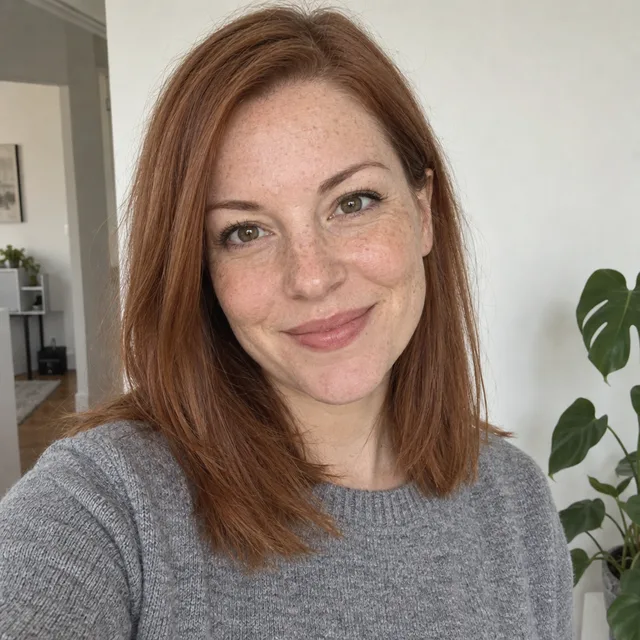
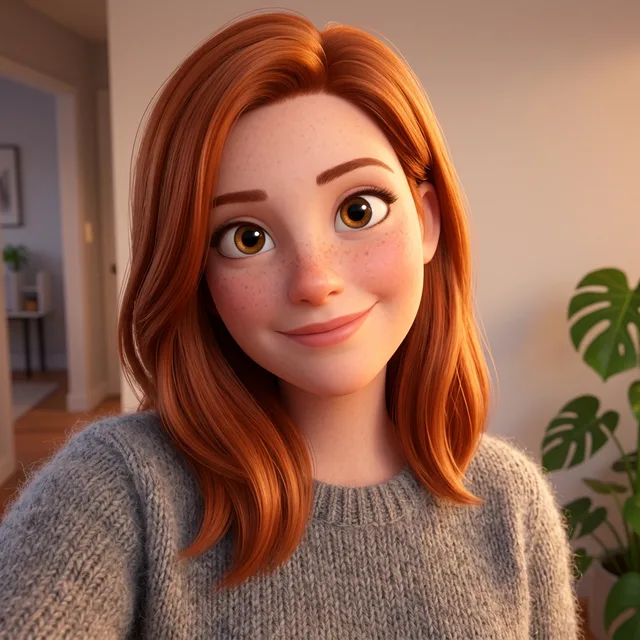
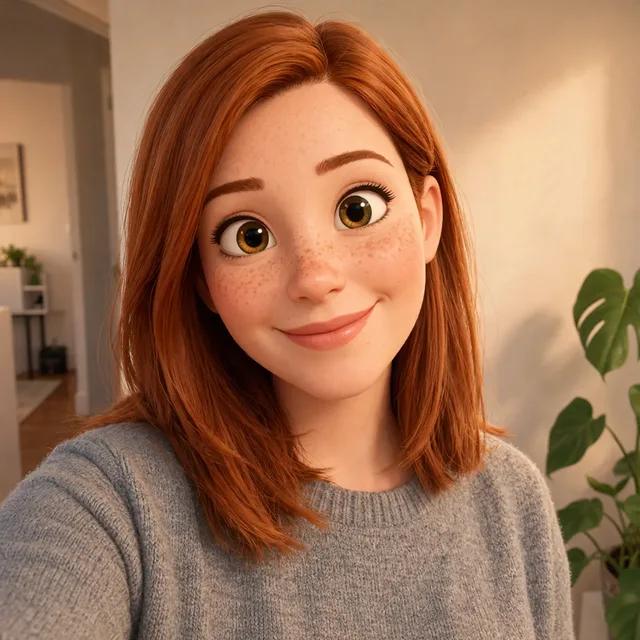
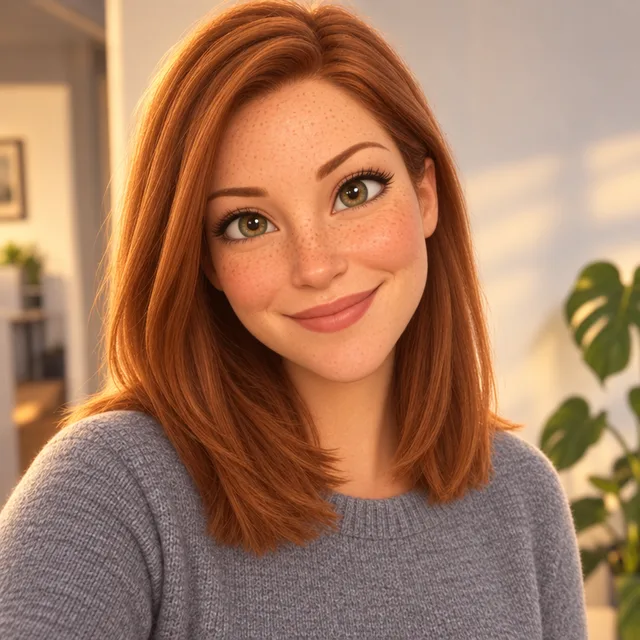
The most requested look. All three kept her hair, freckles, sweater and smile, and all three made her auburn hair a brighter red. Nano Banana 2.1 and Muse Image gave her big brown eyes although hers are grey-blue; GPT Image 2.5 was the least cartoonish and kept her eyes light.
Prompt we ran
Turn this photo into a 3D animated film character render, with soft rounded features, big expressive eyes and warm cinematic lighting. Keep her likeness: face shape, freckles, auburn shoulder-length hair, grey sweater, smile, pose and framing.
Suggested model: Nano Banana 2.1
2.Name the eye colour and it stays
We ran the same prompt again with one change: “grey-blue eyes” in the keep list. Both models that had made her eyes brown now kept them grey-blue. Big cartoon eyes are the feature models restyle most, so name the colour.
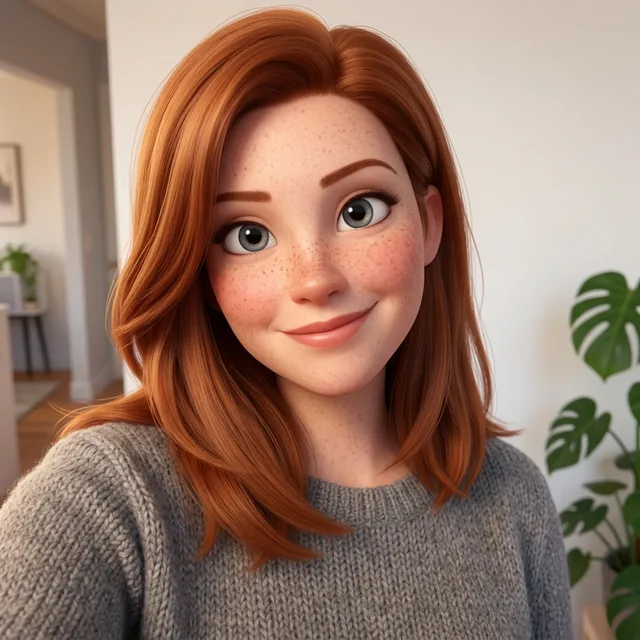
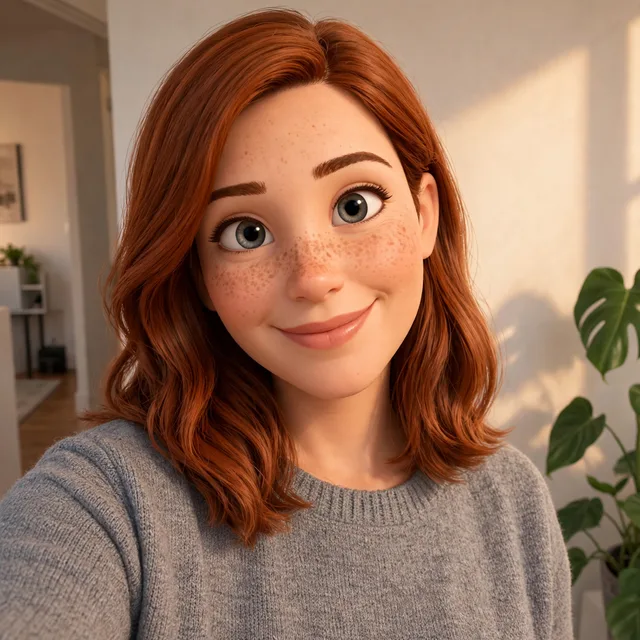
Prompt we ran
Turn this photo into a 3D animated film character render, with soft rounded features, big expressive eyes and warm cinematic lighting. Keep her likeness: face shape, freckles, grey-blue eyes, auburn shoulder-length hair, grey sweater, smile, pose and framing.
Suggested model: Nano Banana 2.1
3.2D cartoon, anime, comic and storybook
The same portrait and keep line in four 2D styles. Each style came back as named and each kept the freckles. The comic panel stayed the most recognisable because it keeps more of the real face shape; the anime style changed her the most.
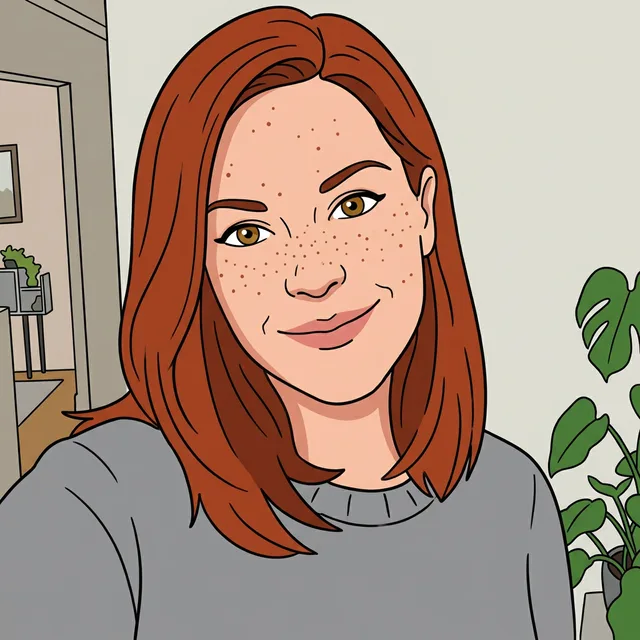
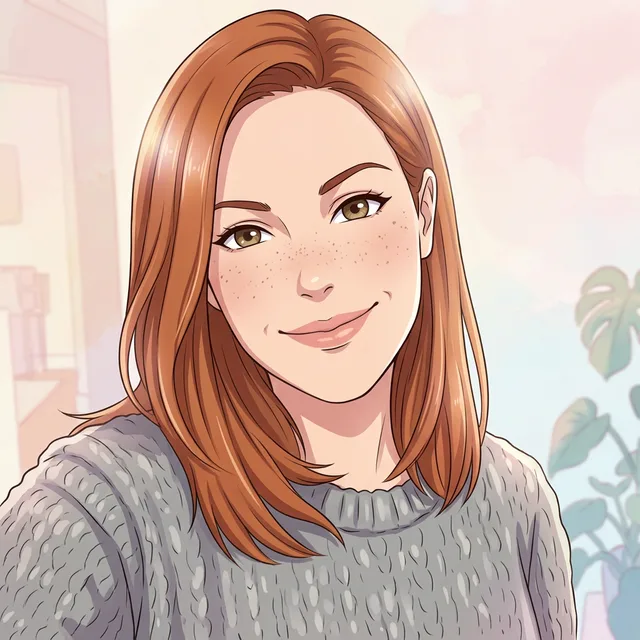
Exact prompt we ran
Turn this photo into an anime illustration with clean line art, cel shading and a soft pastel background. Keep her likeness: face shape, freckles, auburn shoulder-length hair, grey sweater, smile, pose and framing.
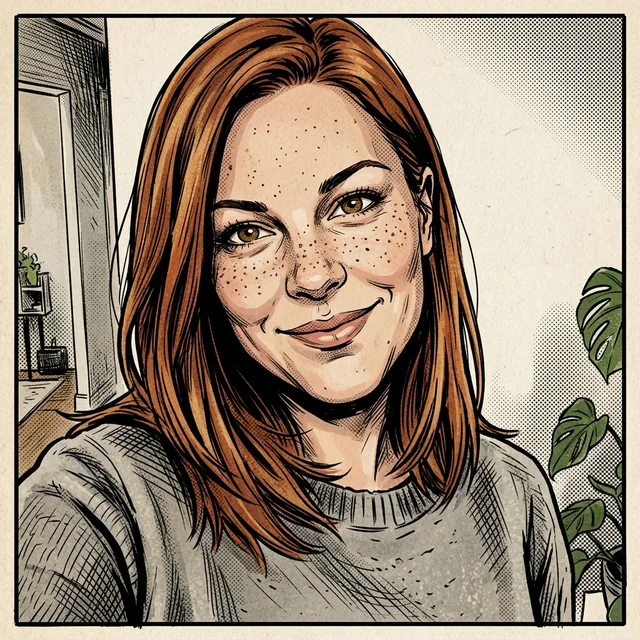
Exact prompt we ran
Turn this photo into a comic book panel with heavy ink lines, halftone dots and strong shadows. Keep her likeness: face shape, freckles, auburn shoulder-length hair, grey sweater, smile, pose and framing.
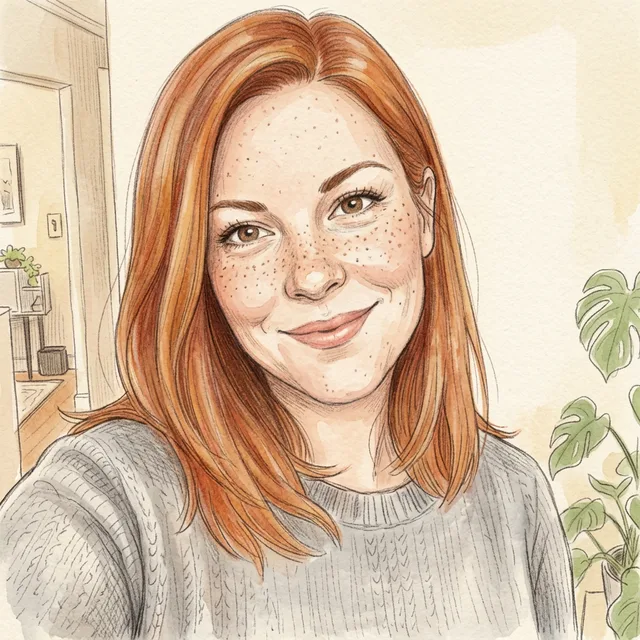
Exact prompt we ran
Turn this photo into a children's storybook illustration in soft watercolour and coloured pencil. Keep her likeness: face shape, freckles, auburn shoulder-length hair, grey sweater, smile, pose and framing.
Prompt we ran
Turn this photo into a flat 2D cartoon with bold black outlines and bright solid colours, like a TV cartoon. Keep her likeness: face shape, freckles, auburn shoulder-length hair, grey sweater, smile, pose and framing.
Suggested model: Nano Banana 2.1
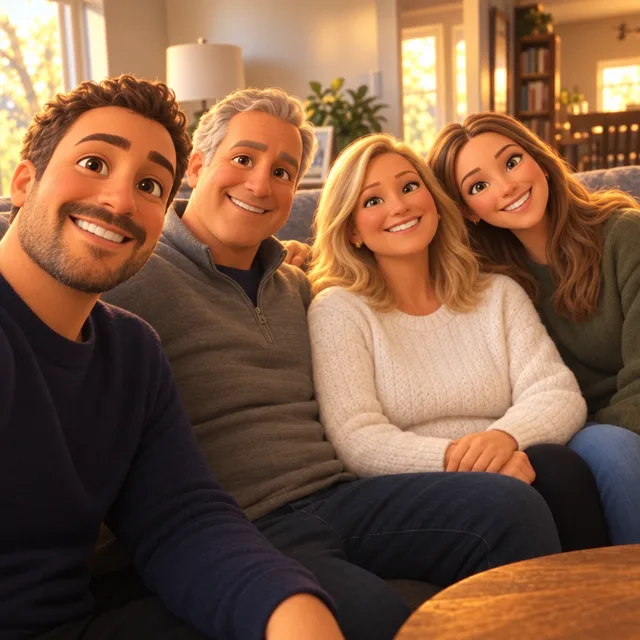
4.A family photo as a 3D animated still
Four people at once. Both models kept all four, in the same order, with their hair colours and clothes. Nano Banana 2.1 kept their ages; GPT Image 2.5 made the faces more stylised and the mother much younger.
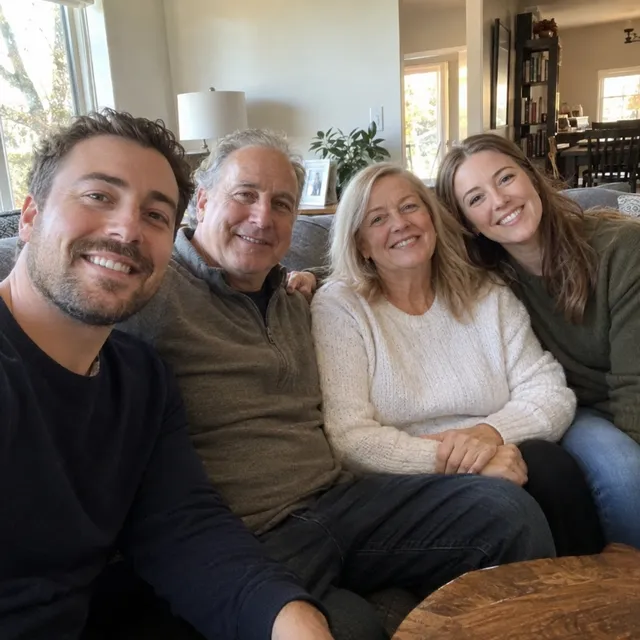
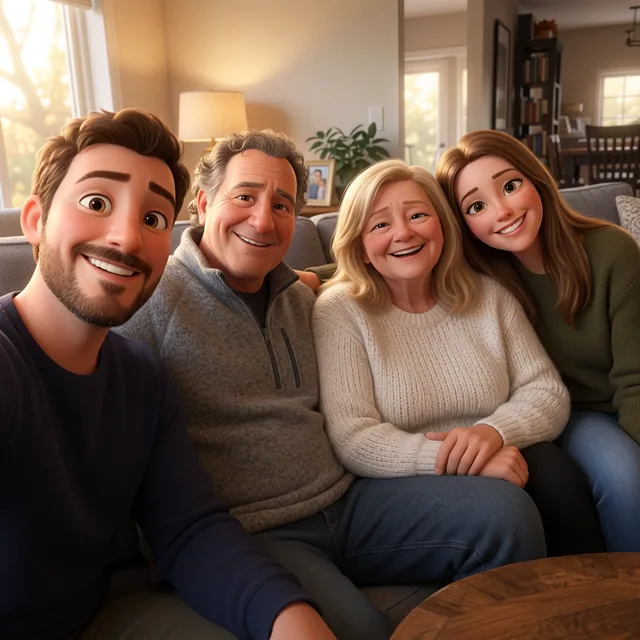
Prompt we ran
Turn this photo into a 3D animated film still, with soft rounded features and warm cinematic lighting. Keep all four people, their order on the sofa, their hair colours, clothes and smiles, so each one is still recognisable.
Suggested model: Nano Banana 2.1
With several people, say how many there are and that each must stay recognisable, then check every face, including ages.
5.Your dog as a cartoon
The 2D version is clearly a cartoon. The 3D version barely changed: it came back as a saturated photo with bigger eyes. For a strong cartoon look on a pet, a 2D style worked better in our test. The prompt mentioned a collar the dog does not have, and neither result added one.
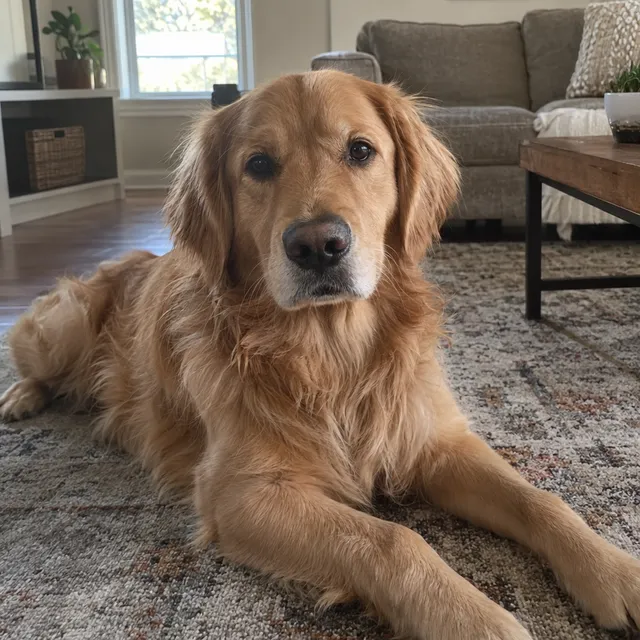
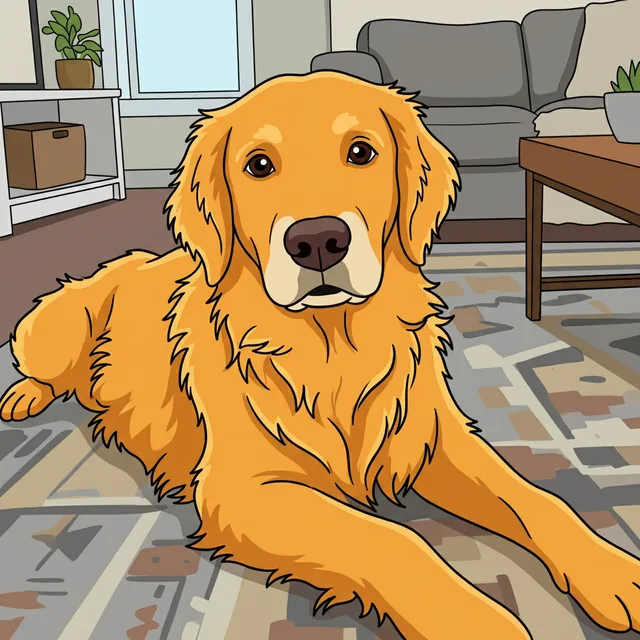
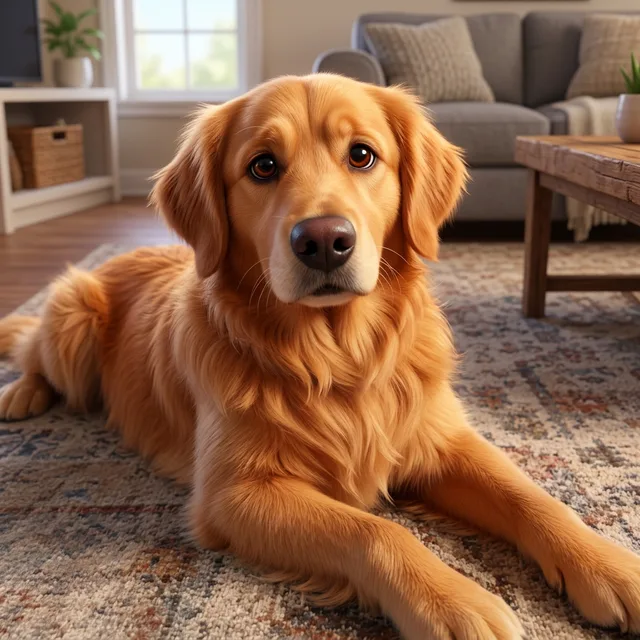
Exact prompt we ran
Turn this photo into a 3D animated film character render of this dog, with soft fur and big expressive eyes. Keep the dog's breed, coat colour and markings, collar and pose.
Prompt we ran
Turn this photo into a flat 2D cartoon of this dog with bold black outlines and bright solid colours. Keep the dog's breed, coat colour and markings, collar and pose.
Suggested model: Nano Banana 2.1
Keep it recognisable
- Name eye colour, hair colour and anything distinctive (freckles, glasses, a beard). Our 3D cartoons turned grey-blue eyes brown until we named them.
- Expect hair colour to get brighter: every style made her auburn hair redder. Name the exact shade if it matters.
- With several people, check every face and age. One model made the mother look much younger.
- Try another style from the original photo, not from a cartoon, so differences do not add up.
- Only cartoon photos of yourself or of people who agreed. A cartoon of a real person is still that person.
Which model to use
Every model runs in the same editor and draws from the same credits. Prices are for one edit in the web app.
| Model | Credits per edit | On Starter | Use it for |
|---|---|---|---|
| Muse Imageone size, about 2.5 MP | 2 | $0.038 | The cheapest way to try the 3D look; it kept freckles and, once named, the eye colour. |
| Nano Banana 2.11K | 9 | $0.171 | Our default: all six styles and the family. A weak 3D result on the dog. 14 credits at 2K. |
| GPT Image 2.5high quality | 11 | $0.209 | The most lifelike 3D portrait, but it made a family member look younger. |
The editor shows the credit cost before you generate. Prices checked .
What it costs
One edit costs 2 credits on Muse Image, 9 on Nano Banana 2.1 at 1K and 11 on GPT Image 2.5. On the Starter plan ($19 for 1,000 credits a month) that is $0.038 to $0.209 per cartoon; trying all five portrait styles on Nano Banana 2.1 costs 45 credits.
Every edit needs a paid plan. Plans start at $19/month. Unused subscription credits roll over, downloads carry no watermark, and paid plans include a commercial license.
Frequently asked questions
How do I turn a photo into a cartoon?
Upload the photo to the editor, name the style (“a 3D animated film character render”, “a flat 2D cartoon with bold black outlines”), list the features that must stay (hair, eye colour, freckles, clothes) and generate. Compare the eyes and hair with your photo, then download it.
Which cartoon styles can I make?
Any style you can describe. On this page: 3D animated film, flat 2D TV cartoon, anime, comic book and storybook watercolour, all from the same photo.
Will the cartoon still look like me?
Mostly, if you name your distinctive features. In our runs hair, freckles and clothes stayed, but 3D cartoons changed grey-blue eyes to brown until we named the eye colour, and every style made auburn hair brighter.
Can I cartoon a family photo or a group?
Yes. Say how many people there are and that each must stay recognisable. Our family of four kept all four people in order; check each face, because one model made the mother look much younger.
Can I turn my pet into a cartoon?
Yes. Our golden retriever worked well as a 2D cartoon. The 3D prompt barely stylised it, so if you want a strong cartoon look, start with a 2D style.
Can I make it look like a specific studio’s films?
Describe the look instead of naming a studio or a character: “3D animated film, soft rounded features, warm cinematic lighting”. Do not present the result as official art from a studio.
How much does it cost? Is there a free option?
One edit costs 2 credits on Muse Image, 9 on Nano Banana 2.1 at 1K or 11 on GPT Image 2.5. AI Media Studio has no free tier. Every edit needs a paid plan. Plans start at $19/month.
Uploads are processed by the AI provider that runs the model you pick. Retention, processors and deletion requests are covered in the privacy policy.