Professional headshot AI
Professional headshot AI: from an everyday selfie to a studio headshot
Upload one clear photo of yourself and describe the headshot: framing (head and shoulders, facing the camera), backdrop, light and clothes. End with what must stay: face, hair, age, and “do not smooth the skin”. We turned a kitchen selfie, a harsh-sun hiking photo and a dark bedroom selfie into 11 headshots; every one still looked like the person, but some details drifted (a new smile, a thinner beard), so compare before you use it. One edit costs 2 credits on Muse Image, 9 on Nano Banana 2.1 or 11 on GPT Image 2.5, and you see the cost before you generate.
Every edit needs a paid plan. Plans start at $19/month.
How do I make a professional headshot with AI?
- 01
Pick one clear photo
Your face visible and in focus, no sunglasses over your eyes, nothing covering your face. Daylight works best; a dark or blurry photo makes the model guess more of your face.
- 02
Describe the headshot
Framing (“head and shoulders, facing the camera”), backdrop (“plain light grey studio backdrop”), light (“soft, even studio lighting”) and clothes (“a navy blazer over a white top”).
- 03
Say what to remove and what to keep
Name what should go: an outstretched arm, sunglasses on your head, backpack straps. Then keep your face, hair, smile and age, and add “do not smooth the skin” so it does not look retouched.
- 04
Compare with your photo
Put the headshot next to your original at full size: eyes, smile, beard, face shape. Ask someone who knows you whether it looks like you before you put it on LinkedIn.
11 headshots from three everyday photos
Every result starts from one of three synthetic everyday photos. Open “Prompt we ran” under an image for the exact prompt, or copy the prompt card and change the backdrop and clothes.
1.LinkedIn headshot from a kitchen selfie, on three models
An arm’s-length selfie with a fridge behind her, turned into a grey-backdrop headshot in a navy blazer. All three models removed the arm, squared up the framing and kept her face. GPT Image 2.5 kept her freckles and lines most faithfully; Muse Image turned her closed-lip smile into one that shows her teeth.
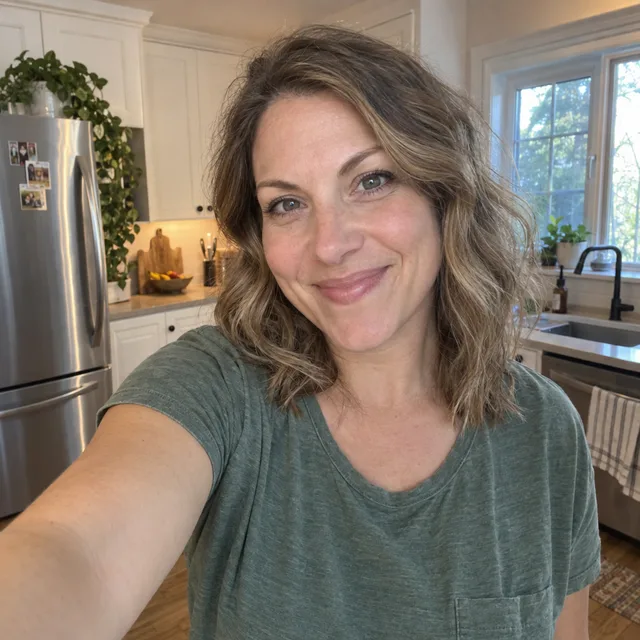
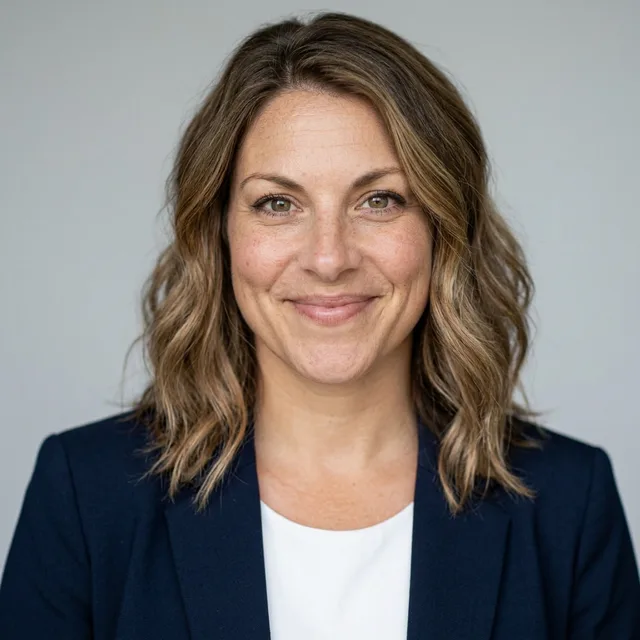
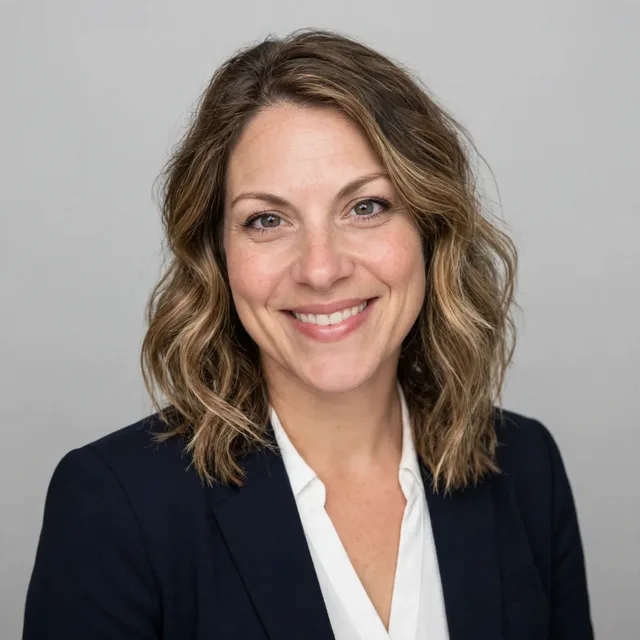
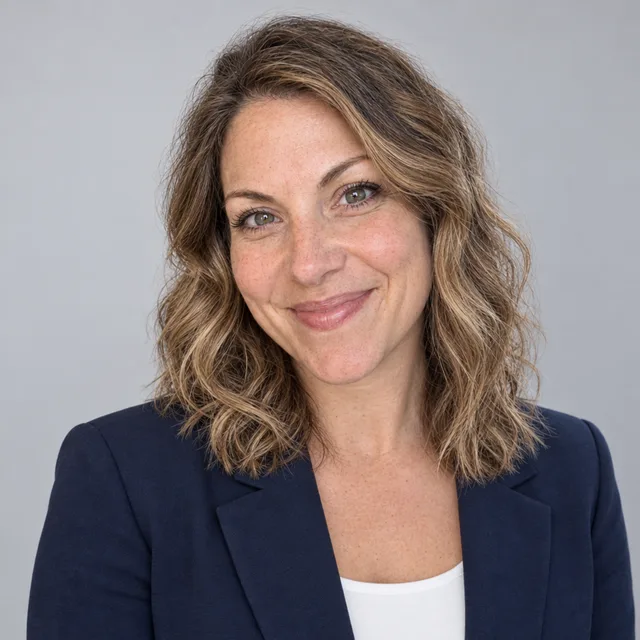
Prompt we ran
Turn this selfie into a professional LinkedIn headshot: head and shoulders, facing the camera, in front of a plain light grey studio backdrop with soft, even studio lighting. Dress her in a navy blazer over a white top. Remove the outstretched arm. Keep her face, eye colour, wavy hair, smile and age exactly the same; do not smooth her skin.
Suggested model: Nano Banana 2.1
2.An office background instead of a studio
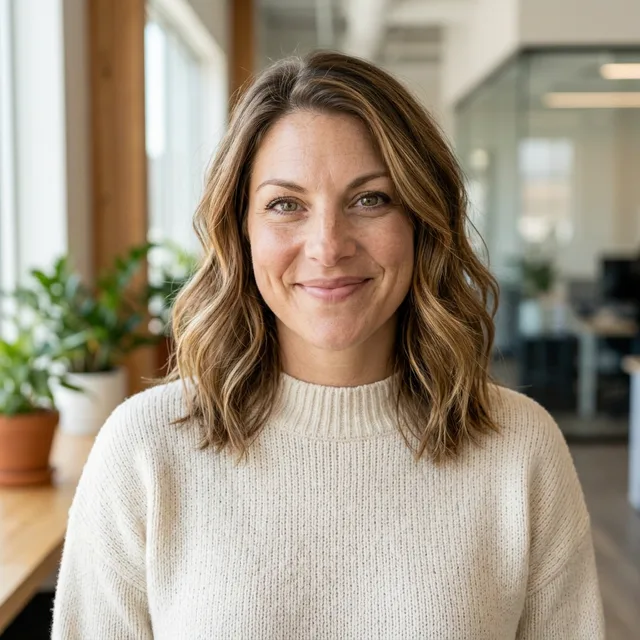
For a company website or an About page, a softly blurred office looks less formal than a grey backdrop. Same selfie, same keep line; her face came out slightly slimmer than in the selfie, which is easy to miss.
Prompt we ran
Turn this selfie into a professional headshot for a company website: head and shoulders, facing the camera, in front of a softly blurred modern office with plants, soft daylight from a window. Dress her in a cream knit sweater. Remove the outstretched arm. Keep her face, eye colour, wavy hair, smile and age exactly the same; do not smooth her skin.
Suggested model: Nano Banana 2.1
3.Harsh sun and sunglasses to a studio headshot
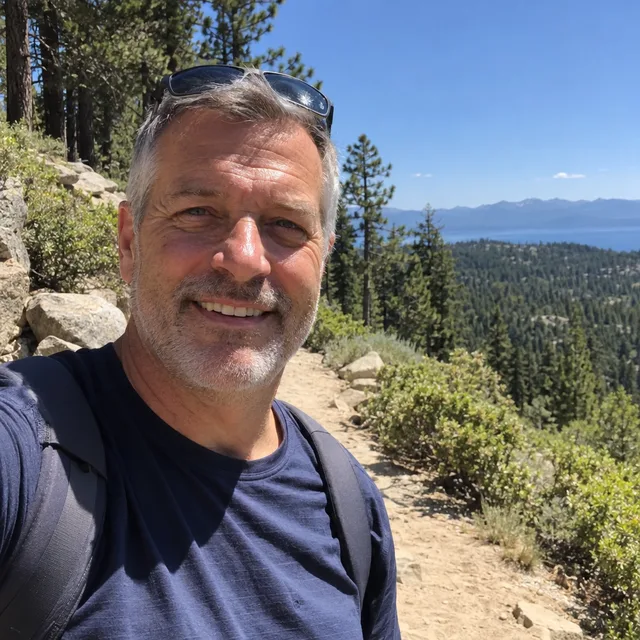
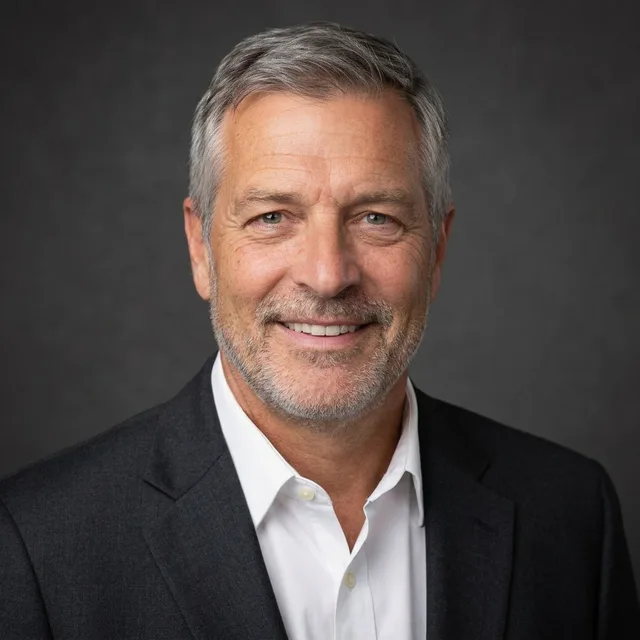
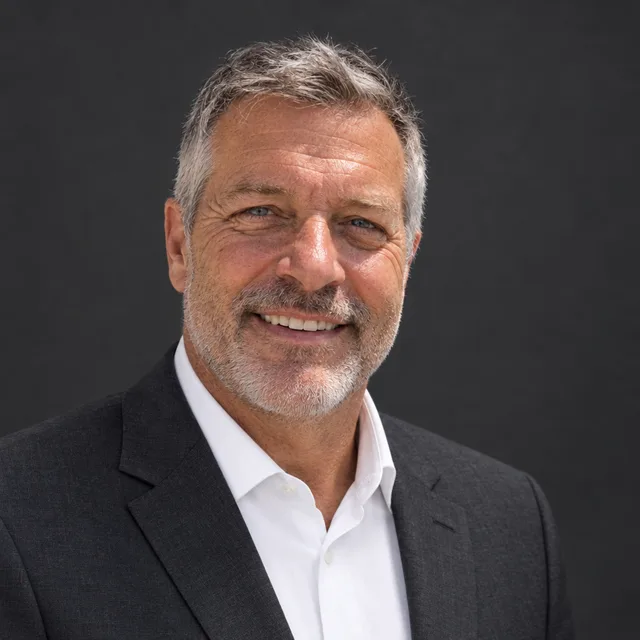
Midday sun leaves hard shadows under the eyes and nose. Both models replaced the light, removed the sunglasses and backpack straps, and kept his wrinkles and grey stubble because the prompt said not to make him look younger.
Prompt we ran
Turn this photo into a professional headshot: head and shoulders, facing the camera, in front of a plain dark grey studio backdrop with soft, even studio lighting that removes the hard shadows. Remove the sunglasses from his head and the backpack straps. Dress him in a charcoal suit jacket, a white shirt and no tie. Keep his face, grey hair, stubble, wrinkles, smile and age exactly the same; do not make him look younger.
Suggested model: Nano Banana 2.1
Without “do not make him look younger”, image models tend to smooth lines and grey. Name your age-related features if you want them kept.
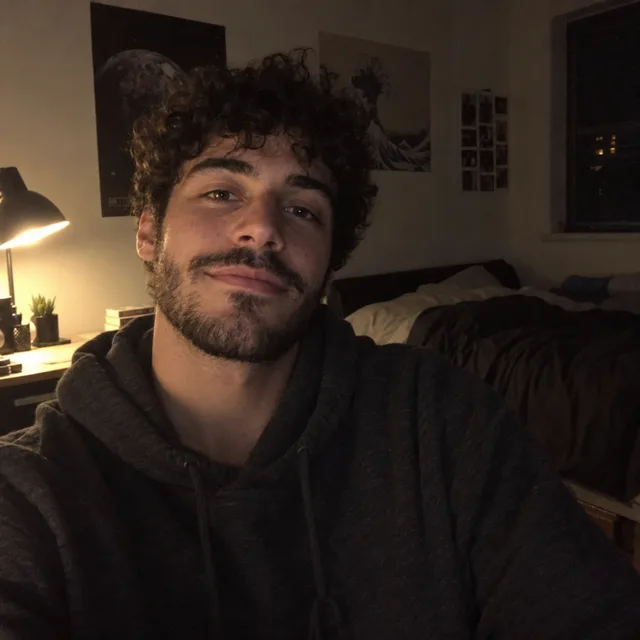
4.A dark, grainy selfie
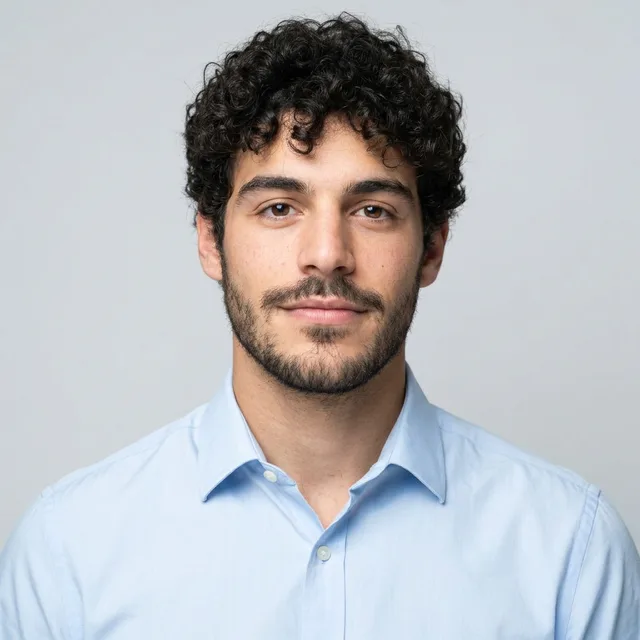
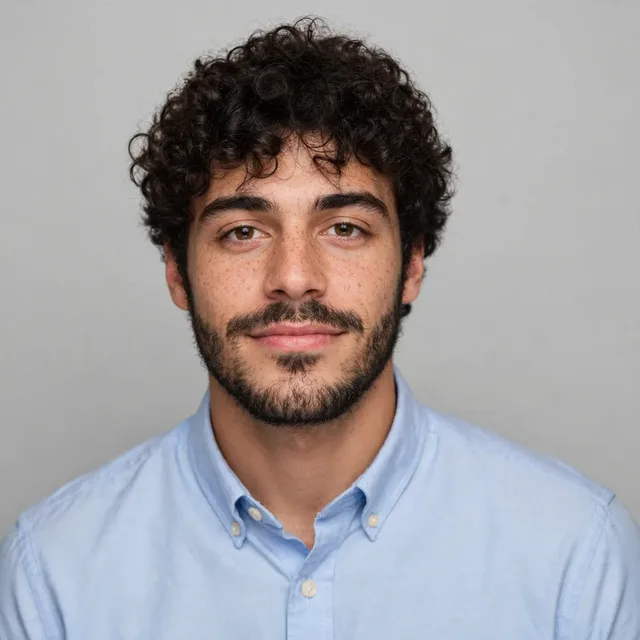
The hardest input: lamp light from one side and lots of grain. Both models produced a clean, bright headshot that looks like him, but they had to fill in detail the photo did not have. Nano Banana 2.1 made his beard thinner and neater; Muse Image kept it fuller but widened his face a little.
Prompt we ran
Turn this dark selfie into a professional headshot: head and shoulders, facing the camera, in front of a plain light grey studio backdrop with bright, soft, even studio lighting and no grain. Dress him in a light blue button-down shirt. Keep his face, curly hair, beard, expression and age exactly the same; do not smooth his skin.
Suggested model: Muse Image
If you can, retake the photo in daylight instead. The darker the photo, the more of your face the model has to guess.
5.Matching team headshots from different photos
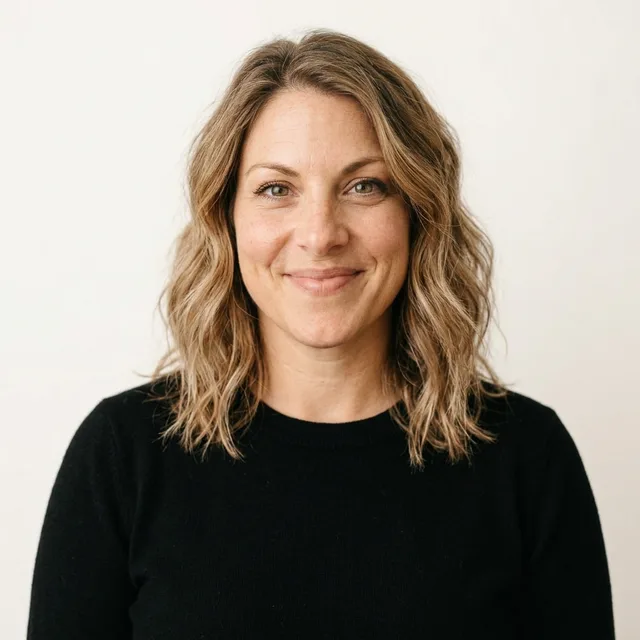
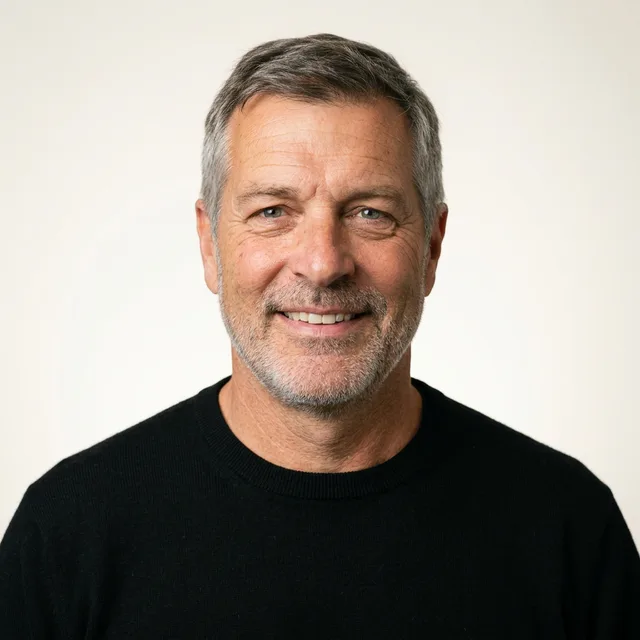
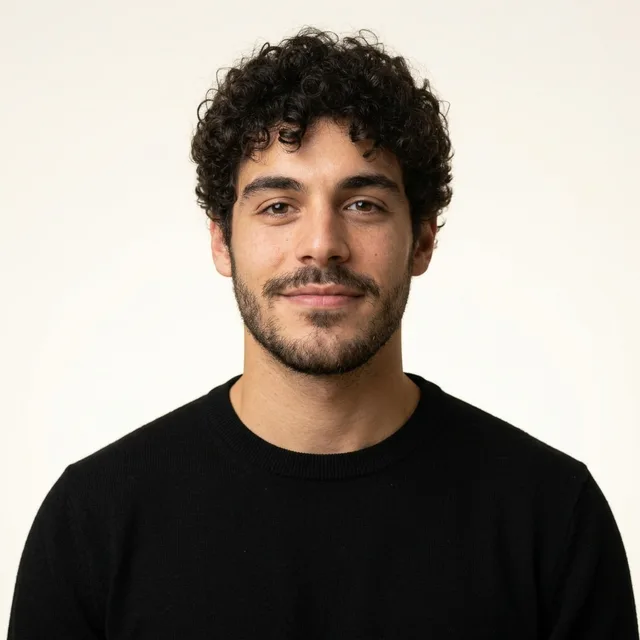
Three people, three very different photos (top row), one prompt. Running the same prompt on each gave the same backdrop, light, sweater and framing, so the photos sit together on a team page.
Prompt we ran
Turn this photo into a team headshot for a company website: head and shoulders, facing the camera, in front of a plain warm white backdrop with soft, even studio lighting. Dress the person in a plain black crew-neck sweater. Remove anything held or worn on the head. Keep the face, hair, expression and age exactly the same; do not smooth the skin.
Suggested model: Nano Banana 2.1
Use exactly the same prompt and model for everyone. Changing either changes the backdrop colour and light.
Make sure it still looks like you
- Compare at full size with your original: eyes, smile, beard, face shape. In our 11 runs the person was always recognisable, but a smile changed, a beard got thinner and two faces got slightly slimmer.
- Name what must not change, including age: “keep his wrinkles”, “do not make him look younger”, “do not smooth the skin”. Without that, headshots tend to look retouched.
- Start from the best photo you have. Daylight and focus matter more than the prompt; a dark selfie makes the model invent detail.
- If something drifts, run the prompt again from the original photo rather than editing the result.
- Use only photos of yourself, or of colleagues who agreed. An AI headshot is not an ID photo: do not use it for a passport, visa or other official document.
Which model to use
Every model runs in the same editor and draws from the same credits. Prices are for one edit in the web app.
| Model | Credits per edit | On Starter | Use it for |
|---|---|---|---|
| Muse Imageone size, about 2.5 MP | 2 | $0.038 | The cheapest way to try backdrops and clothes; it changed a smile and a face width, so check the likeness. |
| Nano Banana 2.11K | 9 | $0.171 | Our default: clean light and framing in all seven of its runs, and consistent for team headshots. 14 credits at 2K for a bigger file. |
| GPT Image 2.5high quality | 11 | $0.209 | The most faithful skin texture and likeness in our tests; use it for the final version. |
The editor shows the credit cost before you generate. Prices checked .
What it costs
One edit costs 2 credits on Muse Image, 9 on Nano Banana 2.1 at 1K and 11 on GPT Image 2.5. On the Starter plan ($19 for 1,000 credits a month) that is $0.038 to $0.209 per headshot; a team of three on Nano Banana 2.1 cost us 27 credits.
Every edit needs a paid plan. Plans start at $19/month. Unused subscription credits roll over, downloads carry no watermark, and paid plans include a commercial license.
Frequently asked questions
Can AI make a professional headshot from a selfie?
Yes. Upload the selfie, describe the framing, backdrop, light and clothes, and say what must stay the same. We turned an arm’s-length kitchen selfie into a LinkedIn headshot on three models; each removed the arm and kept her face.
How many photos do I need?
One. Every headshot on this page was made from a single photo with one prompt. A clear, well-lit photo matters more than how many you have.
Will it still look like me?
In our runs the person was always recognisable, but details drifted: one model changed a closed-lip smile, another thinned a beard, and two faces came out slightly slimmer. Compare at full size and run it again from the original if something is off.
Can I use it on LinkedIn or a CV?
Yes, as long as it still looks like you: people will meet you in person or on video. Choose a realistic result over a flattering one. Paid plans include a commercial license.
Can I make matching headshots for my team?
Yes. Run exactly the same prompt and model on each person’s photo. Our three very different photos came back with the same backdrop, light, sweater and framing. Get each person’s agreement first.
Can I use an AI headshot for a passport or ID?
No. Official photos have their own rules and must show you as you are. Use AI headshots for profiles, CVs, websites and email signatures only.
How much does it cost? Is there a free option?
One edit costs 2 credits on Muse Image, 9 on Nano Banana 2.1 at 1K or 11 on GPT Image 2.5. AI Media Studio has no free tier. Every edit needs a paid plan. Plans start at $19/month.
Uploads are processed by the AI provider that runs the model you pick. Retention, processors and deletion requests are covered in the privacy policy.