AI character swap video
AI character swap: replace the person in a video and keep the scene
An AI character swap replaces the person in a video with someone else from a photo, while the scene, camera, gestures and timing stay. In AI Media Studio you do it in the Remix tab: add a 5 to 30-second clip and one photo per new person, pick Motion transfer on MiniMax Recast, and generate. It costs 44 credits per second of your clip at 768p. Use only clips and photos you have the rights to, of people who agreed to it.
Every edit needs a paid plan. Plans start at $19/month. Paid plans include a commercial license, and downloads carry no watermark.
How do I replace a person in a video with AI?
- 01
Pick the clip
A clip you filmed or have the rights to, 5 to 30 seconds long, with no single shot over 15 seconds, as MP4 or MOV. The people you replace should be clearly visible; trim it to the part you need, because Remix charges per second of the clip.
- 02
Add one photo per new person
A clear photo of each person who should appear, waist-up or full-body, face and hands visible, on a plain background. MiniMax Recast takes up to 4 photos and replaces the people in the clip from left to right. Only photos of people who agreed to it.
- 03
Choose Motion transfer and MiniMax Recast
Open Remix, choose Motion transfer and switch the model to MiniMax Recast, the one that keeps the scene, camera, cuts and sound. Leave the prompt empty or say who becomes whom, confirm that you may use the clip and photos, and generate.
- 04
Check the face, hands and details
Watch the whole clip at full size: the face in every turn, the hands, glasses and jewellery. Then label the video as AI-generated where you post it.
An AI character swap example, on two models
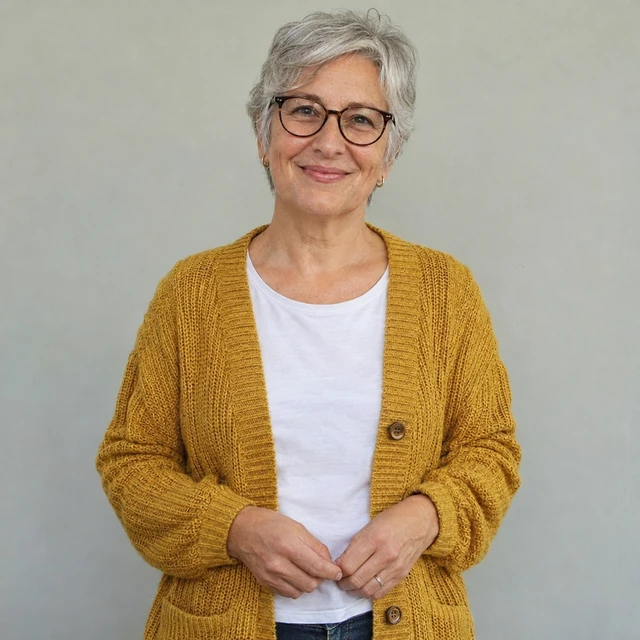
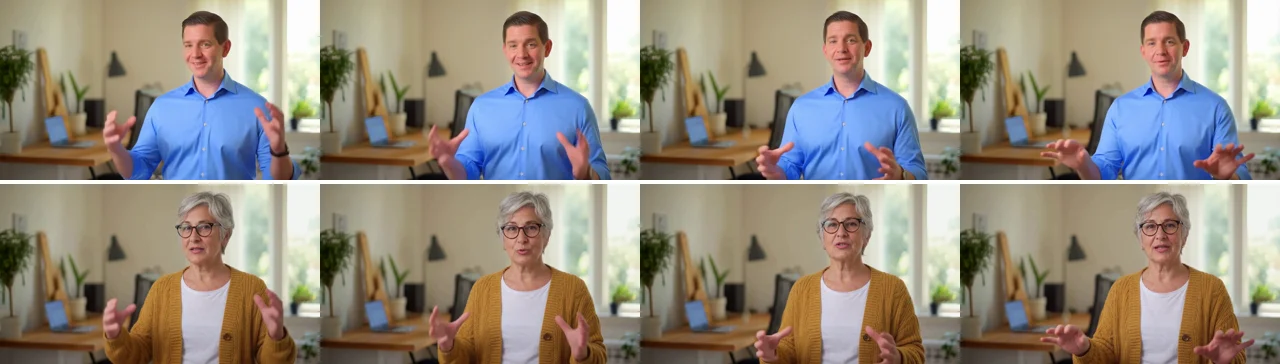
One synthetic talking clip, one photo of a fictional woman, two Remix models. The prompt under each example is the suggestion the app offers; the run log has the exact input each model received.
1.Replace the person and keep everything else: MiniMax Recast
MiniMax Recast swapped the man for the woman from the photo in every frame. The room, the framing, the light and the timing of each gesture stayed as they were; her silver hair, round glasses, mustard cardigan and white t-shirt came from the photo. His smile did not carry over: she talks with a calmer, more serious face. His wristwatch is gone, because her cardigan sleeves cover her wrists. The result came back at 1344 × 768 pixels, 5 seconds long.
Prompt in the app
@Image1 performs every move from the clip in place of the main character.
Suggested model: MiniMax Recast, 768p (Remix, Motion transfer)
2.The same swap on Kling O3 Edit did not replace him
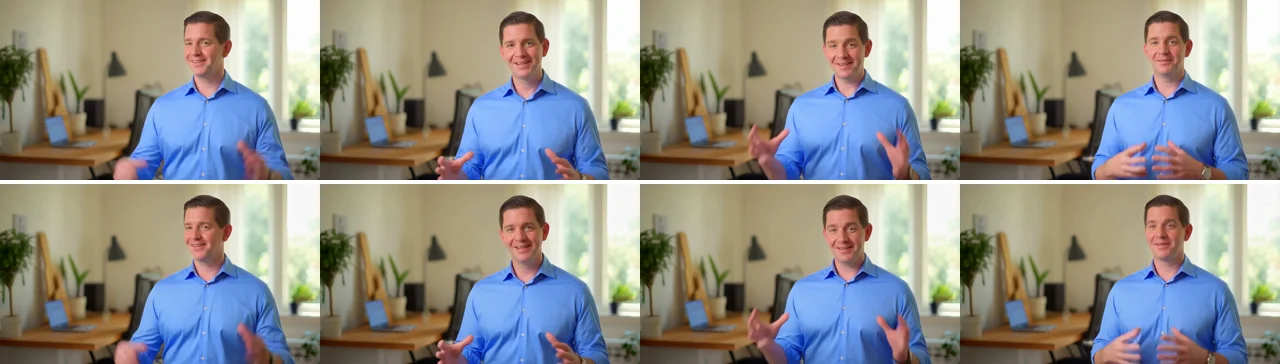
We ran the same photo on Kling O3 Edit, the Object swap model, with the app’s “Change character” suggestion, on the first 3 seconds of the clip. The man stayed. The result is a near copy of the source clip, and nothing of the woman from the photo appears. One run is not a verdict on the model, but for replacing a person, start with MiniMax Recast and keep Kling O3 Edit for outfits, products and locations.
Prompt in the app
Replace the main character with @Image1.
Suggested model: Kling O3 Edit, 720p (Remix, Object swap)
Before you swap someone into a video
- Consent first. Use clips you filmed or have the rights to, and photos of yourself or of people who agreed to appear. The person in the original video should have agreed too. The app asks you to confirm this before every remix.
- No celebrities, politicians or other public figures, and no one who could be mistaken for a real person saying something they never said. We make no promise that any model will put a famous face into a clip, and models can decline clips or photos under their content policies.
- Label realistic swaps as AI-generated where TikTok, Instagram, YouTube or an ad platform asks for it, and never use a swap to impersonate someone.
- Clear inputs work best: people who are fully visible, not covered by others, a steady camera and short shots. Fast spins, hugs and people touching objects are where swaps break.
- Check the whole clip, not one frame: the face when the head turns, hands, glasses, jewellery and anything the person holds. Things the photo does not show, like a watch under a sleeve, can disappear or be invented.
Which Remix model to use for a character swap
All three run in the Remix tab and are billed per second of your source clip, not per second of the result. The app shows the cost before you generate.
| Model | Credits per second | Use it for |
|---|---|---|
| MiniMax Recast (Motion transfer)768p (65 at 1080p), clips 5 to 30 s | 44 | Replacing up to 4 people from one photo each while the scene, camera, cuts and sound stay. Our first choice for a character swap. |
| Kling O3 Edit (Object swap)720p (25 at 1080p), clips 3 to 15 s | 19 | Editing the shot in place: an outfit, a product or the location. In our one run it did not replace the person. Needs a clip at least 720 px on its short side. |
| Kling 3.0 Motion Control (Motion transfer)720p (25 at 1080p), clips 3 to 30 s | 19 | The person and background of your photo perform the clip’s moves, so the clip’s scene is not kept. Good for dances and moves. |
Credits are per second of the source clip; a model that cannot take your clip says why before you generate. Prices checked .
What an AI character swap costs
Remix charges per second of your source clip. A 10-second clip costs 440 credits on MiniMax Recast at 768p (650 at 1080p) and 190 credits on Kling O3 Edit at 720p (250 at 1080p). Trim the clip to the seconds you need before you upload it.
Every edit needs a paid plan. Plans start at $19/month. Unused subscription credits roll over, downloads carry no watermark, and paid plans include a commercial license.
Higgsfield Genjutsu, Viggle and AI Media Studio
What the other tools say they do, from their own pages on 25 November 2026. AI Media Studio is our product, so weigh our view accordingly; we are not affiliated with Higgsfield or Viggle.
- Higgsfield Genjutsu
Two modes: Motion Transfer keeps a clip’s motion, camera and timing and rebuilds the scene from your references; Object Swap changes a character, outfit, product, location or object and keeps the rest. Reference videos of 4 to 30 seconds and up to 30 reference images; runs use Higgsfield credits. It takes far more references than Remix (up to 4 photos).
- Viggle AI body swap
One photo swapped into your own clip or one of more than 10,000 video templates, up to 8 characters with its Multi-Track editor, and real-time swaps for live streams with Viggle LIVE. Its FAQ says sign-up comes with credits that refresh daily. We have no template library and no live mode.
- Higgsfield alternatives
Our wider comparison of Higgsfield with other tools for images, video and audio.
- AI dance video generator
For dances: the person in your photo performs the moves of a dance clip on Kling 3.0 Motion Control.
Frequently asked questions
What is an AI character swap?
A video edit that replaces a person or character in a clip with someone else from a photo while the motion, camera and timing stay. Unlike a face swap, MiniMax Recast replaced the whole person in our example: face, hair, glasses and clothes.
How do I replace a person in a video with AI?
Open Remix, add a 5 to 30-second clip and one clear photo per new person, choose Motion transfer with MiniMax Recast, confirm you may use the clip and photos, and generate. It costs 44 credits per second of the clip at 768p. Check the face and hands in the whole result before you post it.
What is Higgsfield Genjutsu?
Higgsfield’s video-to-video tool. Its page (read 25 November 2026) describes two modes, Motion Transfer and Object Swap, reference videos of 4 to 30 seconds and up to 30 reference images, billed in Higgsfield credits. AI Media Studio is not affiliated with Higgsfield.
Is this a Higgsfield Genjutsu alternative?
For recasting people in your own clip, yes: MiniMax Recast in Remix keeps the scene and replaces up to 4 people, and Kling O3 Edit swaps outfits, products or the location, on every paid plan. Genjutsu takes up to 30 reference images and Remix up to 4 photos, so for large casts or many products Genjutsu fits better. See our Higgsfield alternatives and Higgsfield pricing pages.
Is it a Viggle alternative?
For swapping people in your own clips, yes. Viggle offers more than 10,000 video templates, swaps of up to 8 characters and live swaps for streams (its page, 25 November 2026); we offer none of those. Remix keeps your clip’s scene with MiniMax Recast and can also edit outfits, products and locations with Kling O3 Edit. AI Media Studio is not affiliated with Viggle.
Can I swap in a celebrity or someone else’s face?
No. Use only photos of yourself or of people who agreed, and clips you have the rights to, with the consent of the people in them. Do not use public figures, and do not make videos that could pass as a real person saying or doing something they did not. Models may decline such clips or photos.
How long can the video be, and how many people can I swap?
MiniMax Recast takes clips of 5 to 30 seconds with no single shot over 15 seconds and up to 4 photos, one per person. Kling O3 Edit takes 3 to 15 seconds, Kling 3.0 Motion Control 3 to 30 seconds. Uploads are MP4 or MOV up to 200 MB (100 MB on Kling 3.0 Motion Control).
Does it keep the original sound?
MiniMax Recast always keeps the clip’s sound. On Kling O3 Edit and Kling 3.0 Motion Control you choose with the Keep sound switch. A swap does not change the voice; to change the language, Remix has a separate Dub task.
Is there a free AI character swap?
Not here. AI Media Studio has no free tier. A character swap on MiniMax Recast costs 44 credits per second of your clip at 768p. Every edit needs a paid plan. Plans start at $19/month.
Uploads are processed by the AI provider that runs the model you pick. Retention, processors and deletion requests are covered in the privacy policy.