GTA 6 style, step by step
How to make GTA 6 style images and videos in the AI Media Studio composer
In the Image tab, add your photo, paste a prompt that describes the GTA 6 cover art look, leave Style on “No style” and generate: 2 to 11 credits per picture. For video, add the finished picture as the start frame in the Video tab and describe one action: 85 credits for 5 seconds on Kling O3 Pro. The screenshots below show each screen with the settings we used. This is an unofficial, fan-style look: not affiliated with Rockstar Games.
Every edit needs a paid plan. Plans start at $19/month.
The short version
- 01
Open the Image tab
The buttons on this page open the composer on the Image tab with the look already in the prompt box and GPT Image 2.5 selected, Detail on. You can set everything up before you sign in.
- 02
Add your photo
Click “Add image” or drop a photo on it. A clear face, or a clear view of the pet or car, gives the model more to keep.
- 03
Finish the prompt
After the look, say what must stay: hair, beard, glasses, clothes, how many people. Add a setting if you want one, such as a beachfront boulevard with palm trees at sunset.
- 04
Check the settings
Style on “No style”, Aspect ratio on “Original”, Quality 1K. Outputs sets how many versions you get, and each one is charged.
- 05
Generate and compare
Sign in and press Generate. The button shows the credit cost first. Compare the result with your photo and download it.
- 06
Make it move
In the Video tab, add the finished picture as the start frame, describe one action, set Duration to 5s and generate.
The walkthrough, screen by screen
Each step shows the composer as we set it up, then what came back. Copy a prompt card and swap in your own features.
1.Add your photo and the prompt
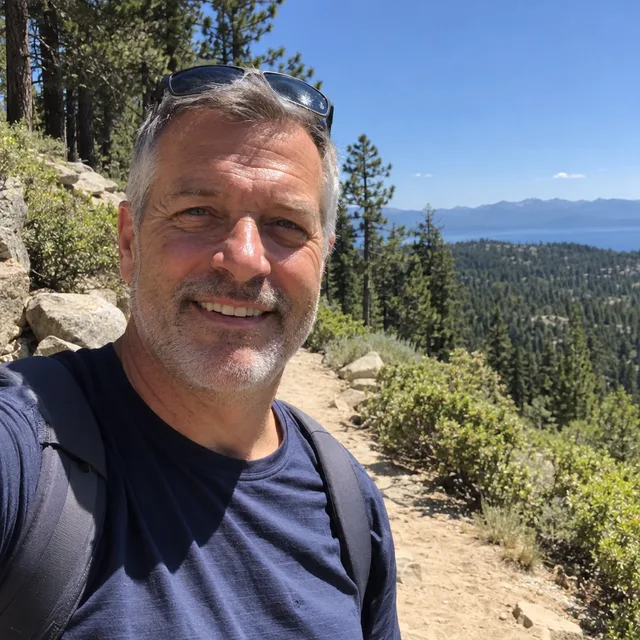
Open the composer and stay on the Image tab. Attach your photo at the top left, then write the prompt underneath: the look first, then where the person should be, then what must stay. With a photo attached, the model edits that photo and does not invent a new person.
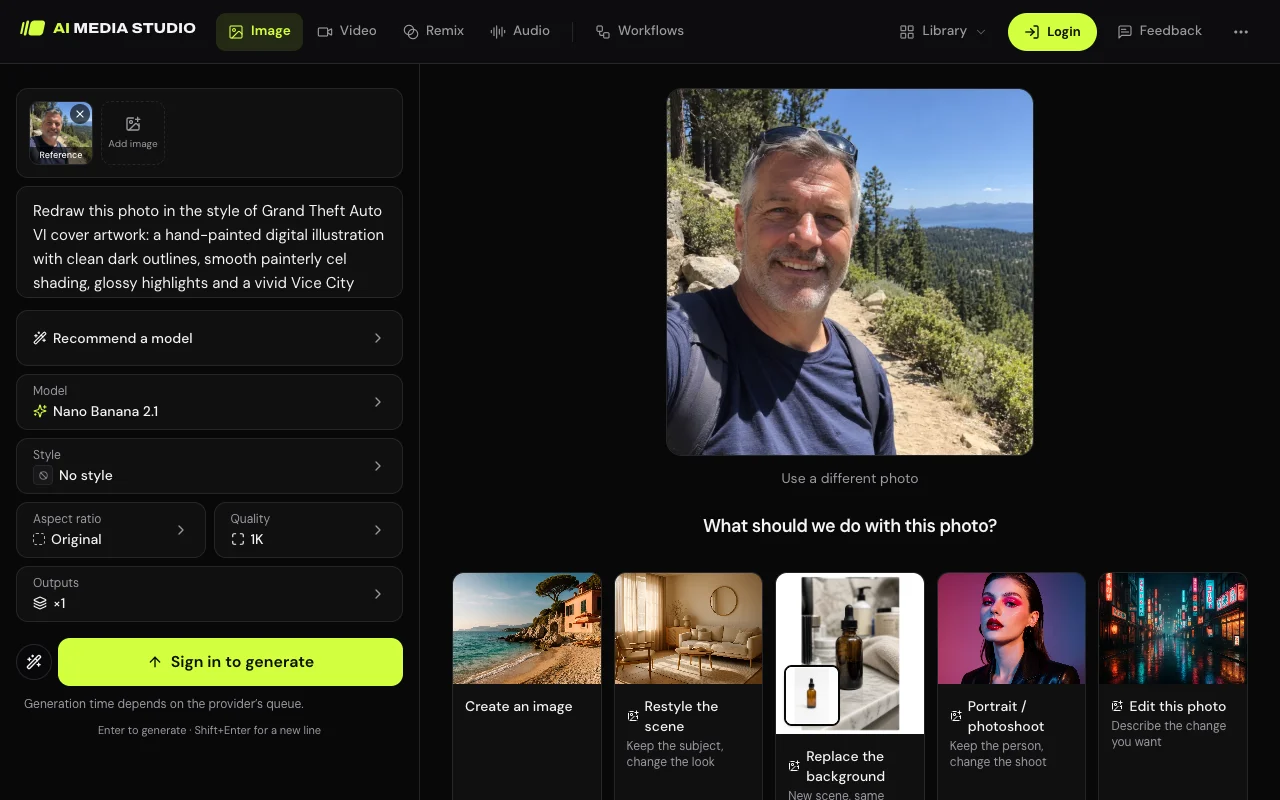
Prompt we ran
Redraw this photo in the style of Grand Theft Auto VI cover artwork: a hand-painted digital illustration with clean dark outlines, smooth painterly cel shading, glossy highlights and a vivid Vice City palette of hot pink, orange and teal. Put him on a Miami-style beachfront boulevard with palm trees and pastel art deco buildings under a pink and orange sunset sky. Keep his likeness: short grey hair, grey stubble, smile, sunglasses pushed up on his head, navy T-shirt and backpack straps. No text or logos.
Suggested model: Nano Banana 2.1
There is no GTA style in the Style menu yet, so the look has to be in the prompt. The phrases that carry it are “clean dark outlines”, “smooth painterly cel shading” and “a vivid Vice City palette of hot pink, orange and teal”.
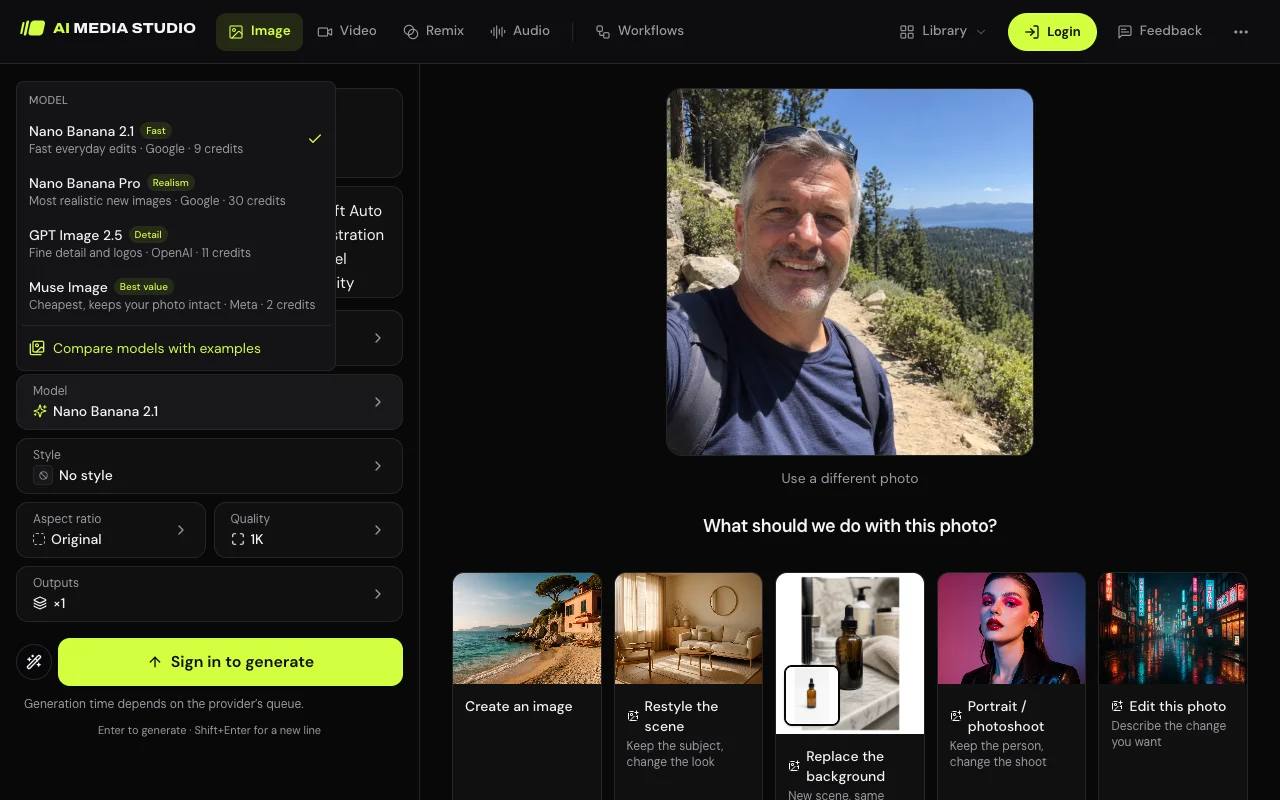
2.Pick a model and check four settings
Click Model to change it. The buttons on this page select GPT Image 2.5 with Detail on: same price, about twice as long. Nano Banana 2.1 is the one we used most. Muse Image is the cheapest way to try the look, and GPT Image 2.5 gave the softest, closest face. Then check the rows below it. Style: leave “No style”, because any other style adds its own look to your prompt. Aspect ratio: “Original” keeps the shape of your photo. Quality: 1K is enough for a profile picture; 2K costs 14 credits on Nano Banana 2.1. Outputs: a new visitor starts on 2, which doubles the cost; set it to 1 while you are still adjusting the prompt.
3.Generate, then compare with your photo
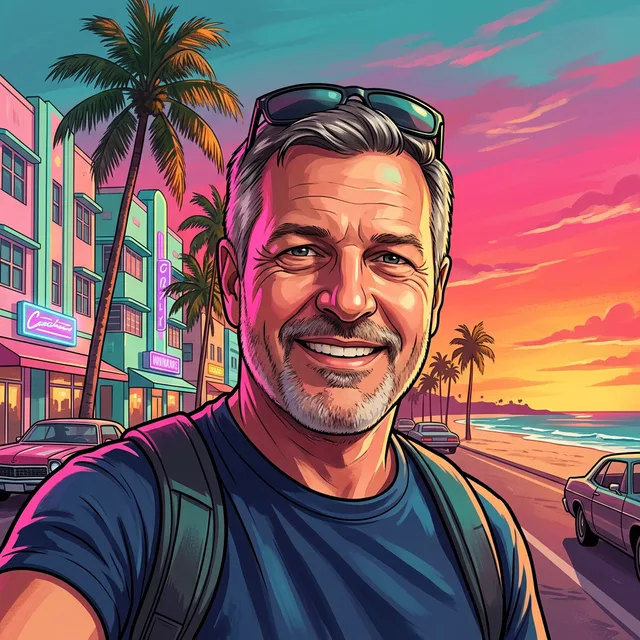
Press Generate. The picture appears on the right after about 20 seconds. Check the features you named against your photo. Here is the same prompt on the three models: all three kept his hair, stubble, sunglasses and T-shirt. Nano Banana 2.1 is the most graphic, Muse Image is softer and GPT Image 2.5 is the most painterly.
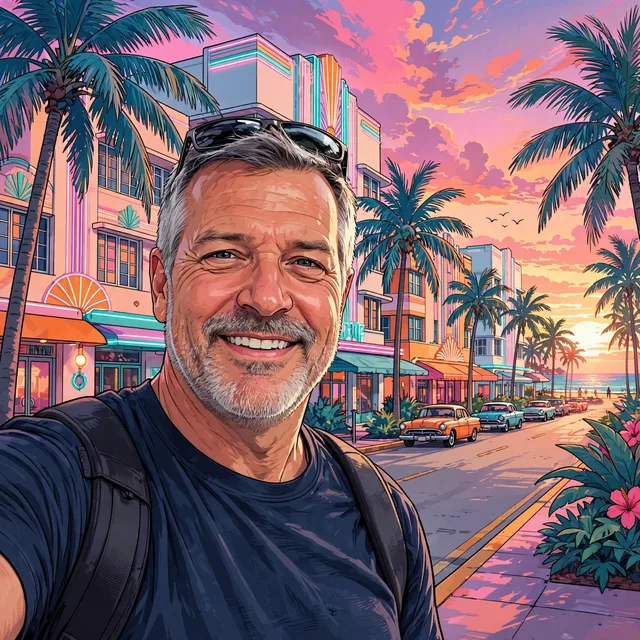
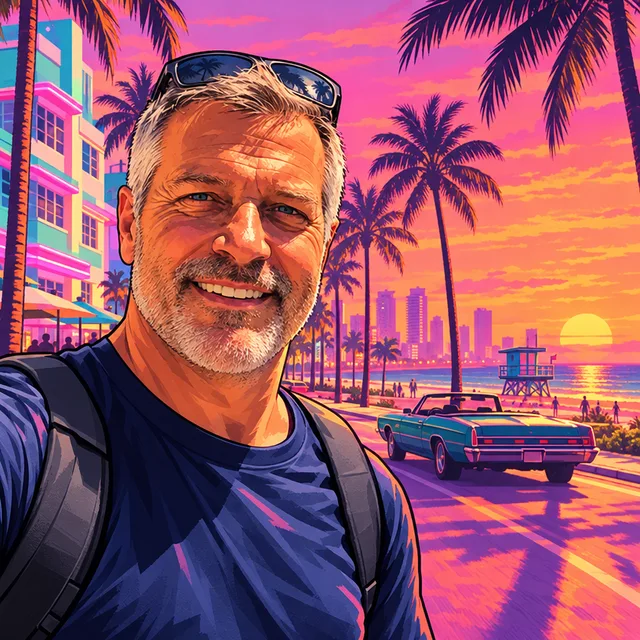
Prompt we ran
Redraw this photo in the style of Grand Theft Auto VI cover artwork: a hand-painted digital illustration with clean dark outlines, smooth painterly cel shading, glossy highlights and a vivid Vice City palette of hot pink, orange and teal. Put him on a Miami-style beachfront boulevard with palm trees and pastel art deco buildings under a pink and orange sunset sky. Keep his likeness: short grey hair, grey stubble, smile, sunglasses pushed up on his head, navy T-shirt and backpack straps. No text or logos.
Suggested model: Nano Banana 2.1
To change something, edit the prompt and generate again from the original photo, not from the result, so changes do not add up.
4.Set up the clip in the Video tab
Download the picture you like, switch to the Video tab and add it as the start frame. Describe one action and end the prompt by naming the look again, so the clip does not drift toward live action. Kling O3 Pro is the default model. Duration opens on 4s (68 credits); we set 5s (85 credits). Sound is off by default and costs extra when on. The Aspect ratio row still reads 16:9, but with a start frame the clip follows the picture: ours came back square.
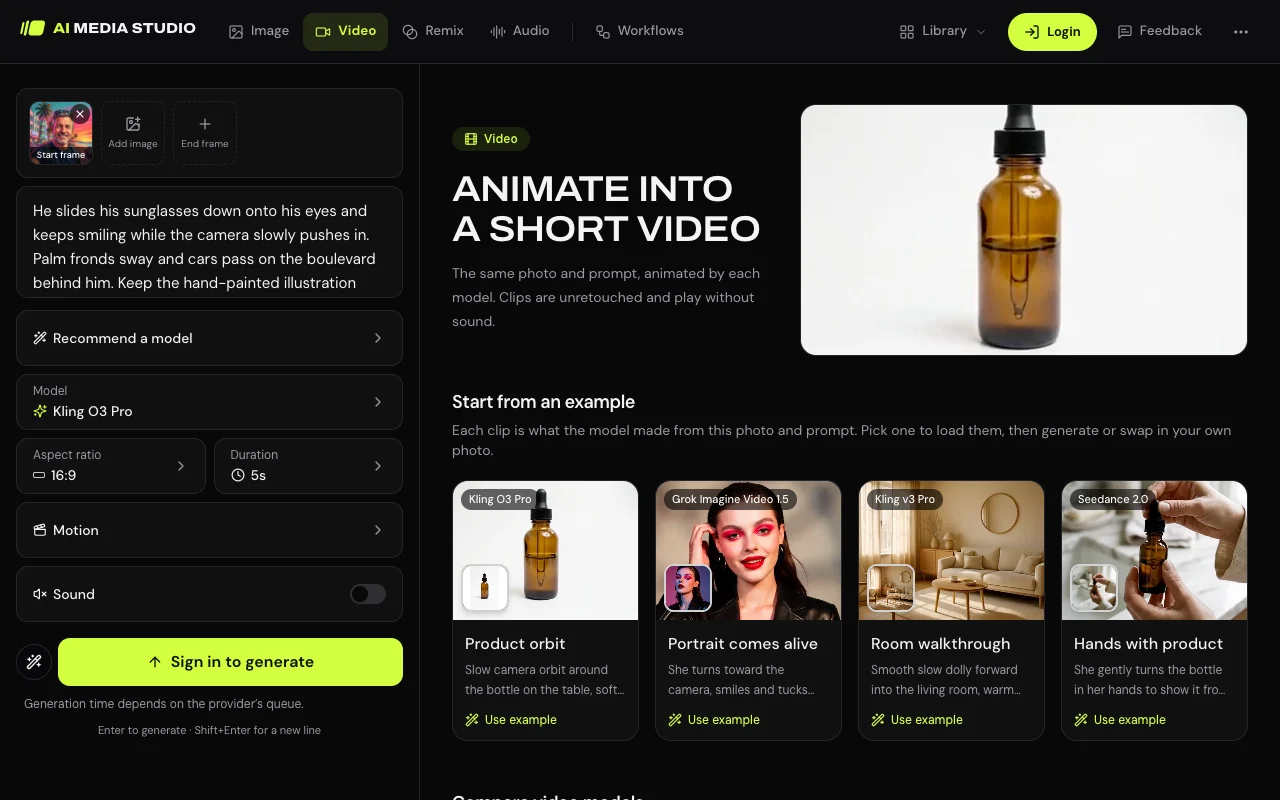
Prompt we ran
He slides his sunglasses down onto his eyes and keeps smiling while the camera slowly pushes in. Palm fronds sway and cars pass on the boulevard behind him. Keep the hand-painted illustration look with clean dark outlines and vivid pink, orange and teal colours in every frame.
Suggested model: Kling O3 Pro
5.The clip that came back
It took just under four minutes. He lifts his hand, slides the sunglasses onto his eyes and the camera pushes in. The outlines and the pink and teal colours held for the whole clip; his hair came out spikier than in the picture.
Exact prompt we ran
Redraw this photo in the style of Grand Theft Auto VI cover artwork: a hand-painted digital illustration with clean dark outlines, smooth painterly cel shading, glossy highlights and a vivid Vice City palette of hot pink, orange and teal. Put him on a Miami-style beachfront boulevard with palm trees and pastel art deco buildings under a pink and orange sunset sky. Keep his likeness: short grey hair, grey stubble, smile, sunglasses pushed up on his head, navy T-shirt and backpack straps. No text or logos.
Prompt we ran
He slides his sunglasses down onto his eyes and keeps smiling while the camera slowly pushes in. Palm fronds sway and cars pass on the boulevard behind him. Keep the hand-painted illustration look with clean dark outlines and vivid pink, orange and teal colours in every frame.
Suggested model: Kling O3 Pro
6.Restyle a video you already have: Remix
The Remix tab changes a clip you upload. Choose Restyle, add an MP4 or MOV of 3 to 15 seconds, and give it a look in one of three ways: a preset, a style photo, or your own words. Kling O3 Edit at 720p is the default. This route keeps the motion of your clip. In our two runs it got the colours of the look but drew a softer cartoon, shown in the next step.
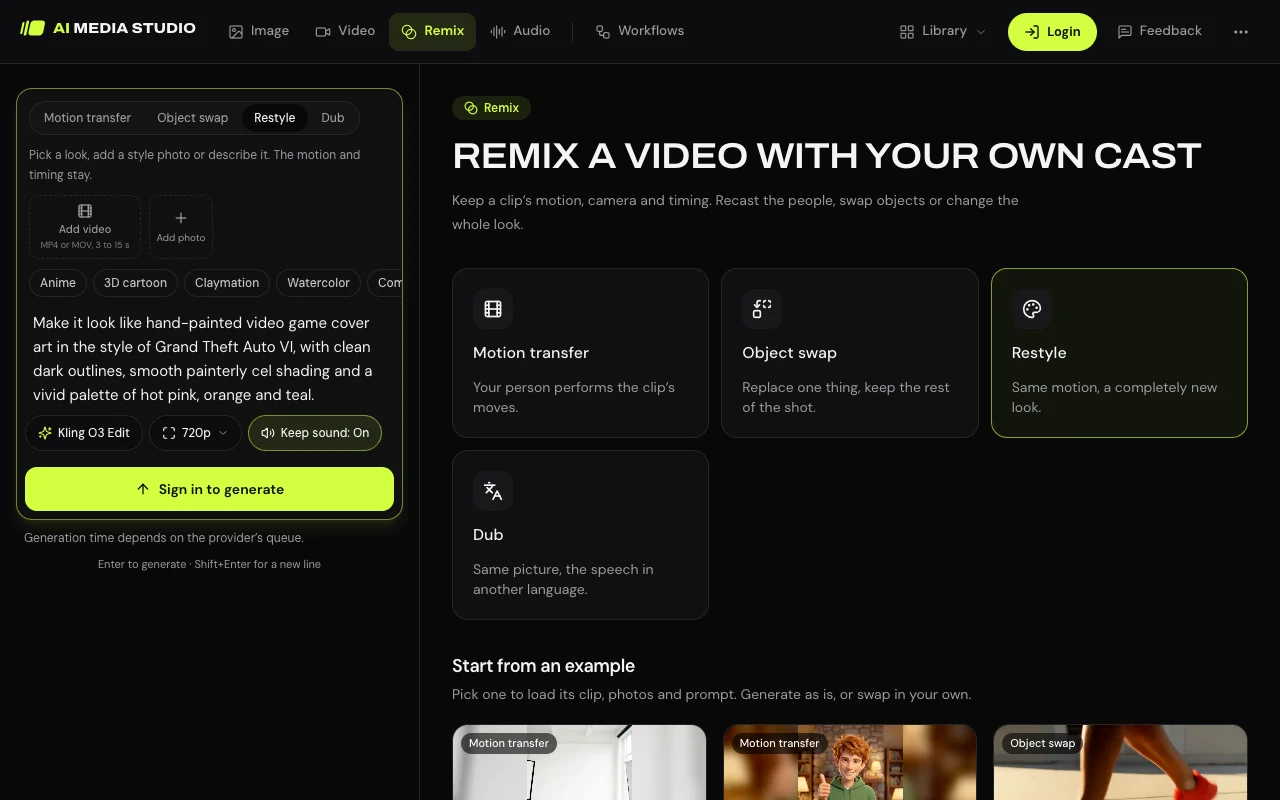
Prompt we ran
Make it look like hand-painted video game cover art in the style of Grand Theft Auto VI, with clean dark outlines, smooth painterly cel shading and a vivid palette of hot pink, orange and teal.
Suggested model: Kling O3 Edit
7.What the restyle gave us
The two runs took 4 and 10 minutes and cost 114 credits each for a 5.9-second clip. With the look in words only, the street clip became a pink and purple dusk scene, drawn as a soft cartoon with simplified faces. With the same words and one of our GTA 6 style pictures as the style photo, the result was nearly the same. Both kept the walk, the framing and the yellow coat.
Prompt we ran
Make it look like hand-painted video game cover art in the style of Grand Theft Auto VI, with clean dark outlines, smooth painterly cel shading and a vivid palette of hot pink, orange and teal.
Suggested model: Kling O3 Edit
For the full look in motion, animate a finished picture in the Video tab. Restyle is the route when the motion of your own clip matters more than the drawing.
If the result is off
- It does not look like you: name more features in the prompt (eye colour, beard, glasses, freckles) or try GPT Image 2.5, which changed the face least.
- It looks like a different style: check that Style still reads “No style”. A style left over from an earlier edit is added to your prompt.
- The background changed and you wanted yours: add “keep the room, the pose and the framing exactly as they are”.
- Extra things appeared: models add cars, string lights and neon signs with scrambled lettering, even when the prompt says no text. Look before you post, and generate again or crop.
- The clip turned realistic: end the video prompt with the look again, “clean dark outlines and vivid pink, orange and teal colours in every frame”.
Models and credits used on this page
Every model runs in the same composer and draws from the same credits. The Kling O3 Edit price is what our restyle was charged on 14 November 2026.
| Model | Credits | On Starter | Where it is |
|---|---|---|---|
| Muse Imageone size, about 2.5 MP | 2 | $0.038 | Image tab. Cheapest way to try the look. |
| Nano Banana 2.11K | 9 | $0.171 | Image tab. The default for photo edits. |
| GPT Image 2.5high quality | 11 | $0.209 | Image tab. Softest lines, closest face. The buttons on this page open it with Detail on. |
| Kling O3 Pro5-second clip, sound off | 85 | $1.61 | Video tab. Animates a finished picture. |
| Kling O3 Edit5.9-second clip at 720p | 114 | $2.17 | Remix tab, Restyle. Keeps your motion; softer drawing. |
The composer shows the credit cost on the Generate button once you are signed in. Prices checked .
What it costs
A picture and a 5-second clip together cost 94 credits with Nano Banana 2.1 and Kling O3 Pro. On the Starter plan ($19 for 1,000 credits a month) that is about $1.79. A picture alone costs $0.038 to $0.209.
Every edit needs a paid plan. Plans start at $19/month. Unused subscription credits roll over and downloads carry no watermark.
Frequently asked questions
Where is the GTA 6 style in the Style menu?
It is not there yet. Leave Style on “No style” and put the look in the prompt: a hand-painted digital illustration with clean dark outlines, smooth painterly cel shading and a vivid palette of hot pink, orange and teal. The buttons on this page open the composer with that prompt typed.
Do I need an account to try it?
You can attach a photo, write the prompt and choose the settings without an account. Generating needs you to sign in, and every generation needs a paid plan. Every edit needs a paid plan. Plans start at $19/month.
Which model should I pick?
The buttons open GPT Image 2.5 (11 credits) with Detail on: it kept the face closest in our runs. Nano Banana 2.1 (9 credits) handled every subject we tried, and Muse Image (2 credits) is the cheapest way to test a prompt.
How do I turn the picture into a video?
Download the picture, open the Video tab, add it as the start frame, describe one action and set Duration to 5s. On Kling O3 Pro with sound off that is 85 credits, and our clip kept the illustrated look.
Can I restyle a video I already filmed?
Yes, in the Remix tab under Restyle, and it keeps the motion of your clip. In our two runs it got the pink and purple colours but drew a softer cartoon than the pictures, with or without a style photo, at 114 credits each. Animating a finished picture kept the full look.
How long does it take?
In our runs on 14 November 2026 a picture took about 20 seconds, the Kling O3 Pro clip just under four minutes, and the two Remix restyles 4 and 10 minutes. Times depend on how busy the model provider is.
Is this an official GTA tool?
No. It is a fan-style look made with general image and video models from a prompt. AI Media Studio is not affiliated with, endorsed by or sponsored by Rockstar Games or Take-Two Interactive. Grand Theft Auto and GTA are their trademarks, named here only to describe an art style. Do not add the game’s logo, title or characters, and do not present a result as official artwork.
How much does it cost? Is there a free option?
One picture costs 2 credits on Muse Image, 9 on Nano Banana 2.1 at 1K or 11 on GPT Image 2.5, and a 5-second clip 85. AI Media Studio has no free tier. Every edit needs a paid plan. Plans start at $19/month.
Uploads are processed by the AI provider that runs the model you pick. Retention, processors and deletion requests are covered in the privacy policy.