AI age filter
Age filter: see yourself older, younger or at every age from one photo
An age filter changes how old a person looks in a photo. Here it is a prompt edit: upload your photo, write the age you want (for example about 70) and list what must stay the same, such as your face shape, eyes, smile and the background. On Nano Banana Pro one edit costs 30 credits at 1K or 2K. The result is an imagined look made by AI, not a forecast of how you will age.

Before
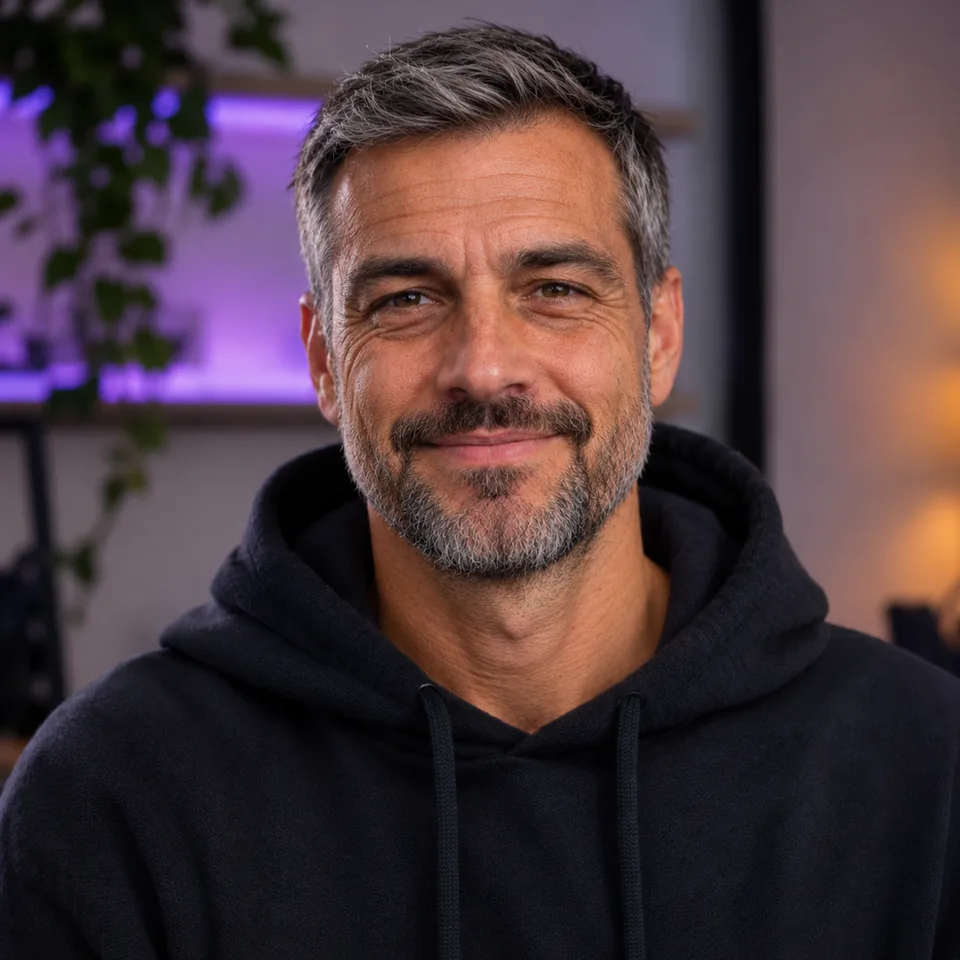
After: about 20 years older
Every edit needs a paid plan. Plans start at $19/month. Paid plans include a commercial license, and downloads carry no watermark.
How do I use an AI age filter on my photo?
- 01
Pick a clear photo of yourself
A sharp, front-facing photo with even light, your whole face visible and no sunglasses. One face is easiest; for two people, see the couple idea below.
- 02
Write the age as a number
The button above opens the editor on Nano Banana Pro with an aging prompt for about 70 loaded. Change the number, and add details you want, such as white hair or a beard.
- 03
Say what stays the same
Keep the line that names your face shape, eye colour, smile, skin tone, clothes and background. Without it the model may change who you are, not only how old you look.
- 04
Compare, then make the next age
Put the result next to the original and check the eyes, nose and smile. For another age, start again from the original photo, not from the aged edit.
Aging filter ideas, with prompts
Each idea is one prompt edit of your own photo. Copy the prompt, or use the button under it to open the editor with the prompt loaded.
1.See yourself older
The classic old age filter: one photo, one target age. Ask for a number rather than “old”, and list the signs of age you want. Vague prompts tend to give a costume look: flat grey hair and painted wrinkles on a face that has not changed.
Prompt to try
Show the person in this photo at about 70 years old. Add the natural signs of that age: lines and wrinkles around the eyes and mouth, skin texture and some age spots, greying or thinning hair in the same style, a softer jawline. Keep the same person: face shape, eye colour, nose, smile, skin tone, clothes, pose, background and lighting. Realistic photo, no filter look.
Suggested model: Nano Banana Pro
2.An aging timeline: 30, 50, 70, 90
The aging timeline trend shows the same face at several ages side by side. Make each age as a separate edit of the original photo, changing only the number in the prompt. Editing the 50 to get the 70 adds the small changes of both edits together, and the face drifts further from you at each step.
Prompt to try
Show the person in this photo at about 50 years old. Add the natural signs of that age: lines and wrinkles around the eyes and mouth, skin texture and some age spots, greying or thinning hair in the same style, a softer jawline. Keep the same person: face shape, eye colour, nose, smile, skin tone, clothes, pose, background and lighting. Realistic photo, no filter look.
Suggested model: Nano Banana Pro
3.An old man or old woman filter
For a stronger old person filter, describe the look in detail: white hair and eyebrows, a white stubble beard, deep forehead lines, drooping eyelids. For an old woman filter, swap the beard for the hairstyle you want, for example short white curls.
Prompt to try
Turn the man in this photo into an old man of about 80: white hair and eyebrows, a white stubble beard, deep lines on the forehead and around the eyes, thinner skin with age spots, slightly drooping eyelids. Keep the same person: face shape, eye colour, nose, smile, skin tone, clothes, pose, background and lighting. Realistic photo, no filter look.
Suggested model: Nano Banana Pro
4.See yourself younger
The same edit works the other way: ask for an age below yours and describe smoother skin and fuller hair. Keep the target an adult age. If you have a real photo from back then, compare the two; the AI version is a guess.
Prompt to try
Show the person in this photo as they might have looked at about 20 years old: smoother skin, fuller hair in its natural younger colour, no grey, a slightly fuller face. Keep the same person: face shape, eye colour, nose, smile, skin tone, clothes, pose, background and lighting. Realistic photo, no filter look.
Suggested model: Nano Banana Pro
5.Grow old together: a couple photo
Upload a photo of the two of you and ask for both to age. If you are in separate photos, upload both (an edit takes up to four images) and ask for the two people side by side. Check that each face stayed with its own person.
Prompt to try
Show both people in this photo at about 75 years old, growing old together: grey and white hair, natural wrinkles and age spots for each of them. Keep both of them recognisable: each face, their skin tones, their positions, how they stand together, the clothes and the background. Realistic photo.
Suggested model: Nano Banana Pro
Both people must agree to the photo being edited.
6.A young-to-old video
Turn the timeline into motion: in the video composer, attach the original photo as the start frame and your oldest edit as the end frame, and Kling 4.0 makes the frames in between. Clips run 3 to 15 seconds and come with sound. The link under “Open an idea in the app” opens the video composer with this prompt loaded. The AI transition guide has more on frame pairs.
Prompt to try
A slow, continuous aging transition from the start frame to the end frame: the hair turns grey and then white, lines deepen around the eyes and mouth, the skin ages naturally. The person keeps looking calmly at the camera. Static camera, no cut, no fade. Keep the face shape, eyes, clothes and the background the same.
Suggested model: Kling 4.0
Tips for a better age filter
- Use your own photo, or a photo of someone who agreed to it. No celebrities or public figures, and children only with their parents’ permission.
- Start every age from the original photo. Each edit changes a face a little, and edits of edits drift away from the person.
- Name the age and the changes: “about 70, grey hair, lines around the eyes” works better than “make me old”.
- The result is an imagined look, not a forecast. Genes, sun, health and habits decide how a face ages, and a single photo shows none of them.
- Do not use an aged image to identify a missing person or to show what someone looks like today; that needs a forensic artist and the police, not a photo edit.
- Label the image as AI-edited when you post it, especially if it looks like a real photo.
Which model to use
Every model runs in the same editor and draws from the same credits. Prices are for one edit in the web app.
| Model | Credits per edit | On Starter | Use it for |
|---|---|---|---|
| Nano Banana Pro1K or 2K | 30 | $0.570 | The model the buttons on this page open. 60 credits at 4K. |
| GPT Image 2.6high quality, one photo | 13 | $0.247 | The editor’s default image model. We have not compared it with Nano Banana Pro on aging edits yet. |
| Nano Banana 2.11K | 9 | $0.171 | A cheaper edit to try a prompt before the final run. Not tested by us on aging. |
| Muse Imageone size | 2 | $0.038 | The cheapest way to try an idea. Not tested by us on aging. |
The editor shows the credit cost before you generate. Prices checked .
What an AI age filter costs
One aging edit costs 30 credits on Nano Banana Pro at 1K or 2K, 60 at 4K. A timeline of three ages from one photo is 90 credits. A 5-second young-to-old clip on Kling 4.0 costs 115 credits at 720p (23 credits per second), so the timeline and the clip together come to 205 credits.
Plans start at $19/month. Downloads carry no watermark, and paid plans include a commercial license.
Frequently asked questions
What is an AI age filter?
An AI age filter is an edit that changes how old a person looks in a photo while keeping them recognisable. Instead of laying grey hair and wrinkles over the face, the AI redraws the face at the age you ask for. Here you write the age in a prompt, so you can ask for any age and any detail.
How does AI age progression work?
An image model reads your photo and your prompt, then generates a new version of the photo with the signs of the age you named: skin, lines, hair colour and the shape of the jaw and eyes. The line that says what to keep, such as face shape, eyes and background, holds the rest of the photo in place.
How do I get the old man filter or old person filter look?
Upload your photo and ask for a specific age, such as about 80, with the details: white hair and eyebrows, a white beard, deep forehead lines, age spots. Keep the line that names your face, clothes and background. For an old woman filter, describe the hairstyle you want instead of the beard.
Is there an age progression app I can use on my phone?
AI Media Studio runs in the web browser, on a phone or a computer, with nothing to install. Upload a photo from your camera roll, write the age and download the result.
How accurate is age progression?
It is not a prediction. The AI shows one plausible older look based on general patterns of aging, and the same prompt can give a different face on the next run. How you actually age depends on genes, sun, health and habits. Do not use it to identify a missing person or to estimate anyone’s real age.
Which AI aging filter keeps my face the same?
Keeping the face comes mostly from the prompt: list what must stay (face shape, eye colour, nose, smile, skin tone) and change one thing, the age. Start every age from the original photo. Nano Banana Pro is the model this page opens with; if a result stops looking like you, run it again or try GPT Image 2.6 with the same prompt.
How do I make an aging timeline video like the TikTok trend?
Make the ages you want as separate edits of one photo, for example 50, 70 and 90. For a video, attach the original as the start frame and the oldest edit as the end frame on Kling 4.0, and describe the aging in between. A 5-second clip costs 115 credits at 720p. See the AI transition guide for frame tips.
Can an old age filter make me look younger too?
Yes. Ask for an age below yours, such as about 20, and describe smoother skin and fuller hair in its younger colour. For a real old photo of yourself or your parents, restore the old photo instead: that keeps what the camera actually recorded.
Is there a free age filter?
AI Media Studio has no free tier. Every edit needs a paid plan. Plans start at $19/month. One aging edit costs 30 credits on Nano Banana Pro.
Uploads are processed by the AI provider that runs the model you pick. Retention, processors and deletion requests are covered in the privacy policy.