Claude Fable 5.2 video generation
Can Claude Fable 5.2 generate videos? It directs them
Can Claude Fable 5.2 generate videos? Not on its own. Anthropic lists the model’s input and output as text and images in, text out, so it cannot render a single frame. What it can do is the director’s job: turn an idea into a shot list, set the camera for each shot and write the prompt or the code that another tool turns into pictures. A video model, a 3D renderer or animation code does the rendering. AI Media Studio renders images and video with models such as Kling and Seedance 2.0: paste Fable’s prompts into its web app, or add its connector to Claude.
Input → output: Text and images → text
Plans start at $19/month. AI Media Studio is not made by Anthropic and is not part of Claude.
Fable 5.2 is the director, not the camera
A clip made “with Fable 5.2” is made in two parts: Fable plans and writes, another tool renders. That tool is a video model fed with Fable’s prompts, a 3D tool or browser code that Fable writes, or Claude Motion, Anthropic’s animation feature.
01You
Write the brief
Say what the clip is about, how long it runs, its shape and what must not appear, such as people, logos or text on screen.
02Claude Fable 5.2
Plan the shots and write the prompts
Fable breaks the idea into shots, each with a length, a camera move and the action, and writes one prompt per shot for an image or video model. For a 3D or motion graphics clip it writes the code instead.
03AI Media Studio
Render each shot
Paste a shot prompt into the AI Media Studio web app, or add the AI Media Studio connector to Claude and sign in. Make a keyframe with an image model, then animate it with Kling, Seedance 2.0, Grok Imagine or FLUX 3 Max. Every result is saved in your workspace.
04You
Watch and give notes
Fable 5.2 reads text and images, not video, so it does not watch the clip. Watch it yourself, or attach a frame, and tell Fable what to change; it rewrites the prompts for the shots that need it.
How to connect AI Media Studio to Claude
These are the setup steps we document for the AI Media Studio connector. As of November 25, 2026 we have confirmed that it can be added and that it asks you to sign in. We have not yet signed in and made a clip through it, so we cannot promise a result: start with one short clip.
- 01
Have a paid AI Media Studio workspace
Claude spends the credits of an AI Media Studio workspace, and agent calls need a paid plan. Plans start at $19/month. Only the workspace’s owner or an admin can connect Claude to it.
- 02
Add the connector in Claude
In claude.ai or Claude Desktop, open Customize > Connectors, click Add and choose Add custom connector. Name it AI Media Studio, paste the server URL and click Add, then Connect. On a Team or Enterprise plan, a Claude Owner adds it once under Organization settings > Connectors, and each member then clicks Connect.
Server URL https://app.ai-media-studio.com/mcpIt is a custom connector: AI Media Studio is not listed in Claude’s connector directory.
- 03
Or add it to Claude Code
Run this once in a terminal. It registers the server for all your projects. Then start Claude Code, type /mcp, pick aims and choose Authenticate.
Terminal claude mcp add --transport http --scope user aims https://app.ai-media-studio.com/mcpOutput of claude mcp list, before you sign in Checking MCP server health… aims: https://app.ai-media-studio.com/mcp (HTTP) - ! Needs authenticationWe ran both commands on November 23, 2026; “Needs authentication” is expected until you sign in.
- 04
Sign in and allow access
Until you sign in, Claude Code lists the server as “Needs authentication”. When Claude asks, sign in to AI Media Studio and choose the workspace. We have not yet tested this sign-in from Claude.
- 05
Choose Fable 5.2 and ask it to direct
In Claude, pick Claude Fable 5.2 as the model if your plan includes it. Ask for the shot list first and read it, then ask Claude to make one shot with AI Media Studio and name the model and length.
Prompt Direct a 20-second 16:9 video of a red paper boat carried by rainwater to a river at dawn: 4 shots, each with length, camera, action and a keyframe prompt. No people, no text. Then use AI Media Studio to make the shot 1 keyframe with FLUX 3 and animate it for 5 seconds with Kling O3 Pro.
A real Fable 5.2 shot list, with stills from its prompts
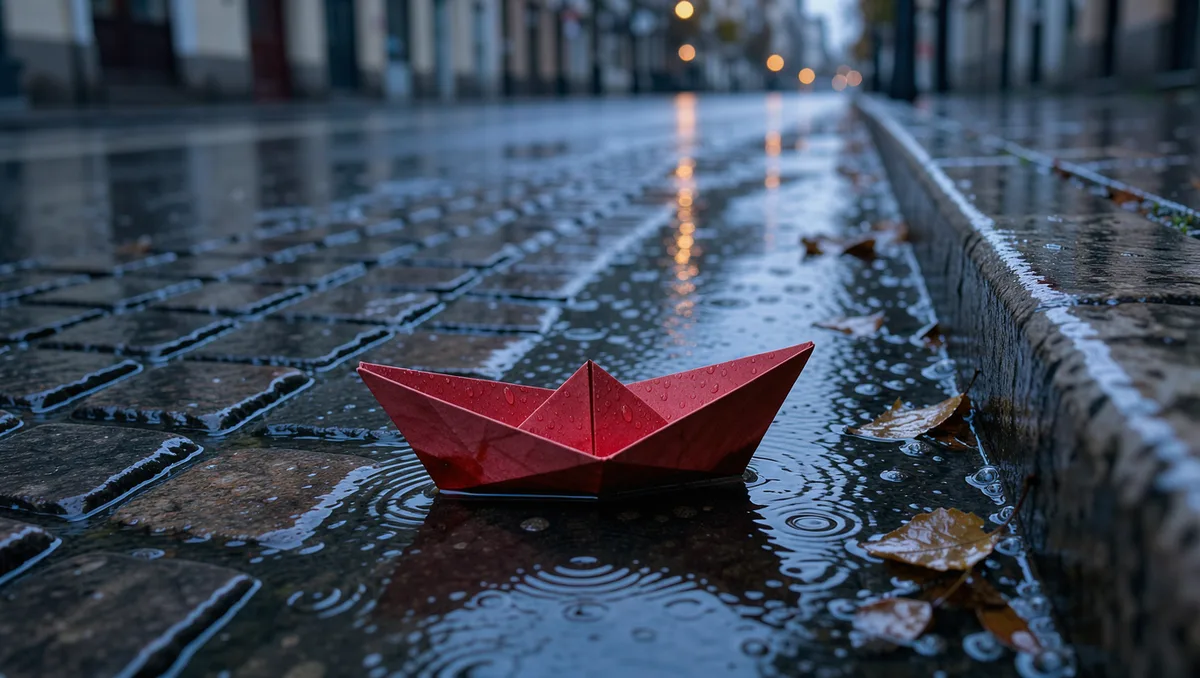
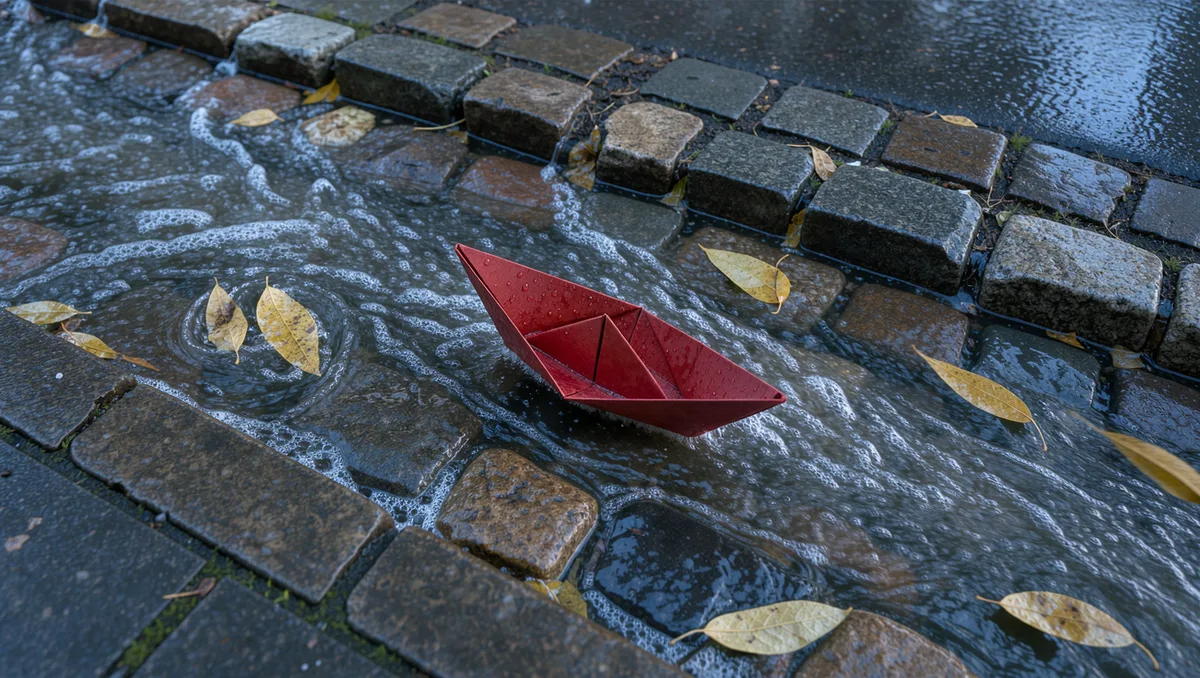
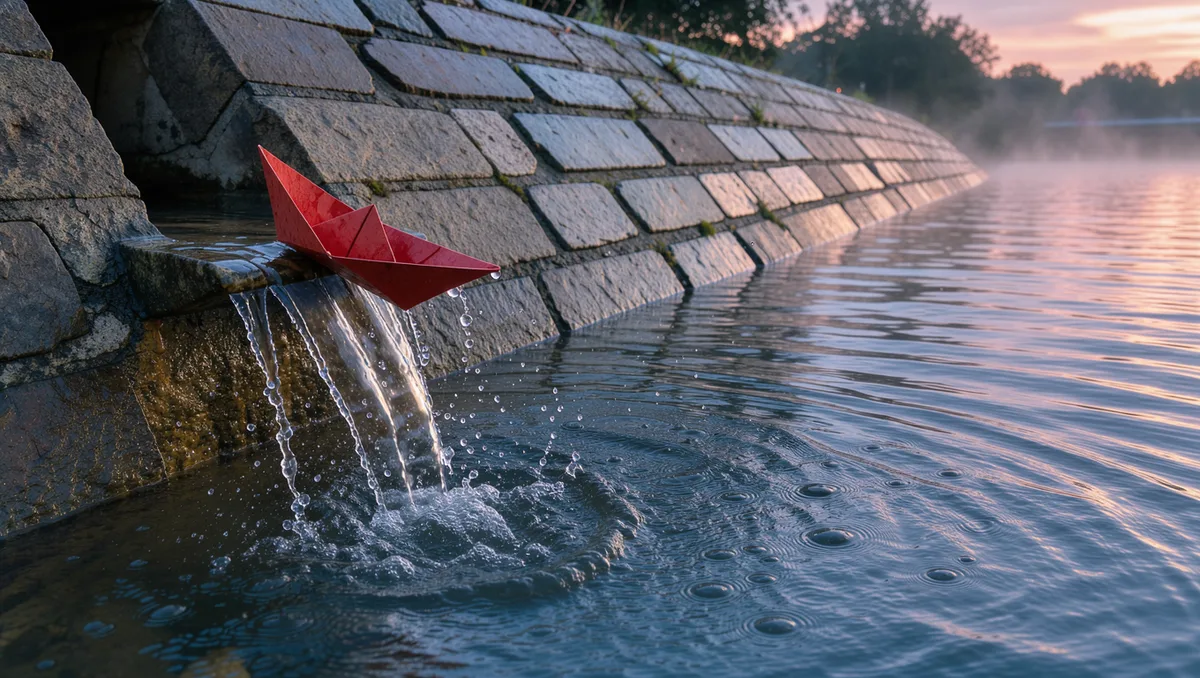
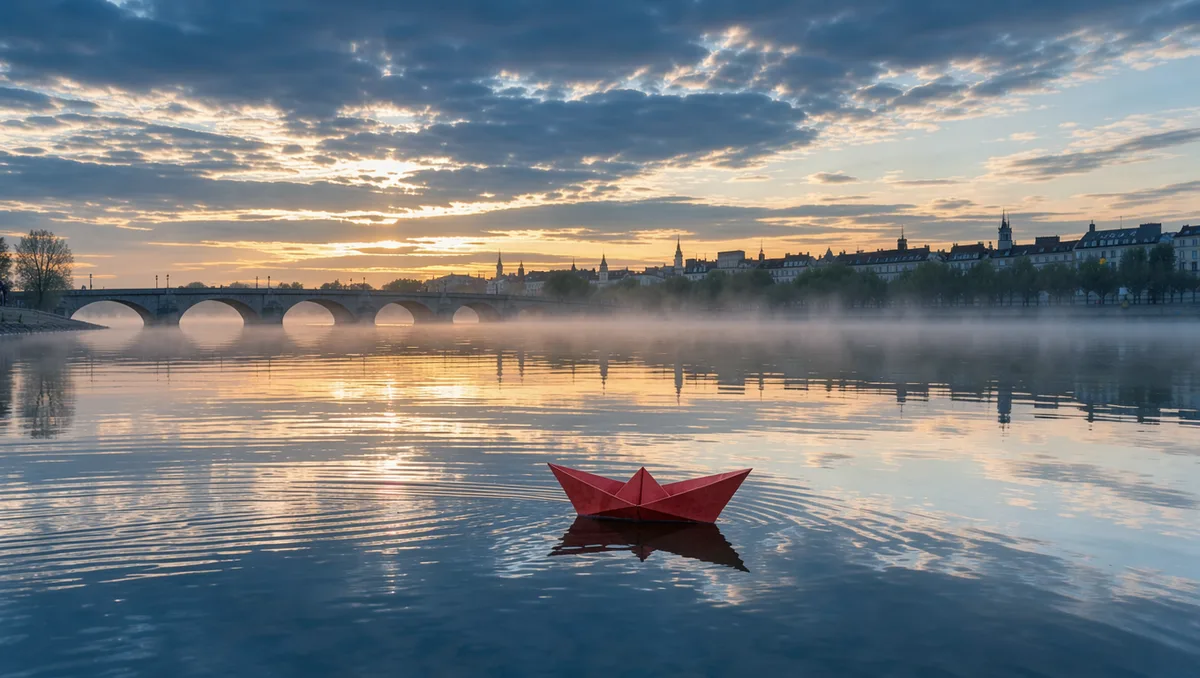
On November 25, 2026 we sent Claude Fable 5.2 one brief, word for word: “Act as the director of a 20-second short video. A video model will render it later; you write the plan. Subject: a small red paper boat carried by rainwater from a city street gutter to a river at dawn. No people, no brands, no text on screen. Give me a one-line logline, then exactly 4 shots. For each shot: shot number and length in seconds, camera (framing, lens, movement), what happens, and a keyframe image prompt of at most 60 words that an image model can render as a single 16:9 still. Plain text, no tables.” It answered with a logline, “A small red paper boat rides the last of the night’s rain from a city gutter out to the open river as dawn breaks.”, and four shots. Each card shows one shot as Fable wrote it, with its camera, action and keyframe prompt, next to a still that an image model rendered from that prompt.
1.Shot 1 (5 seconds)
Camera: Extreme low-angle close-up at water level, 35mm macro look with shallow depth of field. Slow lateral tracking move, keeping pace with the boat from left to right. Action: In blue pre-dawn light, the red paper boat drifts along a rain-filled gutter beside a stone curb. Light rain dimples the water, and blurred amber streetlight reflections slide past. The boat wobbles, catches the current and speeds up.
Keyframe prompt written by Fable 5.2
Ground-level macro photo, small red origami paper boat floating in a rain-filled street gutter beside a stone curb, wet dark cobblestones, light rain ripples, blurred amber streetlight reflections, cool blue pre-dawn light, shallow depth of field, empty city street, no people, no signage, cinematic, 16:9.
2.Shot 2 (4 seconds)
Camera: Top-down overhead medium shot, 50mm. The camera glides forward above the boat as it moves down the frame, with a slight roll to follow the bend of the gutter. Action: The street slopes downhill and the gutter becomes a fast little rapid. The boat spins once among yellow leaves and foam, straightens, and races on. The rain thins and the light shifts from blue to soft grey.
Keyframe prompt written by Fable 5.2
Top-down overhead view, small red origami paper boat riding a fast stream of rainwater along a cobblestone gutter on a sloping street, swirling yellow leaves, white foam streaks, wet stones glistening, soft blue-grey early dawn light, empty street, no people, no signage, cinematic realism, 16:9.
3.Shot 3 (5 seconds)
Camera: Low-angle wide shot from river level looking back at the embankment, 24mm. Static at first, then a gentle tilt down and slight push-in as the boat falls. Slow motion at the drop. Action: The boat reaches the end of a stone drainage channel in the embankment wall and hangs on the lip for a beat. It then slides down a thin waterfall of runoff and lands upright on the river in a small burst of spray. The first pink-gold light touches the wet stone.
Keyframe prompt written by Fable 5.2
Low-angle view from river level, small red origami paper boat tipping over the lip of a stone drainage channel in an old embankment wall, thin waterfall of rainwater spilling into a wide river, spray droplets frozen midair, first pink-gold dawn light on wet stone, mist, no people, no signage, cinematic, 16:9.
4.Shot 4 (6 seconds)
Camera: Wide establishing shot, 35mm. Starts low behind the boat, then makes a slow rising crane move and pull-back until the boat is a small red point on the wide river. Action: The rain has stopped. The boat drifts out on calm water as the sun breaks through the clearing clouds, laying a long golden reflection across the river. Mist lifts, and a distant skyline and arched bridge sit in silhouette. Hold on the boat gliding toward the light.
Keyframe prompt written by Fable 5.2
Wide shot, tiny red origami paper boat drifting on a calm, broad river at sunrise, golden light breaking through clearing rain clouds, soft mist on the water, long shimmering reflection, distant city skyline and arched stone bridge in silhouette, no people, no vessels, no signage, serene, cinematic, 16:9.
Four ways to turn Fable 5.2’s direction into video
Fable 5.2 writes the plan in every case. What changes is what makes the pictures.
| Route | What Fable 5.2 writes | What renders it | What you get |
|---|---|---|---|
| Video model | Shot prompts | A video model such as Kling, Seedance 2.0 or Grok Imagine, in the AI Media Studio web app or, once connected, from Claude | Realistic clips of 1 to 20 seconds per shot, depending on the model |
| 3D scene | Code for a 3D tool such as Blender, or Three.js for the browser | Blender or a browser, on your computer or on rented GPUs | 3D animation with full control of the camera; you run and render the code |
| Claude Motion | Animation code inside Claude | Claude, in beta on Team and Enterprise plans | Animated text, charts, shapes and images exported as MP4; Anthropic says it creates no realistic footage or people |
| Copy and paste | Shot prompts | Any video generator you already use | Clips you make and collect yourself |
Clip lengths for AI Media Studio come from its pricing data. Claude Motion facts are from Anthropic’s help center, read on November 25, 2026. Checked in the app code on .
What Fable 5.2 can and cannot do for a video
- It cannot render video or images. Anthropic lists text and images as its inputs and text as its only output.
- It cannot watch a clip. Video is not one of its inputs, so review clips yourself.
- It can look at stills. Attach a keyframe or a frame grab and ask whether it matches the shot list.
- It thinks before it answers. Anthropic keeps thinking always on for Fable 5.2 with a default effort of high; our four-shot list took 3,556 output tokens, thinking included.
- It keeps a look only if the prompts carry it. Every keyframe prompt in our run repeats the boat, the light and “no people”, because an image model sees one prompt at a time. Ask Fable to do the same.
What directing with Fable 5.2 costs
There are two bills: Claude for the directing and AI Media Studio for the rendering. In the Claude apps, Fable 5.2 counts toward your plan’s usage limits. On the API, Anthropic charges $8 per million input tokens and $40 per million output tokens; our shot list used 175 input and 3,556 output tokens and cost $0.14 through fal.
Rendering uses AI Media Studio credits, priced per image and per second of video. Plans start at $19/month, and agent calls need a paid plan.
Claude Fable 5.2 video FAQ
Can Claude Fable 5.2 generate videos?
Not by itself. Anthropic’s model overview lists text and images as its input and text as its output. Fable 5.2 can plan a video, write the shot prompts or write the code for an animation, and another tool renders the frames: a video model, a 3D renderer or Claude Motion.
Is Claude Fable 5.2 a video model?
No. Anthropic built it for demanding reasoning and long-horizon agentic work and released it on November 9, 2026. Video models such as Kling or Seedance 2.0 turn a prompt into footage; Fable 5.2 writes what they should show.
How are the Fable 5.2 videos on social media made?
Either Fable wrote code that a renderer turned into frames, such as a Blender or Three.js scene, or it wrote prompts that a video model rendered. In both cases another tool made the pictures.
Can Fable 5.2 write prompts for Kling, Seedance or other video models?
Yes. Ask for one prompt per shot and name the target model, length and shape. The example on this page shows four keyframe prompts Fable 5.2 wrote from a one-paragraph brief.
Can Fable 5.2 make a video in Claude Code?
Not by itself. In Claude Code it can write and run code that renders frames, or call a video tool you connect. To add AI Media Studio, run the claude mcp add command from the setup above, then type /mcp and authenticate.
Can Fable 5.2 watch my video and give feedback?
Not the video itself, because video is not one of its inputs. Attach still frames instead, and it can compare them with the shot list.
Should Fable 5.2 or Claude Opus 5.5 write the shot list?
Anthropic recommends starting most work on the latest Claude Opus model and moving to Fable 5.2 when that is not enough. For a short shot list, give both the same brief and compare.
What does AI Media Studio do here?
It renders. AI Media Studio is an image and video generator with models such as Nano Banana, GPT Image, FLUX 3, Kling and Seedance 2.0. Paste Fable’s prompts into the web app, or add its connector to Claude. It does not include Claude or Fable 5.2. Plans start at $19/month.
AI Media Studio is not affiliated with Anthropic, OpenRouter, fal, Black Forest Labs, ByteDance, Google, Kuaishou, OpenAI or xAI. Claude is a trademark of Anthropic. How we handle your files: privacy policy.