Use case · MCP server, CLI and API
Social media content automation: let your agent make the images and videos
Social media content automation has five steps: plan the posts, make the media, review it, schedule it and publish it. AI Media Studio does the second step. An AI agent such as Claude or Claude Code, or your own script, calls our MCP server, the aims CLI or the REST API and gets back images and short video clips in the shapes each platform uses, as hosted links or downloaded files. AI Media Studio does not post or schedule: a social media scheduler or the platform itself does that.
Plans start at $19/month. Agent, CLI and API calls use the same workspace credits as the web app.
Where AI Media Studio fits in a content pipeline
AI Media Studio is the generation step. The other steps need other kinds of tools; the ones named below are common examples of each kind. We have no partnership or tested integration with any of them.
01You or your AI agent
Plan the posts
Topics, dates and captions in a content calendar or a spreadsheet. An agent can draft them from a brief and then ask for the media in the same chat.
02AI Media Studio
Make the images and clips
Your agent or script calls the MCP server, the aims CLI or the API. Images come in 1:1, 4:5, 9:16, 16:9 and other shapes from Nano Banana, GPT Image, FLUX and Muse; clips come from Kling, Seedance 2.0 and Grok Imagine. Every result is a hosted link and is saved in your workspace library, and the CLI can also download the files.
03You
Review every post
Look at each image and clip before it is scheduled: text, hands, products and brand details. Check each platform’s rules for labelling AI-generated media.
04A scheduler or the platform
Schedule and publish
Buffer, Hootsuite and Later are social media schedulers that post to several networks. Meta Business Suite schedules Facebook and Instagram posts, and YouTube Studio schedules uploads. Upload the files there. AI Media Studio does not connect to your social accounts.
05A workflow automation tool
Connect the steps (optional)
n8n, Zapier and Make can send HTTP requests, so they can in principle call the REST API. We have not tested AI Media Studio in them. A video request stays open until the clip is done, up to 600 seconds, so check your tool’s timeout.
Set up the generation step
Pick how your automation calls AI Media Studio: an agent through the MCP server, a script through the aims CLI, or your own code through the REST API. All three use the same workspace, models and credits.
- 01
Use a paid workspace
Agent, CLI and API calls need a paid plan. Plans start at $19/month; Starter includes 1,000 credits a month. Only a workspace owner or admin can connect an agent or create an API key.
- 02
Connect your agent
In claude.ai or Claude Desktop, open Customize > Connectors, choose Add custom connector and paste the server URL. In Claude Code, run the command below, then type /mcp, pick aims and choose Authenticate. A browser page asks you to sign in and allow access to your workspace.
Server URL https://app.ai-media-studio.com/mcpClaude Code claude mcp add --transport http --scope user aims https://app.ai-media-studio.com/mcpOutput of claude mcp list, before you sign in Checking MCP server health… aims: https://app.ai-media-studio.com/mcp (HTTP) - ! Needs authenticationChatGPT, Cursor, Codex and VS Code have setup steps on the AI agents page. We have not tested them for this workflow.
- 03
Or install the CLI for scripts and scheduled jobs
The aims CLI suits shell scripts, cron jobs and coding agents. On a server, log in with an API key from Workspace Settings → API Keys, or set AIMS_API_KEY.
Terminal npm install -g @ai-media-studio/cli aims login # opens the browser; on a server use: aims login --key aims_... aims whoami --json # workspace, credits and scopes - 04
Add the agent skills (optional)
Three skills tell Claude Code and other agents that read skills when to call AI Media Studio and which model to pick: generate an image, edit an image and generate a video.
Terminal npx skills add liebhardt-io/aims-agent - 05
Cap what a run can spend
An automated run should not be able to spend more than you planned. Set AIMS_MAX_CREDITS for the CLI, or pass max_credits to an MCP tool or API call: a request that would cost more is refused and charges nothing. Use --dry-run to print a CLI request without spending credits.
Terminal export AIMS_MAX_CREDITS=60
Social media content automation examples
Each card shows a prompt to send to your agent, the tool call it makes and what it costs. Ask for the shape each platform uses: 9:16 for Stories, Reels, TikTok and Shorts, 4:5 or 1:1 for feed posts and 16:9 for YouTube and link previews.
1.A story or reel cover from one line
Nano Banana Pro is the default image model and suits realistic scenes and product shots.
Prompt to send
Use AI Media Studio with Nano Banana Pro, 9:16: A red vintage convertible sports car with a smiling couple inside, driving toward the camera on a winding coastal cliff road at sunset, the woman’s silk scarf blowing in the wind, turquoise Mediterranean sea far below, warm golden light, cinematic photograph, vertical composition
- Tool call:
- generate_image · fal-ai/nano-banana-pro · aspect_ratio 9:16
- Cost:
- 30 credits at 1K or 2K

2.Turn the still into a vertical clip
Send the still to Seedance 2.0 image-to-video. It keeps the subject’s shape, so the clip matches the image you already approved.
Prompt to send
Animate that image with Seedance 2.0, 5 seconds, 9:16, 720p: Static roadside camera: the convertible drives toward the camera and sweeps past it, the camera pans to follow, the couple laughs with wind in their hair, a warm golden sun flare.
- Tool call:
- generate_video · bytedance/seedance-2.0/image-to-video · image_url · duration 5 · resolution 720p
- Cost:
- 220 credits (44 per second at 720p)
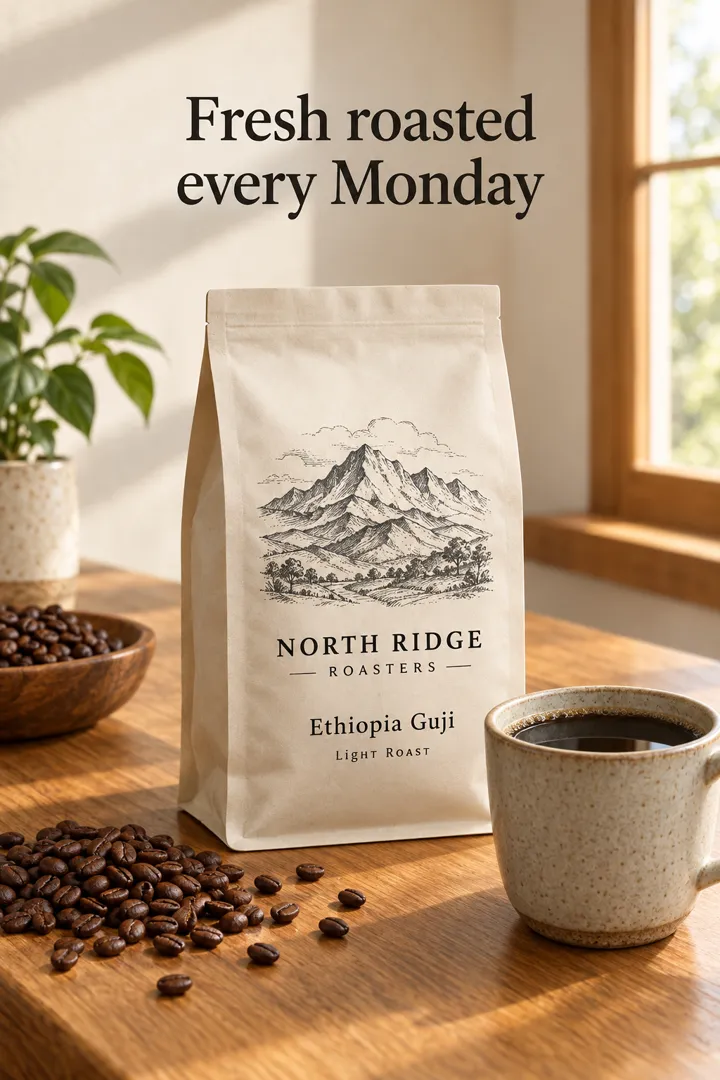
3.A promo post with readable text
For offers, launches and event posts, ask for GPT Image and put the exact words in quotes. 2:3 suits pins; ask for 4:5 for a portrait feed post.
Prompt to send
Use AI Media Studio with GPT Image 2.5 Flare, 2:3: a product poster for a small coffee roaster, a cream coffee bag labelled “NORTH RIDGE ROASTERS” and “Ethiopia Guji, Light Roast” on an oak counter next to a cup of black coffee, morning window light, the headline “Fresh roasted every Monday” at the top, no other text.
- Tool call:
- generate_image · openai/gpt-image-2.5/flare/text-to-image · aspect_ratio 2:3
- Cost:
- 11 credits at high quality
4.A week of posts from a spreadsheet
Give a coding agent such as Claude Code your content calendar and the aims CLI. It runs one command per row and saves the files where your scheduler can pick them up.
Make it yourself: prompt to send
Read posts.csv (one row per day with an image idea and a caption). For each row, run aims image with Nano Banana 2.1 at 4:5 and 1K, save the files to ./week-48 and add each file name to its row. Stop and tell me if a call fails.
- Tool call:
- aims image "<idea>" -m google/nano-banana-2.1 -a 4:5 -r 1K --output ./week-48 (7 runs)
- Cost:
- 56 credits for 7 images (8 each)
Which interface fits your automation
All four call the same API with the same workspace credits. Pick by who runs the automation.
| Interface | How you call it | Fits | What we checked |
|---|---|---|---|
| Hosted MCP server | https://app.ai-media-studio.com/mcp | Agents that plan, caption and make the media in one chat (Claude, Claude Code). | Server added in Claude Code and listed, November 23, 2026. Sign-in and generation not tested; the Claude app not connected. |
| aims CLI | aims image · aims video · aims edit | Scripts, scheduled jobs and coding agents. --output saves the files. | Every command here, with --dry-run, CLI 0.5.0. |
| Agent skills | npx skills add liebhardt-io/aims-agent | Agents that read skills: when to call it and which model to pick. | Names only current models. |
| REST API | POST /api/v1/images/generate · /videos/generate | Your own backend or a workflow tool. | Read in the app code. Not tested in n8n, Zapier or Make. |
Rate limits are shared by all four: 60 image and 20 video requests per 10 minutes per workspace. Checked in the app code on .
Automation recipes
Copy these into a script or hand them to a coding agent. Set AIMS_API_KEY or run aims login first.
# One post in three shapes: feed square, feed portrait, story/reel
for ratio in 1:1 4:5 9:16; do
  aims image "a ceramic travel mug on a mossy rock by a mountain lake at dawn, product photo" \
    -m google/nano-banana-2.1 -a "$ratio" -r 1K --output ./week-48
doneprompt="a ceramic travel mug on a mossy rock by a mountain lake at dawn, product photo"
still=$(aims image "$prompt" -a 9:16 --print url) &&
aims video "slow push-in, mist drifting over the lake, steam rising from the mug" \
-m bytedance/seedance-2.0/image-to-video --image-url "$still" \
-d 5 -r 720p -a 9:16 --output ./week-48curl -X POST https://app.ai-media-studio.com/api/v1/images/generate \
-H "Authorization: Bearer $AIMS_API_KEY" \
-H "Content-Type: application/json" \
-d '{
"prompt": "a ceramic travel mug on a mossy rock by a mountain lake at dawn, product photo",
"model": "google/nano-banana-2.1",
"aspect_ratio": "4:5",
"resolution": "1K",
"n": 4,
"max_credits": 32
}'- Image shapes: auto, 21:9, 16:9, 3:2, 4:3, 5:4, 1:1, 4:5, 3:4, 2:3 and 9:16. n asks for up to 8 images per request; Nano Banana and GPT Image models return at most 4.
- Requests return when the media is ready, with its hosted URL. If one comes back with status "generating", check it with get_media or aims media <id> instead of generating it again: it is charged once it completes.
- Every result is saved in the workspace library, where your team can review it. make_public adds a share link.
- To keep a product or style consistent, upload your own photos (upload_image, aims upload or POST /uploads) and pass them as image_urls, up to 10 per request.
- Rate limit: 60 image and 20 video requests per 10 minutes per workspace. Requests over the limit get HTTP 429 with a Retry-After header.
What AI Media Studio does not do
- It does not post, schedule or publish. It has no connection to Instagram, TikTok, YouTube, Facebook, LinkedIn or X accounts and no integration with any scheduler. You hand the files over.
- It does not write captions or hashtags. Your agent writes those; AI Media Studio makes the media.
- It is not unlimited. Every image and clip spends monthly plan credits, and the rate limits above apply.
- Video sound is on or off only. Voiceover and music are not part of the API.
- Generated media can be wrong: garbled text, extra fingers or off-brand details. Review every post before it goes out.
- We have not tested ChatGPT, Cursor, Codex or VS Code for this workflow, or n8n, Zapier and Make calling the API.
What a week of posts costs in credits
Seven 4:5 feed images with Nano Banana 2.1 at 1K are 56 credits. Add one 5-second 9:16 Seedance 2.0 clip at 720p for 220 credits, and the week is 276 credits. Starter includes 1,000 credits a month, enough for 3 such weeks.
Nano Banana Pro images are 30 credits at 1K or 2K, and every model’s price is on the AI model prices page. Plans start at $19/month.
Social media content automation FAQ
Can AI Media Studio post to Instagram, TikTok or YouTube for me?
No. AI Media Studio makes the images and video clips. Posting and scheduling happen in a social media scheduler or in each platform’s own tools.
Which scheduler works with AI Media Studio?
Any scheduler that lets you upload images and MP4 files. We have not built or tested an integration with any of them. The aims CLI saves the files to a folder with --output, and every result also has a hosted link.
Do I need an AI agent to automate it?
No. A shell script or a scheduled job can call the aims CLI or the REST API directly. An agent helps when you also want it to plan the posts and write the captions.
Can I call it from n8n, Zapier or Make?
They can send HTTP requests to the REST API with your API key, but we have not tested AI Media Studio in them. Video requests can stay open for up to 600 seconds, so check the tool’s request timeout.
How do I stop an automation from spending too many credits?
Set AIMS_MAX_CREDITS for the CLI or pass max_credits to an MCP tool or API call. A request that would cost more is refused and charges nothing. --dry-run prints a CLI request without sending it.
How do I keep my product or brand consistent across posts?
Upload your own product photos or brand images to the workspace and pass them as image_urls, up to 10 per request. For video, Seedance 2.0 reference-to-video takes two or more reference images.
Does it cost extra to use the API or MCP server?
No separate fee. Calls spend the same workspace credits as the web app. Plans start at $19/month.
AI Media Studio is not affiliated with Anthropic, Buffer, Hootsuite, Later, Meta, Google, n8n, Zapier, Make, ByteDance or OpenAI, and names their products only to describe what they do. Claude is a trademark of Anthropic. How we handle your files: privacy policy.