Claude image generation
Claude image generation: how to make Claude create images
Can Claude generate images? Not by itself. Anthropic says Claude doesn’t generate photos or illustrations the way image tools do; it builds diagrams and charts as HTML and SVG and can analyse images you upload. To make Claude create images, connect an image generator: add AI Media Studio as a custom connector in claude.ai, Claude Desktop or Claude Code, sign in once, and Claude can call Nano Banana Pro, Nano Banana 2.1 and GPT Image 2.6. It answers with a link to each finished image in your workspace.
Claude doesn’t generate photos or illustrations the way image-generation tools do.
Plans start at $19/month. Agent calls use the same credits as the studio, with no separate API fee.
How to add image generation to Claude
You add one connector, a remote MCP server that AI Media Studio runs for you. Nothing to install in claude.ai, and no key to copy: you sign in instead.
- 01
Have a paid AI Media Studio workspace
Claude spends the credits of an AI Media Studio workspace, and agent calls need a paid plan: Starter is $19/month for 1,000 credits. Only the workspace's owner or an admin can connect Claude to it.
- 02
Add the connector in Claude
In claude.ai or Claude Desktop, open Customize > Connectors, click Add and choose Add custom connector. Name it AI Media Studio, paste the server URL and click Add, then Connect. On a Team or Enterprise plan, a Claude Owner adds it once under Organization settings > Connectors, and each member then clicks Connect.
Server URL https://app.ai-media-studio.com/mcpIt is a custom connector: AI Media Studio is not listed in Claude’s connector directory.
- 03
Or add it to Claude Code
Run this once in a terminal. It registers the server for all your projects. Then start Claude Code, type /mcp, pick aims and choose Authenticate.
Terminal claude mcp add --transport http --scope user aims https://app.ai-media-studio.com/mcpOutput of claude mcp list, before you sign in Checking MCP server health… aims: https://app.ai-media-studio.com/mcp (HTTP) - ! Needs authenticationWe ran both commands on November 23, 2026; “Needs authentication” is expected until you sign in.
- 04
Sign in and allow access
A page titled “Connect … to AI Media Studio” opens in your browser. Sign in, pick the workspace and click Allow. The page lists what the connection may do, such as generate and edit images and generate videos. This adds an API key to the workspace, which you can revoke any time under Workspace Settings → API Keys.
- 05
Ask Claude for an image
Describe the picture and say “use AI Media Studio” the first time, so Claude picks the right tool. Name a model if you want one; without a name the connector uses Nano Banana Pro. Claude replies with the image link and the credits used.
Prompt Use AI Media Studio to make a 16:9 image with Nano Banana Pro: a ceramic coffee mug on a marble counter, soft morning light, shallow depth of field.
Prompts to try once Claude can make images
Each card shows a prompt to send, the tool call Claude makes and what it costs. A sentence is enough, because Claude writes the detailed prompt for the tool; where a card shows an image, its caption says how that image was made.
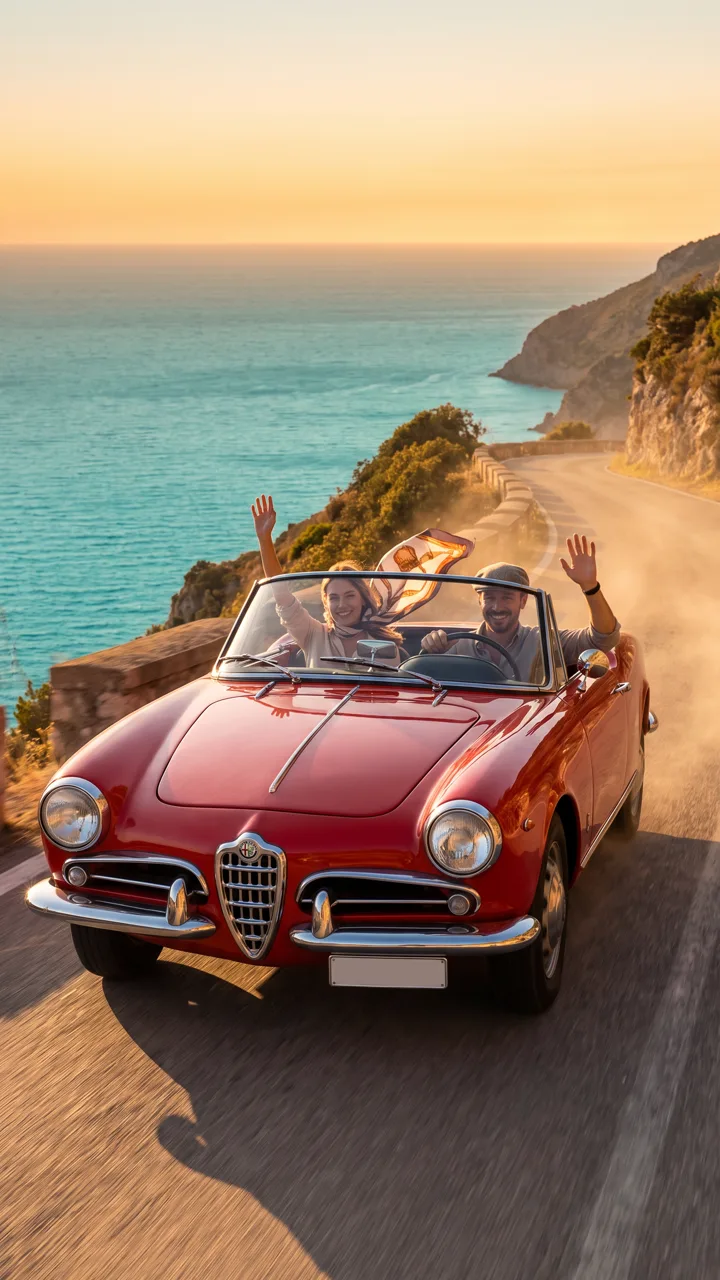
1.A photo from a description
Nano Banana Pro is the default when you name no model. It suits realistic scenes and product shots. Ask for the shape you need, such as 9:16 for a story or 16:9 for a banner.
Prompt to send
Use AI Media Studio with Nano Banana Pro, 9:16: A red vintage convertible sports car with a smiling couple inside, driving toward the camera on a winding coastal cliff road at sunset, the woman’s silk scarf blowing in the wind, turquoise Mediterranean sea far below, warm golden light, cinematic photograph, vertical composition
- Tool call:
- generate_image · fal-ai/nano-banana-pro · aspect_ratio 9:16
- Cost:
- 30 credits at 1K or 2K, 60 at 4K
2.A poster with readable text
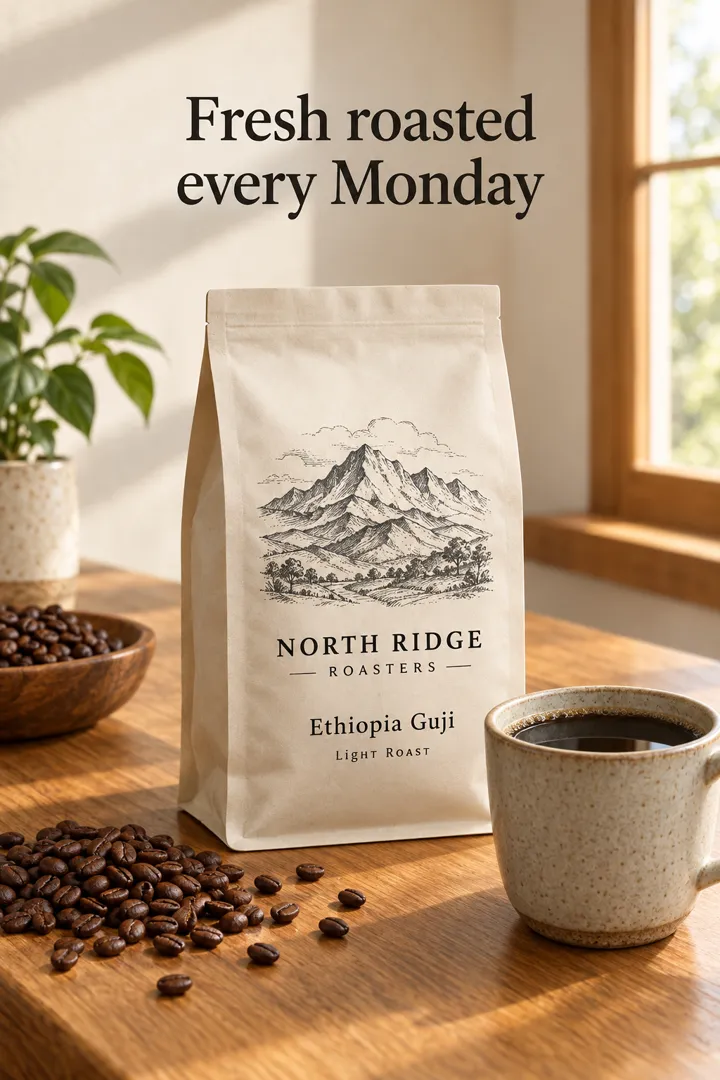
For headlines, labels and menus, ask for GPT Image. It renders short text more reliably than most image models. Put the exact words in quotes.
Prompt to send
Use AI Media Studio with GPT Image 2.5 Flare, 2:3: a product poster for a small coffee roaster, a cream coffee bag labelled “NORTH RIDGE ROASTERS” and “Ethiopia Guji, Light Roast” on an oak counter next to a cup of black coffee, morning window light, the headline “Fresh roasted every Monday” at the top, no other text.
- Tool call:
- generate_image · openai/gpt-image-2.5/flare/text-to-image · aspect_ratio 2:3
- Cost:
- 11 credits at high quality, the API default
3.Change the image Claude just made
Claude keeps the link of the last result, so you can ask for a change by replying. It passes that link to the edit tool and gets a new image back; the first one stays in your workspace.
Make it yourself: prompt to send
Make the same picture at blue hour with the headlights on, square 1:1. Keep the car, the couple and the road.
- Tool call:
- edit_image · image_urls [the link from the last result] · fal-ai/nano-banana-pro · aspect_ratio 1:1
- Cost:
- 30 credits at 1K or 2K
4.A set of variations in one call
Ask for up to four images at once with the Nano Banana models. Nano Banana 2.1 at 1K is the cheap way to explore before you spend on Pro.
Make it yourself: prompt to send
Use AI Media Studio with Nano Banana 2.1 to make 4 square app icon ideas for a budgeting app: a coin inside a leaf, flat vector, mint and navy, white background.
- Tool call:
- generate_image · google/nano-banana-2.1 · n 4 · aspect_ratio 1:1 · resolution 1K
- Cost:
- 32 credits for four (8 each)
Which image models Claude can use
Say the model name in your prompt, or let Claude pick one with the list_models tool, which returns the live list with credit costs. These are the current image models in the studio.
| Model | Model id | Good for | Credits per image |
|---|---|---|---|
| Nano Banana Pro | fal-ai/nano-banana-pro | Realistic photos, products, the default | 30 at 1K or 2K, 60 at 4K |
| Nano Banana 2.1 | google/nano-banana-2.1 | Fast drafts and variations | 8 at 1K, 12 at 2K, 27 at 4K |
| GPT Image 2.6 | openai/gpt-image-2.6/flare/text-to-image | Text in images, layouts | 15 at high quality |
| Muse Image | meta/muse-image/text-to-image | Cheapest drafts | 2 |
| FLUX 3 Image | blackforestlabs/flux-3/text-to-image | Stylised illustration | 10 at 1K |
Credits are for a new image; edits of an existing image can cost a little more, as on /ai-model-prices. Model ids are what Claude passes as model. Checked in the app code on .
What to expect
- Results come back as links. Claude receives a hosted URL for each image plus the credits used and left, and the file is saved in your AI Media Studio workspace. Open the link to see the image full size and download it.
- Editing your own photo: the edit tool works on images in your workspace, such as one Claude made earlier. Bringing in a new photo goes through an upload tool that takes the file’s raw data. We have not confirmed that claude.ai hands a photo you attach in the chat to that tool, so we do not promise it. In Claude Code, upload with the aims CLI instead (see the FAQ).
- Only an owner or admin of the AI Media Studio workspace can approve the connection. Everyone who uses it spends that workspace’s credits.
- Requests are rate limited per workspace: 60 image requests per 10 minutes. Above that, the tool returns an error and Claude should wait before retrying.
- Claude decides when to call the tool. If it answers with a description or an SVG drawing instead, say “use AI Media Studio” or name the model.
What Claude image generation costs
Each image spends credits from your workspace, at the same price as in the web app. One Nano Banana Pro image at 1K or 2K is 30 credits, about $0.57 on the Starter plan ($19/month for 1,000 credits). A Nano Banana 2.1 draft at 1K is 8 credits, about $0.15.
There is no separate API or connector fee, and your Claude plan is separate: Anthropic bills Claude, AI Media Studio bills the images. If a generation fails, its credits are returned.
Claude image generation FAQ
Can Claude generate images?
Not on its own. Anthropic’s help center says Claude doesn’t generate photos or illustrations the way image-generation tools do; it can build diagrams, charts and interactive visuals in HTML and SVG, and it can analyse images you upload. Claude can create images when you connect an image generator such as AI Media Studio through a connector.
Does Claude have image generation built in?
No. Anthropic’s help center says Claude doesn’t generate photos or illustrations the way image-generation tools do. Image generation comes from the tool you connect: Claude writes the prompt, calls the tool and passes back the result.
How do I make Claude create images?
Add https://app.ai-media-studio.com/mcp as a custom connector under Customize > Connectors in claude.ai or Claude Desktop, or with claude mcp add in Claude Code. Sign in to AI Media Studio, pick a workspace with a paid plan and click Allow. Then ask Claude for an image and mention AI Media Studio.
Can Claude edit images?
Claude can ask AI Media Studio to edit an image that is already in your workspace, such as one it just made: reply with the change you want and it calls the edit tool. For a photo of your own, upload it first. In Claude Code, run aims upload ./photo.jpg --print url with the aims CLI and give Claude the URL. We have not confirmed that a photo attached in a claude.ai chat reaches the upload tool.
Does image generation work in Claude Code?
Yes. Run claude mcp add --transport http --scope user aims https://app.ai-media-studio.com/mcp, then /mcp to sign in. Claude Code gets the same tools, which is handy for batches such as icons, hero images or placeholder art for a project, saved as links.
Is this an official Claude AI image generator?
No. AI Media Studio is an independent service and is not affiliated with Anthropic. You connect it to Claude yourself as a custom connector, and it runs image models from Google, OpenAI and others.
Will the image appear inside the chat?
Claude gets a link to each image, not the image file, and gives you that link. Open it to view and download the image. The image is also saved in your AI Media Studio workspace.
Can I use the images commercially?
Yes, on a paid plan. Every paid AI Media Studio plan includes a commercial license for the images you generate. You need the rights to any photo you upload.
AI Media Studio is not affiliated with Anthropic, ByteDance, Google or xAI. Claude is a trademark of Anthropic. How we handle your files: privacy policy.