GTA 6 poster generator
GTA 6 poster generator: your own GTA 6 style movie poster
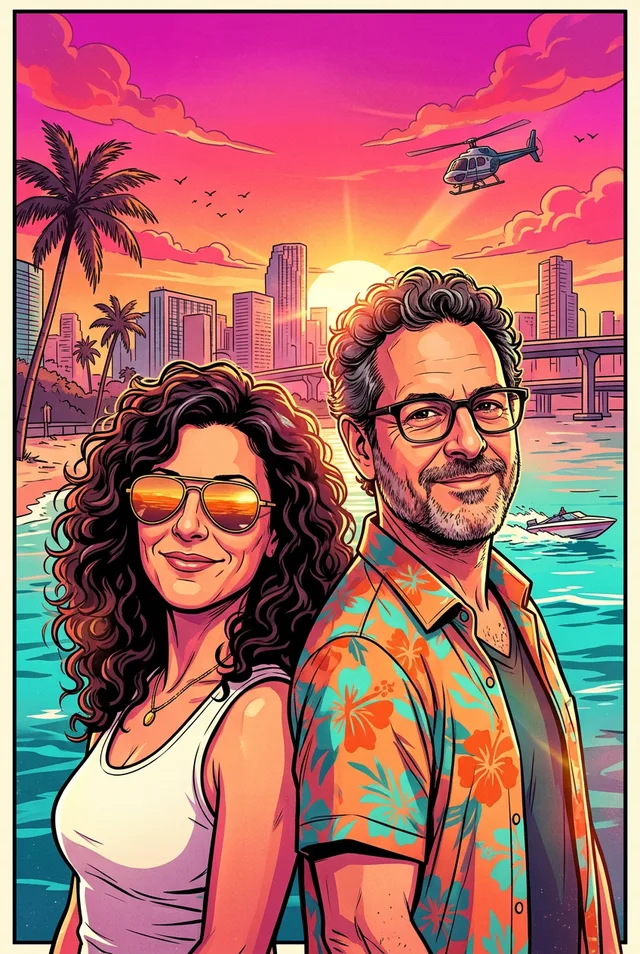
Ask for a vertical movie-style poster in the GTA 6 look and list the scene: who stands where, what they wear, what is in the sky. From a couple’s street photo we got a tall poster with a skyline, a helicopter and a speedboat under a magenta sunset. They stand side by side, not back to back as we asked. Make your own; do not copy the official GTA 6 poster. Unofficial and not affiliated with Rockstar Games.
Every edit needs a paid plan. Plans start at $19/month.
How do I make a GTA 6 style poster?
- 01
Upload a clear photo
One person in focus works best. Whatever makes you recognisable (hair colour, beard, glasses, freckles) should be easy to see, because the ink style flattens fine detail.
- 02
Ask for a vertical poster and list the scene
People and outfits in the foreground; skyline, vehicles and sky behind. Choose 2:3 for a print.
- 03
Leave the title off
Add “no title, text or logos” and set your own lettering afterwards in a layout app.
A movie-style poster from a couple photo
Every result starts from a synthetic photo or from a text prompt alone. Open “Prompt we ran” under a result for the exact prompt, or copy the prompt card and swap in your own details.
1.The couple poster
Tall frame with a thin cream border, skyline, helicopter, speedboat, palms and a magenta sunset, and no title. Her white tank top and aviators and his floral shirt are there; her curls and his glasses stayed. They stand side by side instead of back to back.
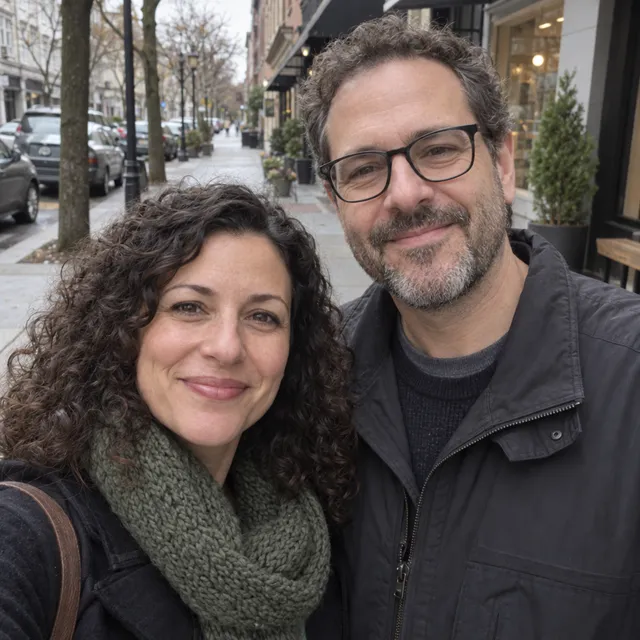
Prompt we ran
Make a vertical movie-style poster from this photo in the style of Grand Theft Auto VI key art: a hand-painted digital illustration with bold black ink outlines, cel-shaded colours and hard-edged shadows, in a hot sun-bleached palette of magenta, coral, orange and turquoise. The two people stand back to back in the foreground, she in a white tank top and aviator sunglasses, he in an open floral shirt, with a beach city skyline, palm trees, a helicopter and a speedboat behind them under a magenta sunset. Keep both likenesses: her curly dark hair, his glasses and their smiles. No title, text or logos.
Suggested model: Nano Banana 2.1
Keep it recognisable, and keep it yours
- Name what must stay: hair colour, beard, glasses, eye colour and clothes. What we named stayed in our runs; what we did not name could change.
- Expect the ink lines to sharpen faces and add a few years. GPT Image 2.5 drew softer faces where we compared it.
- Check what the model added: extra people, signs with invented words, real car badges. Ask again with “no text, logos or brand badges”.
- Do not add the game’s logo, title or characters, and do not present a result as official artwork.
- Only restyle photos of yourself or of people who agreed. An illustration of a real person is still that person.
Which model to use
Every model runs in the same app and draws from the same credits. The table shows web app prices; the credits under each result are what that API run was charged.
| Model | Credits | On Starter | Use it for |
|---|---|---|---|
| Nano Banana 2.11K | 9 | $0.171 | Most results on these pages: holds the ink outlines and the palette. 14 credits at 2K for wallpapers and banners. |
| GPT Image 2.5high quality | 11 | $0.209 | The buttons on these pages open it with Detail on, which keeps the price and takes about twice as long. Softer, more painterly faces; our comparison runs, made with Detail off, are on the profile picture, portrait and character portrait pages. |
| Muse Imageone size, about 2.5 MP | 2 | $0.038 | The cheapest way to try a prompt before you spend more. |
The app shows the credit cost before you generate. Prices checked .
What it costs
In the web app one picture costs 2 credits on Muse Image, 9 on Nano Banana 2.1 at 1K (14 at 2K) and 11 on GPT Image 2.5. On the Starter plan ($19 for 1,000 credits a month) that is $0.038 to $0.209 per picture.
Every edit needs a paid plan. Plans start at $19/month. Unused subscription credits roll over and downloads carry no watermark.
Frequently asked questions
Can I get the official GTA 6 poster?
Not from us. Official posters and artwork belong to Rockstar Games; look for them on their channels. This guide makes your own poster in a similar style.
Poster or cover art: which guide?
This poster is one scene. The cover art guide makes the panel-grid collage look.
Is this an official GTA 6 tool?
No. It is an unofficial, fan-style look made with general image models from a prompt. AI Media Studio is not affiliated with, endorsed by or sponsored by Rockstar Games or Take-Two Interactive. Grand Theft Auto and GTA are their trademarks, named here only to describe an art style. Leave the game’s logo, title and characters out of what you make.
Is there a GTA 6 button or preset?
Yes. The GTA 6 preset library opens Studio with an editable image or video prompt and the model already picked. The buttons on this page open the image composer with the look typed in, and you add what must stay. The prompts on this page are the ones we ran.
How much does it cost? Is there a free option?
One picture costs 2 credits on Muse Image, 9 on Nano Banana 2.1 at 1K or 11 on GPT Image 2.5 in the web app. AI Media Studio has no free tier. Every edit needs a paid plan. Plans start at $19/month.
Uploads are processed by the AI provider that runs the model you pick. Retention, processors and deletion requests are covered in the privacy policy.