To add effects to photos, use a filter in your phone's photo app for quick color and light changes, or describe the effect in words to an AI photo editor for new styles, scenes and lighting. We tested 9 AI effects below. Each run took one prompt and 2 to 11 credits; two effects needed a more specific second prompt, and one partly failed.
Filters or AI effects: which do you need?
A filter changes the colors and tones that are already in the photo. Apple's iPhone guide says you can "adjust the light and color, add a filter, and more" in the Photos app. Google Photos lists filters plus adjustments such as "HDR effect, Portrait light, Brightness, Contrast, Saturation, Warmth".
An AI effect redraws the image. It can add things that were never in the frame: a Santa hat, falling snow, a park behind a person, or a comic book style.
| You want | Use | Why |
|---|---|---|
| Warmer colors, more contrast, a classic filter | Your phone's photo app | It only changes tones, so the photo stays the same picture |
| A cartoon, anime or 3D character style | AI editor | The whole image is redrawn in a new style |
| Snow, lights, props or a new background | AI editor | New objects and light have to be generated |
| Color for a black and white photo | AI editor | The model has to choose colors that are not in the file |
| A blurred background | Either | See our guide to blurring a photo background |
How to add an effect to a photo with AI
- Upload the photo to an AI photo editor and pick a model.
- Describe the effect in one or two sentences: the style, the scene and the light.
- Name what must stay the same: face, eye color, hair, clothes, pose, framing.
- Compare the result with the original. Check eyes, hair, hands, text and colors.
- If a detail changed, run it again with that detail written into the prompt.
Step 3 decided most of our results. The model keeps what you name and may change what you leave out.
The 9 effects we tested
All source photos are synthetic people and objects that we generated with GPT Image 2.5, so no real person's face was edited. Each result is one run, logged with its prompt, model, credits and date in our run logs from October 12, October 27 and October 30, 2026 (cartoon runs, colorize runs). Dollar amounts use the Starter rate of $19 for 1,000 credits, about $0.019 per credit.
1. Cartoon and illustration styles
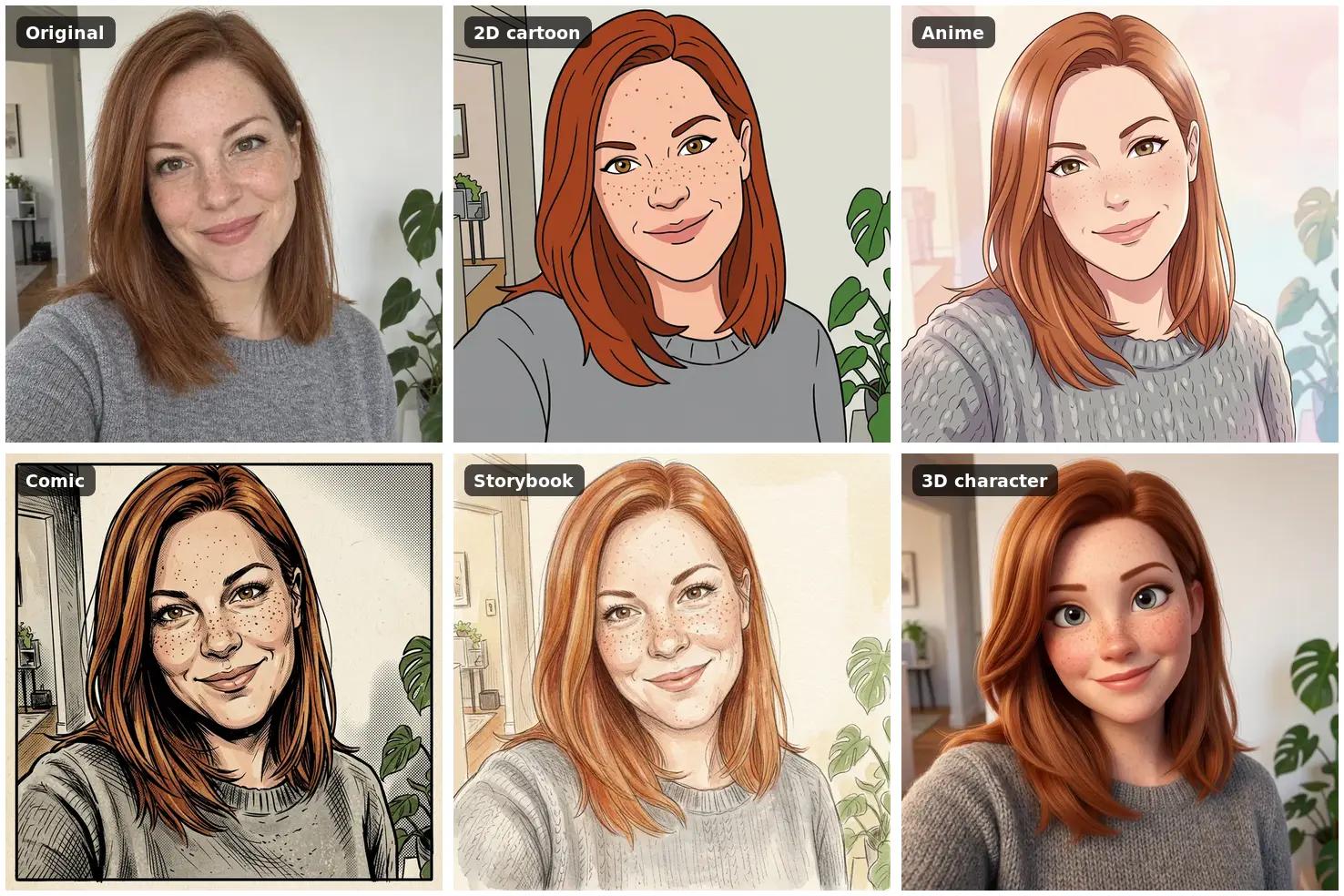
Prompt (2D cartoon): Turn this photo into a flat 2D cartoon with bold black outlines and bright solid colours, like a TV cartoon. Keep her likeness: face shape, freckles, auburn shoulder-length hair, grey sweater, smile, pose and framing.
For the other styles we changed only the first sentence: "an anime illustration with clean line art, cel shading and a soft pastel background", "a comic book panel with heavy ink lines, halftone dots and strong shadows" and "a children's storybook illustration in soft watercolour and coloured pencil".
Model and cost: Nano Banana 2.1, 9 credits per style, October 30, 2026. Result: all four kept her freckles and stayed recognizable. The comic panel looked most like her. The 2D cartoon gave her hazel-green eyes. More styles are in our photo to cartoon guide.
2. 3D animated character
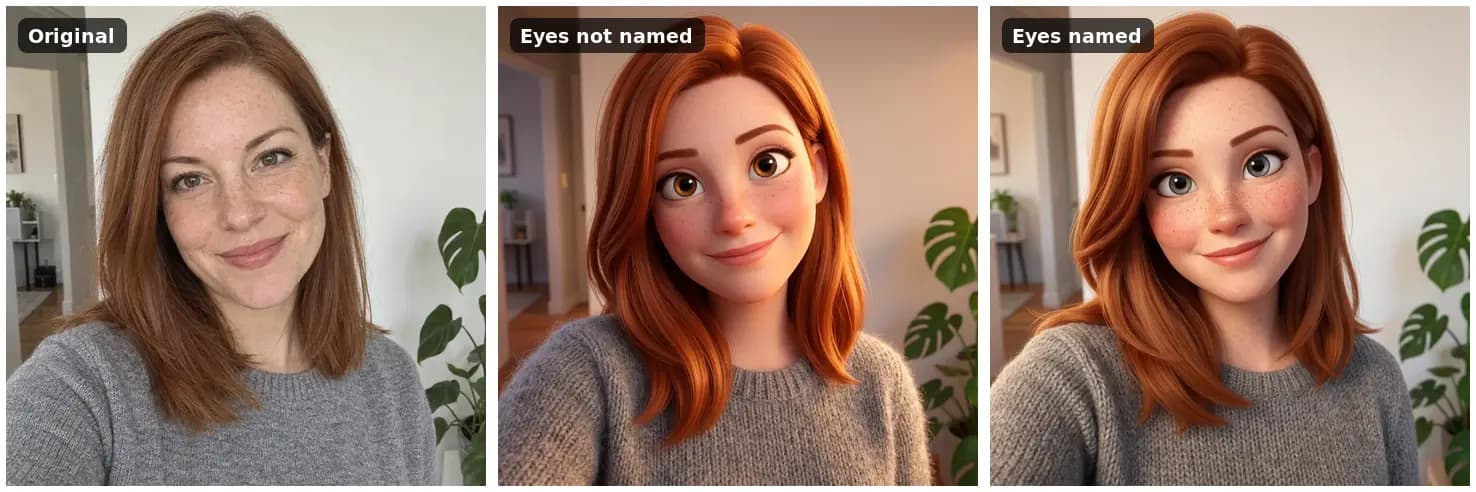
Prompt: Turn this photo into a 3D animated film character render, with soft rounded features, big expressive eyes and warm cinematic lighting. Keep her likeness: face shape, freckles, grey-blue eyes, auburn shoulder-length hair, grey sweater, smile, pose and framing.
Model and cost: Nano Banana 2.1, 9 credits per run, October 30, 2026. Result: the first run did not mention her eyes, and her grey-blue eyes came out brown. Adding "grey-blue eyes" to the same prompt fixed it on the next run and made the freckles stronger. This is the clearest lesson from our tests: any detail you do not name can change.
3. Festive lights and a Santa hat
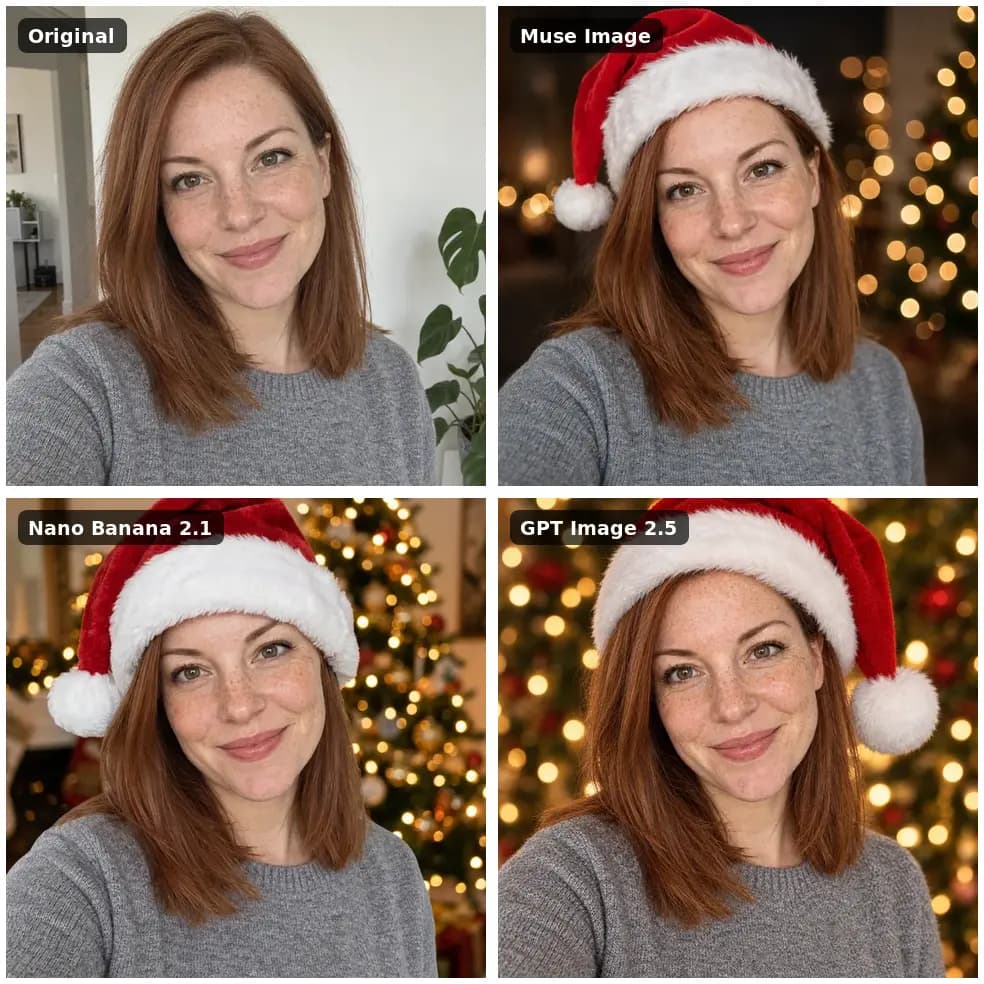
Prompt: Make this a festive Christmas profile picture: a red Santa hat on her head and a soft bokeh of warm Christmas lights in the background. Keep her face, freckles, expression, eye colour and hair exactly the same. Square crop centred on her face.
Models and cost: Muse Image 2 credits, Nano Banana 2.1 9 credits, GPT Image 2.5 11 credits, October 27, 2026. Result: all three kept her face. Muse Image stayed closest to the original framing, Nano Banana 2.1 added a lit tree, and GPT Image 2.5 cropped tighter. See more holiday looks in our AI Christmas photo guide.
4. Snowy street scene (partly failed)
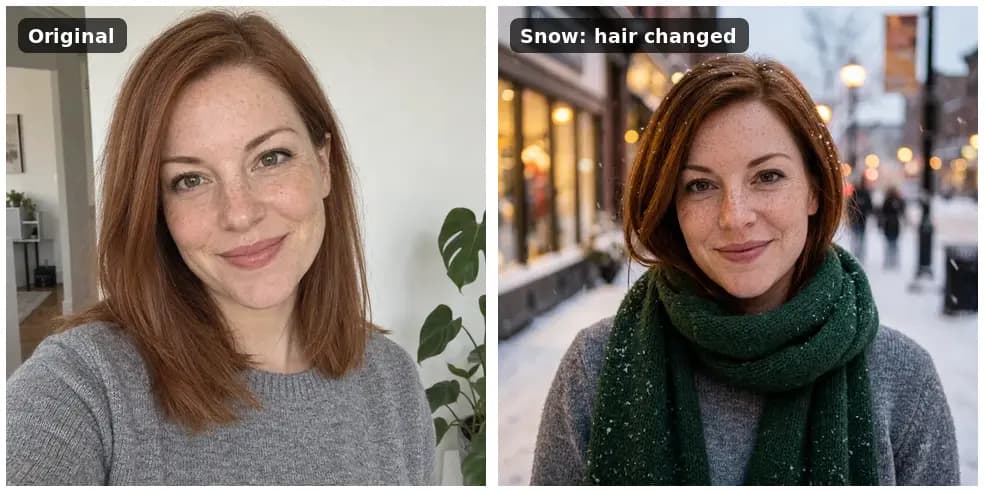
Prompt: Put her outdoors on a snowy evening street with soft falling snow and warm shop-window lights behind her, wearing a deep green knitted scarf over the same grey sweater. Keep her face, freckles, expression, eye colour and hair exactly the same. Square crop, head and shoulders.
Model and cost: Nano Banana 2.1, 9 credits, October 27, 2026. Result: the snow, shop lights and green scarf came out as asked, but her hair came out shorter and darker with a side parting, even though the prompt said to keep it. It was the biggest scene change in our tests and the only one that changed her hair. If hair matters, describe it ("auburn, shoulder length, center parting") and compare a second model.
5. 1970s film look
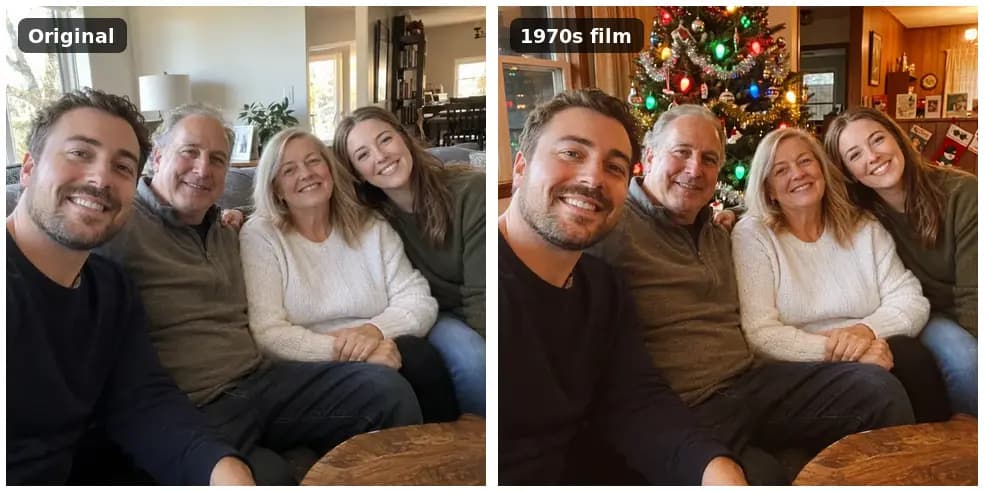
Prompt: Give this photo the look of a 1970s Christmas snapshot: warm film colours, soft grain, tinsel and a vintage Christmas tree with large coloured bulbs in the background. Keep all four people exactly as they are: same faces, expressions, hair, number of people and poses.
Model and cost: Nano Banana 2.1, 9 credits, October 12, 2026. Result: the film colors, grain and tree appeared, and all four faces were kept. We named the number of people so the model would not add or drop anyone from the group.
6. New background with matching light
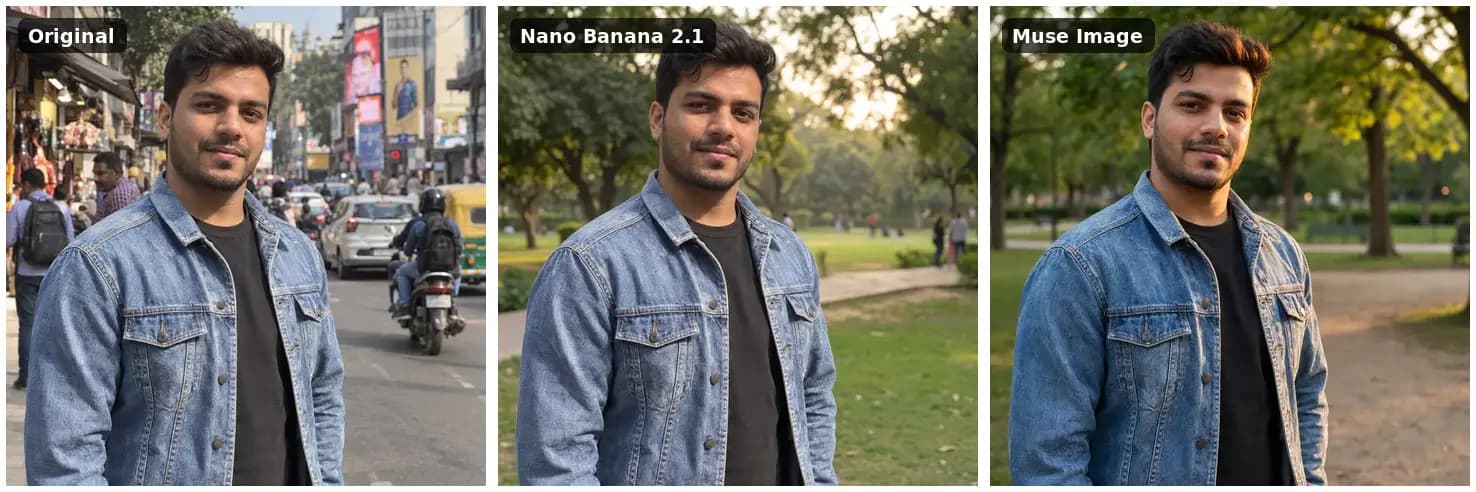
Prompt: Replace the busy street behind him with a quiet green park in soft late-afternoon light. Keep the man, his face, hair, jacket and pose exactly as they are, and match the light on him to the new background.
Models and cost: Nano Banana 2.1 9 credits, Muse Image 2 credits, October 12, 2026. Result: Nano Banana 2.1 kept his face and jacket close to the source. Muse Image relit him more warmly, and his hair and skin look slightly different. We asked it to match the light so he would not look pasted onto the park. More examples are in our background change guide.
7. Studio white backdrop
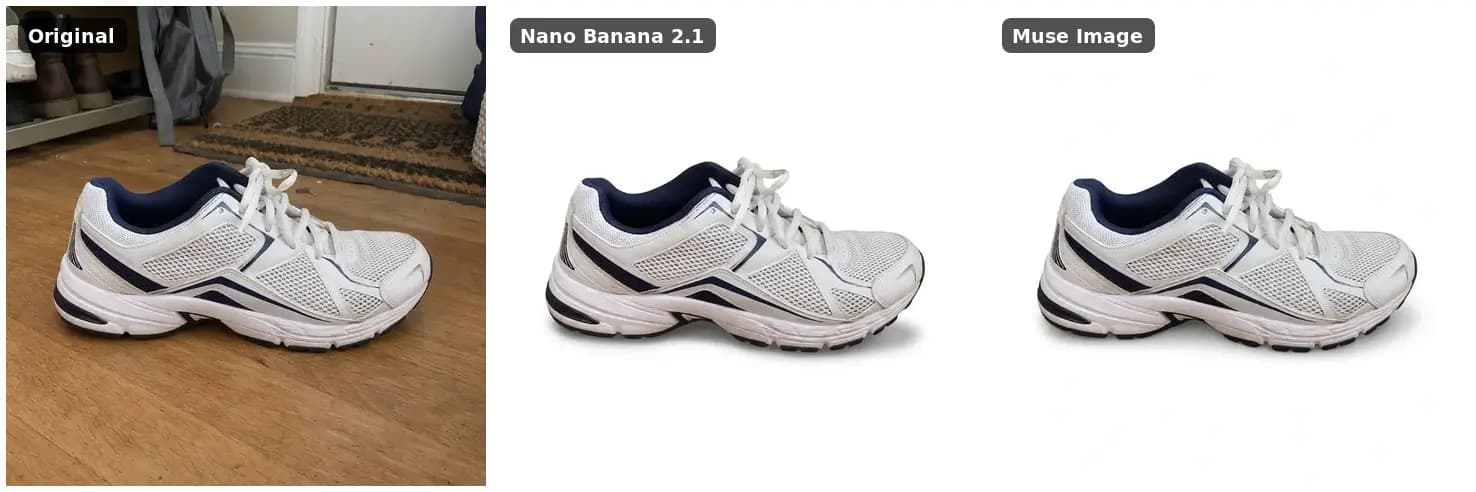
Prompt: Place the sneaker on a pure white background with a soft natural shadow underneath, like a product listing photo. Keep the sneaker exactly as it is: shape, colours, laces and stitching.
Models and cost: Nano Banana 2.1 9 credits, Muse Image 2 credits, October 12, 2026. Result: both made a clean cutout. Nano Banana 2.1 gave a soft shadow, and Muse Image a lighter one. For more product examples, see our white background photo guide.
8. Better light and sharpness
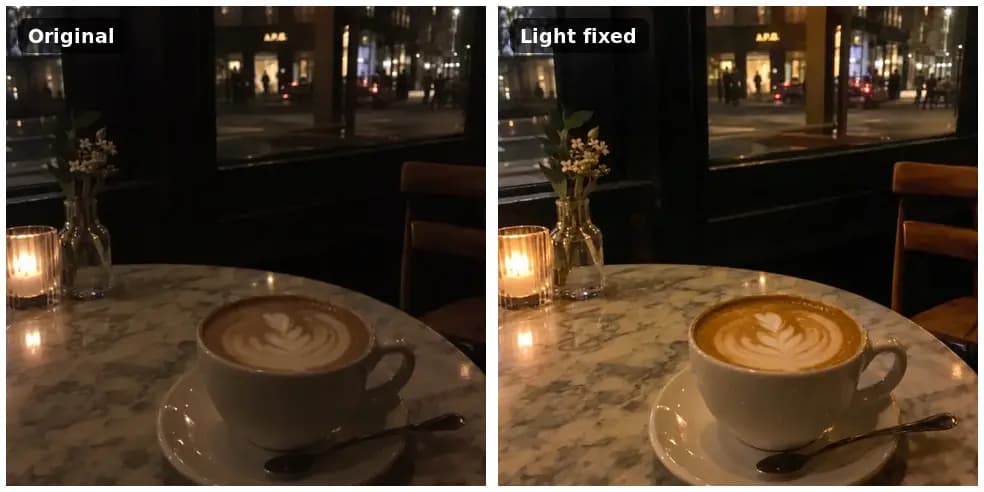
Prompt: Make this photo sharp and well exposed, like it was taken with a good camera: brighter, cleaner, less grain, natural warm evening colours. Keep the cup, latte art, table and window exactly as they are.
Model and cost: Nano Banana 2.1, 9 credits, October 12, 2026. Result: brighter and sharper with the same composition. A filter can brighten a dark photo; this edit also reduced the grain and redrew detail.
9. Colorize a black and white photo
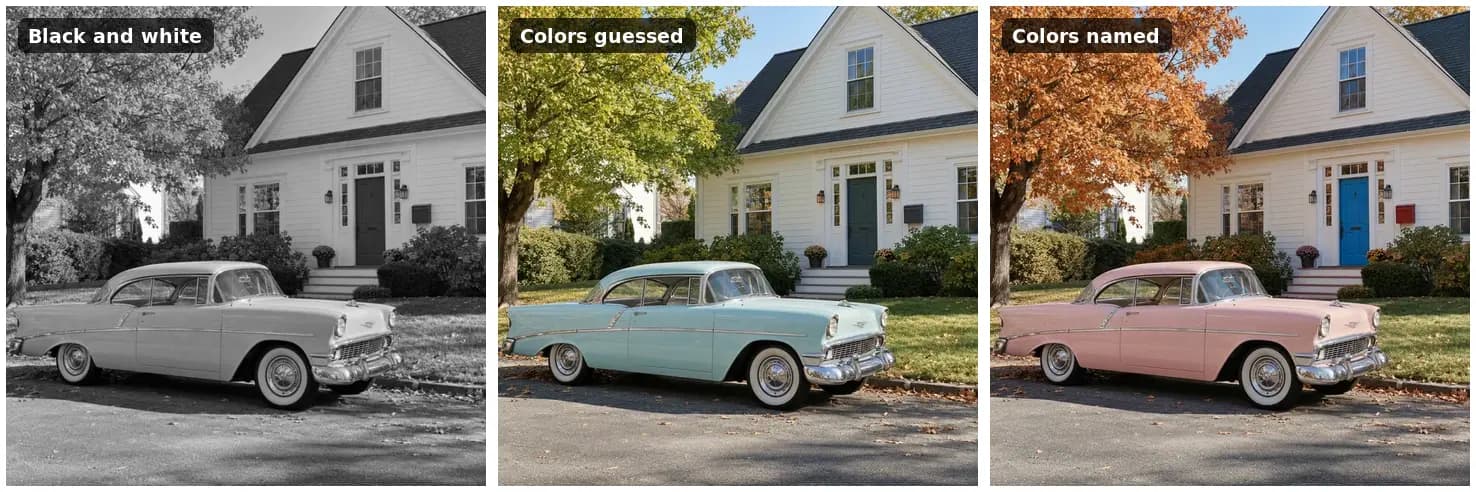
Prompt (second run): Colorize this black and white photo with natural, realistic colors. The car is pastel pink, the front door is bright blue, the mailbox is red and the tree has orange autumn leaves. Keep everything else exactly the same: the car, the house, the door, the tree, the street and the light. Do not add or remove anything.
Model and cost: Nano Banana 2.1, 9 credits per run, October 30, 2026. Result: the first run, without the color sentence, guessed a light turquoise car, a dark green door, a grey mailbox and a green tree. The real colors were pastel pink, blue, red and orange. Naming them made all four match. A model cannot know lost colors, so tell it the ones you know. Our colorize photo guide has more tests.
What each effect cost
Dollar amounts are rounded at the Starter rate of about $0.019 per credit.
| Effect | Model | Credits | USD |
|---|---|---|---|
| Cartoon, anime, comic or storybook style | Nano Banana 2.1 | 9 | $0.17 |
| 3D character (two runs) | Nano Banana 2.1 | 18 | $0.34 |
| Santa hat and lights | Muse Image | 2 | $0.04 |
| Santa hat and lights | GPT Image 2.5 | 11 | $0.21 |
| Snowy street scene | Nano Banana 2.1 | 9 | $0.17 |
| 1970s film look | Nano Banana 2.1 | 9 | $0.17 |
| New background | Muse Image | 2 | $0.04 |
| Studio white backdrop | Nano Banana 2.1 | 9 | $0.17 |
| Better light and sharpness | Nano Banana 2.1 | 9 | $0.17 |
| Colorize (two runs) | Nano Banana 2.1 | 18 | $0.34 |
Credits for a generation that fails are refunded. A result you do not like, such as the snowy scene with changed hair, still uses its credits, so put the important details in the first prompt. Current prices for every model are on our AI model prices page.
Can you add motion to a photo effect?
Yes. After an image effect, you can turn the result into a short video. We animated the fixed cafe photo with Kling O3 Pro: "Steam rises gently from the cappuccino, the candle flickers, people pass by outside the window. Static camera." The 5-second clip cost 85 credits (about $1.62) on October 12, 2026. People and a car passed outside while the cup and latte art stayed stable. Try it with the image to video tool.
Frequently asked questions
Can I add effects to photos on an iPhone?
Yes. The Photos app on an iPhone lets you add a filter and adjust light and color, according to Apple's guide. For effects that add new things, such as snow, a new background or a cartoon style, upload the photo to an AI editor in the phone's browser.
Will an AI effect change my face?
It can. In our tests faces stayed recognizable when the prompt said to keep them, but eye color and hair changed when the prompt did not name them, or when the scene changed a lot. Name the details that matter and compare the result with the original before you share it.
How much does it cost to add an effect with AI Media Studio?
Every edit needs a paid plan. Plans start at $19/month for 1,000 credits. One effect costs 2 credits with Muse Image, 9 with Nano Banana 2.1 or 11 with GPT Image 2.5, so a Starter plan covers more than 100 Nano Banana 2.1 edits. See plans and credits.
Try one of these prompts on your photo
Open the AI image editor, upload your photo and paste the prompt for the effect you want. Change the details to match your photo, and name everything that must stay the same. Every edit needs a paid plan. Plans start at $19/month.