Book mockup generator
Book mockup generator: turn a flat cover into a photo of your book
To make a book mockup, upload the front cover as a flat image and describe the shot: a hardcover on a desk, a paperback in someone’s hands, or an ebook on a tablet. The AI draws a photo of a book with your cover on it. It invents the spine, the page edges and anything you did not upload, and it can redraw the title and author name, so read every word against your cover before you post it. It is a photo for your website, ads and launch posts, not a 3D model or a print file. One mockup costs 13 credits on GPT Image 2.6 or 9 on Nano Banana 2.1, and you see the cost before you generate.
Every edit needs a paid plan. Plans start at $19/month. Paid plans include a commercial license.
How do I make a book mockup?
- 01
Export the front cover as a flat image
The front cover only, as a JPG or PNG, large enough that the author name is easy to read. A full wraparound cover confuses the model about which part is the front.
- 02
Describe the book and the scene
Hardcover or paperback, standing or held, and where: a desk, a café table, a bookshelf. Say how the book is turned so the model knows how much spine to show.
- 03
Ask for an exact copy of the cover
“Copy the cover exactly: the same artwork, colors, title and author name, letter for letter.” Add the spine color if it matters.
- 04
Read every word on the mockup
Compare the title, subtitle and author name with your cover at full size, and check the spine, which the model made up. If something changed, run it again from the cover, not from the result.
Book mockup ideas, with prompts to copy
Each idea has a prompt to copy. The pattern stays the same: the cover is the only photo, the prompt describes the book and the scene, and it asks for an exact copy of the cover.
1.Hardcover on a desk
The standard book cover mockup for an author website or a retailer page: one hardcover standing on a desk, turned slightly so the spine shows. The spine is the model’s: in this example the prompt asked for a plain navy spine, and it wrote the title on it as well.
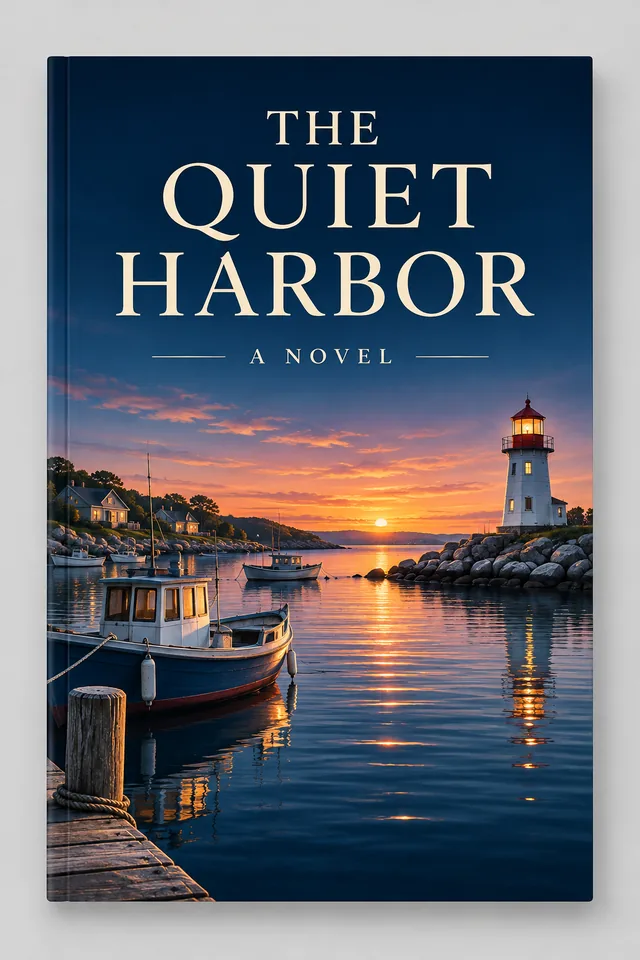

- Upload the front cover only, as the one photo of the edit.
- Say hardcover or paperback and how far the book is turned.
- The spine, the page edges and the back are invented. Do not use a mockup to show a spine you designed.
- Read the title, subtitle and author name letter by letter against your cover.
- Uploads are processed by the AI provider that runs the model you pick. Retention, processors and deletion requests are covered in the privacy policy.
Prompt to try
Make a photo of a hardcover book standing upright on a light wooden desk next to a window, with the cover from this image on its front, turned slightly to the left so a plain spine in the cover's main color shows. Copy the cover exactly: the same artwork, colors, title and author name, letter for letter, with nothing added or left out. Soft daylight, shallow depth of field.
Suggested model: GPT Image 2.6
2.Paperback in someone’s hands
A lifestyle shot for social posts and ads: the book held up in a café or at home. Asking for no face keeps the cover the subject of the photo.

Prompt to try
Make a photo of two hands holding a paperback book with the cover from this image, in a bright café, the book filling most of the frame and facing the camera, no face shown. Copy the cover exactly: the same artwork, colors, title and author name, letter for letter, with nothing added or left out.
Suggested model: GPT Image 2.6
3.Ebook on a tablet
For an ebook or a lead magnet, show the cover on a tablet screen. Asking for the cover upright and filling the screen keeps the model from shrinking it into a corner.

Prompt to try
Make a photo of a tablet lying on a linen sofa cushion next to a cup of tea, its screen showing the cover from this image upright and filling the screen. Copy the cover exactly: the same artwork, colors, title and author name, letter for letter, with nothing added or left out. Warm evening lamp light.
Suggested model: GPT Image 2.6
4.Square children’s or photo book
Square covers need the word square in the prompt, or the model may stretch the cover to a portrait book. Pick a scene that suits the reader: a playroom rug, a coffee table, a gift wrap.
Prompt to try
Make a photo of a square hardcover children's book lying on a soft rug in a sunny playroom, with the cover from this image on its front. Copy the cover exactly: the same artwork, colors, title and author name, letter for letter, with nothing added or left out.
Suggested model: GPT Image 2.6
5.A stack of copies for a launch post
Several copies in one photo read as a launch or a giveaway. Every copy is drawn separately, so check each cover in the stack, not only the front one.
Prompt to try
Make a photo of three copies of a paperback book with the cover from this image, one standing and two lying in a stack, on a white table with a small plant, for a book launch post. Copy the cover exactly: the same artwork, colors, title and author name, letter for letter, with nothing added or left out.
Suggested model: GPT Image 2.6
What an AI book mockup can and cannot do
- It shows your cover on a book in a scene: a desk, a café, a tablet, a stack of copies.
- It is not pixel-exact. The model redraws the cover with the book, so the title, the author name and small artwork can change. Read every word.
- It invents what you did not upload: the spine, the page edges and the back cover.
- It is a photo, not a 3D model. You cannot turn the book around afterwards; each angle is a new edit.
- It has no KDP or print sizes and no PSD export. Your cover file for printing comes from your designer or your printer’s template, never from a mockup.
Which model to use
Both models run in the same editor and draw from the same credits. Prices are for one mockup in the web app.
| Model | Credits per edit | On Starter | Use it for |
|---|---|---|---|
| GPT Image 2.6high quality, with the cover | 13 | $0.247 | The examples on this page use it. The cover is the only photo, so there is no extra photo charge. |
| Nano Banana 2.11K | 9 | $0.171 | Fewer credits per mockup. Run the same prompt on both models if the title matters and keep the closer result. |
The editor shows the credit cost before you generate. Prices checked .
What a book mockup costs
One mockup from a cover costs 13 credits on GPT Image 2.6 or 9 on Nano Banana 2.1 at 1K. On the Starter plan ($19 for 1,000 credits a month) that is $0.171 to $0.247 per mockup. A hardcover, a paperback and an ebook shot are three edits.
Every edit needs a paid plan. Plans start at $19/month. Unused subscription credits roll over, downloads carry no watermark, and paid plans include a commercial license.
Frequently asked questions
What is a book mockup?
A book mockup is a photo of a book with your cover on it, made before or without photographing a printed copy. Authors and publishers use it on their website, on retailer pages, in ads and in launch posts. Template tools place the cover on a stock book photo or a 3D render; this guide draws the photo with an AI edit of your cover.
How do I make a book mockup?
Upload the front cover as a flat image and describe the shot, such as “a hardcover book standing upright on a wooden desk, turned slightly to the left”. Add “Copy the cover exactly: the same artwork, colors, title and author name, letter for letter.” Then read every word of the mockup against your cover.
How do I make a book mockup in Canva?
Canva has book mockup templates in its Mockups section: you pick a book template and drag your cover onto it, and the book stays Canva’s stock item. This guide does the same job without a template, from your cover and a description of the scene. The Canva mockup generator comparison explains how Canva’s mockups work and what Canva Pro costs.
How do I make a book mockup in Photoshop?
In Photoshop, a book mockup is a PSD template with a smart object for the cover: you paste the cover in and the template bends it onto the book. That places the cover exactly, but needs a template for every book and angle. This guide works without Photoshop or a template, and it does not export PSD files.
Will the title and author name stay exactly as on my cover?
Not guaranteed. The model redraws the cover with the book, and lettering is what it most often changes: a missing letter, a different font weight, a shifted subtitle. Upload a large, sharp cover, ask for an exact copy, and read the mockup word by word before you use it.
What will the spine and back cover look like?
The model invents them, because it only sees the front cover. Name the spine color in the prompt if it matters. A mockup cannot show a spine or back cover you designed; for that, photograph a printed proof.
Can I make a 3D book mockup?
You get a photo with a three-dimensional look: a book standing at an angle with depth and shadows. It is not a 3D model you can rotate, and each new angle is a new edit. Tools that render a 3D book from a template place the cover more exactly; this one gives you a photographic scene.
Can I show the inside of my book?
Not reliably. An open book mockup gets pages the model invents, with text that is not yours. To show your real interior pages, photograph a printed proof or use a screenshot of the pages.
Can I make an ebook mockup?
Yes. Ask for the cover on a tablet, a phone or an e-reader screen, upright and filling the screen, as in the ebook idea above. The device is drawn by the model, so it is a generic tablet, not a specific brand.
Does it use KDP or print sizes?
No. The mockup is a photo, not a print file, and it knows nothing about trim sizes, bleed or spine width. Your print cover comes from your designer or your printer’s cover template. Upload the front cover in its real proportions so the book in the mockup has the right shape.
Is there a free book mockup generator?
AI Media Studio has no free plan: plans start at $19/month. What each mockup tool gives you without paying compares the template tools and their limits, if one stock book photo is all you need.
Can I use book mockups in ads and on my website?
Yes. Paid plans include a commercial license for what you generate, so the mockups can go on your website, retailer pages, social posts and ads, as long as the cover is yours or licensed to you. For a set of ad sizes around the mockup, see the AI ad creative generator.
How much does a book mockup cost?
13 credits on GPT Image 2.6, or 9 on Nano Banana 2.1 at 1K. Every edit needs a paid plan. Plans start at $19/month.
Uploads are processed by the AI provider that runs the model you pick. Retention, processors and deletion requests are covered in the privacy policy.