Laser engraving designs
Laser engraving designs with AI: from a photo or a description to black and white line art
Upload a photo and ask for “a fine black and white line drawing for laser engraving: pure black lines on pure white, no gray tones, shadows as fine hatching”, and say what must stay the same. Or describe the design in words. We turned a photo of a dog into engraving line art on two models and made a coaster design from text, with prompts in six languages. The results are 1024 px raster images (PNG) for image engraving, not SVG or DXF cut files, and 2 to 8 percent of their pixels are gray. An edit costs 11 credits on GPT Image 2.6 or 9 on Nano Banana 2.1.
Every edit needs a paid plan. Plans start at $19/month.
How do I make a laser engraving design from a photo?
- 01
Pick a sharp photo with one clear subject
A pet, a person, a house or an object, in focus and well lit, with the whole outline visible. Fur, hair and edges become lines, so detail you cannot see in the photo will not appear in the drawing.
- 02
Ask for line art, not a filter
“Fine black and white line drawing for laser engraving: pure black lines on pure white, no gray tones, no soft shading, shadows drawn with fine hatching.” Then: “Remove the background completely.”
- 03
Say what must stay the same
For a pet: same face, markings, ears and pose. Without that line the model may draw a nicer but different animal.
- 04
Prepare it in your laser software
Import the PNG as an image, set its size, and use the software’s image mode (threshold or dithering) to turn the remaining gray into dots. Test on scrap material first.
Two laser designs: a pet photo and a coaster
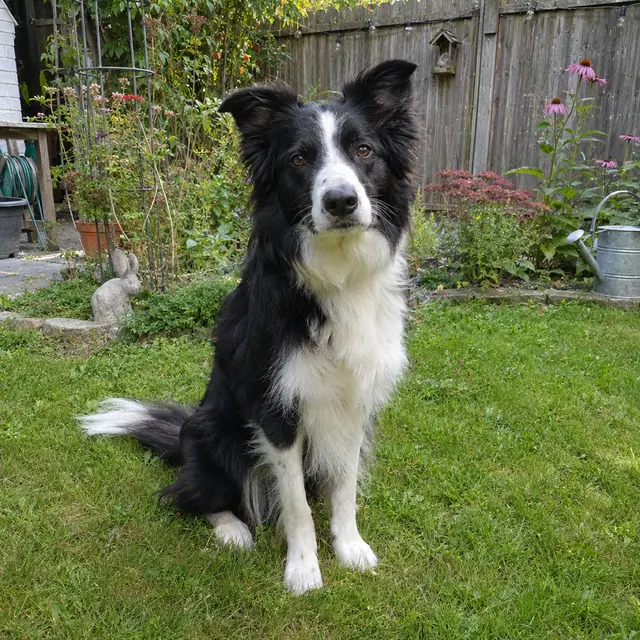
The dog photo is synthetic, made for this page. Each image is the first result of the prompt shown.
1.Pet photo to engraving line art, on two models
Both models removed the garden, kept the dog’s face, markings, ears and pose, and drew the fur with hatching. GPT Image 2.6 drew denser, darker hatching; Nano Banana 2.1 a lighter drawing with finer lines. Neither is pure black and white: about 6 percent of the pixels in both are gray, from soft edges and fine hatching, which your laser software has to threshold or dither.
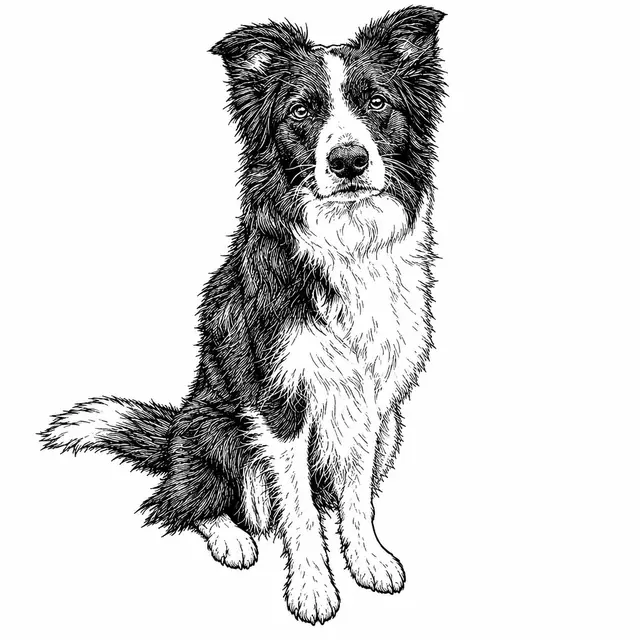
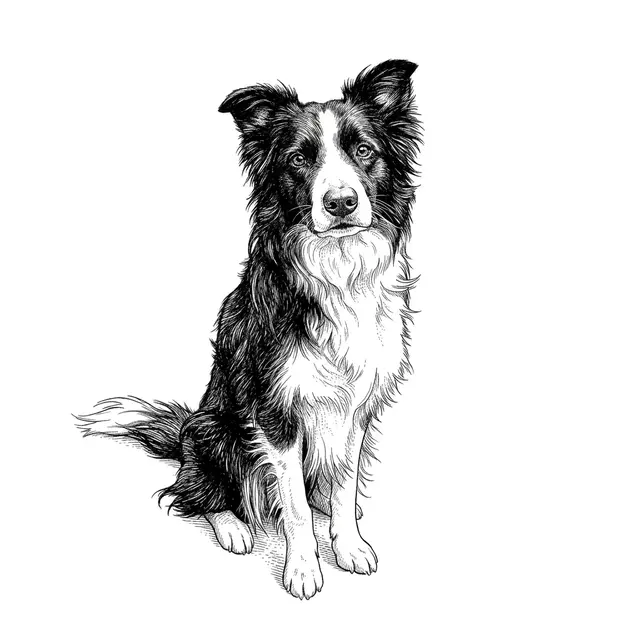
Prompt we ran
Turn this photo into a fine black and white line drawing for laser engraving: pure black lines on a pure white background, no gray tones, no soft shading, shadows drawn with fine hatching. Keep the dog exactly as it is: same face, markings, ears and pose. Remove the garden background completely.
Suggested model: GPT Image 2.6
Dense black areas burn darker and longer. On light wood, the GPT Image 2.6 version will engrave as a darker dog than the Nano Banana version.
2.A design from a description, for a round coaster
No photo needed: describe the motif, the frame and the style. Nano Banana 2.1 drew the lighthouse, rocks, waves and two gulls inside a double circle, in black lines with about 2 percent gray pixels. In this run the rocks cut through the outer circle on the left; in the other five languages the circles stayed closed in four.
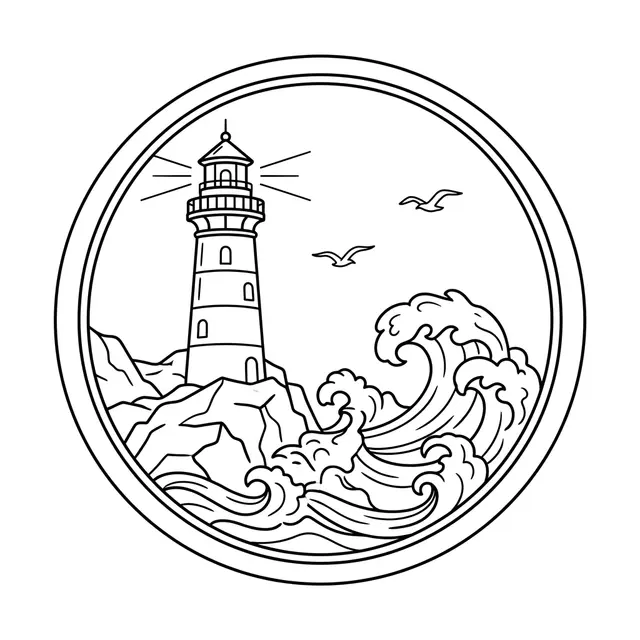
Prompt we ran
A design for laser engraving on a round wooden coaster: a lighthouse on rocks with waves and two seagulls, framed by a thin double circle. Fine black line art on pure white, no gray tones, no shading gradients, no text, clean closed outlines.
Suggested model: Nano Banana 2.1
At 1024 px, a design engraves sharply up to about 8.7 cm (3.4 in) wide at 300 dpi. Nano Banana 2.1 also makes 2K and 4K images (12 and 27 credits from text); we did not test those for this page.
Check before you engrave
- It is a raster image (PNG, 1024 × 1024 px), not an SVG or DXF. Use it for image engraving; to cut along the lines, trace it to a vector in your laser or vector software first.
- Expect some gray. Our results had 2 to 8 percent gray pixels despite “no gray tones” in the prompt. Set threshold or dithering in your laser software and look at the preview.
- Compare the subject with the photo: face, markings, ears. Both models kept our dog, but a model can draw a nicer, different animal.
- Check that frames and outlines are closed where you need them. In two of our six coaster runs, rocks or waves crossed the frame.
- Test on scrap of the same material. Dense hatching burns darker than it looks on screen.
Which model to use
Both models run in the same editor and draw from the same credits. Prices are for one image edit in the web app.
| Model | Credits per image | On Starter | Use it for |
|---|---|---|---|
| GPT Image 2.6Flare, high quality | 11 | $0.209 | The default for photo edits. Denser, darker hatching; kept the dog in all six languages. |
| Nano Banana 2.11K | 9 | $0.171 | Lighter line art, also kept the dog. From text only it costs 8 credits, as for the coaster. |
The editor shows the credit cost before you generate. Prices checked .
What it costs
Turning a photo into line art costs 11 credits on GPT Image 2.6 or 9 on Nano Banana 2.1; a design from text costs 8 on Nano Banana 2.1. On the Starter plan ($19 for 1,000 credits a month) one photo on both models is 20 credits, about $0.380.
Every image needs a paid plan. Plans start at $19/month. Unused subscription credits roll over, downloads carry no watermark, and paid plans include a commercial license.
Frequently asked questions
Can I get an SVG or DXF file for my laser?
No. AI Media Studio makes raster images (PNG). Use them for image engraving, or trace them to a vector in your laser or vector software if you need to cut along the lines.
Will the result be pure black and white?
Not quite. Even with “no gray tones” in the prompt, 2 to 8 percent of the pixels in our results were gray. Your laser software’s threshold or dithering setting handles that.
Can I turn a photo of my pet into an engraving?
Yes. Upload the photo, ask for line art with hatching, say that the face, markings and pose must stay the same, and ask for the background to be removed. Compare the result with the photo before you engrave.
How big can I engrave it?
The images are 1024 × 1024 px, about 8.7 cm (3.4 in) wide at 300 dpi. Larger engravings need a 2K or 4K image, which Nano Banana 2.1 can make; we did not test those here.
How much does it cost? Is there a free option?
One image costs 11 credits on GPT Image 2.6, 9 on Nano Banana 2.1 from a photo, or 8 from text. AI Media Studio has no free tier. Every edit needs a paid plan. Plans start at $19/month.
Uploads are processed by the AI provider that runs the model you pick. Retention, processors and deletion requests are covered in the privacy policy.