Photo to sketch
Photo to sketch with AI: a pencil drawing or a coloring page from your photo
Upload the photo, name the exact style (“a realistic pencil drawing on white paper” or “a coloring page: only closed black outlines”) and say what must stay the same: face, eyes, hair, expression. We turned a portrait into a pencil sketch on two models and a family photo into a coloring page, and the faces stayed recognizable in every run. One edit costs 11 credits on GPT Image 2.6 or 9 on Nano Banana 2.1, shown before you generate.
Every edit needs a paid plan. Plans start at $19/month.
How do you turn a photo into a sketch?
- 01
Pick a sharp photo
A well-lit face, front-on or three-quarter, without blur. The drawing follows the photo: what the photo does not show, the drawing will not show either.
- 02
Name the exact style
“Realistic pencil drawing, fine graphite lines, hatched shading” gives a sketch. “Only clean, closed black outlines, no shading, no gray” gives a coloring page. “Drawing” on its own lets the model choose.
- 03
Say what must stay the same
Same face, same eyes, same freckles, same hair, same expression. Without that sentence a model can draw a prettier but different person.
- 04
Compare with the photo, then download
Check the eyes, mouth and hair at full size. To try another style, start again from the original photo rather than editing the drawing.
Two drawing styles, with real results
The source photos are synthetic: fictional people. Open “Exact prompt we ran” under an image to see the prompt, or copy the prompt card and swap in your own details. For a colored cartoon, see our guide to turning a photo into a cartoon.
1.Portrait to pencil sketch, on two models
Both models kept the face, eyes, freckles, hair and smile, and drew the background (the doorway, the plant) in pencil too. GPT Image 2.6 shaded densely: 46% of the pixels are gray, the darkest sketch across the nine languages we ran. Nano Banana 2.1 drew light, firm lines and only sketched the background: 23% gray, one of the lightest. Neither removed the background; ask for that if you want the face alone.
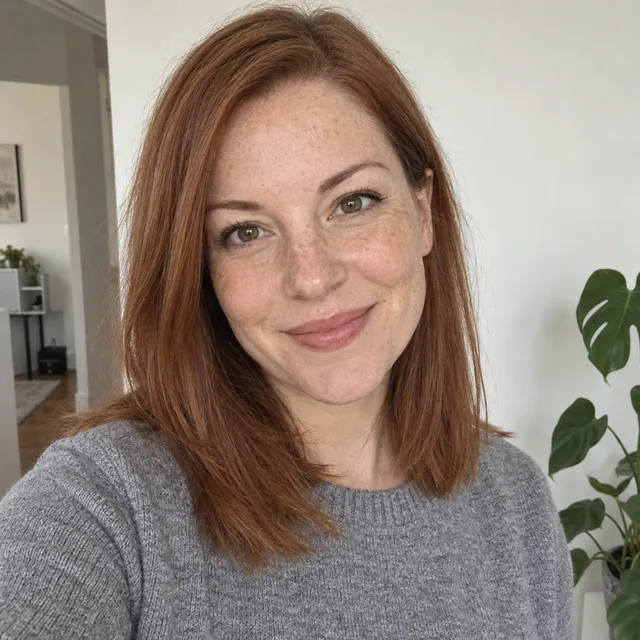
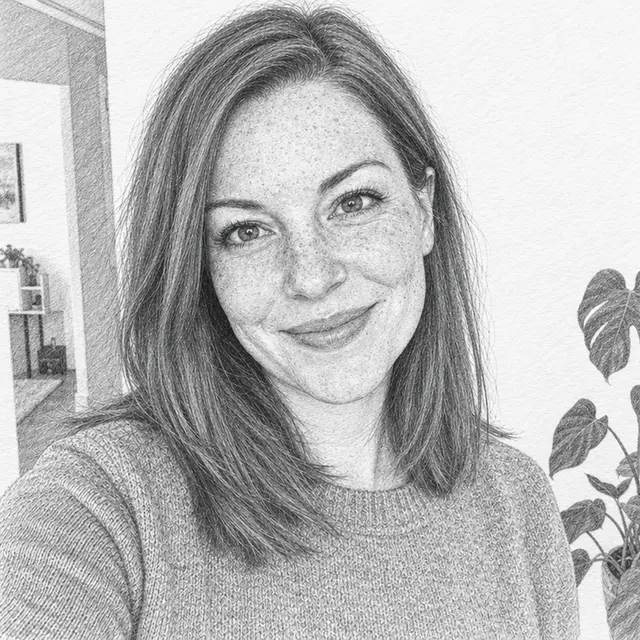
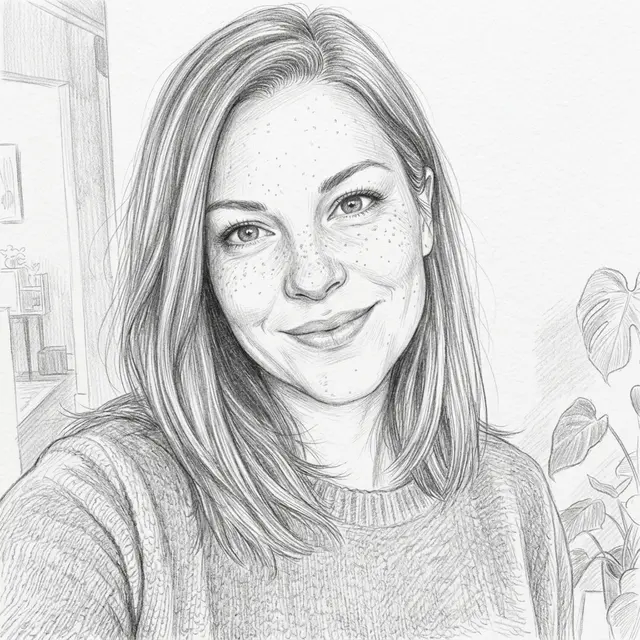
Prompt we ran
Turn this photo into a realistic pencil drawing on white paper: fine graphite lines, soft hatched shading, no colour. Keep the person exactly as they are: same face, same eyes, same freckles, same hair, same expression and same framing.
Suggested model: GPT Image 2.6
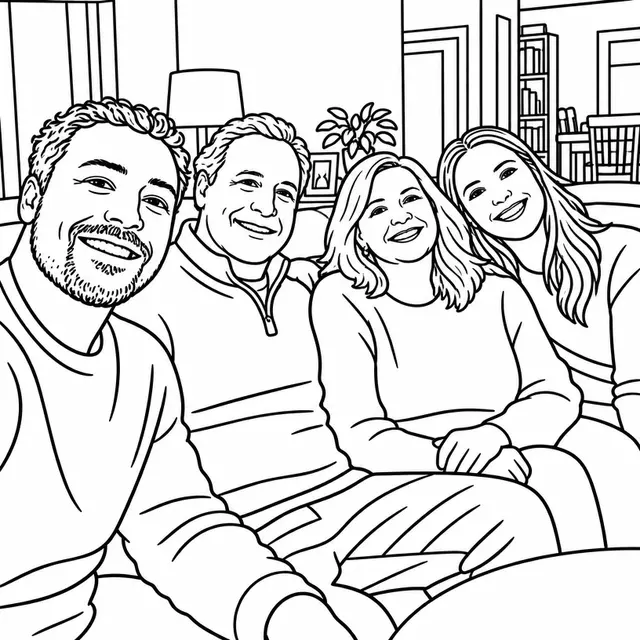
2.Family photo to coloring page
The four people, their faces, their poses and the sofa stayed, as closed black outlines on white with only 4% gray pixels (anti-aliased edges). Three flaws: the front man’s stubble is many tiny strokes that are hard to color, there are fold lines on the trousers despite “no hatching”, and the wooden coffee table turned into a cushion. The table became a cushion in all nine languages we ran.
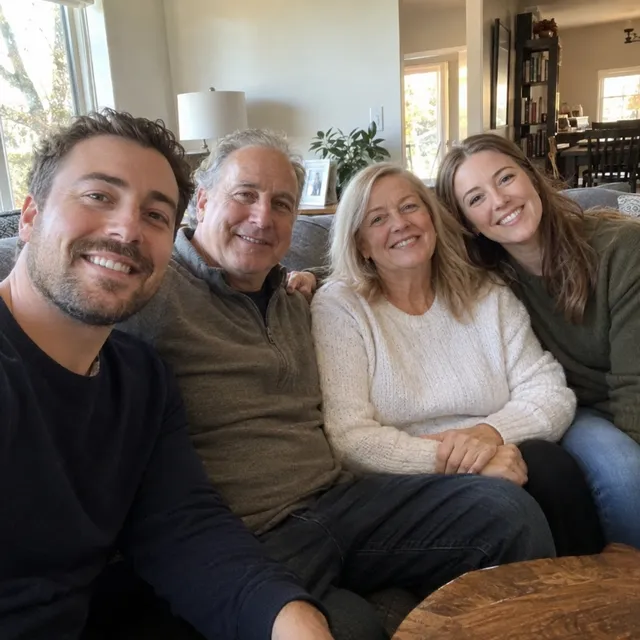
Prompt we ran
Turn this photo into a coloring page: only clean, closed black outlines on a white background, no shading, no hatching, no gray, with areas large enough to color in. Keep the four people, their faces, their poses and the sofa.
Suggested model: GPT Image 2.6
For a children’s coloring page, pick a photo with few small details in the foreground and ask for “areas large enough to color in”.
What to check before you share or print
- Compare the eyes, mouth and hair with the photo. In our runs the faces stayed recognizable, but a model can flatter or change a feature.
- Look at the objects: the coffee table in our family photo became a cushion on every coloring page.
- A pencil sketch is mostly gray (20 to 46% of the pixels in our runs): that is the shading. For a coloring page or a laser engraving, ask for black outlines with no gray.
- The file is a 1024 × 1024 pixel PNG, about 8.7 cm (3.4 in) wide printed at 300 dpi. It is not a vector file.
- Use photos of people who agree to it, especially if you share or sell the drawing.
Which model to use
Both models run in the same editor and use the same credits. Prices for one edit in the web app.
| Model | Credits per image | On Starter | Use it for |
|---|---|---|---|
| GPT Image 2.6Flare, high quality | 11 | $0.209 | The default for photos. Denser pencil shading and a clean coloring page in our runs. |
| Nano Banana 2.11K | 9 | $0.171 | A lighter, firmer pencil sketch for two credits less. |
The editor shows the cost in credits before you generate. Prices checked .
What it costs
One edit costs 11 credits on GPT Image 2.6 and 9 on Nano Banana 2.1 at 1K. On the Starter plan ($19 for 1,000 credits a month) a sketch on GPT Image 2.6 is about $0.209.
Every edit needs a paid plan. Plans start at $19/month. Unused subscription credits roll over, downloads carry no watermark, and paid plans include a commercial license.
Frequently asked questions
How do I turn a photo into a pencil sketch?
Upload the photo to the editor and ask for “a realistic pencil drawing on white paper: fine graphite lines, soft hatched shading, no colour”, followed by what must stay the same: face, eyes, hair, expression.
How do I turn a photo into a coloring page?
Ask for “only clean, closed black outlines on a white background, no shading, no hatching, no gray, with areas large enough to color in”. Pick a photo with few small details: beards, patterns and folds turn into tight strokes.
Will the drawing still look like the person?
In our runs, yes: both models kept the face, freckles and hair. Name those details in the prompt and compare with the photo before you share it.
Can I turn a photo into a cartoon instead?
Yes. Our guide to turning a photo into a cartoon shows 3D, 2D, anime and comic results with the prompts we used.
Can I use it for laser engraving?
For engraving, ask for black lines with no gray. Our laser engraving designs guide shows the result on a dog photo and a coaster.
How much does it cost? Is there a free option?
One edit costs 11 credits on GPT Image 2.6 or 9 on Nano Banana 2.1. AI Media Studio has no free tier. Every edit needs a paid plan. Plans start at $19/month.
Uploads are processed by the AI provider that runs the model you pick. Retention, processors and deletion requests are covered in the privacy policy.