AI voice clone
AI voice cloning: clone your own voice from one recording
To clone your voice with AI, record 10 seconds to 5 minutes of yourself speaking, upload it in Clone voice, give the voice a name, confirm that it is your own voice and create it. The clone is saved to your workspace, and you pick it under My voices to read any script aloud in your voice. One clone costs 330 credits, once.
Plans start at $19/month. Paid plans include a commercial license.
How to clone your voice with AI
- 01
Record yourself
Record 10 seconds to 5 minutes of your own natural speech: one speaker, no music, little room echo. About a minute works well. Save it as MP3, WAV or M4A.
- 02
Upload it in Clone voice
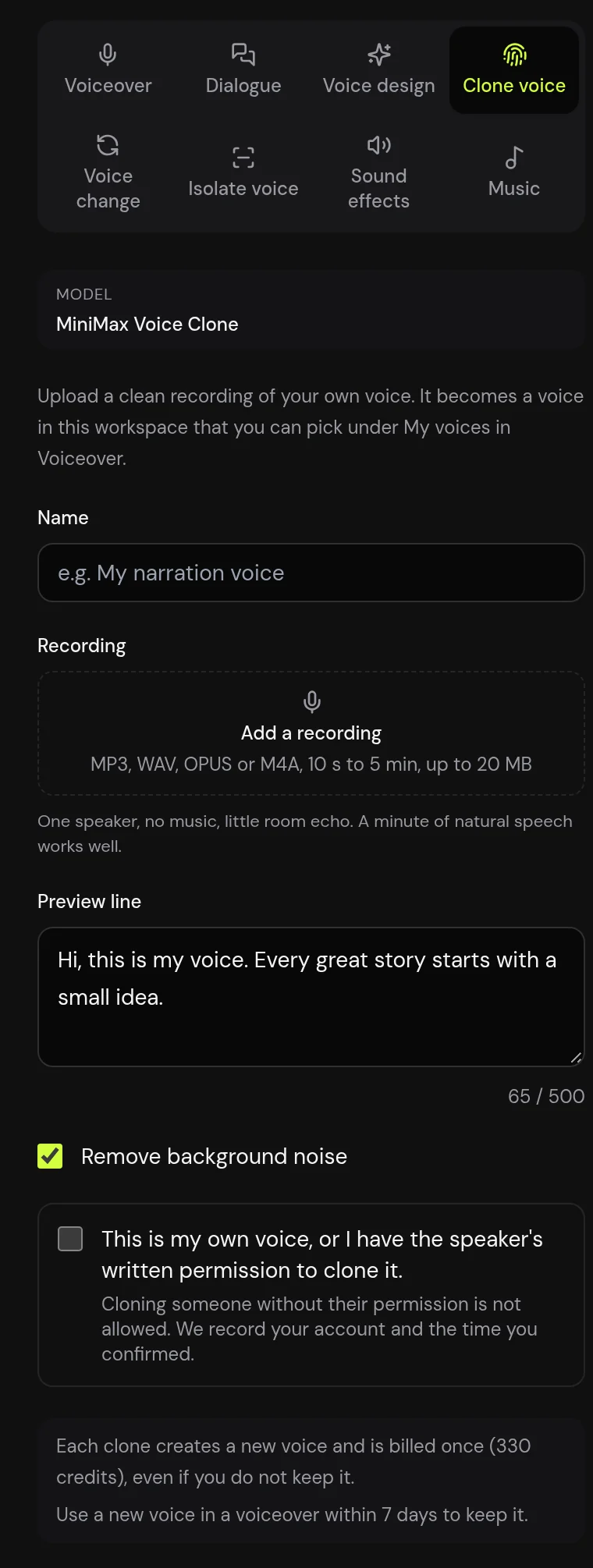
Open Audio, choose Clone voice, add the recording and give the voice a name, such as “My narration voice”. Noise removal is on by default.
- 03
Confirm it is your voice
Tick the consent box to confirm the recording is your own voice. We record your account and the time you confirmed, and the clone cannot start without it.
- 04
Create it, then use it
The clone speaks a short preview line so you can hear it. Then open Voiceover, pick it under My voices and paste any script.
Voice cloning, step by step
The recording decides most of the result. Here is what to record, what the consent step does, and what you can do with your clone afterwards.
1.What is AI voice cloning?
AI voice cloning turns a recording of your voice into a voice model that can read new text aloud. You record once; afterwards you type a script and get it back in a voice that sounds like yours, without recording again. Here the clone is made by MiniMax Voice Clone and spoken by MiniMax Speech 2.8 HD.
2.Record a clean voice sample
The model copies everything it hears, including the room, the microphone and your mood. A clean recording gives a clean clone.
- Length: 10 seconds is the minimum and 5 minutes the maximum; about one minute of natural speech works well.
- Room: a small, furnished room with the door closed. Soft surfaces cut the echo.
- Microphone: a headset or a phone held about a hand’s width from your mouth, at the same distance throughout.
- Delivery: read in the voice you want back. If you want a calm narration voice, record calm narration.
- File: MP3 up to 16 MB, or WAV or M4A up to 20 MB.
Text to read aloud for your recording
I usually start my day with a coffee and a quick look at the news. Then I plan the three things that matter most, and I try to finish the hardest one before lunch. In the afternoon I answer messages, and in the evening I go for a walk, whatever the weather.
About 20 seconds aloud. Read it three times, or keep talking naturally, for a one-minute sample.
3.The consent step
Before a clone starts, you tick a box to confirm that the recording is your own voice. The clone does not start without it, and we store your account and the time you confirmed with the voice. The cloned voice can only be used inside the workspace that made it.
4.Clone your voice, then give it a script
Make the clone from your own recording and listen to its preview line in the studio. Then pick it in Voiceover and compare a new script with how you sound.
Make it yourself
Your cloned voice and its preview line
- In the studio:
- Clone voice · name the voice · noise removal on · keep the default preview line, “Hi, this is my voice. Every great story starts with a small idea.”, or write your own · tick the consent box
- You need:
- a recording of your own voice, 10 seconds to 5 minutes, as MP3 up to 16 MB or WAV or M4A up to 20 MB. The read-aloud text above works.
- Cost:
- 330 credits, once per clone
Make it yourself
A voiceover in your cloned voice
- In the studio:
- Voiceover · your clone under My voices (spoken by MiniMax Speech 2.8 HD, no emotion tags)
- You need:
- the clone you made from your own recording.
- Cost:
- 3 credits per take
Script to paste
Welcome to week three of the course. Today we look at how to plan a project in five steps, and I’ll show you the template I use myself.
5.What to do with your cloned voice
Your clone works like any other voice in Voiceover, at the same price per character. Use a new voice in a voiceover within 7 days to keep it.
- Course and training updates: change a sentence without booking a recording session.
- Product videos and tutorials in your own voice, from a script.
- Podcast intros, outros and ad reads you can rewrite every week.
- Fixing a line you misspoke in a recording, in the same voice.
- AI voice over: scripts, voices and tips for any voiceover.
6.What a voice clone cannot do
A clone is a copy of your recording, not a new performer. Know the limits before you plan around it.
- No emotion tags: [whispers] or [laughs] only work with the preset voices on Eleven v3.
- It sounds like your recording: a flat recording gives a flat clone, an echo gives an echo.
- Your accent comes with it, including when the clone reads another language.
- It is billed once even if you do not keep it, so record carefully before you create it.
7.Prefer not to clone? Design a voice instead
Voice design creates a new voice from a description, such as “a warm, unhurried narrator in their fifties”, with no recording at all. It costs 603 credits per voice and appears under My voices like a clone.
Get a clone that sounds like you
- Record in one take at one distance from the microphone. Changes in level are copied too.
- Speak the way you want the clone to speak; it cannot be more energetic than the sample.
- Leave noise removal on unless your recording is already studio-clean.
- Listen to the preview line before you write long scripts for the voice.
What cloning and voiceovers cost
You pay once for the clone and then per character for each voiceover in it. The cost shows on the button before you start.
| Mode | Credits | On the Starter plan | Use it for |
|---|---|---|---|
| Clone voiceMiniMax Voice Clone | 330 credits per voice | $6.27 per voice | Creating the clone from your recording, billed once. |
| Voiceover in your own voiceMiniMax Speech 2.8 HD | 20 credits per 1,000 characters | $0.380 per 1,000 characters | Every voiceover in your cloned voice afterwards. |
| Voice designMiniMax Voice Design | 603 credits per voice | $11.46 per voice | A new voice from a description, without a recording. |
A clone is billed even if you do not keep it. Prices checked in the app on .
What AI voice cloning costs
One clone costs 330 credits, which is $6.27 on the Starter plan ($19 for 1,000 credits a month). After that, each voiceover in your voice costs 20 credits per 1,000 characters, about a minute of speech.
Plans start at $19/month. Every audio mode needs a paid plan and enough workspace credits.
Frequently asked questions
What is AI voice cloning?
It turns a recording of your voice into a voice that can read any new text aloud. After one recording, you type a script and get it back as an MP3 in a voice that sounds like yours.
How does AI voice cloning work?
The model analyses the sound of your voice in the recording, such as pitch, timbre and pace, and builds a voice from it. A text-to-speech model then speaks new text with that voice. Here MiniMax Voice Clone makes the voice and MiniMax Speech 2.8 HD speaks it.
How long does my recording need to be?
At least 10 seconds and at most 5 minutes. About one minute of natural speech, with one speaker and no music, works well.
Which file formats can I upload?
MP3 up to 16 MB, or WAV or M4A up to 20 MB.
What happens to my recording?
It is uploaded to your workspace and used to create the clone. The cloned voice stays in your workspace, can only be used there, and is stored with the record of your consent. See our privacy policy for how uploads are stored.
Can my cloned voice show emotion?
Not with tags. Emotion tags work only with the preset voices on Eleven v3. Your clone copies the delivery of your recording, so record in the tone you want.
Can my cloned voice speak other languages?
MiniMax Speech 2.8 HD reads many languages, including Spanish and Japanese, and the clone can carry your own accent when it does. Listen to a take before you publish it.
How much does voice cloning cost?
330 credits per clone, once, then 20 credits per 1,000 characters for each voiceover. Plans start at $19/month.
How we handle your uploads and recordings: privacy policy.