Spanish text to speech
Spanish text to speech: turn a Spanish script into a voiceover
To turn Spanish text into speech, paste the Spanish script into Voiceover and generate: the language is detected from the script, and both Multilingual v2 and Eleven v3 read Spanish. The 21 preset voices are English voices and keep some of their accent in Spanish, so listen to a take first. For a native accent, clone your own voice if you speak Spanish. 1,000 characters cost 20 credits.
Plans start at $19/month. Paid plans include a commercial license.
How to convert Spanish text to speech
- 01
Paste your Spanish script
Open Audio, choose Voiceover and paste up to 5,000 characters of Spanish, with its accents, ñ, ¿ and ¡. There is no language setting: the language is detected from the text.
- 02
Try two or three voices
Play a few voices on the same two lines. The voices are English voices, so some sound more natural in Spanish than others. Keep the one your audience will find most natural.
- 03
Choose the engine
Multilingual v2 gives a steady read with a speed control. Eleven v3 is more expressive and reads emotion tags, which stay in English inside a Spanish script: [excited], [whispers], [laughs].
- 04
Generate and check
Generate one to four takes, listen to names, numbers and stressed syllables, then download the MP3.
Spanish scripts to make in the studio
Copy a script, paste it into the studio and try it with two voices. Change the words to your own; keep the punctuation, because it sets the pauses.
1.Make a Spanish voiceover from these scripts
Three short Spanish scripts for a YouTube intro, an ad and a lesson. Short sentences read best, and punctuation sets the pauses, so change the product, the channel or the topic and keep the length. The studio screenshot shows the first script in the Voiceover box.
Make it yourself
YouTube channel intro in Spanish
- In the studio:
- Voiceover · engine Multilingual v2 · try two or three voices and keep the one that sounds most natural to you
- Cost:
- 3 credits per take
Script to paste
Bienvenidos de nuevo al canal. Hoy les enseño tres trucos rápidos para que sus fotos se vean mucho mejor.Make it yourself
Product ad in Spanish
- In the studio:
- Voiceover · engine Multilingual v2 · try two or three voices and keep the one that sounds most natural to you
- Cost:
- 3 credits per take
Script to paste
¿Tu café se enfría antes de terminarlo? Esta botella lo mantiene caliente durante doce horas. Pide la tuya hoy.Make it yourself
Lesson narration in Spanish
- In the studio:
- Voiceover · engine Multilingual v2 · try two or three voices and keep the one that sounds most natural to you
- Cost:
- 4 credits per take
Script to paste
En esta lección vamos a ver cómo preparar un presupuesto mensual. Primero, anota todos tus ingresos. Después, separa los gastos fijos de los variables.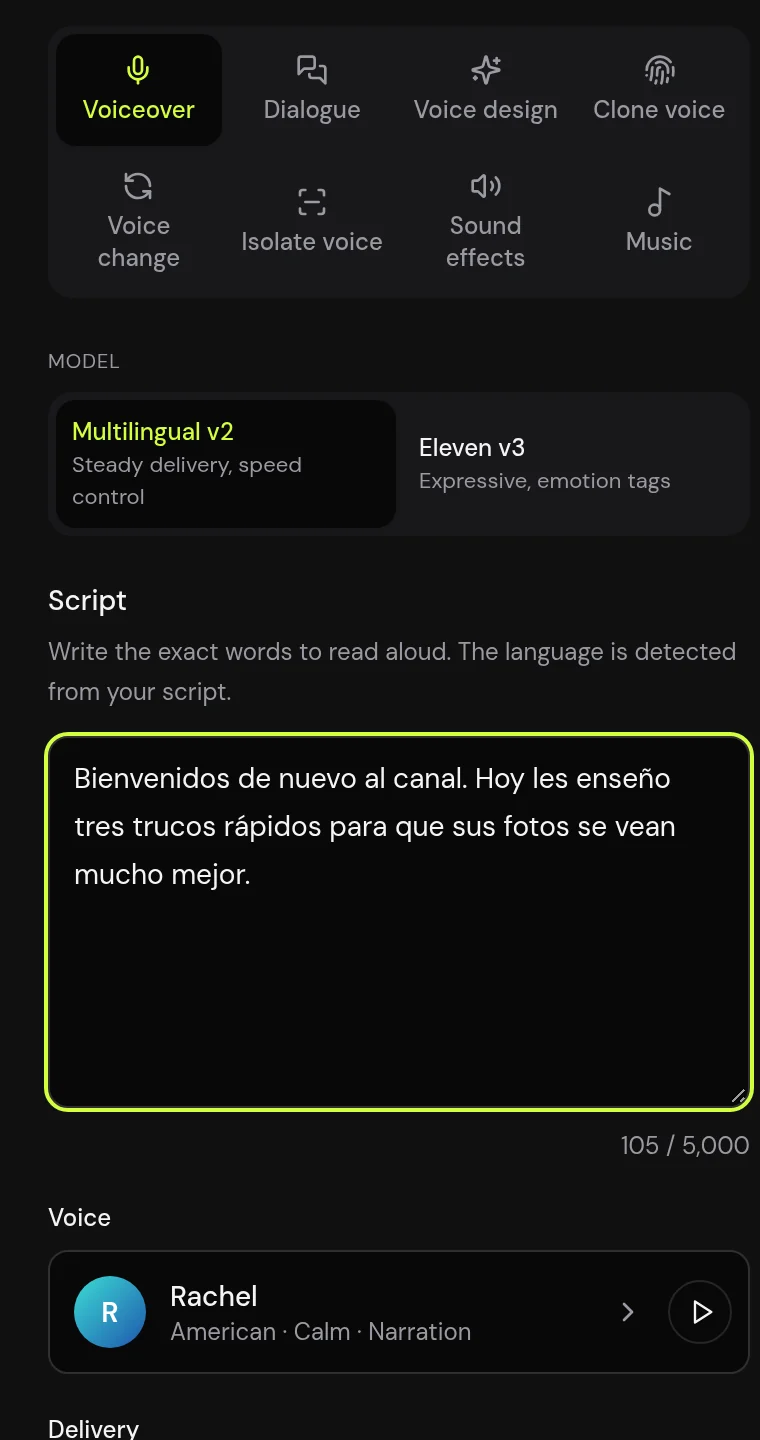
2.What accent to expect in Spanish
The 21 preset voices were made as English voices. ElevenLabs, whose models read the script, says a voice keeps its own characteristics and accent when it speaks another language. In practice that means clear Spanish that can carry a trace of an English accent, more with some voices than others.
- There is no setting for Spain or Latin American Spanish. Write the vocabulary your audience uses, such as “ordenador” or “computadora”, “vosotros” or “ustedes”.
- Listen to every take before you publish it, especially names, numbers and words with a written accent.
- If you need a native speaker’s sound, clone your own voice from a Spanish recording.
3.A Spanish voiceover in your own voice
If you speak Spanish, clone your voice from a recording of 10 seconds to 5 minutes and pick it under My voices. Your voice is spoken by MiniMax Speech 2.8 HD, which lists Spanish among its languages, at the same price per character. Emotion tags do not work with your own voices.
- AI voice cloning: how to record the sample and what it costs (330 credits, once).
4.Already have a video? Dub it into Spanish
If the video exists and only the language should change, use Dub in Remix instead of writing a new script. It translates the speech of a clip of up to 60 seconds into Spanish, or 19 other languages, in the speakers’ own voices, and leaves the picture as it is. It costs 87 credits per started minute.
5.More voices and languages
The hub page has all 21 voices with samples; the Japanese guide uses the same steps for Japanese text.
- AI voice over: the voices, engines, emotion tags and prices.
- Japanese text to speech: the same approach for Japanese scripts.
Get clean Spanish speech
- Keep the written accents (á, é, í, ó, ú) and ñ: without them, the voice can stress the wrong syllable.
- Use ¿ and ¡ so questions and exclamations get the right intonation from the first word.
- Write numbers, dates and prices as words when the reading matters: “doce horas”, “el tres de marzo”.
- Compare two voices on the same two lines before you generate the whole script.
Engines and prices
Spanish costs the same as English. You see the credit cost on the Generate button before you start.
| Mode | Credits | On the Starter plan | Use it for |
|---|---|---|---|
| Voiceover, Multilingual v2preset voices, speed 0.7 to 1.2× | 20 credits per 1,000 characters | $0.380 per 1,000 characters | A steady Spanish read with a speed control. |
| Voiceover, Eleven v3preset voices, emotion tags | 20 credits per 1,000 characters | $0.380 per 1,000 characters | A more expressive read, with emotion tags written in English. |
| Voiceover in your own voiceMiniMax Speech 2.8 HD | 20 credits per 1,000 characters | $0.380 per 1,000 characters | Spanish in your own cloned voice. No emotion tags. |
| Dub a video (Remix)ElevenLabs Dubbing, clips up to 60 s | 87 credits per started minute | $1.65 per started minute | Translating the speech of an existing video into Spanish. |
Each take is billed at the full price. Prices checked in the app on .
What Spanish text to speech costs
20 credits per 1,000 characters, about a minute of speech, which is $0.380 on the Starter plan ($19 for 1,000 credits a month). Spanish runs a little longer than English for the same message, so count your characters, not your English draft’s.
Plans start at $19/month. Every audio mode needs a paid plan and enough workspace credits.
Frequently asked questions
Is there a native Spanish voice?
No. The 21 preset voices are English voices that also read Spanish, and each keeps some of its own accent. For a native Spanish sound, clone your own voice if you are a Spanish speaker.
Can I choose Spain or Latin American Spanish?
Not as a setting. The language is detected from the script, and the accent comes from the voice. Use the words and forms your audience uses, and check a take before you publish.
Does it translate English text into Spanish?
No. Voiceover reads the language you paste, so write or translate the script into Spanish first. To translate the speech of an existing video, use Dub in Remix, for clips of up to 60 seconds.
Can it read Spanish text aloud for learning?
Yes. Paste any Spanish text, generate and replay the MP3 as often as you like. Keep in mind that the voices are not native speakers, so do not treat every vowel as a pronunciation model.
Do emotion tags work in Spanish?
Yes, on Eleven v3. The tags are written in English inside the Spanish script, such as [excited] or [whispers], and they count as characters.
Is the studio available in Spanish?
The studio screens are in English, German, French and Italian. Spanish scripts work in any of them.
How much does Spanish text to speech cost?
20 credits per 1,000 characters, about $0.380 per minute on the Starter plan. Plans start at $19/month.
How we handle your uploads and recordings: privacy policy.