Faceless YouTube with AI
Faceless YouTube channel: how to make faceless videos with AI
A faceless YouTube channel publishes videos without the creator on camera: a voice-over over images, clips or animation. AI can make most of that material. In AI Media Studio you make one scene image per sentence of your script (Nano Banana 2.1, 8 credits at 1K), turn the scenes that need motion into 3 to 15-second clips (Kling 4.0, 23 credits per second at 720p) and record the voice-over from your script in Audio (20 credits per 1,000 characters, about a minute of speech). You write the script, cut it all together in your own video editor and upload it to YouTube yourself. AI Media Studio is not affiliated with YouTube.
Plans start at $19/month. Downloads carry no watermark, and paid plans include a commercial license.
How to start a faceless YouTube channel with AI
- 01
Pick a topic and a format you can repeat
A narrow topic and one format: narrated stories, explainers, facts, history or calm ambient videos. Decide on long videos (16:9) or Shorts (9:16) first, because every image and clip is made in that frame.
- 02
Write the script and split it into scenes
AI Media Studio does not write scripts. Write it yourself, or draft it with a chatbot and rewrite it in your own words, and check every fact. Then split it into scenes of one or two sentences: one scene, one image.
- 03
Make one image per scene
Describe each scene in the image composer and repeat the same style sentence every time. For a character who returns, attach your first scene as a reference and ask for the same character in a new scene, as in example 1. Nano Banana 2.1 costs 8 credits per image at 1K, 9 with a reference.
- 04
Animate only the scenes that need motion
Attach a scene image in the Video tab and describe one movement. Kling 4.0 makes 3 to 15-second clips with sound. Stills with a slow pan or zoom added in your editor cost nothing extra, so most faceless videos mix both.
- 05
Record the voice-over
In Audio, paste up to 5,000 characters of your script, pick one of 21 voices or your own cloned voice, and download the MP3. Sound effects and music are made in Audio too.
- 06
Edit, label and upload
Put the images, clips and voice-over on a timeline in your own video editor and add captions there. When you upload in YouTube Studio, answer the “AI use” question honestly: YouTube requires disclosure for realistic AI scenes.
Faceless YouTube channel ideas that suit AI scenes
The first two ideas show scenes we made for them; the other four have a prompt to try. Every example is a still made as a scene image for a video. None of them is a frame from a video, and we did not animate them.
1.A narrated story channel: one character, one style, many scenes
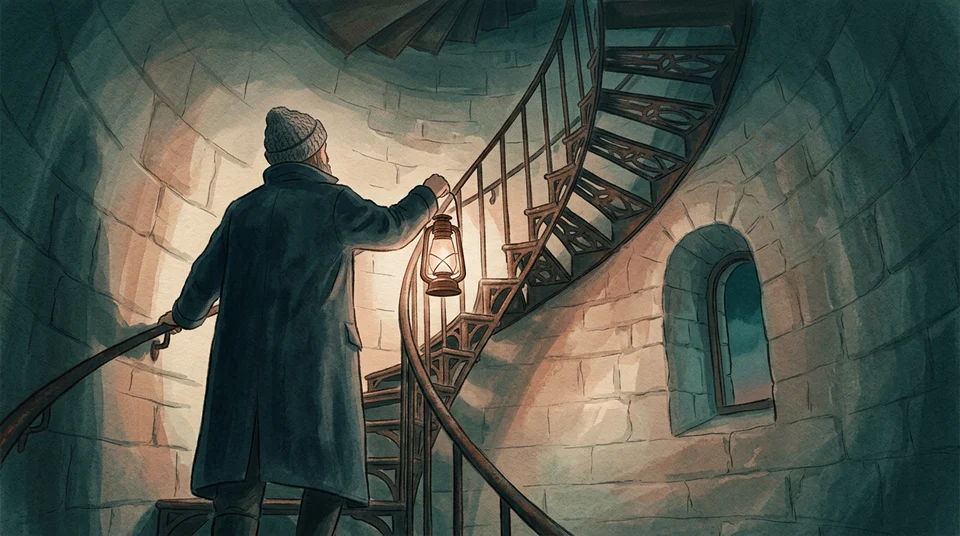
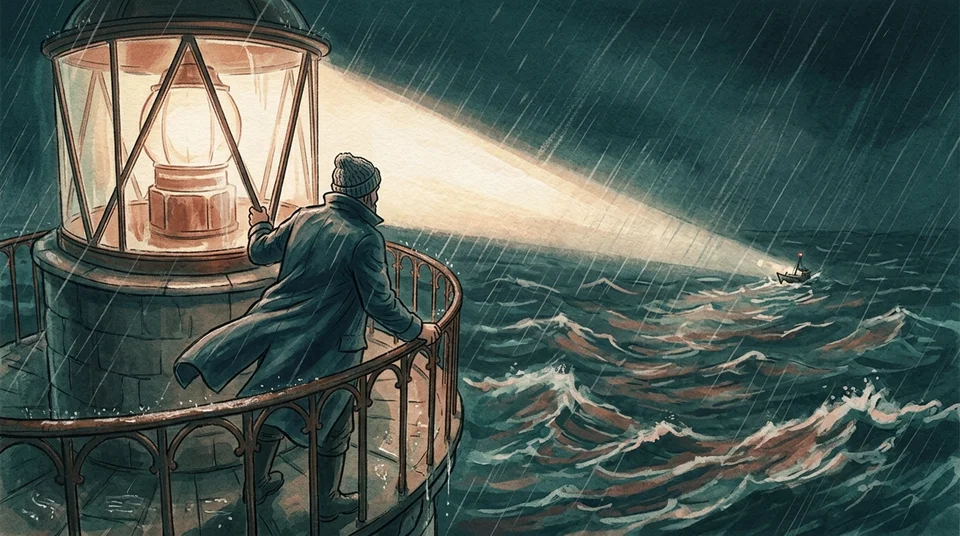
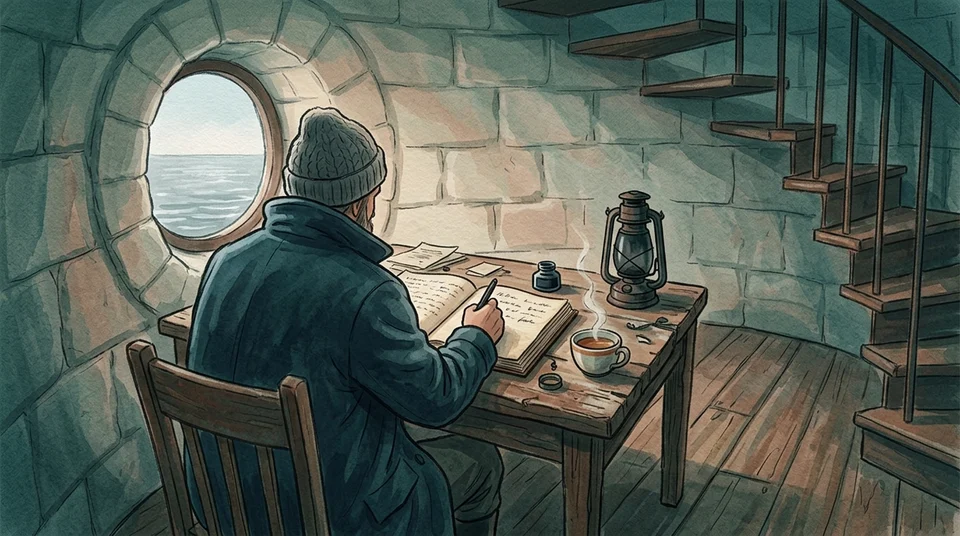
Story channels narrate a tale over a new scene every few seconds. The hard part is keeping the character and the look the same from scene to scene. We made the first scene from text, then attached it as a reference for the next two and asked for the same keeper in a new scene. The style, colours, coat and hat stayed the same in all three, and the keeper’s face never shows, which also hides small differences. The model did not follow every detail: on the stairs he stands at the foot of the staircase instead of climbing it, and in the storm he holds the lamp housing with one hand instead of the railing with both.
Prompt we ran for this scene
Keep the same storybook gouache style, paper texture and muted teal, cream and rust colours, and the same lighthouse keeper: long dark-blue coat, knitted grey hat, seen from behind, face never visible. New scene: the keeper stands on the narrow iron balcony at the top of the lighthouse at night in a storm, both hands on the railing, the lighthouse beam cutting through the rain towards a small fishing boat far out on the waves. No text, no logos. Wide 16:9 frame.
Prompt we ran for this scene
Keep the same storybook gouache style, paper texture and muted teal, cream and rust colours, and the same lighthouse keeper: long dark-blue coat, knitted grey hat, seen from behind, face never visible. New scene: the next morning, the keeper sits at a wooden table by a small round window inside the lighthouse, seen over his shoulder, writing in a logbook, a cup of tea and the unlit lantern beside him, a calm grey sea outside. The logbook pages show no readable text. No text, no logos. Wide 16:9 frame.
Prompt to try
Storybook illustration in soft gouache with visible paper texture, in muted teal, cream and rust colours. A lighthouse keeper seen from behind, a tall figure in a long dark-blue coat and a knitted grey hat, climbs a spiral iron staircase inside an old stone lighthouse at dusk, holding up an oil lantern that lights the curved wall. The keeper's face is never visible. No text, no logos. Wide 16:9 frame.
Suggested model: Nano Banana 2.1
To turn a scene into a clip, attach it in the Video tab and describe one movement, for example “the lantern light flickers, slow push-in”. A 5-second clip on Kling 4.0 costs 115 credits at 720p. We did not animate these scenes for this page. For the narration, the story sample on our AI voice over page reads a line about a lighthouse keeper in George’s British voice, made in Audio.
2.A Shorts facts channel: one realistic scene per fact
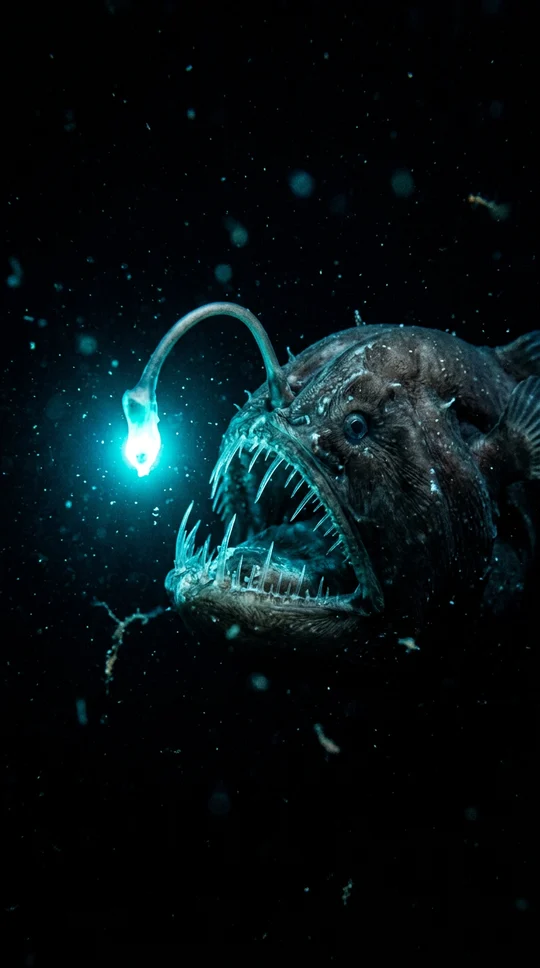
Fact and explainer Shorts show one striking image per fact under the voice-over, in the vertical 9:16 frame. These three deep-sea scenes are photorealistic, and that matters on YouTube: a realistic scene that did not actually happen has to be disclosed when you upload. Check the facts and the details yourself before you narrate over them. The model drew a convincing anglerfish, whale skeleton and vent, not a scientifically checked one.
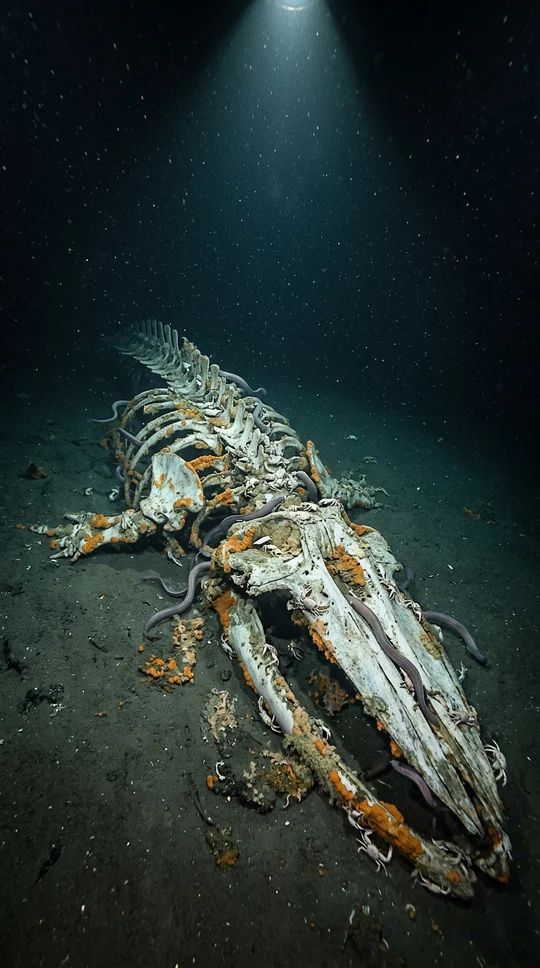
Prompt we ran for this scene
Photorealistic deep-sea scene, vertical 9:16 frame: a whale fall on the dark sea floor, the white skeleton of a whale lying on grey sand, covered in small crabs, eel-like fish and orange bacterial mats, lit by a single soft beam from above as if from a submersible. Documentary underwater photography look. No text, no logos, no divers.
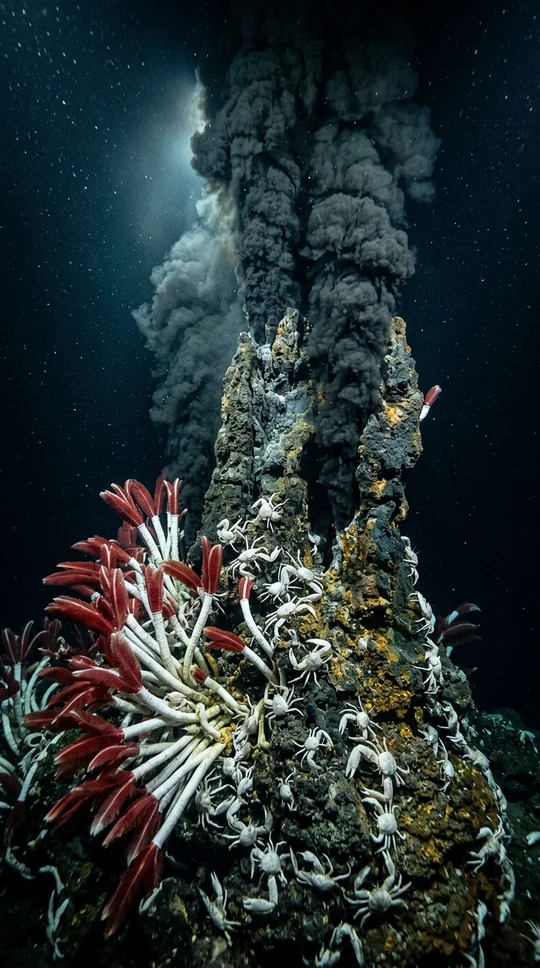
Prompt we ran for this scene
Photorealistic deep-sea scene, vertical 9:16 frame: a hydrothermal vent, black smoke billowing from a tall mineral chimney on the sea floor, white tube worms with red plumes and pale crabs crowded around its base, lit by a soft beam from above as if from a submersible. Documentary underwater photography look. No text, no logos, no divers.
Prompt to try
Photorealistic deep-sea scene, vertical 9:16 frame: an anglerfish with a glowing blue-green lure hanging in front of its open, needle-toothed mouth, in total darkness, a few particles of marine snow drifting past, lit only by its own light. Documentary underwater photography look. No text, no logos, no divers.
Suggested model: Nano Banana 2.1
3.History and “how it worked” explainers
Illustrate each period, place or machine in one consistent style, so the channel looks the same from video to video. An engraving or watercolour look also tells viewers these are illustrations, not historical photos. Name your sources in the description: an AI image is not evidence of what something looked like.
Prompt to try
Illustration in the style of an old engraving with soft watercolour washes: a busy harbour town at dawn several centuries ago, wooden cargo ships being unloaded, workers seen from behind carrying barrels and sacks along the quay. No readable text, no logos. Wide 16:9 frame.
Suggested model: Nano Banana 2.1
4.Calm ambient and study videos
One calm scene, a slow loop and a long soundtrack. Make the scene, animate a short loop of up to 15 seconds and make rain or fire as a sound effect in Audio, then loop and lengthen both in your video editor. AI Media Studio does not make hour-long videos itself.
Prompt to try
A cosy reading nook by a tall rain-streaked window at night, a softly glowing lamp, a wool blanket on an armchair, a cat asleep on a cushion, blurred city lights outside. Calm and warm, photorealistic, no people, no text, no logos. Wide 16:9 frame.
Suggested model: Nano Banana 2.1
5.Top lists and countdowns
One scene per list item, the voice-over reading the list, and the number added as a caption in your editor. Write the list from sources you have checked; the scenes only illustrate it.
Prompt to try
A vast salt flat after rain that mirrors the sky like a glass floor, one small figure walking far away, seen from behind, sunset colours. Photorealistic, no text, no logos. Vertical 9:16 frame.
Suggested model: Nano Banana 2.1
6.Mysteries and folklore told as stories
Moody painted scenes with no people, or figures seen from behind, carry a narrated story without faces. Tell invented stories as fiction, and do not put real people or events into realistic scenes.
Prompt to try
Moody painted illustration: an empty wooden rowing boat drifting on a still lake in thick fog at dawn, a lantern still burning on its bench, a dark pine forest on the shore. No people, no text, no logos. Wide 16:9 frame.
Suggested model: Nano Banana 2.1
7.YouTube’s rules for AI-made faceless videos
From YouTube Help, read on 25 November 2026: YouTube requires creators to disclose AI-generated or altered content that seems realistic, including content that “generates a realistic scene that didn’t actually occur”, with the “AI use” setting when you upload in YouTube Studio. Non-realistic content and minor edits don’t need it, and YouTube says disclosing AI content alone won’t limit a video’s audience or its eligibility to earn money. Its channel monetization policies expect monetized content to be your original creation and not “mass-produced, generic, repetitive, or manipulative”; since 15 July 2025 that part is called the “inauthentic content” policy. The three pages are linked under “How these examples were made”. We make no promise about views, subscribers or income.
What AI Media Studio does not do for a faceless channel
- It does not write scripts or plan videos. The voice-over reads exactly what you paste.
- It does not turn a script into a finished video. There is no timeline, no automatic editing and no captions: you cut the images, clips and voice-over together in your own video editor.
- Each clip is 3 to 15 seconds on Kling 4.0, not a whole video. A long video is many scenes, and the clips come with their own sound, so mute that track in your editor if it clashes with the voice-over.
- A voice-over take holds up to 5,000 characters, about five minutes of speech; a longer script is several takes. There is no talking avatar, and lip sync is limited: Use in video in the Audio studio has Seedance 2.0 animate one photo to up to 15 seconds of the audio and asks it to lip-sync the words. That is a request, not a guarantee, we have not tested it, and Seedance 2.0 declines photos with a real-looking human face.
- You cannot upload a finished video to cut or edit it. The only video uploads are Remix (clips up to 60 seconds) and Voice change (up to five minutes).
- It does not upload to YouTube, schedule posts or show channel analytics. You download the files and upload them in YouTube Studio yourself.
Which model makes which part
Prices are in the web app and draw from the same credits. The editor shows the credit cost before you generate.
| Model | Credits | Use it for |
|---|---|---|
| Nano Banana 2.1per scene image at 1K, from text | 8 | Scene images in 16:9 or 9:16; all six examples here. 9 credits with a reference image attached for the same character. |
| Kling 4.0per second of video, 720p, with sound, 3 to 15 s | 23 | Animating a scene image, or a scene from text; the Video tab’s default. 34 credits per second at 1080p. |
| Grok Imagine Video 1.5per second, 480p, with sound, 1 to 15 s | 12 | A cheaper way to test a movement before you pay for 720p. We have not compared it with Kling 4.0 on these scenes. |
| ElevenLabs Multilingual v2 or Eleven v3per 1,000 characters of voice-over | 20 | 21 preset voices; Eleven v3 reads tags such as [whispers]. Your own cloned voice costs the same per character after a one-time 330 credits to clone it. |
| ElevenLabs Sound Effects v2per 10 seconds, 0.5 to 22 s | 4 | Rain, waves, footsteps and room tone under the narration. |
Music is made in Audio as well. A clip that looks wrong still costs its credits, so test a movement on a short clip first. Prices checked .
What a faceless video costs to make
A one-minute Short made like example 2, with 6 scene images on Nano Banana 2.1 (48 credits), 3 of them animated as 5-second clips on Kling 4.0 at 720p (345 credits) and a 1,000-character voice-over (20 credits), comes to 413 credits if every image and clip works the first time. With stills and a pan added in your editor instead of clips, it is 68 credits.
Plans start at $19/month. Unused subscription credits roll over, downloads carry no watermark, and paid plans include a commercial license.
Make each part of a faceless video
Our guides for each step, with prompts, samples and prices.
- Image to video
Turn a scene image into a moving clip.
- Text to video
Make a scene clip from a written description, without an image.
- AI cartoon video generator
For a cartoon story channel: the same character in every episode, from a character sheet.
- AI voice over
Turn your script into narration with 21 voices, emotion tags or your own voice.
- AI voice cloning
Narrate every video in your own voice without recording each one.
- AI sound effect generator
Ambience and effects to put under the narration.
- YouTube banner maker
Channel art in YouTube’s banner size.
Frequently asked questions
What is a faceless YouTube channel?
A channel whose creator never appears on camera. The videos use a voice-over over images, clips, animation, text or screen recordings, and the voice can be the creator’s own or a generated one.
How do I start a faceless YouTube channel with AI?
Pick a topic and one format you can repeat, write the script and split it into scenes, make one image per scene, animate the scenes that need motion, record the voice-over from the script, then edit everything together in your video editor and upload it in YouTube Studio with the AI question answered honestly.
How do I make faceless videos with AI?
In AI Media Studio: scene images in the image composer (8 credits each on Nano Banana 2.1 at 1K), 3 to 15-second clips in the Video tab (115 credits for 5 seconds on Kling 4.0 at 720p) and the voice-over in Audio (20 credits per 1,000 characters). The script and the editing are yours.
Can AI make a whole faceless video from a script?
Not in AI Media Studio. It makes the scenes, clips and voice-over; it does not write the script, cut a timeline, add captions or export a finished video.
What are good faceless YouTube channel ideas?
Formats that work without a face and suit AI scenes: narrated stories with one recurring character, fact and explainer Shorts, history explainers in an illustrated style, calm ambient videos, top lists, and mysteries or folklore told as fiction. Pick one you can make many videos about.
Do I have to label AI videos on YouTube?
If they look realistic, yes. YouTube requires creators to disclose AI-generated or altered content that seems realistic, such as a realistic scene that didn’t actually occur, with the “AI use” setting in YouTube Studio; non-realistic content and minor edits don’t need it ([YouTube Help](https://support.google.com/youtube/answer/14328491), read 25 November 2026).
Can a faceless AI channel make money on YouTube?
We cannot promise views, subscribers or income. YouTube’s [channel monetization policies](https://support.google.com/youtube/answer/1311392) expect monetized content to be your original creation and not “mass-produced, generic, repetitive, or manipulative”. For the YouTube Partner Program, [YouTube Help](https://support.google.com/youtube/answer/72851) lists 1,000 subscribers with either 4,000 qualified watch hours in the last 12 months or 10 million qualified Shorts views in the last 90 days. YouTube also says disclosing AI content alone won’t affect a video’s eligibility to earn money (all read 25 November 2026).
How long can the clips and the voice-over be?
Each clip is 3 to 15 seconds on Kling 4.0 (1 to 15 on Grok Imagine Video 1.5). One voice-over take holds up to 5,000 characters, about five minutes of speech. Longer videos are several clips and takes joined in your editor.
Can I narrate in my own voice?
Yes. Clone your voice from a recording of 10 seconds to 5 minutes after a consent step (330 credits once), then make every voice-over with it at 20 credits per 1,000 characters. See AI voice cloning.
Is AI Media Studio affiliated with YouTube?
No. AI Media Studio is not affiliated with, endorsed by or sponsored by YouTube or Google. YouTube is named here only to describe where you publish the videos.
Is there a free faceless video generator?
Not here. AI Media Studio has no free tier. Every edit needs a paid plan. Plans start at $19/month.
Uploads are processed by the AI provider that runs the model you pick. Retention, processors and deletion requests are covered in the privacy policy.