AI voice isolator
Voice isolator: remove background noise and keep only the voice
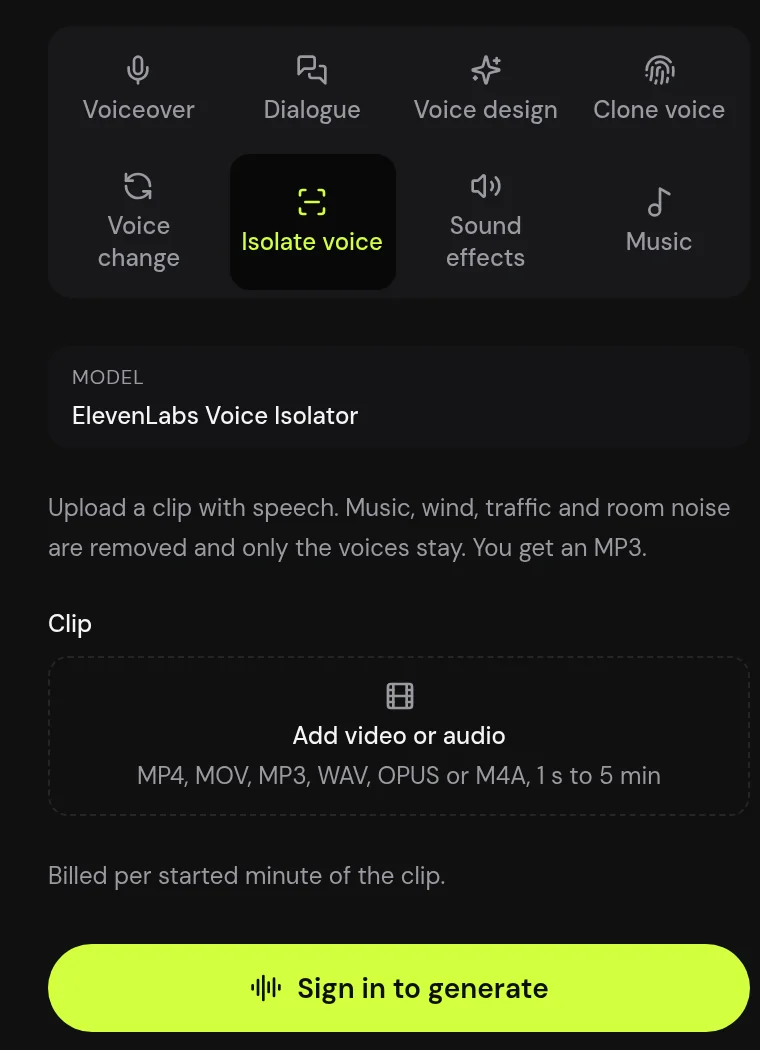
To isolate a voice, upload a clip with speech to Isolate voice: a video (MP4 or MOV) or audio (MP3, WAV or M4A) from 1 second to 5 minutes. Music, wind, traffic and room noise are removed and only the voices stay. You get the clean voice as an MP3, not a video, for 20 credits per started minute.
Plans start at $19/month. Paid plans include a commercial license.
How to remove background noise from audio
- 01
Upload your clip
Open Audio and choose Isolate voice. Add a video (MP4 or MOV, up to 200 MB) or an audio file (MP3 up to 16 MB, WAV or M4A up to 100 MB), from 1 second to 5 minutes long.
- 02
Check the length and price
The clip is measured after upload, and the button shows the price: 20 credits for each started minute, so a 70-second clip counts as two minutes.
- 03
Isolate the voice
Generate. Music, wind, traffic and room noise are removed, and only the speech stays.
- 04
Download the MP3
You get an MP3 of the clean voice. For a video, put the MP3 back under the picture in your editor and mute the original track.
Try the voice isolator on your own recordings
Three common problems and what to upload for each. You bring the recording and the studio returns the voice as an MP3. Compare it with your original: the difference is clearest with headphones.
1.Street interview with traffic
Traffic is a steady, broad noise under the voice, the classic case for a voice isolator. Isolate voice keeps the speech and removes the cars.
Make it yourself
Your street recording without the traffic
- In the studio:
- Isolate voice · upload the clip; there is nothing else to set, and you get an MP3
- You need:
- your own recording of someone speaking next to traffic, such as an interview filmed on a phone, 1 second to 5 minutes, as MP4, MOV, MP3, WAV or M4A.
- Cost:
- 20 credits for a clip of up to a minute
2.Speech over background music
When someone talks over music, a voice isolator removes the music and keeps the speech. That makes an old vlog or a talk recorded with music in the room usable again.
Make it yourself
Your speech without the music
- In the studio:
- Isolate voice · upload the clip; there is nothing else to set, and you get an MP3
- You need:
- your own recording of someone talking with music audible behind them, 1 second to 5 minutes, as MP4, MOV, MP3, WAV or M4A.
- Cost:
- 20 credits for a clip of up to a minute
3.Remove wind noise from an outdoor recording
Wind hits the microphone in gusts and is hard to fix by hand. Isolating the voice removes the rumble while the words stay.
Make it yourself
Your outdoor recording without the wind
- In the studio:
- Isolate voice · upload the clip; there is nothing else to set, and you get an MP3
- You need:
- your own recording made outdoors with wind on the microphone, 1 second to 5 minutes, as MP4, MOV, MP3, WAV or M4A.
- Cost:
- 20 credits for a clip of up to a minute
4.Remove background noise from a video
You can upload the video itself: the studio reads its sound track. The result is an MP3, not a new video, so the last step happens in your editor.
- Upload the MP4 or MOV, up to 200 MB and 5 minutes.
- Download the isolated MP3.
- In your editor, mute the original sound track and place the MP3 at the start of the clip, then check that the words line up with the lips.
5.What to do with the clean voice
A clean voice track is useful beyond the video it came from.
- AI voice cloning: a clean recording of your own voice makes a better clone.
- AI sound effect generator: add new ambience under the clean voice.
- AI voice over: replace a line with a voiceover from a script.
Use in video also works with an isolated voice: Seedance 2.0 animates a photo to up to 15 seconds of it.
Get the cleanest result
- Start from the best recording you have. The isolator removes noise; it cannot restore words the noise covered.
- Trim the clip to the part you need before uploading: you pay per started minute.
- Two people talking at once stay together: it keeps all voices and removes everything else.
- For music with singing, results vary. The isolator is made for speech.
Limits and prices
Isolate voice is billed by the length of your clip, per started minute. You see the cost on the Generate button after the upload.
| Mode | Credits | On the Starter plan | Use it for |
|---|---|---|---|
| Isolate voiceElevenLabs Voice Isolator, MP3 out | 20 credits per started minute | $0.380 per started minute | Removing music, wind, traffic and room noise from speech, up to 5 minutes per clip. |
A clip of 1 to 60 seconds is billed as one minute, 61 to 120 seconds as two, and so on up to five minutes. Prices checked in the app on .
What the voice isolator costs
20 credits per started minute: $0.380 for a clip of up to a minute on the Starter plan ($19 for 1,000 credits a month), and 100 credits for the longest clip, five minutes.
Plans start at $19/month. Every audio mode needs a paid plan and enough workspace credits.
Frequently asked questions
What is a voice isolator?
A background noise remover for speech: it separates the voices from everything else in a recording. It removes music, wind, traffic and room noise, and keeps only the voices. Here it runs on the ElevenLabs Voice Isolator model.
How do I remove background noise from audio?
Upload the audio or video to Isolate voice, generate, and download the MP3 of the clean voice. The whole clip is processed at once; there are no settings to adjust.
How do I remove background noise from a video?
Upload the MP4 or MOV (up to 200 MB and 5 minutes) to Isolate voice and download the MP3 of the clean voice. In your editor, mute the video’s original sound, place the MP3 at the start of the clip and check that the words line up with the lips. Wind noise is removed the same way.
Do I get my video back?
No. Isolate voice returns an MP3 of the voice only, also when you upload a video. Mute the video’s original sound in your editor and put the MP3 in its place.
Which files can I upload?
Video as MP4 or MOV up to 200 MB, or audio as MP3 up to 16 MB, WAV or M4A up to 100 MB. Clips run from 1 second to 5 minutes.
Can it isolate vocals from a song?
It is made for speech, so results with singing vary, and the music around the voice is removed, not kept as a separate track. Only upload music you have the rights to.
Does it keep more than one voice?
Yes. It keeps every voice and removes the rest, so an interview with two speakers stays an interview. It does not split the speakers into separate files.
Can it fix a recording where the words are hard to hear?
It removes the noise, but it cannot recreate words the noise covered. If a word is lost, a voiceover from a script or your cloned voice can replace that line.
How much does the voice isolator cost?
20 credits per started minute of your clip, up to 100 credits for five minutes. Plans start at $19/month.
How we handle your uploads and recordings: privacy policy.