AI voice over generator
AI voice over: turn a script into a natural voiceover
To make an AI voice over, paste your script (up to 5,000 characters), pick one of 21 voices and generate. Multilingual v2 gives a steady read with a speed control; Eleven v3 reads emotion tags such as [whispers] or [laughs]. You can also speak in a voice you designed or cloned. You get an MP3, and 1,000 characters, about a minute of speech, cost 20 credits.
Plans start at $19/month. Paid plans include a commercial license.
How to make a voice over with AI
- 01
Paste your script
Open Audio, choose Voiceover and paste the exact words to read, up to 5,000 characters. The language is detected from the script, so there is nothing to set.
- 02
Pick a voice
Browse the 21 voices by gender and by use (narration, social media, news, conversation or characters) and play a preview before you choose. Your own designed or cloned voices appear under My voices.
- 03
Set the delivery
On Multilingual v2, pick Calm narrator, Energetic ad, Friendly explainer or Dramatic trailer, or set speed (0.7 to 1.2×) and stability yourself. On Eleven v3, add emotion tags and choose Creative, Natural or Robust.
- 04
Generate and download the MP3
Generate up to 4 takes at once and keep the best one. Download the MP3 for your editor, or press Use in video to animate a photo to it.
AI voice over examples and scripts
Press play to hear the voices, then copy a script and change the words. Every sample says which voice, engine and delivery made it; the Eleven v3 example is one you make yourself in the studio.
1.Hear the AI voices
Each preset voice has an accent, a tone and a use it suits. These four read the studio’s preview line, “Every great story starts with a small idea. Welcome to a space where yours can come to life.”, on Multilingual v2 at default speed and stability, so you can compare them on the same words.
The default voice: an even, unhurried read for explainers and narration.
2.Voiceover for YouTube videos and stories
For narration, pick a voice tagged Narration and the Calm narrator delivery, which slows the read a little and keeps it steady. For a channel intro, Friendly explainer keeps the normal pace with a livelier tone.
- Faceless YouTube channel: Make the scene images and clips for a narrated video without a face on camera.
Narration script to try
Every morning at six, the market wakes up. Before the first customer arrives, the bakers have been working for three hours, and the smell of bread is already drifting down the street.
About 180 characters: 4 credits per take.
ScriptThe lighthouse keeper climbed the stairs one last time, counting each step like an old friend.
A slow, measured read in George’s British voice.
ScriptHey everyone, welcome back! Today I’ll show you three quick ways to make your photos look amazing.
A casual, upbeat intro at normal speed.
3.Emotion tags with Eleven v3
Eleven v3 reads tags in square brackets as delivery cues: excited, curious, sarcastic, mischievously, crying, whispers, laughs and sighs. The voice changes from the tag onwards, so put one where the mood shifts. Tags are inserted in English whatever the script language, and they count as characters.
Make it yourself
Ad read with emotion tags
- In the studio:
- Voiceover · engine Eleven v3 · voice Laura · delivery Natural
- Cost:
- 3 credits per take
Script to paste
[excited] Our spring collection is finally here. [whispers] And the first hundred orders ship today. [laughs] Don’t wait too long.
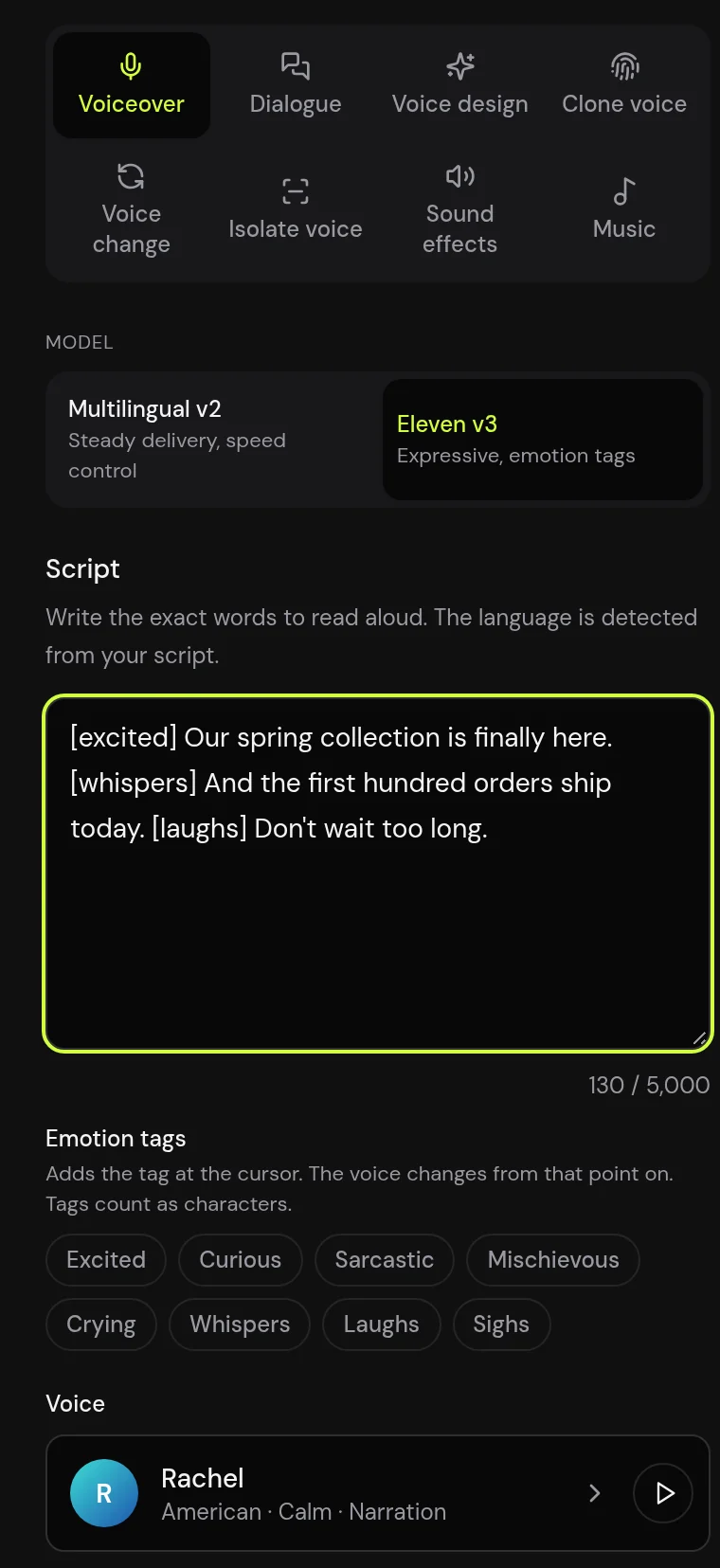
Eleven v3 has no speed control, and the voice previews in the studio are recorded with Multilingual v2, so a v3 read sounds more expressive than its preview.
5.Narration for explainer videos, courses and slides
For training videos and presentations, write one voiceover per slide or scene. Short files are easier to fix: when a sentence changes, you regenerate one clip instead of the whole lesson.
- PowerPoint: Insert, then Audio, then Audio on My PC, and set the clip to play automatically.
- Google Slides: upload the MP3 to Google Drive, then Insert, then Audio.
- For a course, keep the same voice and delivery for every lesson so the narration sounds like one speaker.
6.A voiceover in your own voice
If you want your own voice, clone it from a recording, or describe a new voice in Voice design. Either one is saved to your workspace and appears under My voices in Voiceover. Those voices are spoken by MiniMax Speech 2.8 HD, at the same price per character, but emotion tags are not available with them.
- AI voice cloning: clone your own voice from 10 seconds to 5 minutes of speech, once for 330 credits.
7.Voice over in other accents and languages
The 21 voices are English voices: mostly American, four British, one Australian, one Swedish and one transatlantic. The engines also read other languages, but a preset voice keeps its own accent when it does. These guides go into detail:
- British accent generator: George, Daniel, Alice and Lily, with samples of each.
- Spanish text to speech: how to turn a Spanish script into a voiceover, and what to expect from the accent.
- Japanese text to speech: how to turn Japanese text into a voiceover, with tips for kanji readings.
8.Put your voiceover in a video
Press Use in video on a finished voiceover to open the video composer with the clip attached as @Audio1. Only Seedance 2.0 takes an audio clip: add a photo, and it animates the photo to up to 15 seconds of your audio and is asked to lip-sync the words. Seedance 2.0 declines photos with a real-looking face, and we have not tested its lip-sync yet. For anything longer, add the MP3 to your video in an editor.
- Image to video: the video models, their lengths and their prices.
Write a script that sounds human
- Read it aloud yourself first. If you run out of breath, split the sentence.
- Punctuation sets the rhythm: commas for short pauses, full stops for longer ones.
- Spell out anything with two possible readings, such as dates, units and abbreviations.
- Test the first two lines before you generate a long script: every take is billed in full.
- On Eleven v3, use one tag per mood change. A tag in every sentence sounds forced.
Voices, engines and prices
All modes run in the Audio studio and draw from the same workspace credits. You see the cost on the Generate button before you start.
| Mode | Credits | On the Starter plan | Use it for |
|---|---|---|---|
| Voiceover, Multilingual v2preset voices, speed 0.7 to 1.2× | 20 credits per 1,000 characters | $0.380 per 1,000 characters | Steady narration and explainers, and the default for long scripts. |
| Voiceover, Eleven v3preset voices, emotion tags | 20 credits per 1,000 characters | $0.380 per 1,000 characters | Ads, characters and anything that needs a whisper, a laugh or a sigh. |
| Voiceover in your own voiceMiniMax Speech 2.8 HD | 20 credits per 1,000 characters | $0.380 per 1,000 characters | Voiceovers in a voice you designed or cloned. No emotion tags. |
| Clone voiceMiniMax Voice Clone | 330 credits per voice | $6.27 per voice | Turning a recording of your own voice into a voice you can reuse. |
| Voice designMiniMax Voice Design | 603 credits per voice | $11.46 per voice | Describing a new voice, such as “a warm, unhurried older narrator”. |
Emotion tags count as characters. Each take is billed at the full price. Prices checked in the app on .
What an AI voice over costs
A voiceover costs 20 credits per 1,000 characters, on every engine. A one-minute script of about 1,000 characters costs 20 credits, which is $0.380 on the Starter plan ($19 for 1,000 credits a month). A full 5,000-character script, about five minutes, costs 100 credits.
Plans start at $19/month. Every audio mode needs a paid plan and enough workspace credits, and unused subscription credits roll over.
Frequently asked questions
What is a voice over?
A voice over is narration that plays over a video, slideshow or animation by a speaker you do not see on screen. An AI voice over is made from a written script by a text-to-speech model instead of a recording.
How do I make a voice over using AI?
Paste your script into Voiceover in the Audio studio, pick a voice, choose Multilingual v2 or Eleven v3, set the delivery and generate. Download the MP3 and add it to your video, or press Use in video.
Is this an AI voice generator or text to speech?
Both names describe it: you type a script, an AI voice reads it aloud and you download an MP3. Choose one of the 21 preset voices, or generate a new voice from a written description in Voice design (603 credits, once).
Which voices can I use?
There are 21 preset voices: 14 American, 4 British (George, Daniel, Alice and Lily), 1 Australian (Charlie), 1 Swedish (Charlotte) and 1 transatlantic (Callum). You can filter them by gender and by use, and play a preview of each. You can also add voices you designed or cloned.
Can I make the AI voice sound excited, sad or quiet?
Yes, with Eleven v3. Put a tag such as [excited], [crying], [whispers], [laughs] or [sighs] before the words, and the voice changes from there. Multilingual v2 has no tags; use its delivery presets or the speed and stability settings instead.
How long can an AI voice over be?
Up to 5,000 characters per generation, about five minutes of speech. For a longer narration, split the script into parts with the same voice and settings, then join the MP3s in your editor.
How do I add an AI voice over to TikTok or CapCut?
Download the MP3, move it to your phone or computer and import it as an audio track in the editor you use for the video, such as CapCut. Then trim and line it up with your clips. Write the script to the length of the video: about 15 characters per second of speech.
How do I add a voice over to PowerPoint or Google Slides?
In PowerPoint, choose Insert, Audio, Audio on My PC and pick the MP3. In Google Slides, upload the MP3 to Google Drive first, then choose Insert, Audio. One clip per slide is easiest to keep in sync.
Can I use my own voice?
Yes. Clone your voice from a recording of 10 seconds to 5 minutes (330 credits, once) or design a new voice from a description (603 credits, once). Both appear under My voices in Voiceover. Emotion tags do not work with your own voices.
Which languages does the AI voice over speak?
The language is detected from your script. ElevenLabs lists 29 languages for Multilingual v2 and more than 70 for Eleven v3. The preset voices are English voices and keep their accent in other languages, so listen to a take before you publish it. The studio itself is in English, German, French and Italian.
Does it make subtitles or lip-sync a video?
No. The studio has no transcription or subtitles, and no stand-alone lip-sync tool. Use in video sends a voiceover to Seedance 2.0, which animates a photo to up to 15 seconds of it.
Can I use an AI voice over commercially?
Paid plans include a commercial license. You are responsible for the script and for any recordings you upload.
How much does an AI voice over cost?
20 credits per 1,000 characters on every engine, about $0.380 per minute of speech on the Starter plan. Plans start at $19/month.
How we handle your uploads and recordings: privacy policy.
4.Voiceover for TikTok, Reels and Shorts
Short videos need a voice that starts fast. Pick a voice tagged Social media, use the Energetic ad delivery and keep the first sentence under ten words. Generate two or three takes and keep the one with the best opening.
Short video script to try