AI cartoon videos
AI cartoon video generator: make cartoon clips and a series with the same characters
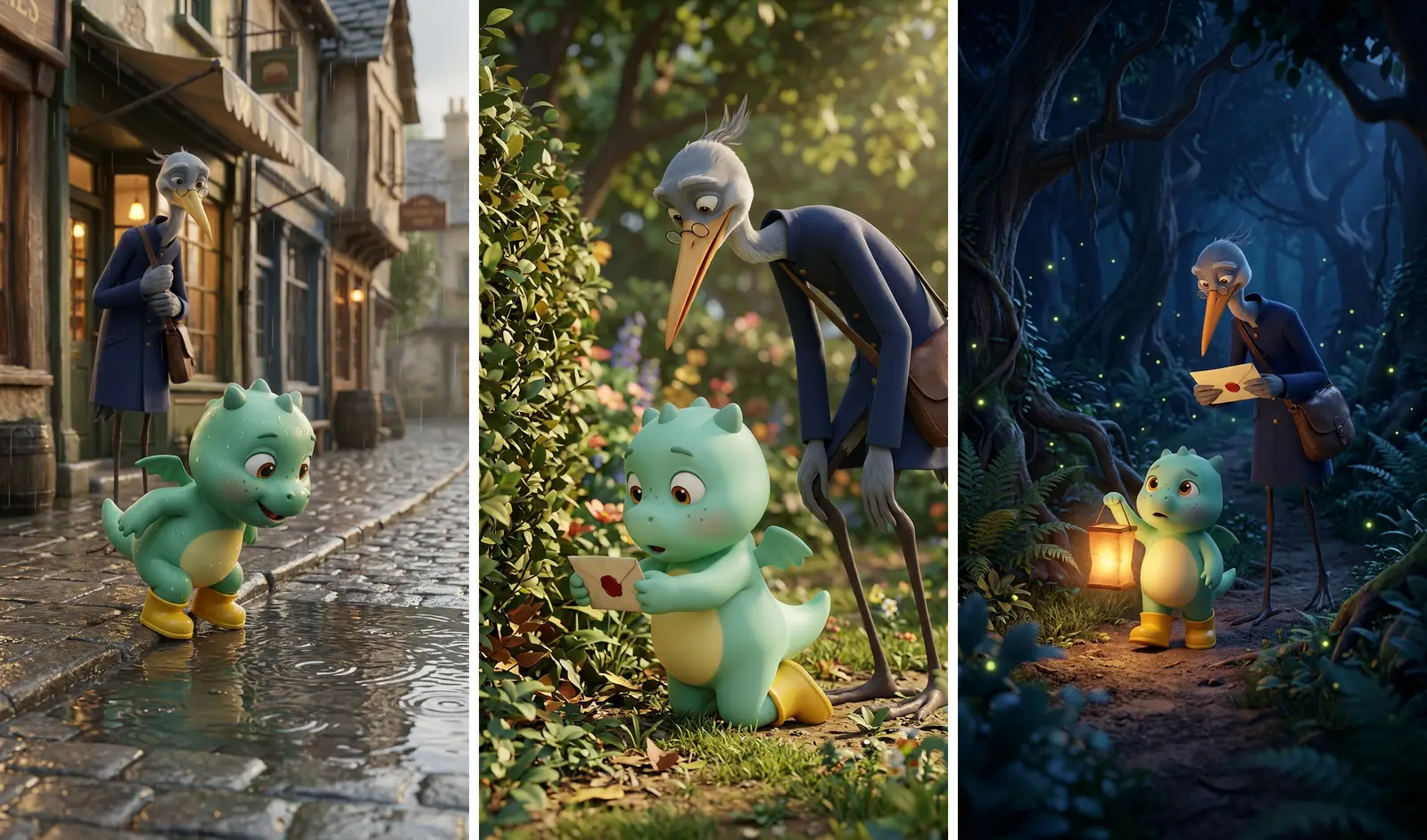
To make an AI cartoon video, design your character first as a character sheet, make one still per scene with that sheet attached, and animate each still on image to video. For a one-off clip you can also describe the whole scene and use text to video. In AI Media Studio, Kling 4.0, the video composer's default, makes 3 to 15-second clips with sound: 5 seconds at 720p cost 115 credits. Below are two invented characters, three episode start frames and three styles, with the prompts we ran.
Every edit needs a paid plan. Plans start at $19/month. Paid plans include a commercial license.
How to make an AI cartoon video
- 01
Design the character as a character sheet
In the Image tab, describe your character and ask for a character sheet: the full body from the front, side and back, plus a few expressions, on a plain background. Fix anything you do not like now, because every scene copies the sheet.
- 02
Make a start frame for each scene
Attach the sheet (or one sheet per character) and describe the scene: where the characters are, what they are doing and where the camera is. Ask for 9:16 if the series is for TikTok or Reels.
- 03
Animate each start frame
Open the Video tab, attach the still and describe one action, the camera and what must stay the same. Kling 4.0 is selected by default and makes 3 to 15-second clips with sound.
- 04
Join the clips and add the voice
Put the clips in order in your video editor and add captions. Make narration in the Audio studio and lay it over the clips, or press Use in video on a voiceover to send it to Seedance 2.0 with a start frame.
An AI cartoon series, step by step: two characters, three episodes, three styles
We invented two characters for this page, a baby dragon in rain boots and a heron who delivers the village post, and made the start frames of three episodes from their character sheets. Every image here is a still: the frame you would animate on image to video, not a frame from a finished video.
1.Design the characters first: one character sheet each
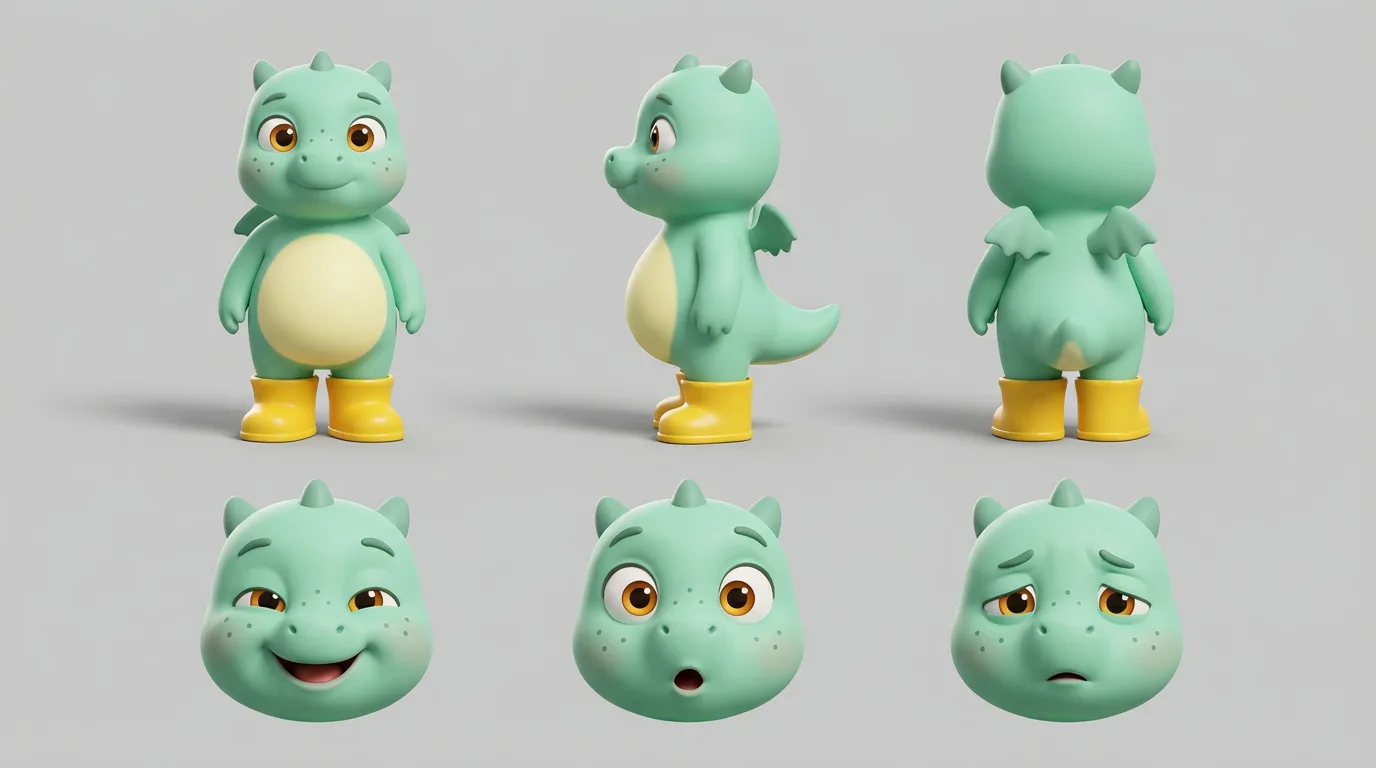
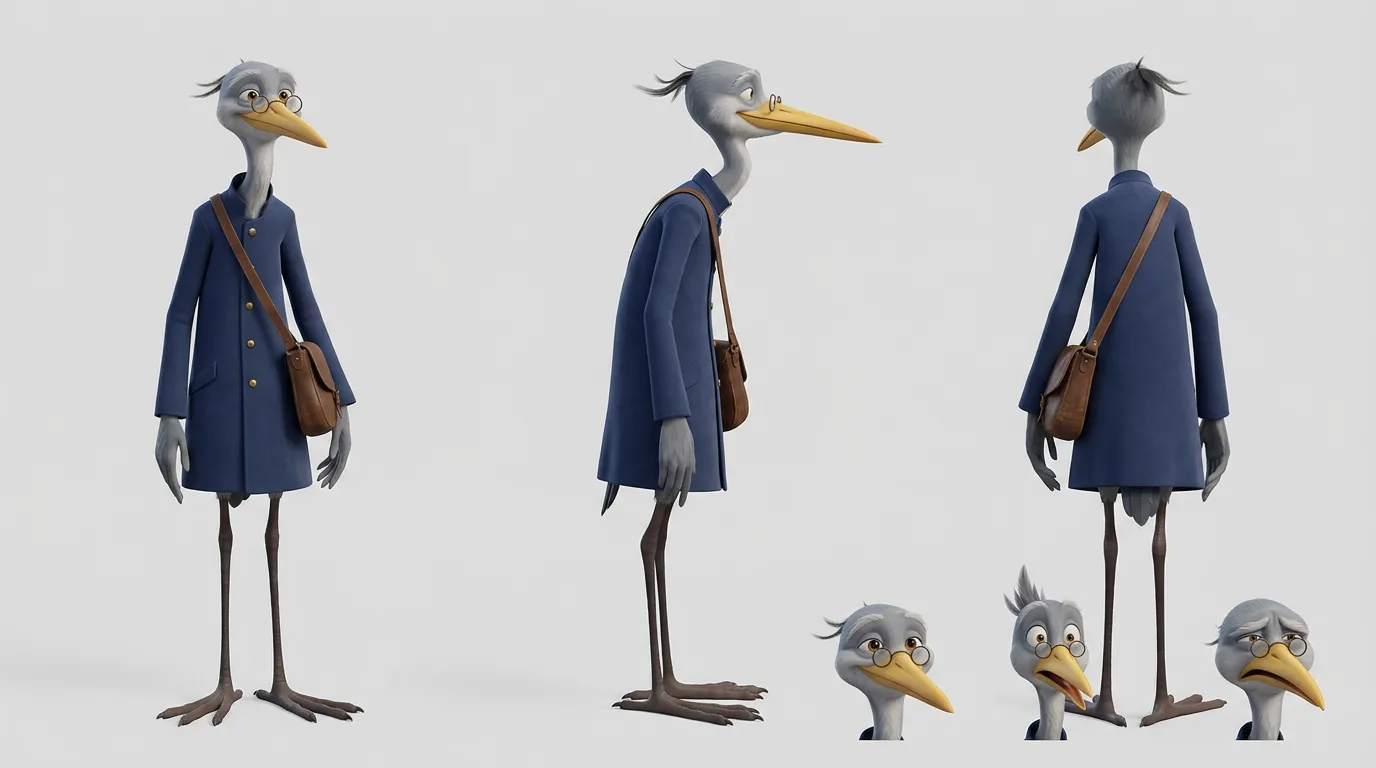
A video model only knows what it sees. A character sheet shows it the whole character at once: front, side and back at the same size, plus a few expressions. We made one sheet per character from text. The dragon came out with a third horn in the middle that we did not ask for, and it then appears in every episode; on the heron sheet the close-ups squeezed in next to the back view. Check a sheet before you build scenes on it.
Prompt we ran for this image
An original cartoon character sheet for an animated short series, showing one invented character: an elderly grey heron who works as the village postman, tall and thin with long legs, a long yellow beak, a small tuft of feathers on his head, small round glasses, a navy-blue coat with brass buttons and a brown leather satchel across his body; no badges, insignia or logos. Soft 3D animated film look, clean even studio light, plain light grey background. One wide image: the full body three times in a row at the same size and height, front view, side view and back view, and below them a row of three small head close-ups with kind, surprised and worried expressions. Same proportions, colours, glasses, coat and satchel in every view. No text, no labels, no logos, no watermark.
Prompt
An original cartoon character sheet for an animated short series, showing one invented character: a small, chubby mint-green baby dragon with a round pale-yellow belly, short stubby wings, two tiny rounded horns, big amber eyes, a few darker green freckles on her cheeks and bright yellow rubber rain boots. Soft 3D animated film look, clean even studio light, plain light grey background. One wide image: the full body three times in a row at the same size and height, front view, side view and back view, and below them a row of three small head close-ups with happy, surprised and sad expressions. Same proportions, colours and boots in every view. No text, no labels, no logos, no watermark.
Model: Nano Banana 2.1 through the fal.ai API, 1K, 16:9 (the dragon sheet's prompt)
2.One start frame per episode, with both sheets attached
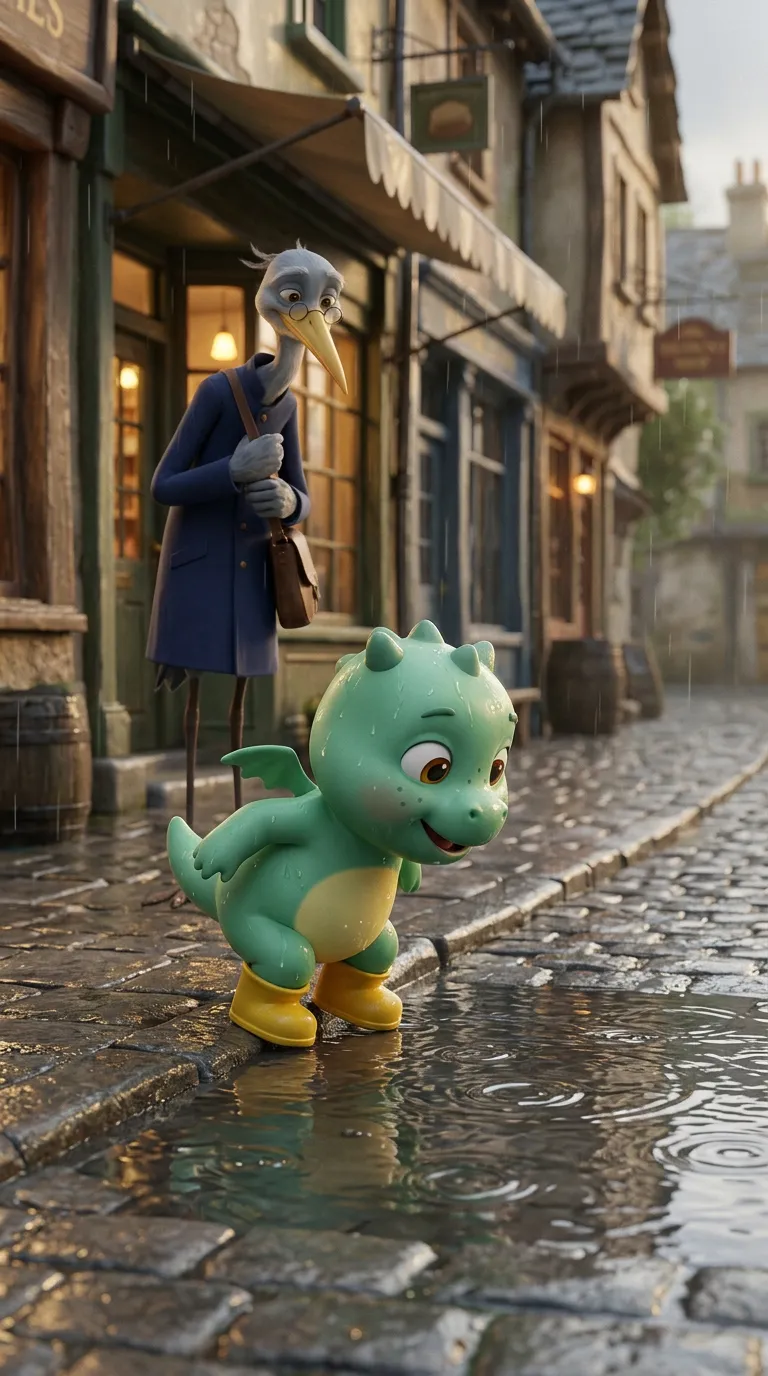
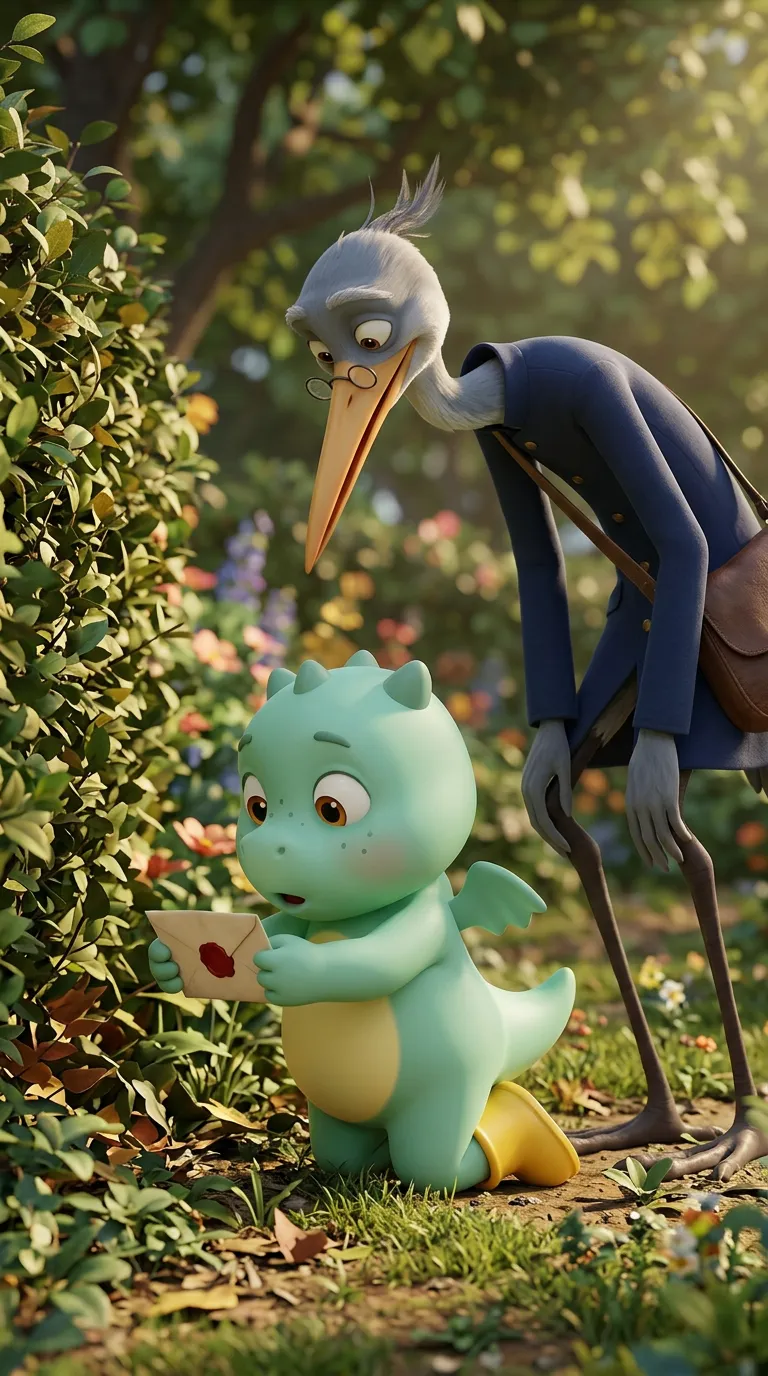
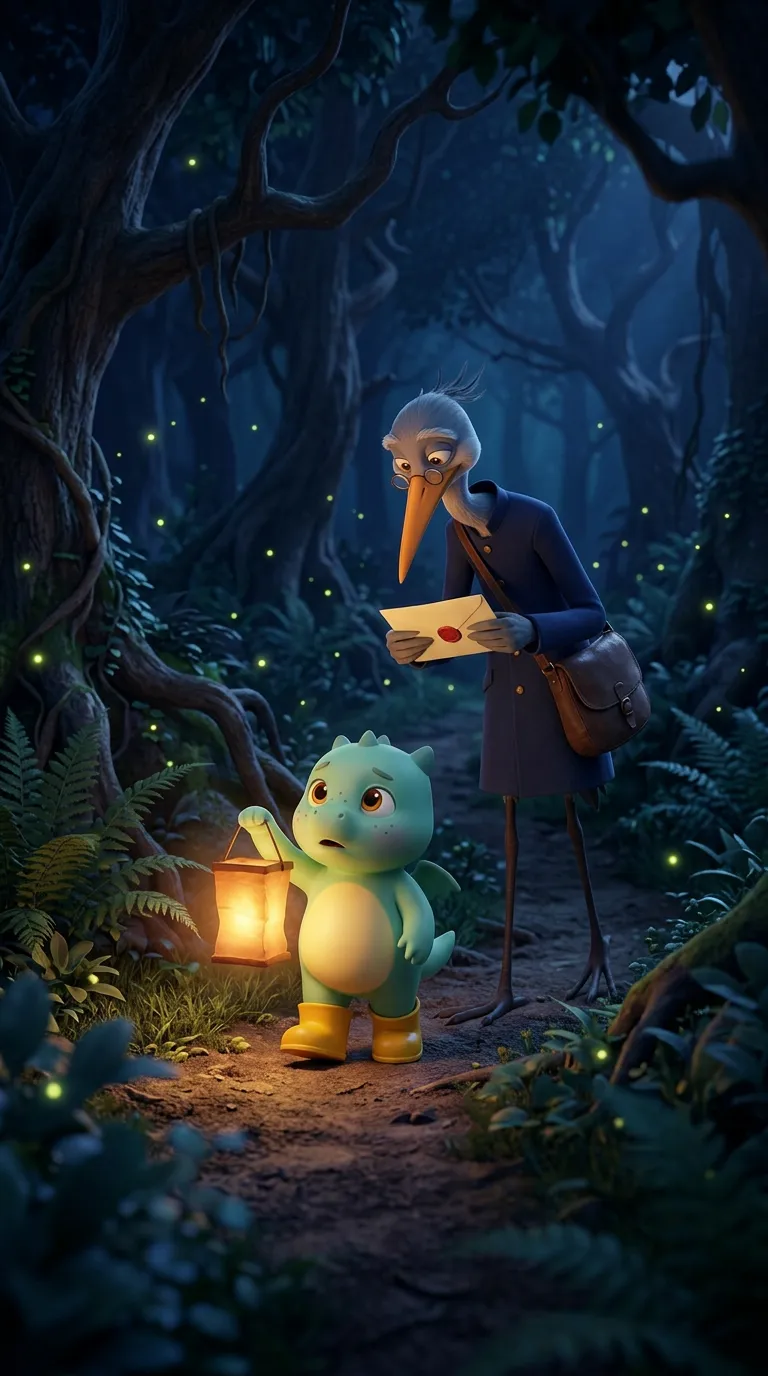
With both sheets attached as references, the opening scene of each episode came back with the same dragon and the same heron: the freckles, the yellow boots, the glasses, the coat and the satchel all match. These stills are what you attach in the Video tab to animate a scene. Not everything followed the prompt: in episode 3 the dragon holds the lantern low in one hand instead of up high with both, and the shop signs in episode 1 carry unreadable letters.
Prompt we ran for this image
Using the two attached character sheets, make the first frame of episode 2 of a cartoon series, vertical 9:16. The baby dragon from the first sheet kneels next to a garden hedge and holds up a small cream envelope with a red wax seal that she has just found among the leaves, her eyes wide with surprise. The heron postman from the second sheet bends down behind her, peering at the envelope over his glasses. Sunny morning in a village garden, the camera close at the dragon's eye level. Keep both characters exactly as on their sheets: same proportions, colours, freckles and yellow boots for the dragon, same glasses, navy coat and satchel for the heron. Soft 3D animated film look. One single scene, not a character sheet. No text, no logos, no watermark.
Prompt we ran for this image
Using the two attached character sheets, make the first frame of episode 3 of a cartoon series, vertical 9:16. Night in a quiet forest: the baby dragon from the first sheet walks along a narrow path holding a glowing paper lantern up high with both hands, looking ahead, a little scared but brave. The heron postman from the second sheet walks close behind her, reading the address on a cream envelope with a red wax seal by the lantern light. Fireflies, deep blue moonlight, warm lantern glow on both faces, low camera behind the path. Keep both characters exactly as on their sheets: same proportions, colours, freckles and yellow boots for the dragon, same glasses, navy coat and satchel for the heron. Soft 3D animated film look. One single scene, not a character sheet. No text, no logos, no watermark.
Prompt
Using the two attached character sheets, make the first frame of episode 1 of a cartoon series, vertical 9:16. The baby dragon from the first sheet stands at the edge of a big rain puddle on a cobblestone village street, knees bent, about to jump in, grinning. The heron postman from the second sheet watches from under a shop awning a few steps behind her, holding his satchel closed with one wing-hand. Light rain, warm late-afternoon light, the camera at the dragon's eye level. Keep both characters exactly as on their sheets: same proportions, colours, freckles and yellow boots for the dragon, same glasses, navy coat and satchel for the heron. Soft 3D animated film look. One single scene, not a character sheet. No text, no logos, no watermark.
Model: Nano Banana 2.1 through the fal.ai API, 1K, 9:16, both sheets attached (episode 1's prompt)
3.Animate each start frame on image to video
Attach the still in the Video tab and describe one action and how the camera moves, then say what must stay the same. Kling 4.0 is the default and makes 3 to 15-second clips with sound. We did not animate these frames for this page; the prompt below is the one we would start from for episode 1. Watch the hands, the boots and the faces in the result, and run it again if a character changes.
Prompt
The baby dragon jumps into the puddle with both boots, water splashes up around her and she laughs. The heron postman flinches under the awning and lifts his satchel out of the way. Static camera at the dragon's eye level, light rain. Keep both characters, the street and the light exactly as in the image. No dialogue, no text on screen.
Model: Kling 4.0, image to video (not run for this page)
4.Pick a cartoon style: 2D, clay or picture book
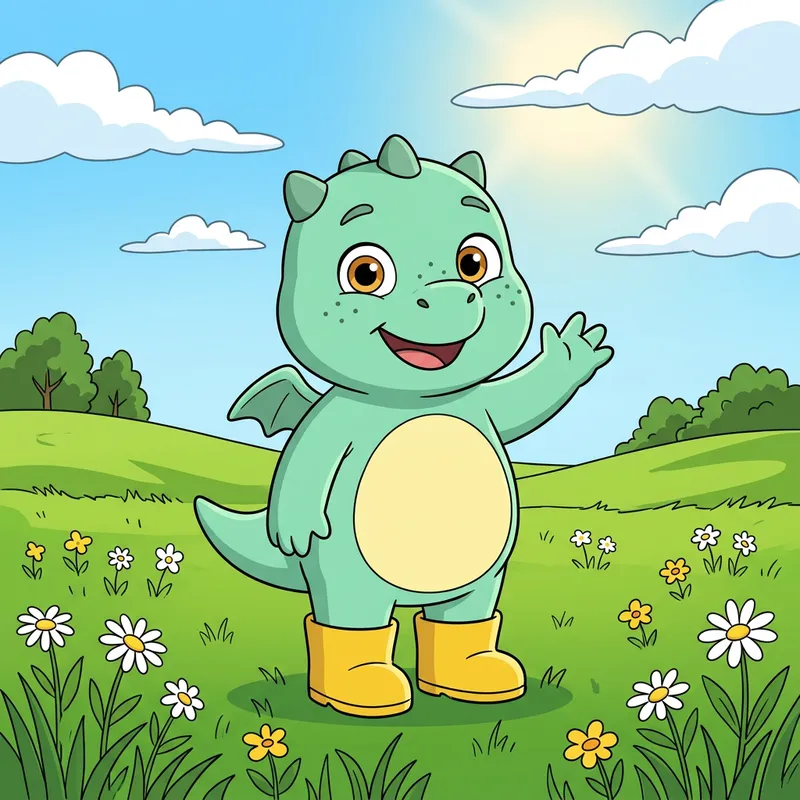
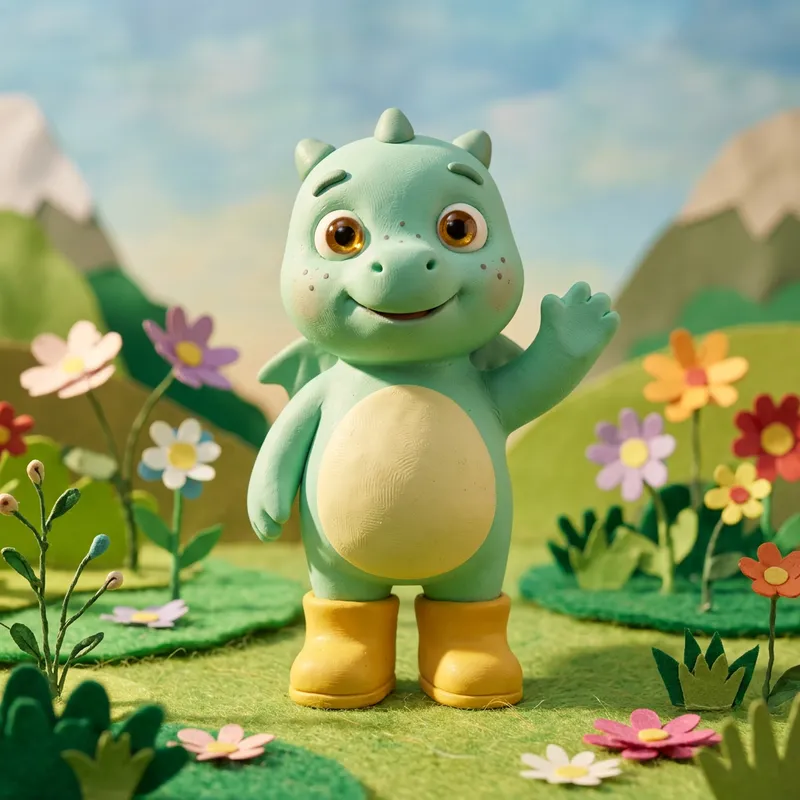
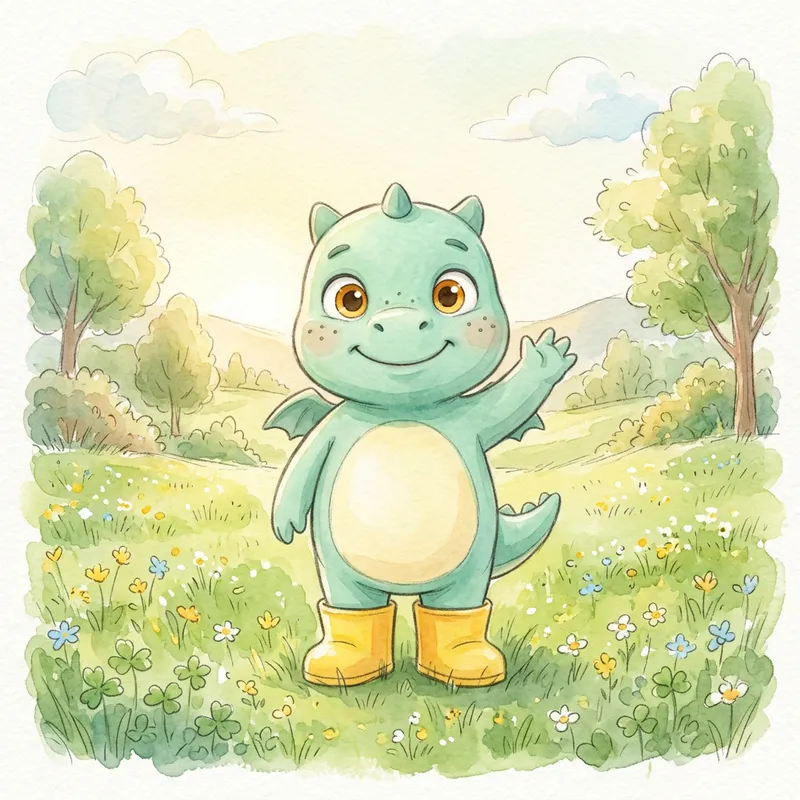
The style is part of the prompt. With the same dragon sheet attached, three style prompts gave a flat 2D cartoon, a clay puppet and a watercolour picture-book look, and she stayed recognisable in each (her freckles are faint on the clay one). Choose one style for a whole series and repeat it word for word in every prompt.
Prompt we ran for this image
Remake the baby dragon from the attached character sheet as a handmade clay stop-motion puppet with small fingerprints and tool marks in the clay. She stands in a sunny meadow made of felt and paper flowers on a small tabletop set, and waves at the viewer, smiling. Keep her design exactly: mint-green body, pale-yellow belly, freckles on her cheeks, stubby wings, small rounded horns, amber eyes and yellow rain boots. One single image, not a character sheet. No text, no logos, no watermark.
Prompt we ran for this image
Repaint the baby dragon from the attached character sheet as a soft watercolour picture-book illustration with light pencil lines and paper texture. She stands in a sunny meadow and waves at the viewer, smiling. Keep her design exactly: mint-green body, pale-yellow belly, freckles on her cheeks, stubby wings, small rounded horns, amber eyes and yellow rain boots. One single image, not a character sheet. No text, no logos, no watermark.
Prompt
Redraw the baby dragon from the attached character sheet as a flat 2D cartoon with clean bold outlines and flat colours, like a frame from a hand-drawn TV cartoon. She stands in a sunny meadow and waves at the viewer, smiling. Keep her design exactly: mint-green body, pale-yellow belly, freckles on her cheeks, stubby wings, small rounded horns, amber eyes and yellow rain boots. One single image, not a character sheet. No text, no logos, no watermark.
Model: Nano Banana 2.1 through the fal.ai API, 1K, 1:1, dragon sheet attached (the 2D cartoon's prompt)
5.A one-off cartoon clip from text
For a single gag or a short scene, skip the sheet and describe everything in one text-to-video prompt: the character, the place, the action, the camera and the style. It is the fastest way to a cartoon video, but the character will look different in the next clip, so keep text to video for one-offs and use start frames for a series.
Prompt
A soft 3D animated cartoon: a small round orange robot with one big blue eye tries to catch a falling autumn leaf in a park, misses, and the leaf lands on its head instead. It looks up at the leaf, then at the camera, pleased. Static camera at the robot's height, warm afternoon light. No dialogue, no text on screen.
Model: Kling 4.0, text to video (not run for this page)
Tips for a cartoon series with recurring characters
- Attach the same character sheets to every start frame, and describe each character with the same words in every prompt.
- For a scene without a start frame, attach up to 3 character images in the Video tab. That runs reference-to-video on Kling O3 Pro (3 to 15 s), because Kling 4.0 does not take references.
- Kling 4.0 also takes an end frame next to the start frame, for a shot that has to end exactly where the next one begins.
- One action per clip, 5 to 10 seconds. A 60-second episode is 6 to 12 clips joined in your own video editor; AI Media Studio has no timeline editor.
- Make the start frames 9:16 for TikTok and Reels and 16:9 for YouTube: image to video starts from the still, so the still sets the shape of the clip.
- For voices, write the narration or each line in the Audio studio. Use in video sends one clip of up to 15 seconds and your start frame to Seedance 2.0, which is asked to lip-sync it; we have not tested that on cartoon characters yet. Otherwise lay the audio over the clips in your editor.
- Keep the characters your own: describe an original design instead of naming an existing cartoon character or studio.
Which models to use for AI cartoon videos
Video prices are credits per second of video, image prices credits per image, in the web app. Kling 4.0 is the default in the Video tab.
| Model | Credits | Use it for |
|---|---|---|
| Kling 4.0per second, 3 to 15 s, 720p, with sound | 23 | Our pick and the default: animate each start frame. 34 credits per second at 1080p. |
| Kling O3 Proper second, 3 to 15 s, audio off | 17 | Up to 3 character images as references, for a scene without a start frame. |
| Seedance 2.0per second, 720p | 44 | Use in video with a voiceover from the Audio studio, up to 15 s. It declines photos with a real-looking human face. |
| Nano Banana 2.11K image from text | 8 | Character sheets; 9 credits per start frame with sheets attached. The model behind the examples above. |
| GPT Image 2.6image from text, high | 15 | The image composer's default model, for a second try at a character sheet. |
The app shows the credit cost before you generate. Prices checked .
What an AI cartoon episode costs
A 5-second clip on Kling 4.0 costs 115 credits at 720p and 170 credits at 1080p. An episode of 4 scenes, each a start frame on Nano Banana 2.1 (9 credits) and a 5-second Kling 4.0 clip, comes to 496 credits at 720p if every clip works the first time, plus 8 credits per character sheet, made once for the whole series.
Plans start at $19/month. Downloads carry no watermark, and paid plans include a commercial license.
Related tools for cartoon videos
Each part of a cartoon series has its own guide.
- AI character sheet generator
A front, side and back turnaround of one character from a single reference image.
- Turn a photo into a cartoon
A cartoon still of yourself or your family from a photo, to animate afterwards.
- AI fruit video generator
Cartoon fruit drama in episodes, the fruit version of a cartoon series.
- AI voice over
Narration and character lines for your episodes, from a script.
- Faceless YouTube channel
Run your cartoon series as a channel without showing your face: formats, scenes, voice-over and YouTube’s AI rules.
Frequently asked questions
How do I make an AI cartoon video?
Make a character sheet of your character in the Image tab, make a start frame for the scene with the sheet attached, then animate it in the Video tab: describe one action and the camera, pick the length and generate. Kling 4.0 is the default model. For a one-off clip, describe the whole scene and use text to video instead.
Can I make a cartoon video from text?
Yes. Leave the Video tab without an image and describe the character, the place, the action, the camera and the style, such as "a soft 3D animated cartoon". That is text to video. The character will look different in each new clip, so for a series make start frames from a character sheet instead.
How do I create a cartoon video with AI from my own character or drawing?
Attach your drawing or character image in the Video tab and describe how it should move: that is image to video, and the clip starts from your image. For new scenes, make a character sheet from your drawing first, as on the character sheet generator, and build each scene from it.
How do I keep the same cartoon character in every episode?
Make one character sheet per character, attach the sheets to every start frame and describe each character with the same words every time. For a scene without a start frame, attach up to 3 character images in the Video tab, which runs reference-to-video on Kling O3 Pro. Check each result: a reference makes a match likely, not certain.
Can I make a long cartoon video or a whole episode?
One clip is 3 to 15 seconds on Kling 4.0. A longer episode is several clips, one per scene, joined in your own video editor; AI Media Studio does not join clips for you.
Can my cartoon characters talk?
Make the lines in the Audio studio and press Use in video: it sends up to 15 seconds of audio with your start frame to Seedance 2.0, which is asked to lip-sync the words. We have not tested its lip-sync on cartoon characters yet. You can also lay narration over the clips in your editor and use captions.
Which cartoon styles can I make?
Any style you can describe: soft 3D, flat 2D with bold outlines, clay stop-motion, watercolour picture book and more. Name the style in every prompt. The examples on this page show the same dragon in four styles.
Can I post AI cartoon videos on TikTok, Instagram and YouTube?
Yes. Make the start frames 9:16 for TikTok and Reels and 16:9 for YouTube, and label AI content where the platform asks for it. Videos made on a paid plan include a commercial license and carry no watermark.
Can I use characters from existing cartoons?
Use characters you created. Existing cartoon characters belong to their owners, so describe an original design instead. The characters on this page were invented for it.
Is there a free AI cartoon video generator?
AI Media Studio has no free tier. Every edit needs a paid plan. Plans start at $19/month. A 5-second cartoon clip on Kling 4.0 costs 115 credits at 720p.
Uploads are processed by the AI provider that runs the model you pick. Retention, processors and deletion requests are covered in the privacy policy.