AI music video
How to make an AI music video for your own song
To make an AI music video, map your song’s sections, make one reference image of your singer, turn it into a start frame for every shot, animate each frame into a 3 to 15-second clip, and cut the clips to the beat in your video editor. AI Media Studio makes the images and the clips. It does not turn a whole song into a finished video: you cannot upload your song, there is no timeline, and nothing is cut to the beat for you. Only one kind of clip can follow music, and only 15 seconds of a track made in our Audio studio.
Every edit needs a paid plan. Plans start at $19/month. Paid plans include a commercial license.
How do I make an AI music video?
- 01
Lock the song and map it in bars
Start from the finished song, because every cut depends on it. Write down where the intro, verses, chorus, bridge and outro start, and find the tempo. In 4/4 time one bar lasts 240 ÷ BPM seconds: at 120 BPM a bar is 2 seconds and a four-bar phrase is 8 seconds.
- 02
Write a shot list
Give each section one to four shots, each a few bars long: performance shots of the singer, story shots, and details such as hands or a window. A three-minute song cut into 8-second shots needs about 22 of them, so plan to reuse strong shots with a new framing.
- 03
Make one reference image of your singer
An invented character, or you. Generate a front and a side view on a plain background (8 credits on Nano Banana 2.1 at 1K) and attach it to every shot so the face, hair and clothes stay the same. For the clip that follows music, use an illustrated or 3D-animated singer: Seedance 2.0 declined a real-looking face in our model test.
- 04
Turn it into a start frame per shot
Attach the reference and describe the shot: place, light, pose, framing, 9:16 for TikTok and Reels or 16:9 for YouTube. End with what must stay the same. Each frame costs 9 credits on Nano Banana 2.1 at 1K. Fixing a hand in a still is far cheaper than fixing it in a clip.
- 05
Animate each frame in the Video tab
Attach the frame, describe one movement and one camera move, and set the length to the shot’s bars, rounded up: Kling 4.0 makes 3 to 15-second clips for 23 credits per second at 720p. Its clips come with their own generated sound, which you mute under your song.
- 06
Cut the clips to your song in your editor
Download the clips and put them on a timeline with your song in the video editor you already use (CapCut, DaVinci Resolve, Premiere Pro or another). Cut on bar lines and the first word of each chorus, mute the clips’ own sound, and export vertical, horizontal or both.
Example: one invented singer and four start frames
For an invented synth-pop song about the last bus home, we made one reference image of an invented singer and one start frame for each section: verse, chorus, bridge and outro. Every image is the first and only result. The prompts we ran are with each image: copy one and change the singer and the place.
1.The singer: one reference image for every shot
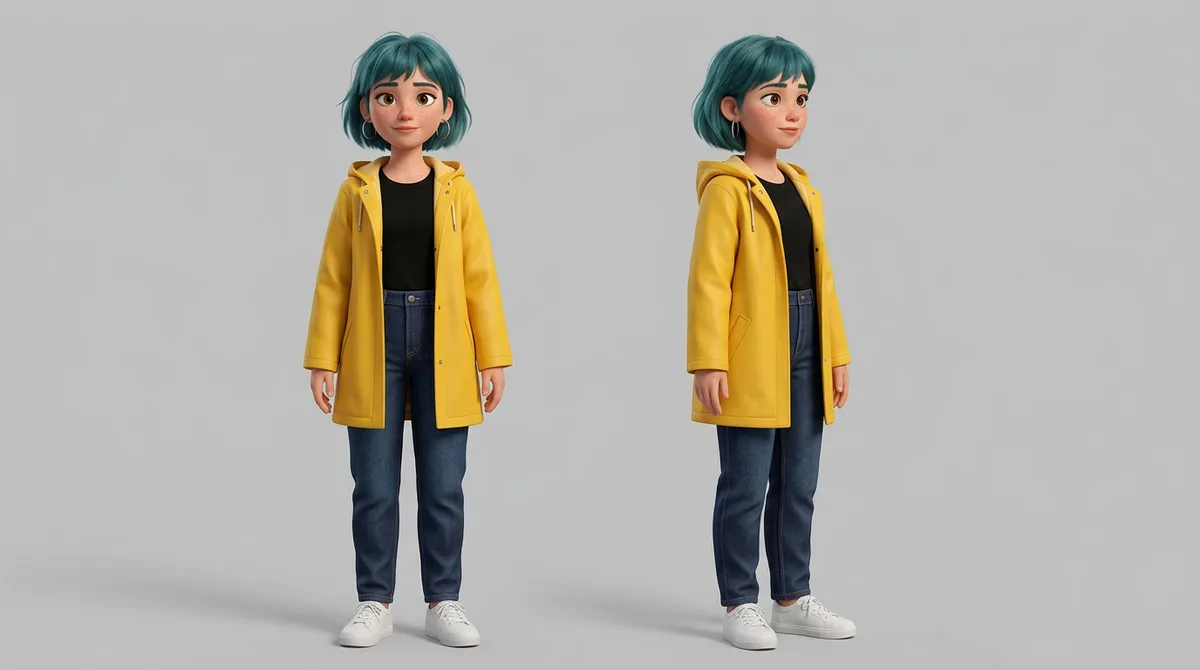
A front view and a three-quarter view of the same invented singer on a plain grey background. Both views kept the teal bob, freckles, hoop earrings, yellow raincoat, jeans and white sneakers. We attached this one image to every start frame below. We chose a 3D-animated look on purpose: the one model that makes a clip follow music, Seedance 2.0, declined a real-looking face in our model test.
Prompt
Character reference sheet for an invented singer in a stylized 3D animated film look: a young woman in her twenties with a short teal bob haircut, freckles, round silver hoop earrings, a yellow raincoat over a black t-shirt, dark jeans and white sneakers. Two full-body views side by side on a plain light grey background, front view and three-quarter view, neutral standing pose, arms relaxed, soft even studio light. No text, no labels, no logos.
Model: Nano Banana 2.1 (1K, 16:9)
2.Four start frames, one per section of the song
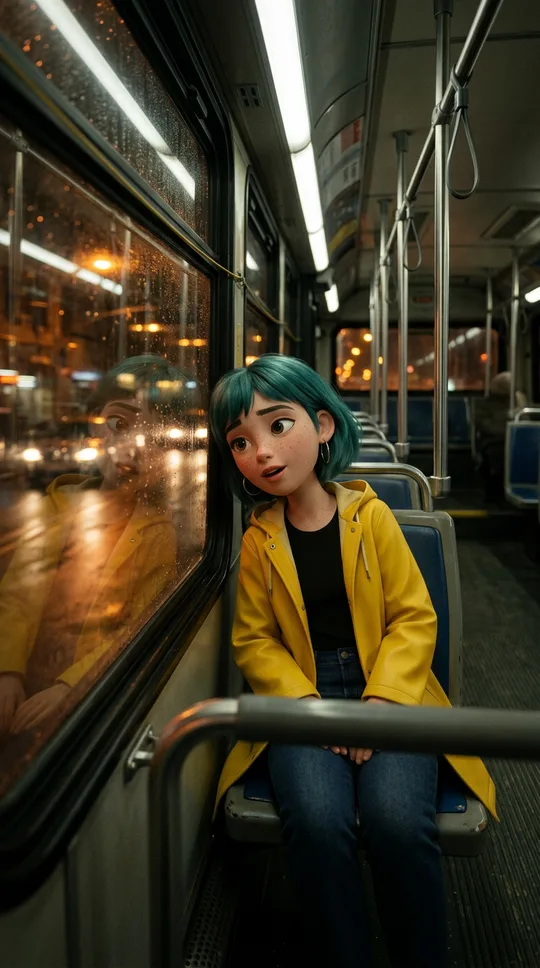
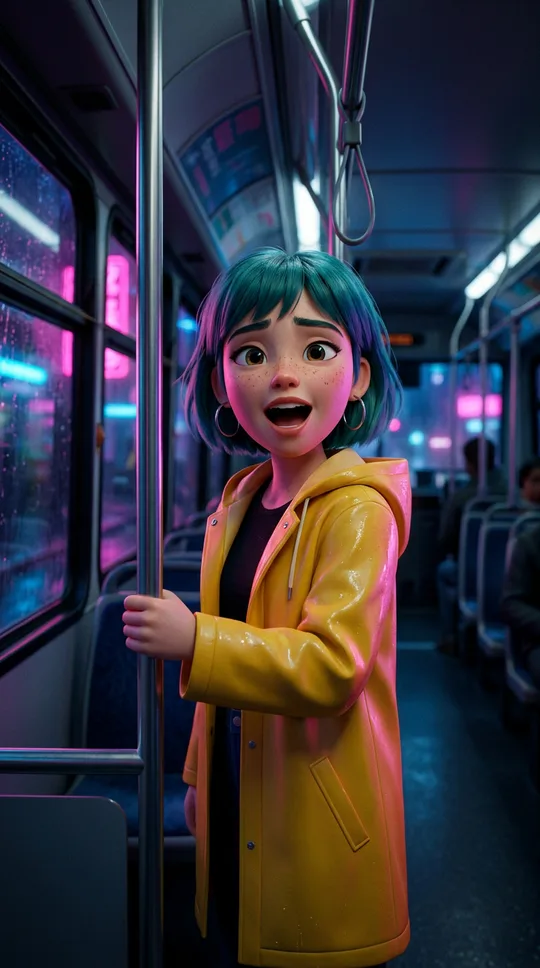
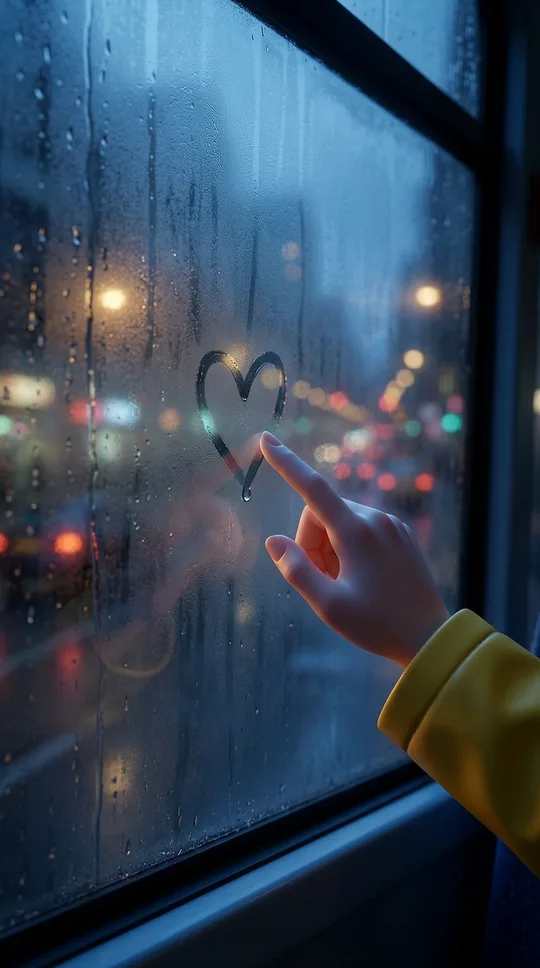
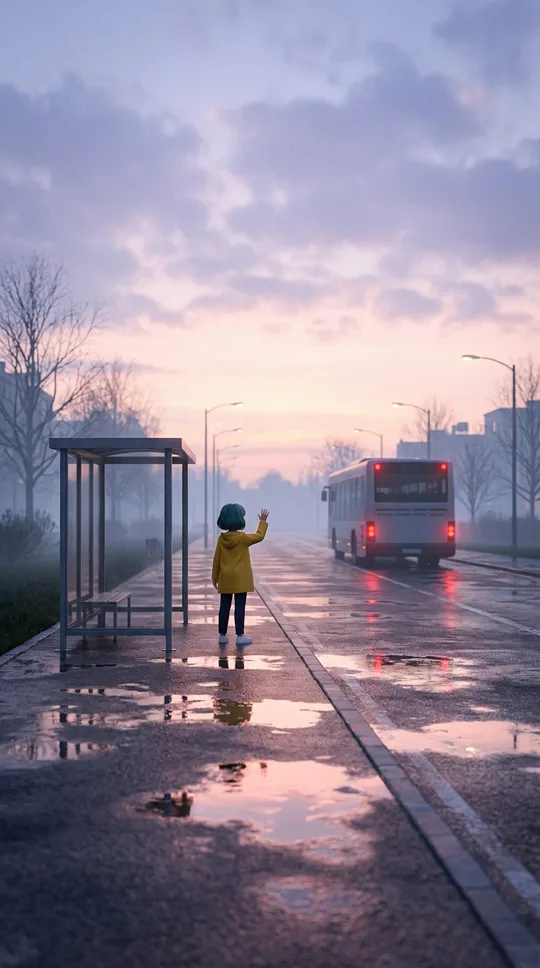
Each frame is the reference image plus a shot description. In the verse and chorus, where her face is large, the face, teal bob, freckles and earrings match the reference; the bridge shows only her hand and sleeve, and in the outro she is too small to check. Not everything followed the prompts: in the verse she looks out of the window instead of resting her head on the glass, and in the chorus the raincoat came out glossier than in the reference. Each frame would become one clip in the Video tab, which we did not run for this page. The verse, bridge and outro would be silent shots on Kling 4.0; the chorus frame faces the camera with an open mouth, the kind of frame you would give Seedance 2.0 with a track to follow.
Prompt we ran for this frame
Use the singer from the reference image, in the same stylized 3D animated look. Verse shot: she sits alone by the window of an almost empty city bus at night, her head resting against the glass, singing quietly to herself. Blurred orange street lights streak past outside. Medium shot from the seat across the aisle. Keep her face, teal bob, freckles, hoop earrings and yellow raincoat exactly as in the reference. Vertical 9:16 frame. No text, no logos, no readable signs.
Prompt we ran for this frame
Use the singer from the reference image, in the same stylized 3D animated look. Chorus shot: she stands in the aisle of the night bus, one hand on the pole, facing the camera and singing out loud with her mouth open mid-note, eyes bright. Pink and blue neon light from outside sweeps across her. Medium close-up, her face and shoulders clearly visible and evenly lit. Keep her face, teal bob, freckles, hoop earrings and yellow raincoat exactly as in the reference. Vertical 9:16 frame. No text, no logos, no readable signs.
Prompt we ran for this frame
Use the singer from the reference image, in the same stylized 3D animated look. Bridge shot: a close-up of her hand drawing a small heart in the fog on the bus window, raindrops on the glass, soft city lights out of focus behind it, the sleeve of her yellow raincoat at the edge of the frame. Quiet, blue-toned light. Vertical 9:16 frame. No text, no logos.
Prompt we ran for this frame
Use the singer from the reference image, in the same stylized 3D animated look. Final shot: at dawn she stands at an empty bus stop on a wet street and waves as the bus drives away into the distance. Wide shot, she is small in the frame, pale pink sky, puddles reflecting the light. Keep her teal bob and yellow raincoat. Vertical 9:16 frame. No text, no logos, no readable signs, no brand names on the bus.
3.The song map behind the frames
Before any image, we wrote down the invented song’s sections at 100 BPM, where one bar lasts 2.4 seconds, and gave each section a job. Intro, 4 bars (9.6 s): one wide, quiet shot of the street at night. Verse, 8 bars (19.2 s): two shots of about 10 seconds, the verse frame and a second angle of it. Chorus, 8 bars (19.2 s): the shot facing the camera, with fast cuts to the other frames. Bridge, 4 bars (9.6 s): one slow close-up of the heart on the window. Outro, 4 bars (9.6 s): the bus driving away, held until the music ends. The frames above cover one shot per section; the finished video needs the extra shots too.
4.A clip that follows the music: 15 seconds at most
One kind of clip can move to music. Make the track in the Audio studio, either a song with your own lyrics on MiniMax Music v2 (6 credits per song; the lyrics set its length, so keep them to a short chorus) or an instrumental on ElevenLabs Music with an exact length of 3 to 120 seconds. Click “Use in video” on the result: the Video tab opens with the track attached and the prompt below. Add the start frame and generate on Seedance 2.0. The track can be 15 seconds at most, the clip keeps the track as its sound, and it costs 44 credits per second at 720p. We did not run this for the page, so we cannot show you how closely a singer’s lips follow sung words.
Prompt
@Image1 in a scene that moves to the rhythm and mood of the music in @Audio1.
Model: Seedance 2.0 (the Audio studio’s “Use in video” prompt)
You cannot attach your own recording here: the clip only takes tracks made in the Audio studio. If your song is already recorded, see the next section.
5.If your song is already recorded
Then every clip is a silent shot that you cut to your recording in your editor. Plan shots that do not need lips in time with your vocals: wide shots, the singer from behind or in silhouette, hands on an instrument, a walk through the city, moments that move with the rhythm. Keep close-ups of a singing mouth short, because nothing in them is synced to your words.
Prompt
She looks out of the bus window as the city lights slide past, then turns her head slowly towards the camera. Slow push-in, gentle sway of the bus. Keep her face, hair, earrings and raincoat unchanged.
Model: Kling 4.0 (a prompt to try, not run for this page)
What AI Media Studio can’t do for a music video
- Turn a song into a video. You cannot upload a song and get a music video back, and the app does not read the tempo, sections or lyrics of your song.
- Make a full-length video. Each clip is generated on its own and lasts 3 to 15 seconds on Kling 4.0 or 4 to 15 on Seedance 2.0. There is no timeline: the edit happens in your video editor.
- Cut to the beat for you. There are no automatic cuts, no beat-reactive visualizer and no lyric captions.
- Follow your own recording. Only Seedance 2.0 makes a clip follow audio, only for up to 15 seconds, only with a track made in our Audio studio and only with a reference image. It declined a real-looking face in our model test.
- Copy a real artist or a song you do not have the rights to. Use your own song or one you licensed, and your own face, someone who agreed, or an invented singer: no celebrities.
- For the parts it does, see the guides on photo to video, AI character sheets for a consistent singer, and AI transitions for a clip that moves between two frames.
Which model for which step
Every model runs in the same app and draws from the same credits. The images and clips are made in the editor and the Video tab, the music in the Audio studio.
| Model | Credits | Use it for |
|---|---|---|
| Nano Banana 2.1per image from text at 1K (9 with a reference) | 8 | The singer reference and the start frames. All five examples on this page. |
| Kling 4.0per second at 720p, with sound (34 at 1080p) | 23 | Silent shots of 3 to 15 seconds from each start frame; mute its sound under your song. |
| Seedance 2.0per second at 720p (21 at 480p) | 44 | The one clip that follows a track from the Audio studio, up to 15 seconds. Use an illustrated or 3D-animated singer. |
| MiniMax Music v2per song | 6 | A song sung from lyrics you write; the lyrics set the length. |
| ElevenLabs Musicper started minute | 120 | An instrumental track of exactly 3 to 120 seconds. |
The app shows the credit cost before you generate. Prices checked .
What an AI music video costs
A 60-second video from 6 shots: one singer reference and 6 start frames on Nano Banana 2.1 at 1K cost 62 credits, and 6 clips of 10 seconds on Kling 4.0 at 720p cost 1380 (230 each), so 1442 credits before retakes. Plan for retakes: a hand or a face that drifts means running a shot again.
A 15-second clip that follows a track adds 660 credits on Seedance 2.0 at 720p, plus 6 credits for a song on MiniMax Music v2 or 120 for an ElevenLabs Music track of up to a minute. Plans start at $19/month, and downloads carry no watermark.
Frequently asked questions
How do I make an AI music video?
Map your song’s sections in bars, write a shot list, make one reference image of your singer, turn it into a start frame for each shot, animate each frame into a 3 to 15-second clip, and cut the clips to the beat in a video editor. In AI Media Studio the images come from the editor and the clips from the Video tab; the edit happens in your own editor.
What is the best AI music video generator?
It depends on how much you want to do yourself. To upload a finished song and get a beat-synced video back, you need a dedicated song-to-video generator; AI Media Studio is not one. To direct each shot, make the frames and clips with image and video models, as on this page, and cut them yourself, which takes longer but gives you control over every shot.
Can I upload my own song?
No. The app has no song upload for videos, and a clip can only follow a track made in its Audio studio, for up to 15 seconds. With a song you already recorded, make silent shots here and put them together with your song in your video editor.
Can AI make a full-length music video from my song?
Not in AI Media Studio. Each clip lasts 3 to 15 seconds and there is no timeline, so a full-length video means cutting many clips together in your editor. A three-minute song in 8-second shots needs about 22 shots, fewer if you reuse the strongest ones.
Can the singer lip-sync to my song?
Not to a song you recorded elsewhere. Seedance 2.0 can make a clip follow up to 15 seconds of a track made in the Audio studio, such as a song MiniMax Music v2 sang from your lyrics. We have not tested how closely the lips follow sung words, and Seedance 2.0 declined a real-looking face in our model test.
How do I keep the singer looking the same in every shot?
Make one reference image first, ideally a front and a side view on a plain background, and attach it to every start frame. End each prompt with what must stay: face, hair, earrings, clothes. In the two start frames on this page that show her face up close, the face, hair and earrings matched the reference; the raincoat came out glossier in one of them.
Can I make the song with AI too?
Yes, in the Audio studio. MiniMax Music v2 sings lyrics you write in a style you describe (6 credits per song), and ElevenLabs Music makes an instrumental of exactly 3 to 120 seconds (120 credits per started minute). A style line to start from: “Dreamy synth-pop, female vocal, 100 BPM, warm analog synths, soft drum machine, late-night mood.”
Can I use a real artist or a famous song?
No. Use a song you wrote, made or licensed, and your own face, someone who agreed, or an invented singer. Do not copy a celebrity’s face or voice. Label realistic AI videos as AI-generated where TikTok, Instagram or YouTube ask for it.
Is there a free AI music video generator?
AI Media Studio has no free tier. Every edit needs a paid plan. Plans start at $19/month. A 10-second shot on Kling 4.0 costs 230 credits at 720p.
Uploads are processed by the AI provider that runs the model you pick. Retention, processors and deletion requests are covered in the privacy policy.